
ER605(UN)_V2.30_2.4.3_Build 20260512 is available

It was release 2nd of June 2026
(English website with up to HW 2.30)
https://support.omadanetworks.com/en/download/firmware/er605/
(USA website with the HW 2.36 and HW 2.60 versions)
https://support.omadanetworks.com/us/download/firmware/er605/v2/
- Copy Link
- Subscribe
- Bookmark
- Report Inappropriate Content


Hi, @MartinKirk
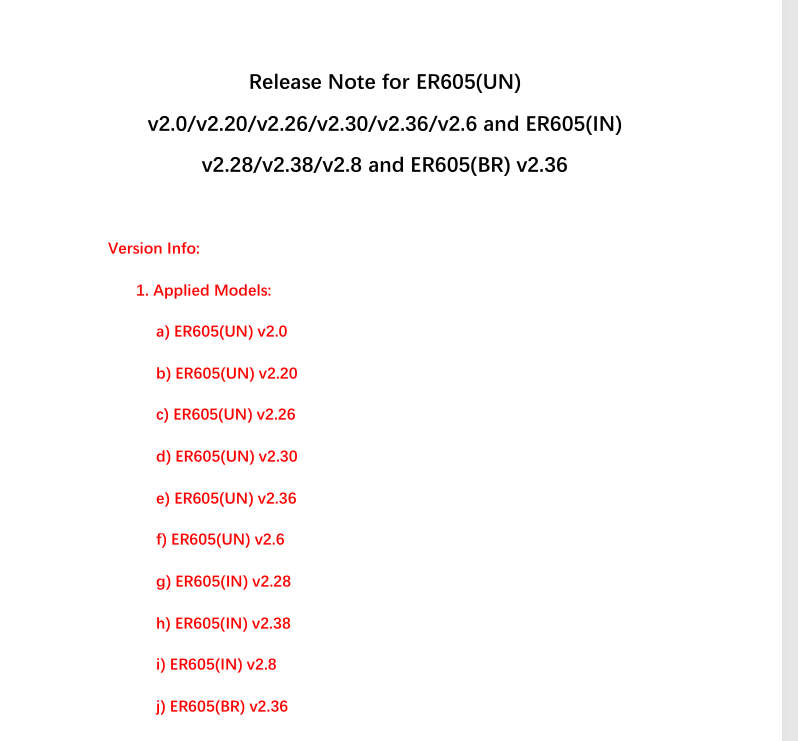
Thank you for posting on the business forum. The hardware versions compatible with ER605(UN)_V2.30_2.4.3_Build 20260512 are as follows; Thanks for your sharing!
- Copy Link
- Report Inappropriate Content
Hi, @MartinKirk
Thank you for posting on the business forum. The hardware versions compatible with ER605(UN)_V2.30_2.4.3_Build 20260512 are as follows; Thanks for your sharing!
- Copy Link
- Report Inappropriate Content

After upgrading to 2.4.3, I'm running into an issue with reserved ip-adresses that are assigned via DHCP.
I'm using standalone mode.
Before the upgrade, when I did an 'Address Reservation' for a particular MAC address, after the computer with that MAC address connected to the router, it would get the assigned IP-Address, and that IP-Address would act like a static IP-Address, i.e. it would stay valid as long as the computer stayed connected to the router, and would be marked as 'Permanent' in the 'DHCP Client list'
However, after upgrading 2.4.3, any ip-address given out by the router has become dynamic, even for computers for which the MAC address is in the 'Address Reservation List'. This means that every 6 hours (leases on my router are 12 hours), even for the computers that have an address reserved, the lease will be renewed. Also, in the 'DHCP Client list', I no longer see 'Permanent', but instead the time for how much longer the lease is valid.
As this didn't happen before the upgrade, is there something I need to do to make this work as before again? I tried deleting and recreating some of the address reservation entries (and corresponding IP-MAC bindings in the ARP-Spoofing section), but that doesn't work.
Or is this maybe a bug in the new firmware?
- Copy Link
- Report Inappropriate Content
I just had a look, the devices i have on reserved ip list have the correct ip. But they don't mention 'permanent' or 'reserved' next to their lease time..
So its a little confusing.
It seems that address reservation is working 🤷🏻
- Copy Link
- Report Inappropriate Content
Thanks for the answer. The address reservation itself is working, i.e. the computers in the address reservation list will still get the ip-addresses that are reserved from them. However, instead of getting a permanent lease, the lease is only valid for a certain duration (12 hours in my particular case). This was not the case before the 2.4.3 update, where the lease would be valid permanently until the computer disconnected from the router. I was able to verify this as I see a lot of new entries in the log for lease renewals, even for the computers that are in the address reservation list. These entries were not in the log before the 2.4.3 update.
- Copy Link
- Report Inappropriate Content
Hi,@Noot_Noot_Not
Could you please keep your computer connected to the router for 12 hours, and then check if your IP address changes dynamically?
Please provide the relevant screenshot of the IP lease expiration period you mentioned.
Please confirm whether the lease expiration prompt appears on other connected devices, aside from your computer.
In addition, to make your post more visible to more forum members and to allow more relevant parties to view and respond to the issue you mentioned, we recommend creating a separate thread for this query. Thanks.
- Copy Link
- Report Inappropriate Content
I have an access point that is constantly connected to the router. In both the log of the ER605 and the log for the access point, I see that the lease is renewed every 6 hours (lease duration is configured to 12 hours on the ER605, but renewal happens at half of that). The same also happens for several other devices that I have that are constantly connected.
Here is the part of the ER605 log that shows the lease renewal for the access point (I removed the MAC address as I don't want to share it on the forum)
2026-06-07 19:17:35 DHCP Server allocated IP address 192.168.37.200 for the [client:XXXXXXXXXXXXX ].
2026-06-08 01:17:35 DHCP Server allocated IP address 192.168.37.200 for the [client:XXXXXXXXXXXXX ].
2026-06-08 07:17:35 DHCP Server allocated IP address 192.168.37.200 for the [client:XXXXXXXXXXXXX ].
Before the 2.4.3 change, there would be one line like this in the log when the access point connected to the ER605 for the first time, and lease renewal would not happen after that. Also, the DHCP client list would say 'Permanent' for lease time. After the 2.4.3 upgrade, the DHCP client list will have a time that is less than 12 hours, and the renewals happen every six hours.
Note that I'm using standalone mode for the ER605.
- Copy Link
- Report Inappropriate Content
Information
Helpful: 1
Views: 244
Replies: 6
Voters 1
