
Bug Report: WAN Failover Issue on ER707-M2 V1.2/V1.3 with Firmware v1.4.2
Bug Report: WAN Failover Issue on ER707-M2 V1.2/V1.3 with Firmware v1.4.2

Dear Support
I am writing to report a critical bug regarding the WAN failover feature found in the latest firmware version 1.4.2 on the ER707-M2 (V1.2 / V1.3). This issue did not occur in the previous firmware version 1.3.2.
Please find the detailed scenario and test results below:
[Network Configuration & Application] This deployment is for a maritime vessel network with the following strict requirements:
-
WAN 1 (Primary WAN): Connected to Starlink (used when offshore).
-
WAN 2 (Primary WAN): Connected to a SIM Card (Chunghwa Telecom) via MR600 (used when docked).
-
WAN 3 (Backup WAN): Connected to VSAT.
[Issue Description]
-
Failover failure from WAN1 to WAN2: When WAN1 experiences a network disconnection/outage (while the physical cable remains plugged into the ER707-M2), the router fails to failover to WAN2. Traffic remains stuck on the disconnected WAN1. The router will only switch the traffic to WAN2 after the WAN1 cable is physically unplugged.
-
Failback failure from WAN2 to WAN1: Similarly, if the WAN1 cable is plugged back in and WAN2 subsequently goes offline, the router does not automatically failback to WAN1. Again, traffic remains stuck until the WAN2 cable is physically removed.
[Impact] Since firmware v1.4.2 blocks downgrading back to v1.3.2, we are currently unable to revert to the working version. This issue severely impacts daily operations, as the vessel relies on automatic switching between SIM and Starlink networks depending on its proximity to the shore.
This behavior has been verified as a regression bug introduced in v1.4.2. Could you please forward this case to the RD team for an urgent fix?
Thank you for your prompt assistance.

Topology

All Device

- Copy Link
- Subscribe
- Bookmark
- Report Inappropriate Content
Dear Team
To follow up on this issue, we have attached the screenshots/photos for your reference.
Please note that these photos were taken from a device running firmware v1.3.2. Due to the critical nature of this bug on v1.4.2, we were forced to purchase a brand-new ER707-M2 unit and strictly keep it on v1.3.2 without updating, just to keep the current vessel's network operational.
However, since we have multiple other vessels scheduled to deploy this exact hardware and network structure in the near future, we cannot rely on this temporary workaround indefinitely.
It is absolutely vital for us that this issue gets resolved in the upcoming firmware release. We look forward to a prompt fix from the RD team.
Thank you for your understanding and cooperation.
- Copy Link
- Report Inappropriate Content
Dear Team,
I would like to provide some additional configuration details regarding the ER707-M2 WAN failover issue reported earlier to help the RD team replicate the environment.
Please note that our network is centrally managed via an Omada Hardware Controller:
-
Controller Model: OC200
-
Controller Firmware Version: 6.2.10.18
Please pass this specification along to the technical support and RD teams. We hope this helps speed up the investigation.
- Copy Link
- Report Inappropriate Content


Hi @Brian-Lin
Thanks for posting here.
I don't think this is a common bug for ER707-M2, 1.4.2. This is the first case we received on the ER707-M2 link backup work failed.
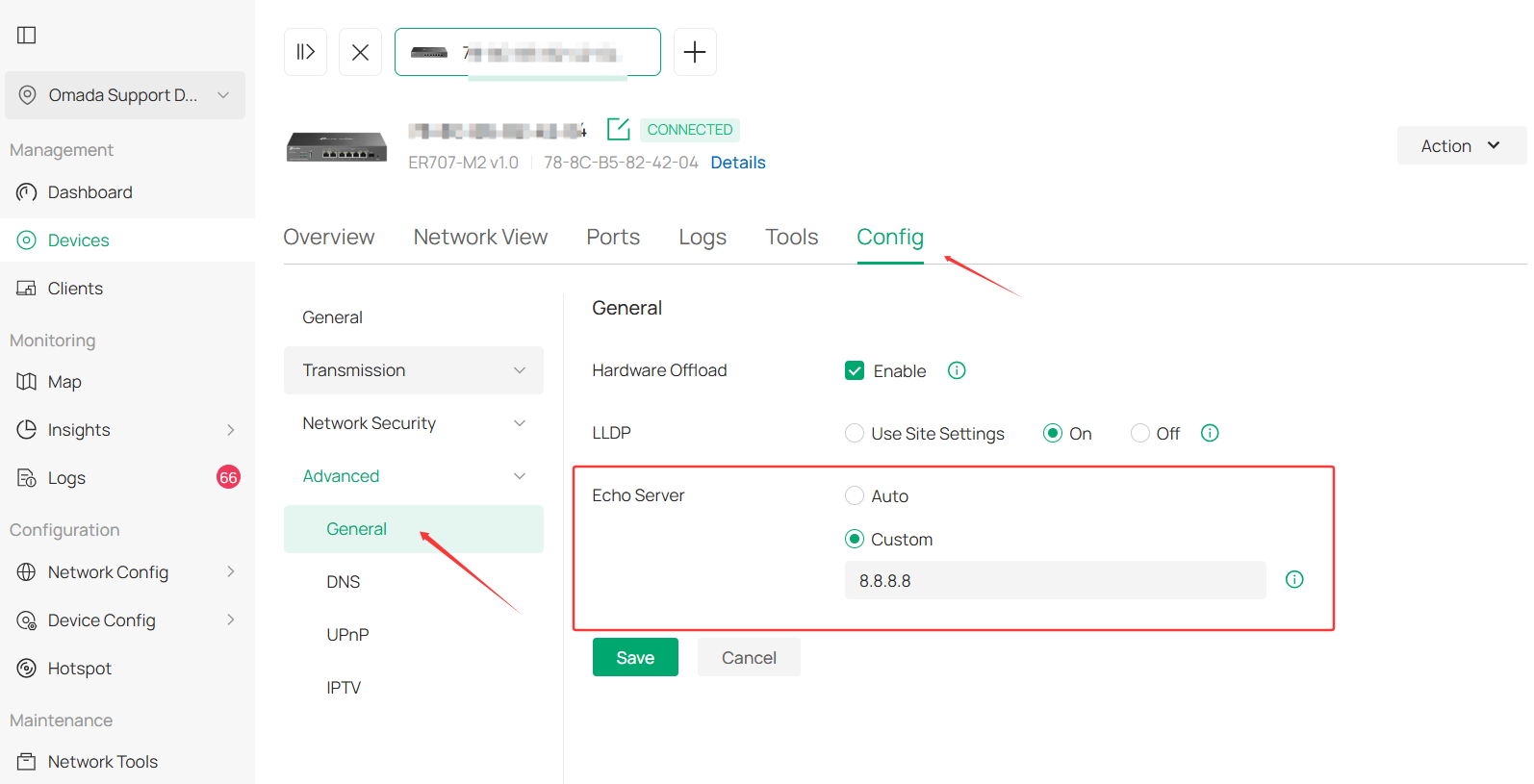
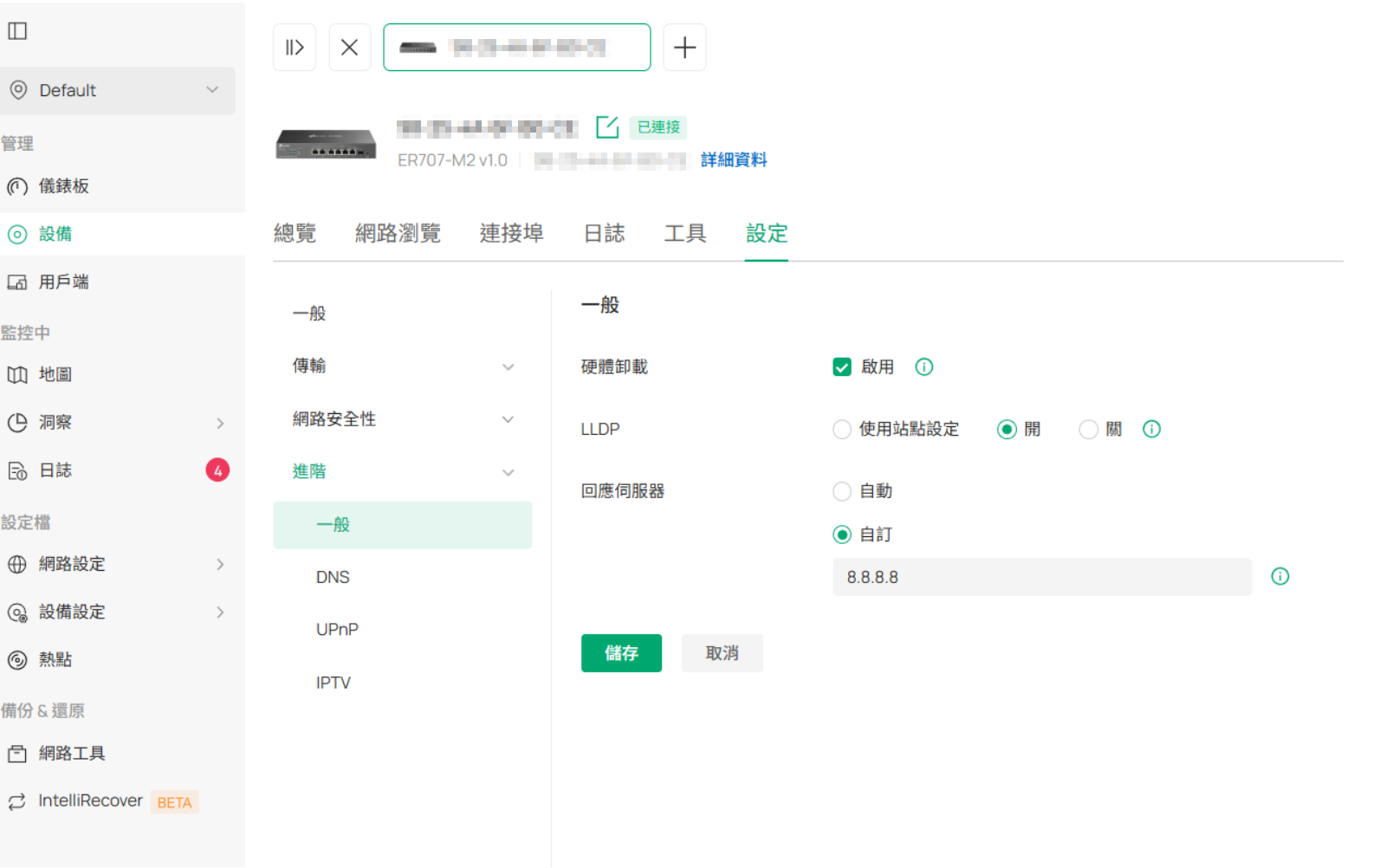
For your situation, please configure the Echo server as 8.8.8.8 and see if the situation persists:
- Copy Link
- Report Inappropriate Content
I want to confirm I'm having the same problem on a much more simple network.
Standalone ER707M2 1.4.2
Cable modem connection is down, cable modem is still issuing a IP address added glinet travel router with iPhone on wan6 (since native ability was removed)
Have to manually disconnect either physical ethernet cable or in interface on wan1 to get any packets to go via wan6 even when the router cannot ping anything (besides cable modem) on wan1. Even with Link Backup configured.
WAN1 -> Netgear CM3000 Modem (DHCP)
WAN6 -> Glinet Travel Router -> iPhone
- Copy Link
- Report Inappropriate Content
Dear Team,
I would like to provide additional, detailed test data and routing verifications to help your RD team isolate this issue.
During my testing, both Static Routes and Policy Routes were completely empty (blank) on the controller.
The Load Balancing / Link Backup settings were configured as follows:
-
Primary WANs (Main WAN): 2.5G WAN2 & 1G WAN3
-
Backup WAN: 2.5G WAN1
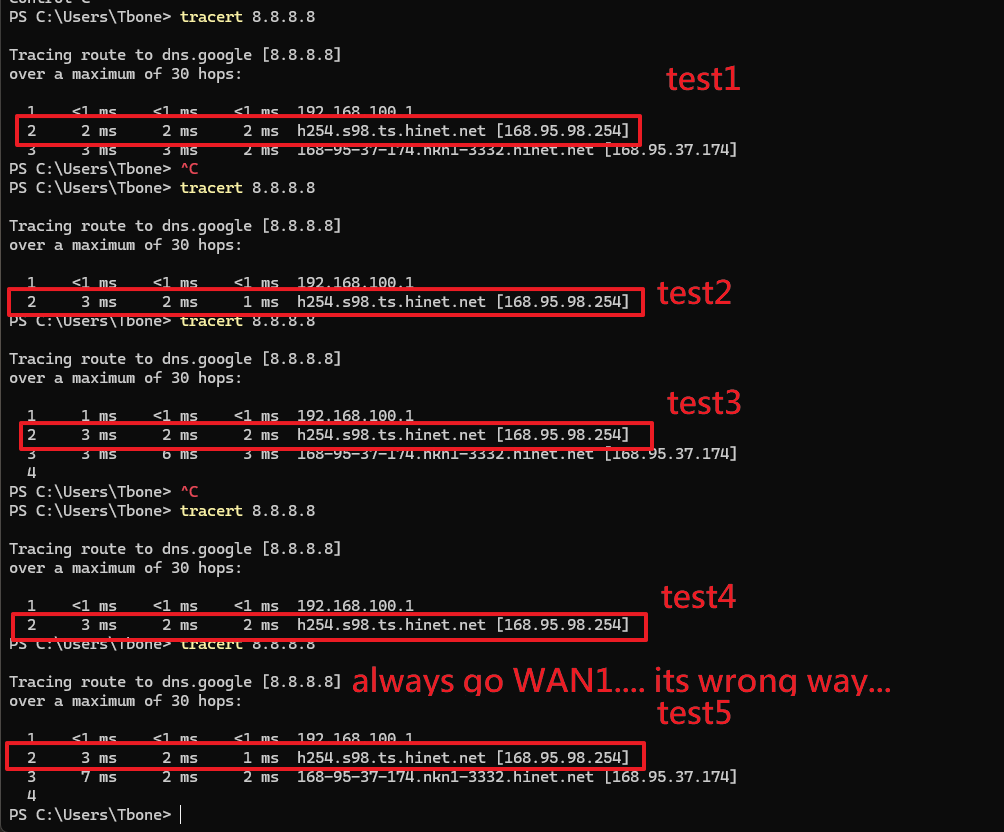
Based on this configuration, a tracert 8.8.8.8 command should expectedly yield the following routing paths:
-
Via 2.5G WAN2:
192.168.100.1->192.168.200.1-> Public IP -
Via 1G WAN3:
192.168.100.1->192.168.250.1-> Public IP -
Via 2.5G WAN1:
192.168.100.1-> Public IP (Since WAN1 directly obtains a public IP, it does not have an extra local hop like WAN2/WAN3).
[The Problem in Firmware v1.4.2] Under firmware v1.4.2, the ER707-M2 completely ignores the Main WAN and Backup WAN definitions designated by the Omada controller. Instead, it persistently and blindly routes all traffic through WAN1, even though WAN1 is explicitly configured as the Backup WAN. The router completely fails to utilize the Primary WANs (WAN2 and WAN3).
This is a critical bug that severely breaks the core, fundamental routing functionality of the device. This exact configuration works flawlessly under firmware v1.3.2.
[Our Technical Hypothesis] We suspect that this regression was introduced in v1.4.2 during the implementation of the new feature allowing DHCP client list viewing on the controller. There appears to be a communication breakdown or synchronization issue between the ER707-M2 and the controller regarding Link Backup profiles when these components interact.
Please forward these findings to your RD team with high priority. This issue significantly disrupts basic deployment operations, and we urgent require a fix.
Thank you for your prompt and serious attention to this matter.
Best regards,
- Copy Link
- Report Inappropriate Content
Dear Team,
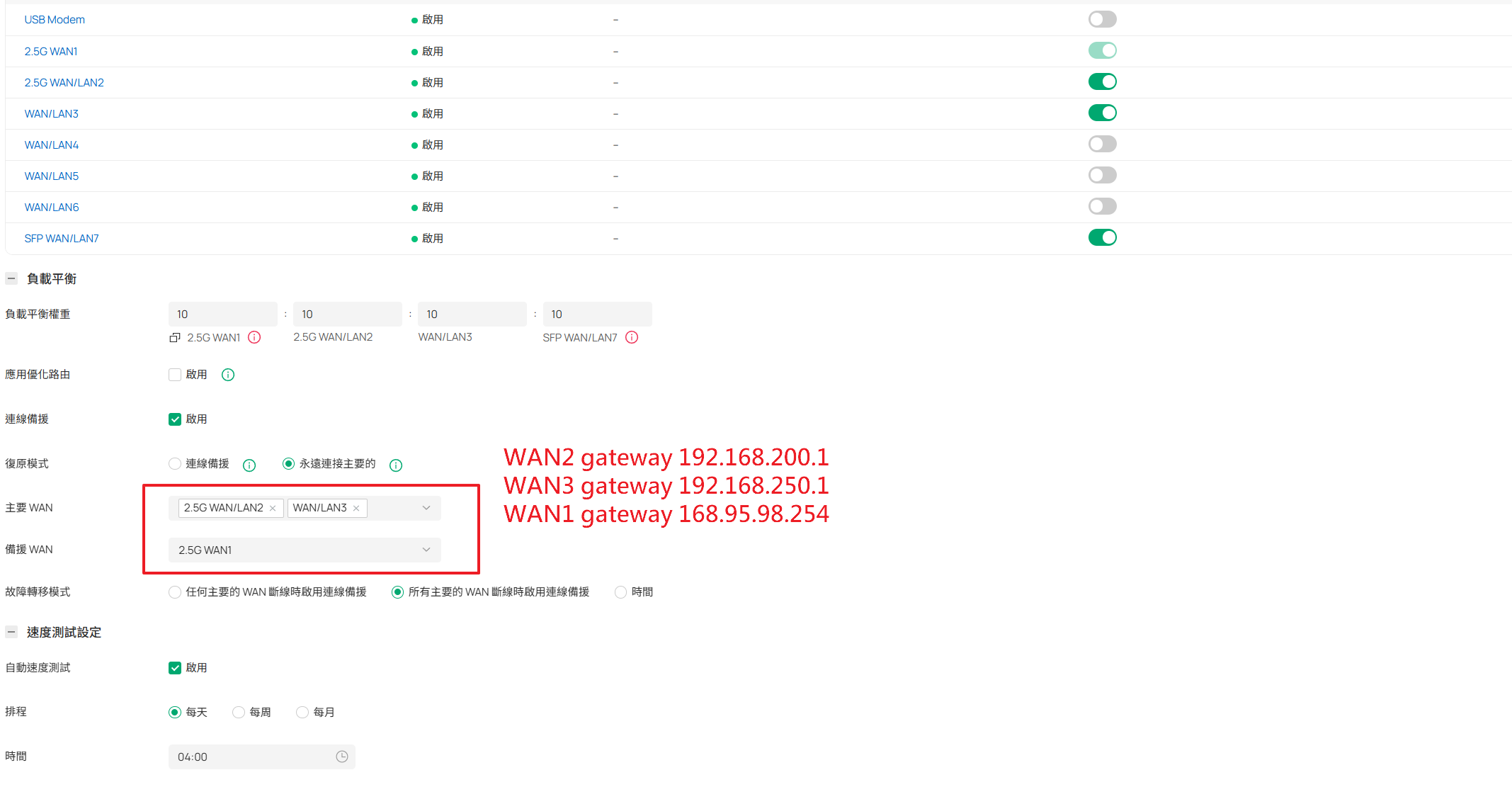
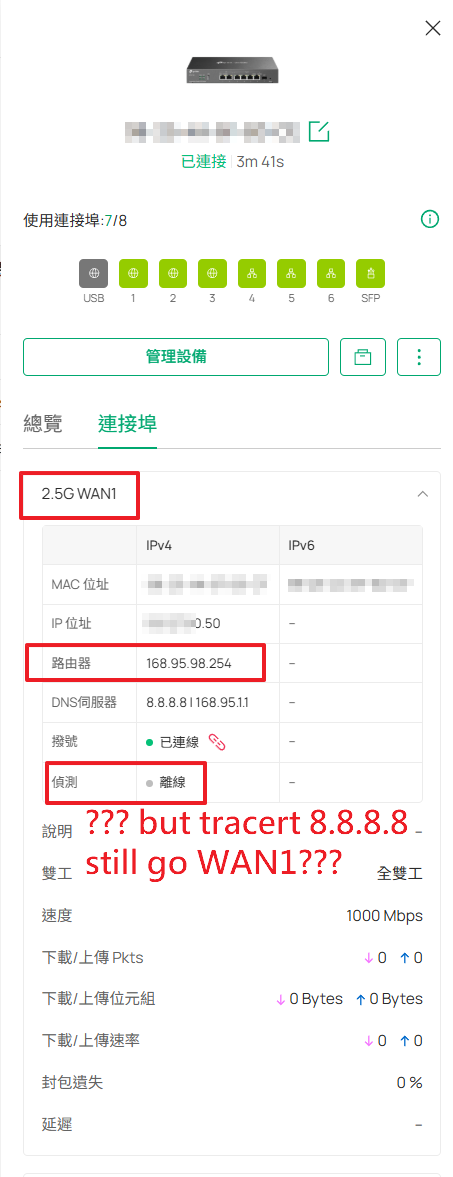
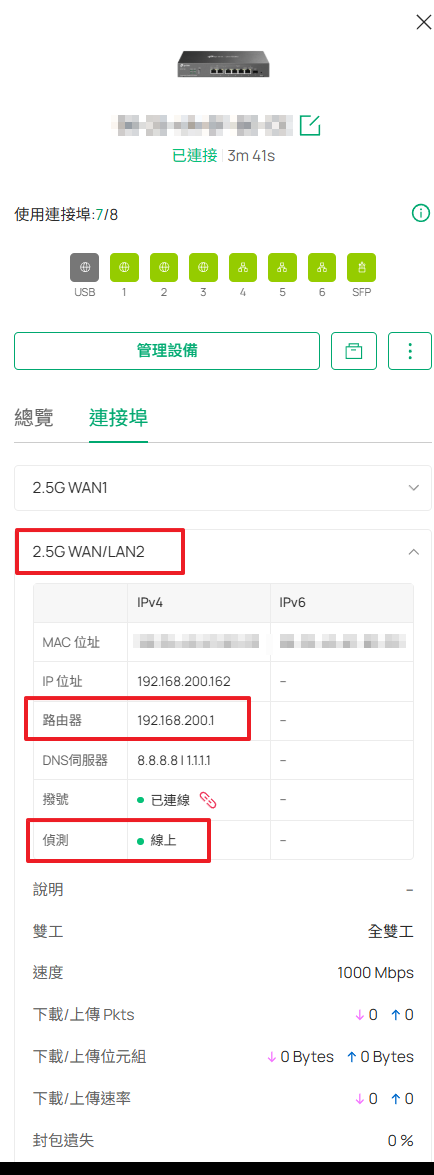
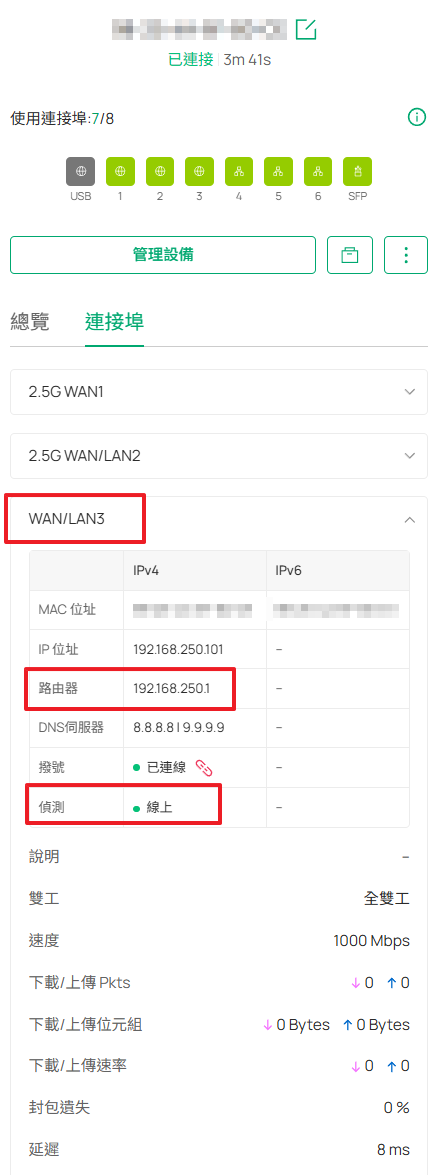
Please find attached the configuration screenshots and the Router WAN status information as requested.
These attachments include:
-
Load Balancing / Link Backup Settings: Showing that WAN2 and WAN3 are designated as Primary WANs, while WAN1 is set as the Backup WAN.
-
Router WAN Status: Showing the actual interface status and IP assignments (including the Public IP on WAN1 and the local hops on WAN2/WAN3 as described in my previous email).
These visual references further prove that despite the correct controller configurations, the router's routing behavior contradicts its settings under firmware v1.4.2.
Please pass these files along to the RD team together with the test results I provided earlier.
Thank you,
- Copy Link
- Report Inappropriate Content
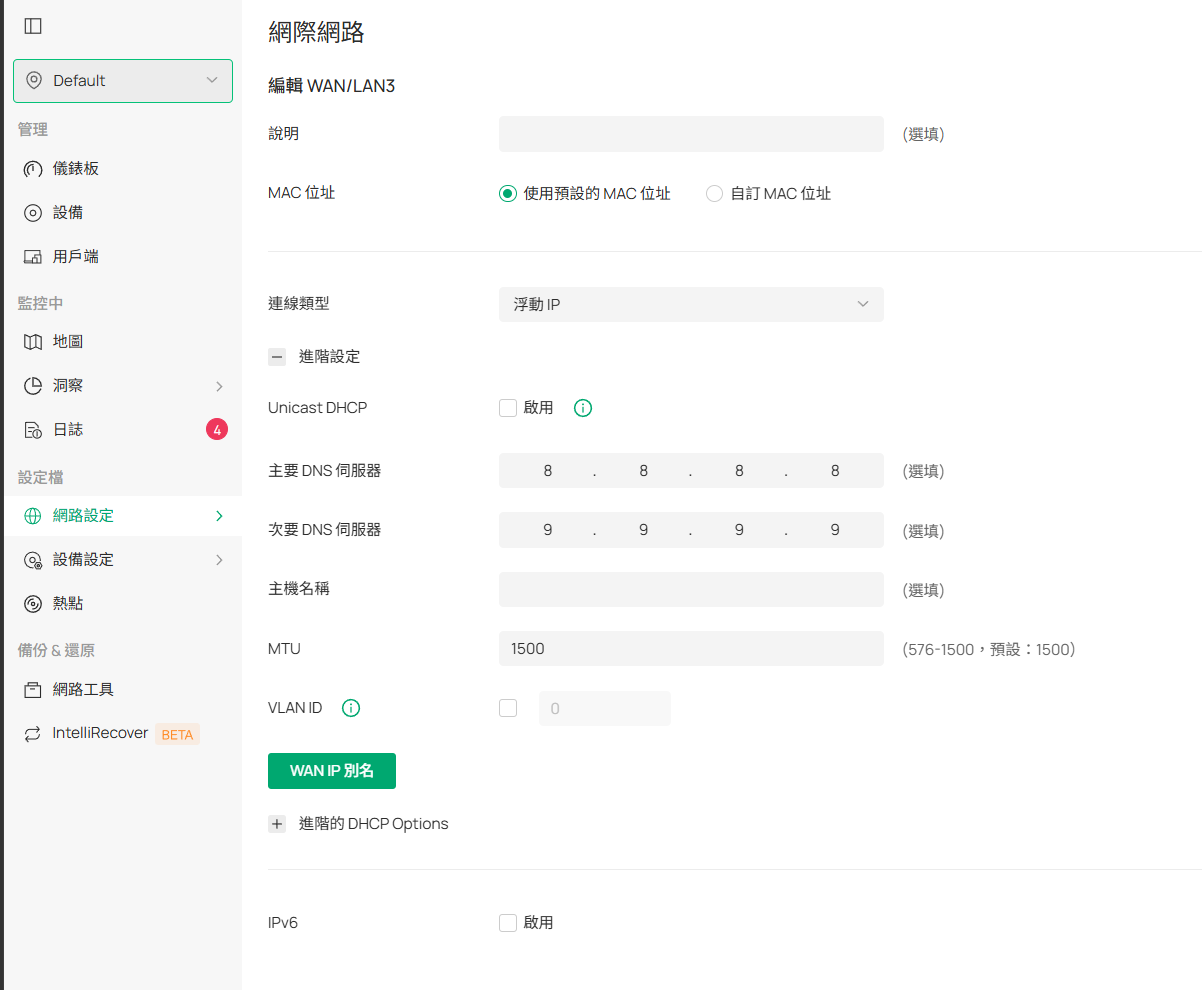
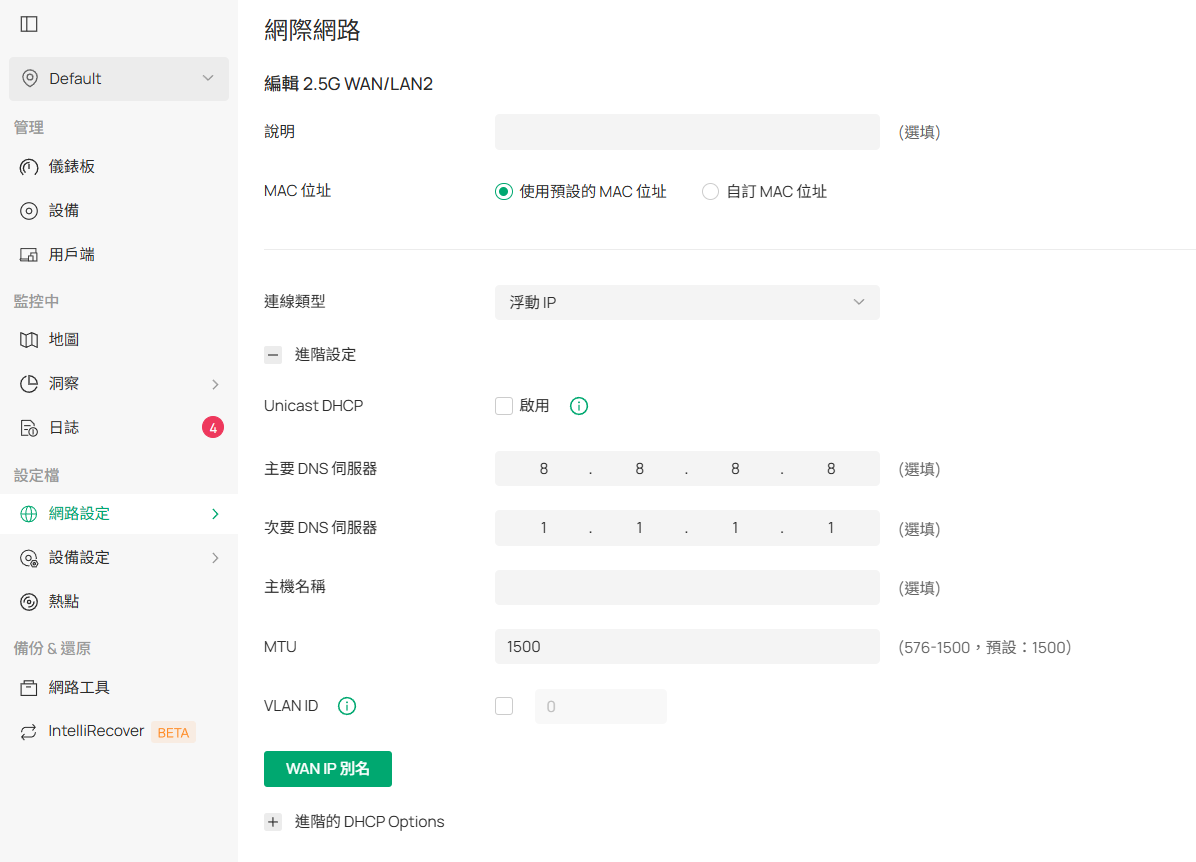
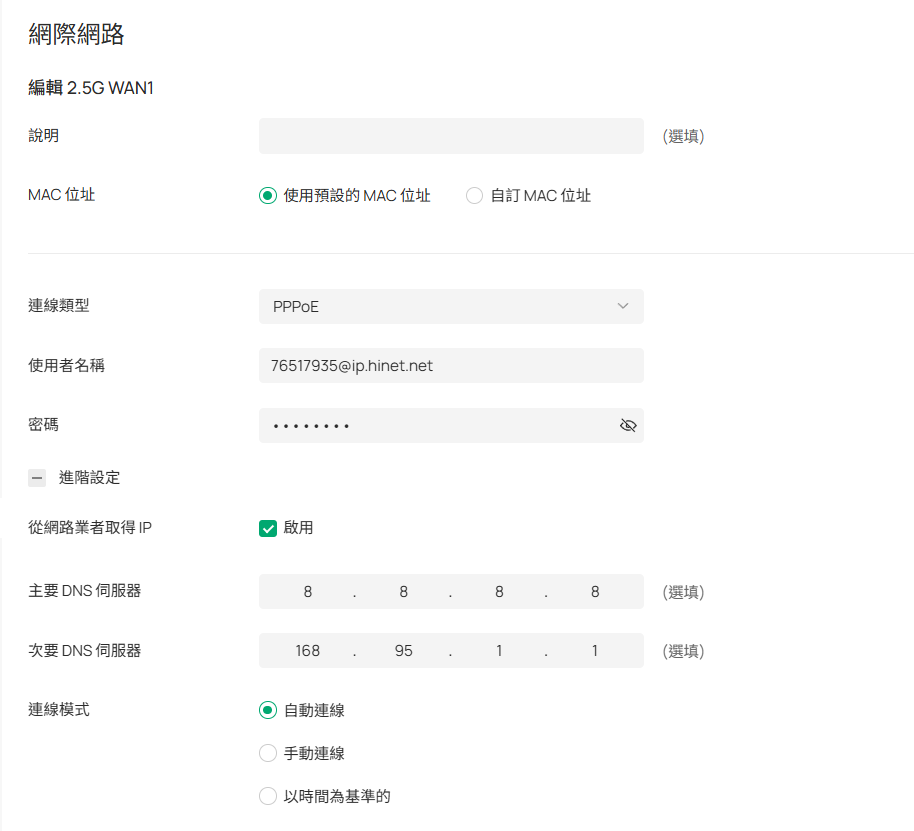
Dear Team,
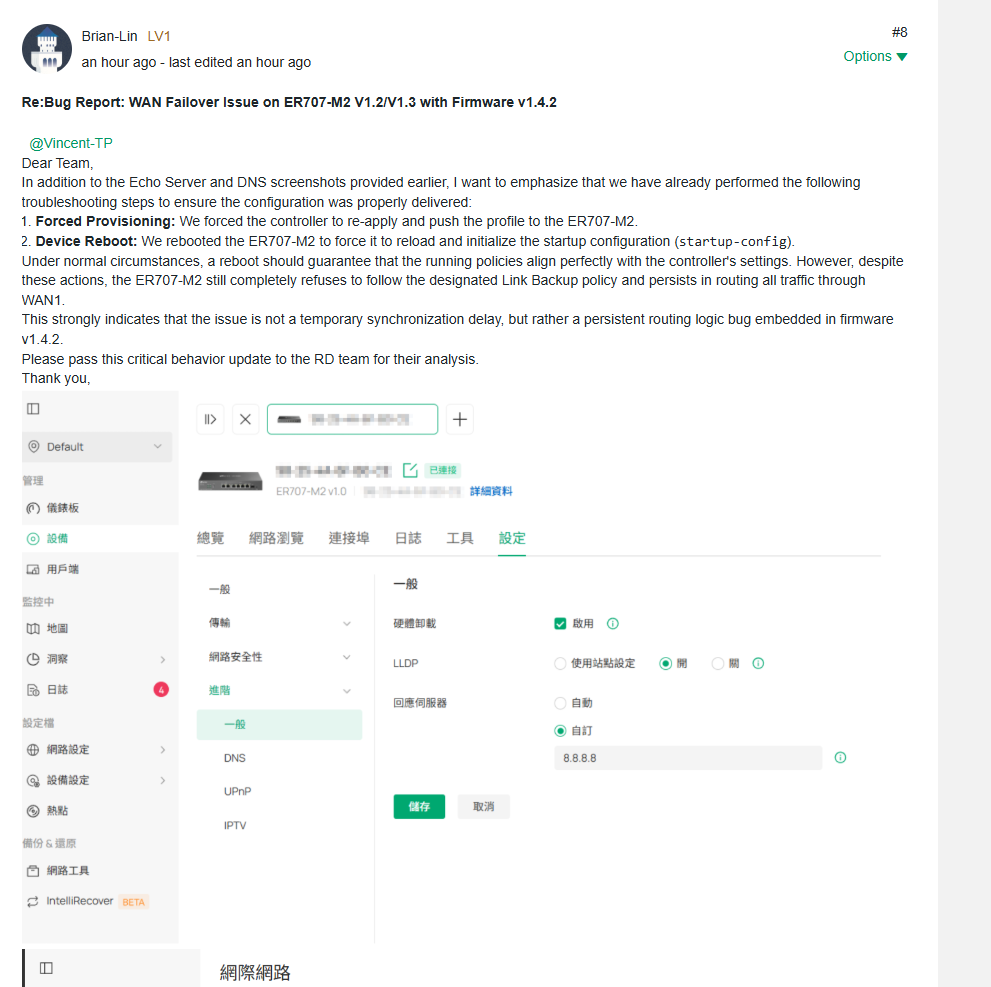
In addition to the Echo Server and DNS screenshots provided earlier, I want to emphasize that we have already performed the following troubleshooting steps to ensure the configuration was properly delivered:
-
Forced Provisioning: We forced the controller to re-apply and push the profile to the ER707-M2.
-
Device Reboot: We rebooted the ER707-M2 to force it to reload and initialize the startup configuration (
startup-config).
Under normal circumstances, a reboot should guarantee that the running policies align perfectly with the controller's settings. However, despite these actions, the ER707-M2 still completely refuses to follow the designated Link Backup policy and persists in routing all traffic through WAN1.
This strongly indicates that the issue is not a temporary synchronization delay, but rather a persistent routing logic bug embedded in firmware v1.4.2.
Please pass this critical behavior update to the RD team for their analysis.
Thank you,
- Copy Link
- Report Inappropriate Content
Hi @Brian-Lin
Thanks for the detailed feedback. We are working on it with high priority.
Just to confirm, you configured Echo server as 8.8.8.8 and the issue persists, right? I didn't see a screenshot of the Echo server config.
- Copy Link
- Report Inappropriate Content
Dear Team,
I am providing a critical update with breakthrough test results that precisely isolate the root cause of this firmware bug.
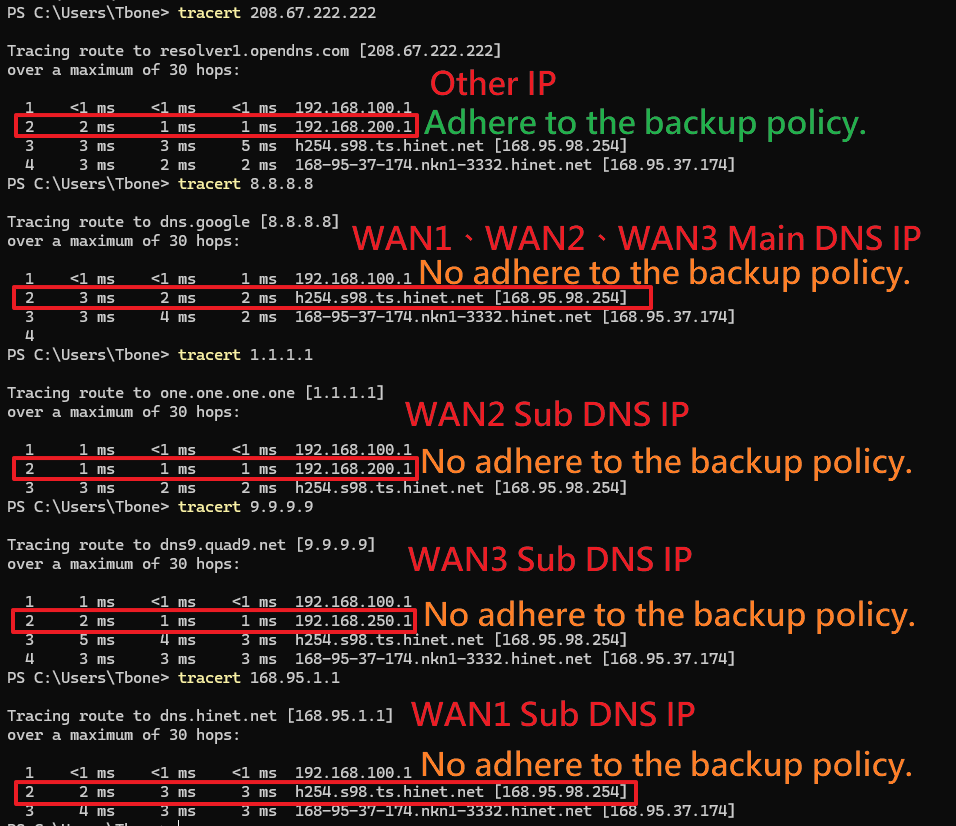
Through extensive testing using ping and tracert via CMD, we discovered that the ER707-M2's Layer 3 routing behavior under firmware v1.4.2 treats DNS IPs and Regular (Other) IPs differently, failing to apply the Link Backup policy consistently:
-
Behavior with DNS IPs: When we ping or tracert a designated DNS IP, the router completely ignores the Backup WAN Policy. It stubbornly forces the traffic through WAN1 (the Backup WAN).
-
Behavior with Regular (Other) IPs: When we ping or tracert any other standard IP addresses (e.g., website destination IPs), the router correctly obeys the Backup WAN Policy and routes traffic through the Primary WANs (WAN2 / WAN3).
[The Resulting Network Symptom] This explains why the network appears completely disconnected when WAN1 fails:
-
When WAN1 is physically connected but online status drops, the PC attempts to resolve a domain name.
-
The router routes this DNS Request via WAN1 (ignoring the policy), causing the DNS query to time out. Since the domain cannot be resolved, the browser shows a "No Internet" error.
-
However, if we bypass DNS and enter a raw destination IP address directly into Microsoft Edge, the connection succeeds because the router correctly routes this regular IP traffic through WAN2 or WAN3 according to the Link Backup policy.
[Conclusion & Request for RD] Evidently, during L3 NAT translation or system traffic initialization, DNS-related traffic/IPs are bypassing the Link Backup policy and taking an erroneous routing path. Naturally, ALL IP traffic must strictly adhere to the designated WAN policies without exception.
Please forward this detailed diagnostic data to your RD team immediately so they can replicate this asymmetric routing bug in their lab and provide a hotfix.
Thank you for your continuous support.
Best regards,
- Copy Link
- Report Inappropriate Content
Dear Team,
Please note that the configuration layout mentioned above has already been provided in the screenshots attached to my previous email.
You can refer to those files for visual verification of these test settings.
Thank you,
- Copy Link
- Report Inappropriate Content
Information
Helpful: 0
Views: 1605
Replies: 15
Voters 0
No one has voted for it yet.