
Issue Enabling Dual WAN (for failover)

Be default, SPF1 and WAN3 are enabled for WAN use.
As ususal, I disable SFP1 and then enable WAN4 for my secondary / LTE backup.
LTE wasn't working showing disconnected. So I turn off Port4 as a WAN use and then the device shows linked.
Try to re-enable it as WAN and then I get an error. Also re-enabled sfp1 and port4 at the same time for WAN use, no error thrown. Then try to disable SFP1, error again after apply.
I feel like I had this issue once before and I might just factory reset and try again.
Anyone else run into something like this?
Cheers!
edit: Leaving SFP1 on seems to fix the issue but its a workaround. At least my port4 shows connectivity now.
- Copy Link
- Subscribe
- Bookmark
- Report Inappropriate Content


Hi, @EIBROG
Thank you for posting in the business networking forum.
Regarding the issue you mentioned, we would like to confirm a few more details with you:
1. Could you please confirm your current Link Backup configuration? Specifically, have you enabled WAN3 and WAN4 (LTE) as two WAN sources, with WAN4 serving as the backup WAN? If possible, could you provide a screenshot of your WAN failover settings?
2. Have you tried configuring WAN4 as the primary WAN and WAN3 as the backup WAN, disabling the SFP port, and then testing whether WAN failover works correctly?
3. When did you first notice this issue? Did the Getaway work fine before?
- Copy Link
- Report Inappropriate Content
Hi, @EIBROG
Any updates on this concern?
If the issue persists, please feel free to contact us and provide the information mentioned in my last post. Thanks.
- Copy Link
- Report Inappropriate Content
@Nathan-TP Sorry for the delay in getitng back to you.
1 - Yes and Yes. I've setup and deployed over 60 of these.
2 - No
3 - Site is remote from me. I generally stage the unit and it gets shipped to the site. Sometimes I happen to forget to enable the wan failover before shipping but have always successfully configured it remotely.
Nathan-TP wrote
Hi, @EIBROG
Thank you for posting in the business networking forum.
Regarding the issue you mentioned, we would like to confirm a few more details with you:
1. Could you please confirm your current Link Backup configuration? Specifically, have you enabled WAN3 and WAN4 (LTE) as two WAN sources, with WAN4 serving as the backup WAN? If possible, could you provide a screenshot of your WAN failover settings?
2. Have you tried configuring WAN4 as the primary WAN and WAN3 as the backup WAN, disabling the SFP port, and then testing whether WAN failover works correctly?
3. When did you first notice this issue? Did the Getaway work fine before?
- Copy Link
- Report Inappropriate Content
Hi, @EIBROG
To assist you more effectively, we have created a Support Ticket via your registered email address(TKID260755906). Please check your inbox to ensure you have received the email.
- Copy Link
- Report Inappropriate Content
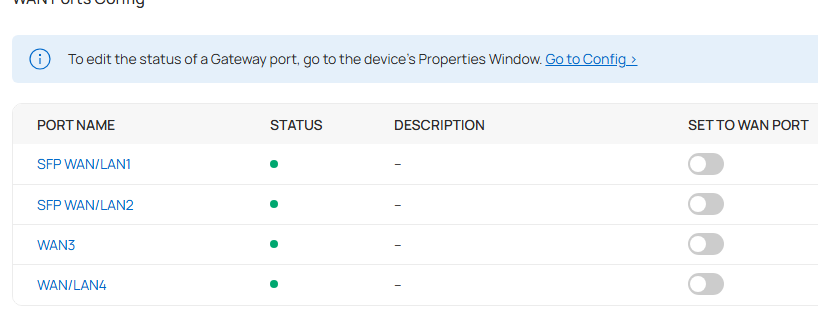
@Nathan-TP Yes I did. So what I did was remove this router and replaced it at the site it was deployed so there was no rush to resolve. What's even more funny is the Internet settings. Yet this unit is cloud connected.
- Copy Link
- Report Inappropriate Content
@Nathan-TP Sorry but I may have mixed something up. I actually had weird issues occuring at two different sites I had recently deployed, but both were related to weird wan issues. From the screengrab I put below, this is from another site that is different than the issue I was having at the other site trying to enable the wan backup. The "no wan" site was just all sorts of crazy.
Long story short and takeaway lesson is I need to make the time to fully setup my equiipment before shipping to site.
Cheers
- Copy Link
- Report Inappropriate Content
Information
Helpful: 0
Views: 745
Replies: 6
Voters 0
No one has voted for it yet.