
IP Conflicting issue
IP Conflicting issue

Hi
I am experiencing a persistent IP conflict issue with my ER7206 gateway. The problem has recently become more frequent and is causing significant network disruptions.
When the ER7206 gateway detects an IP conflict, shouldn't it automatically assign a new IP address to the conflicting device?
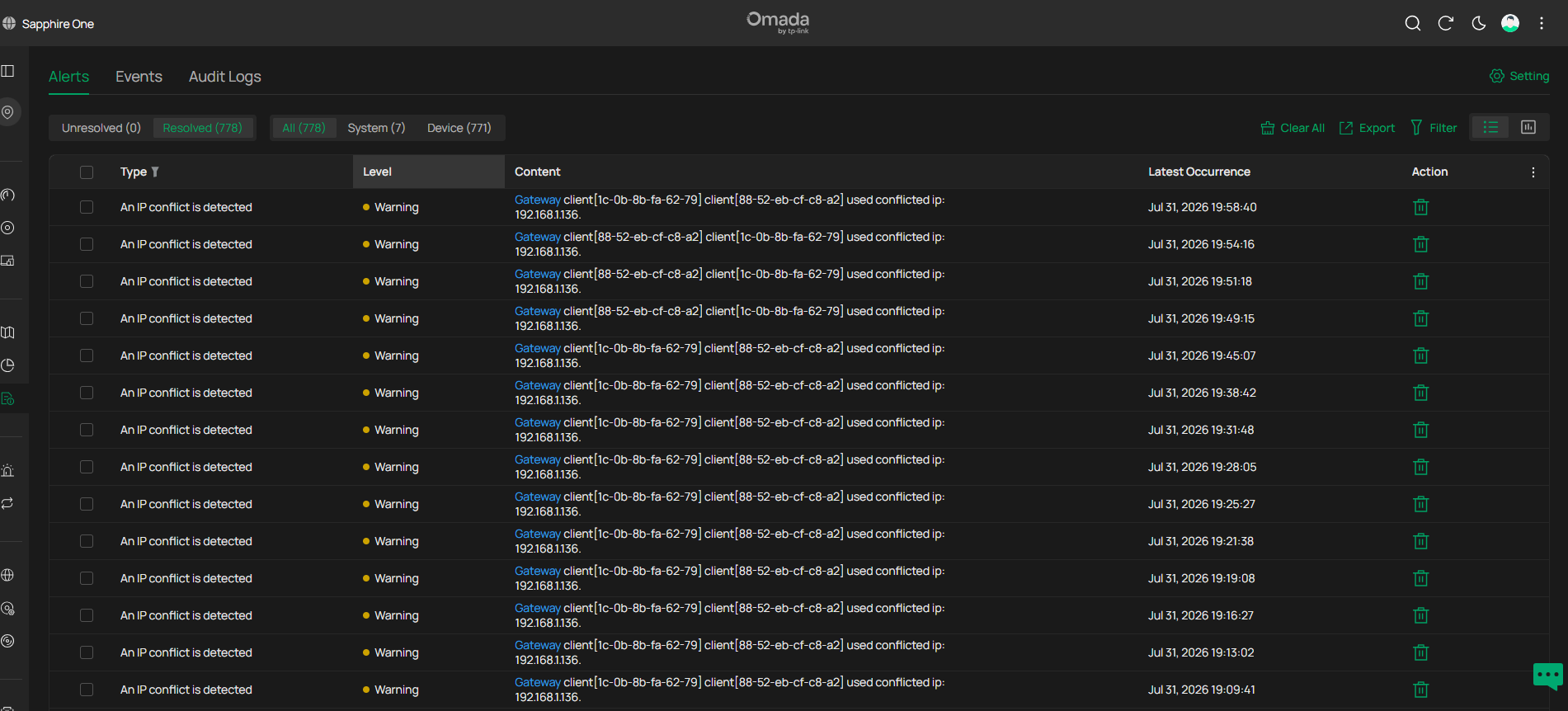
Specifically, I have a wired NVR with a static IP of 192.168.1.136, which is also configured under DHCP reservation. Despite this, the gateway keeps assigning the exact same IP address to a mobile phone.
I attempted to reconnect the mobile phone remotely three times, but the gateway continued to assign it the 192.168.1.136 address. To restore the NVR's connection, I blocked and then unblocked the mobile phone, but the gateway still reassigned the conflicting IP to the phone. Finally, I had to remotely remove ("forget") the mobile phone from the network. The NVR has now reclaimed its IP address, and the mobile phone is no longer visible in the client list.
Could you please assist me in resolving this DHCP reservation and IP conflict issue?
Please see the attached screenshot. The conflict log is 4 pages long; it started at 12:08 and continued until I noticed it around 20:00. Just sending the last page. Thanks
Best regards,
Vishnu Lamba
- Copy Link
- Subscribe
- Bookmark
- Report Inappropriate Content
Update: Resolved this with VLAN segmentation
Thanks to Umesh Chavan, Sr. Technical Support Engineer at TP-Link, for the detailed explanation on how the DHCP pool and static/reserved addressing interact — that clarified a lot for me, and the four recommendations given (static IPs kept outside the DHCP pool, DHCP reservation by MAC where possible, DHCP Snooping, and Trusted/Untrusted port configuration) are genuinely worth following regardless of network size.
For us, though, the root issue was less about pool overlap specifically and more about having every device type — switches, APs, cameras, and regular clients — all sharing one flat 192.168.1.0/24 network. With that much mixed static and dynamic addressing in a single subnet, collisions kept surfacing no matter how carefully the pool boundaries were managed.
So alongside the good practices above, we went a step further and split things into dedicated VLANs, each with its own subnet and DHCP pool:
- VLAN30 (192.168.30.0/24) — switch management interfaces only
- VLAN40 (192.168.40.0/24) — AP management interfaces only
- VLAN50 (192.168.50.0/24) — CCTV cameras and NVR-adjacent devices
Each switch/AP had its management VLAN set under its own port/device config, and cameras were migrated one at a time — updating each camera's static IP to its new VLAN50 address, its channel IP in the NVR, then flipping that camera's switch port's Native Network (PVID) to the new VLAN.
This fully separates the address spaces, so devices in different VLANs simply can't collide with each other at all — not just "less likely to," but structurally impossible, since each VLAN is its own broadcast domain with its own pool. The main client network (phones, laptops, etc.) stayed on the original 192.168.1.0/24, now with far fewer devices in it.
Between Umesh's DHCP Snooping/Trusted-port guidance and this VLAN segmentation, this has been solid ever since. Sharing in case it helps anyone else running into the same kind of conflict on a larger, mixed-device network.
Thanks
Vish
- Copy Link
- Report Inappropriate Content

Hi @Vishlamba
Thanks for posting here. To understand the situation better, please give us the following info:
Specifically, I have a wired NVR with a static IP of 192.168.1.136, which is also configured under DHCP reservation.
>>>What's the DHCP range? Is the IP 192.168.1.136 out of the DHCP range?
I attempted to reconnect the mobile phone remotely three times, but the gateway continued to assign it the 192.168.1.136 address.
>>>How did you connect the phone remotely? Via a VPN connection? Or other ways?
Is this issue only happens on the mobile phone? if yes, please let us know its brand and model. Thanks.
- Copy Link
- Report Inappropriate Content
Hi Please see my reply
Specifically, I have a wired NVR with a static IP of 192.168.1.136, which is also configured under DHCP reservation.
>>>What's the DHCP range? my dhcp range is 192.168.1.1 to 192.168.1.254 Is the IP 192.168.1.136 out of the DHCP range? NO.
I attempted to reconnect the mobile phone remotely three times, but the gateway continued to assign it the 192.168.1.136 address.
>>>How did you connect the phone remotely? Via a VPN connection? Or other ways? reconnecting moblie 3 times meant using the reconnect option on the device UI page.
Is this issue only happens on the mobile phone? NO, the issue is not only limited to mobile phone, Ip confilts with any devices on the same DHCP. if yes, please let us know its brand and model. Thanks.
Thanks
- Copy Link
- Report Inappropriate Content
Hi @Vishlamba
Thanks for the reply.
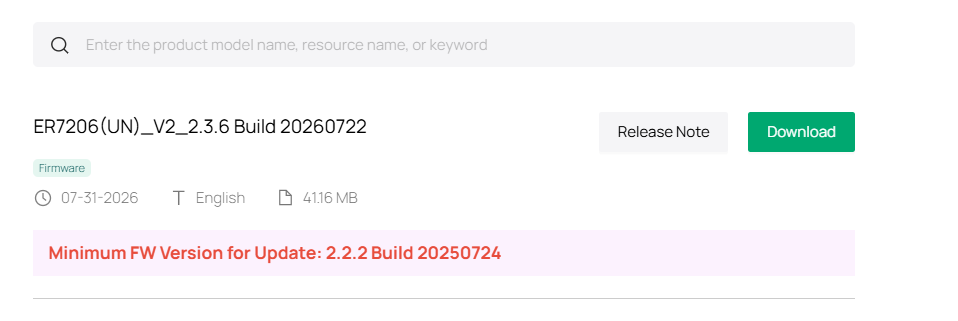
We had released a newer firmware 2.3.6 for ER7206 V2, please update it and see if the issue persists:
https://support.omadanetworks.com/en/product/er7206/v2/?resourceType=download
If it doesn't help, please give us the following info:
1. Around how many clients are in the network in total?
2. When did you first notice this issue?
3. Does every IP conflict issue involve the NVR's IP address 192.168.1.136?
- Copy Link
- Report Inappropriate Content
@Vincent-TP Hi
I am writing to report an ongoing IP conflict issue with the ER7206 router that persists even after the latest firmware update (ER7206V2.3, version 2.3.6).
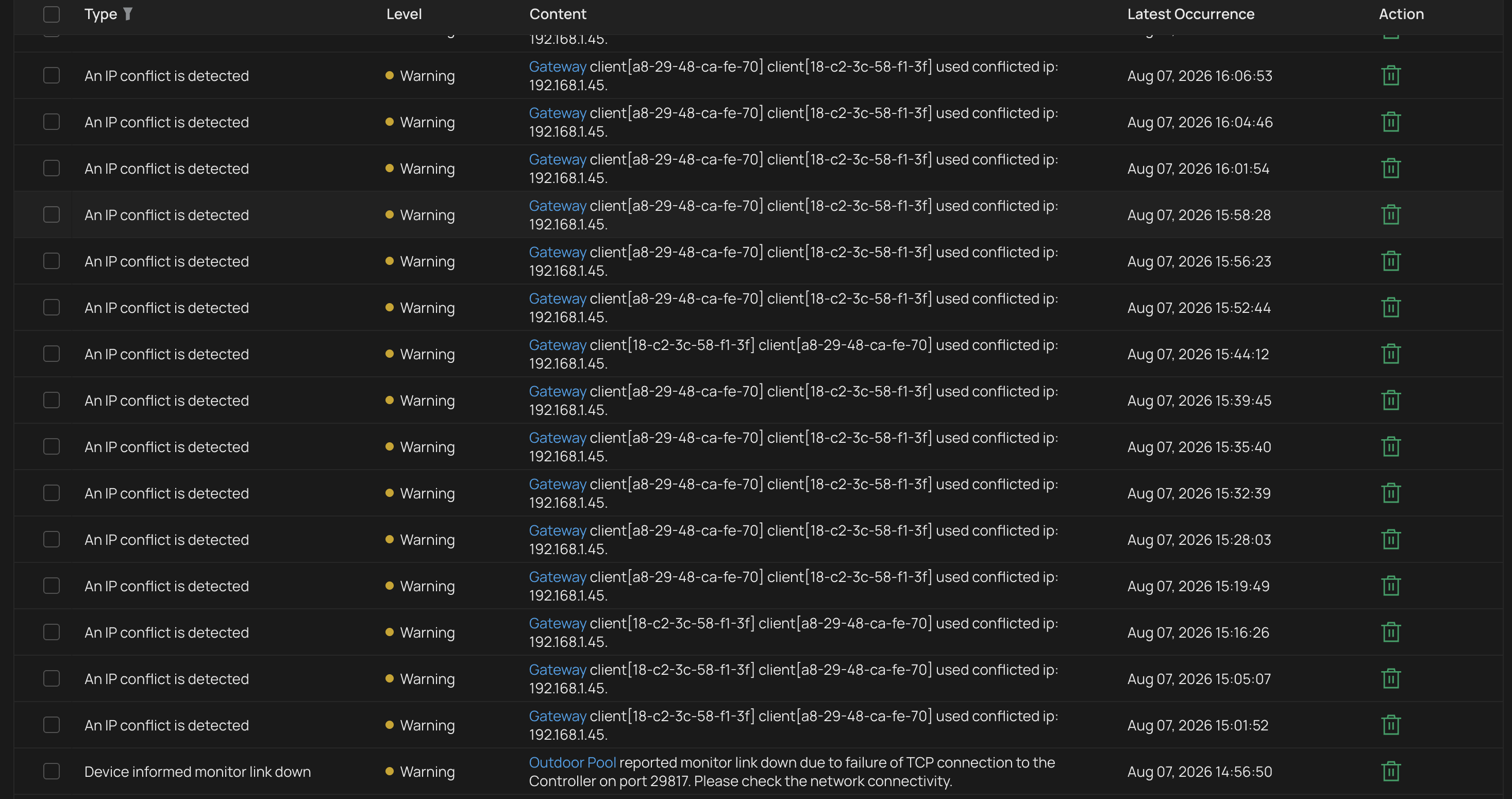
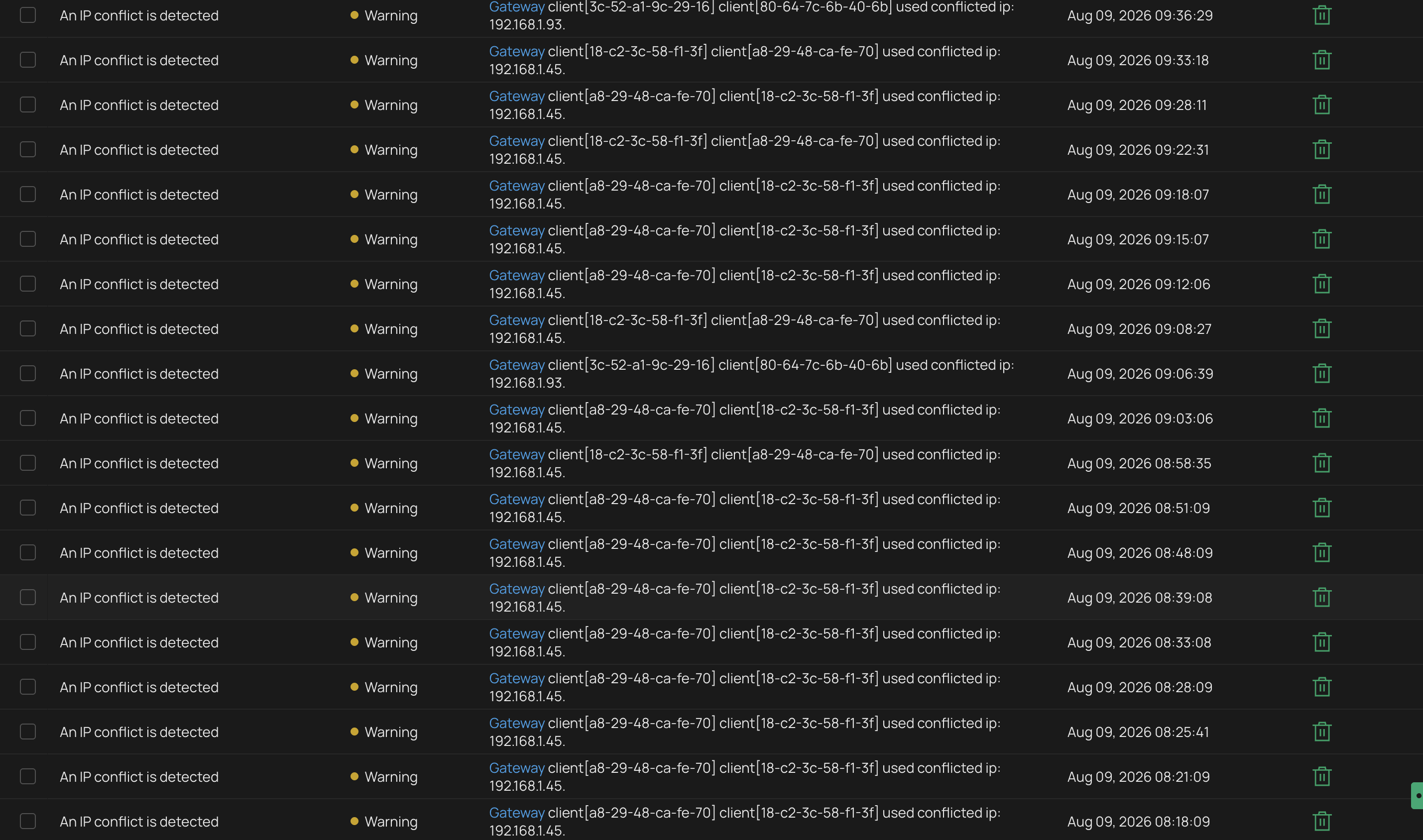
Most recently, the conflict occurred between my outdoor EAP 772 and an Aqara Hub M3; please note that both of these conflicting devices are wired. The EAP 772 was configured with a static IP (192.168.1.45), but the Aqara Hub was assigned the exact same IP. This conflict continued for over 24 hours. Because I was traveling, I only noticed the issue today, August 9, 2026, when pings to the gateway became very high or dropped entirely. I am attaching the error log, which is 6 pages long, along with two screenshots showing the timeframe from when the conflict started until today.
Rebooting the devices did not resolve the issue, so I had to manually assign a new IP to the Aqara Hub. Even after assigning a new IP to the Aqara Hub, pings to the gateway, Google, and Apple remained unstable. Normal ping stability only resumed after I rebooted my PoE switch (SG2428P).
Please let me know how we can resolve this recurring IP conflict issue.
Vish.
- Copy Link
- Report Inappropriate Content
Seems like the logs were failed to uploaded.
To better assist you, I've created a support ticket via your registered email address and escalated it to our support engineer to look into the issue. The ticket ID is TKID260818612. Please check your inbox and confirm that the support email was received. Thanks!
Once the issue is resolved, please update this thread with your solution to help others who may encounter the same problem.
Many thanks for your excellent cooperation and patience!
- Copy Link
- Report Inappropriate Content
Hi Thank you, I have replied to the email with the information required, with the log files I meant Screen shots sorry for the confusion. and yes I will update the thread once the resolution is done thanks again.
Vish.
- Copy Link
- Report Inappropriate Content

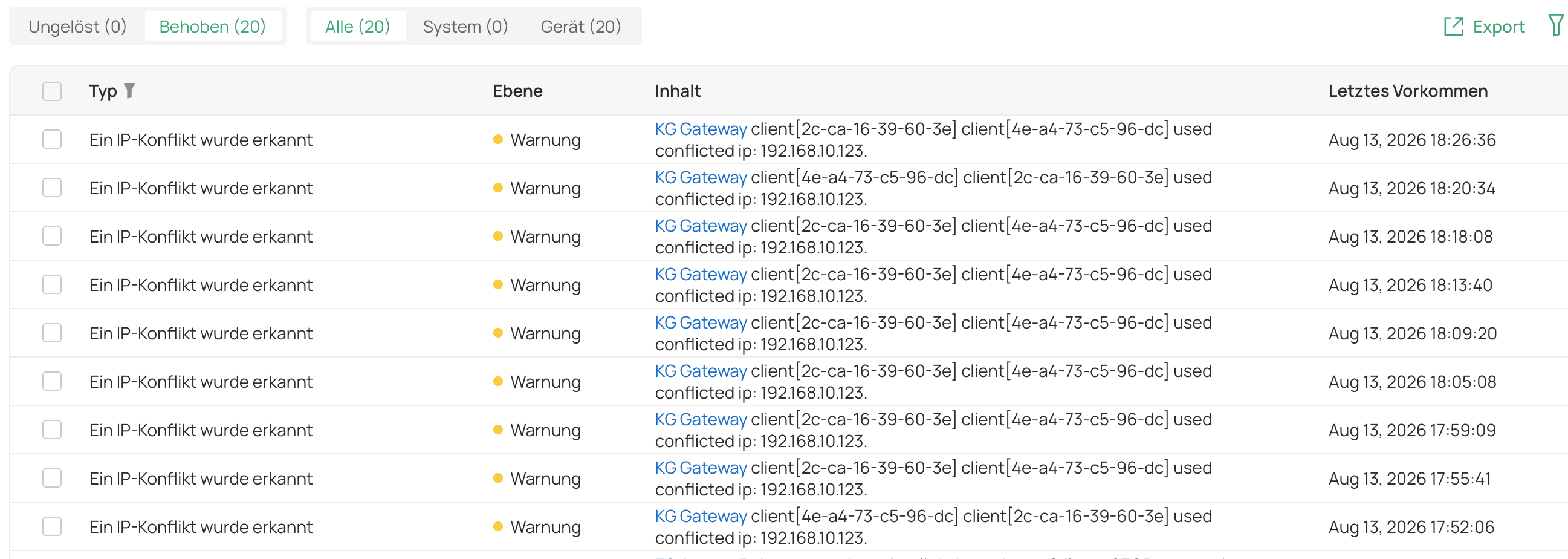
Hello.
I have the same error.
I encountered the IP conflict for the second time today.
It seems to happen only when new devices are added or—as was the case today—when I reconnect my laptop at home after returning from vacation.
It appears that the highest previously assigned IP address in the range is being assigned a second time. I was able to resolve the conflict by reconnecting multiple times; the system then assigned the next IP address in the sequence (192.168.10.124).
My software controller is version 6.3.0.42.
The gateway is an ER7412-M2 v1.20 (version 1.2.0).
Best regards, Thorsten.
- Copy Link
- Report Inappropriate Content
Hi All
No conncret solution was provided by Tplink India team as such, excpet some troubleshooting and finally closed it with the follwoing email.
Dear sir,
After discussing with our team, we believe the IP Conflict logs are mainly caused by the complex network environment. During device reboot or reconnection, DHCP lease information may not be synchronized in time, and some clients may respond slowly to ARP probing, resulting in actual duplicate IP assignments and repeated IP Conflict logs. At present, we have not observed any obvious impact on the network connectivity. R&D is planning to suppress this type of IP Conflict log in a future firmware release (currently targeted around October for ER605/ER7206 and most other models).
So will just have to wait for the update.
Thanks.
- Copy Link
- Report Inappropriate Content

Hi @Totti_14
For your case, we recommend sending the following details to the listed Support Email on your region’s support page:
Subject: [Forum Escalation][ID 869554]
Forum Nickname:
Thread URL: https://community.tp-link.com/en/business/forum/topic/869554?replyId=1717848
Model & Version:
Description:
Any Other Relevant Information (Logs, Config Files, Images, etc.):
Once sent, a ticket will be created in our support system, and a team member will follow up to gather more information or troubleshoot the issue. If you would like our team to ensure your ticket is responded to in a timely manner, feel free to reply with your Ticket ID Number.
Totti_14 wrote
Hello.
I have the same error.
I encountered the IP conflict for the second time today.
It seems to happen only when new devices are added or—as was the case today—when I reconnect my laptop at home after returning from vacation.
It appears that the highest previously assigned IP address in the range is being assigned a second time. I was able to resolve the conflict by reconnecting multiple times; the system then assigned the next IP address in the sequence (192.168.10.124).
My software controller is version 6.3.0.42.
The gateway is an ER7412-M2 v1.20 (version 1.2.0).
Best regards, Thorsten.
- Copy Link
- Report Inappropriate Content
Update: Resolved this with VLAN segmentation
Thanks to Umesh Chavan, Sr. Technical Support Engineer at TP-Link, for the detailed explanation on how the DHCP pool and static/reserved addressing interact — that clarified a lot for me, and the four recommendations given (static IPs kept outside the DHCP pool, DHCP reservation by MAC where possible, DHCP Snooping, and Trusted/Untrusted port configuration) are genuinely worth following regardless of network size.
For us, though, the root issue was less about pool overlap specifically and more about having every device type — switches, APs, cameras, and regular clients — all sharing one flat 192.168.1.0/24 network. With that much mixed static and dynamic addressing in a single subnet, collisions kept surfacing no matter how carefully the pool boundaries were managed.
So alongside the good practices above, we went a step further and split things into dedicated VLANs, each with its own subnet and DHCP pool:
- VLAN30 (192.168.30.0/24) — switch management interfaces only
- VLAN40 (192.168.40.0/24) — AP management interfaces only
- VLAN50 (192.168.50.0/24) — CCTV cameras and NVR-adjacent devices
Each switch/AP had its management VLAN set under its own port/device config, and cameras were migrated one at a time — updating each camera's static IP to its new VLAN50 address, its channel IP in the NVR, then flipping that camera's switch port's Native Network (PVID) to the new VLAN.
This fully separates the address spaces, so devices in different VLANs simply can't collide with each other at all — not just "less likely to," but structurally impossible, since each VLAN is its own broadcast domain with its own pool. The main client network (phones, laptops, etc.) stayed on the original 192.168.1.0/24, now with far fewer devices in it.
Between Umesh's DHCP Snooping/Trusted-port guidance and this VLAN segmentation, this has been solid ever since. Sharing in case it helps anyone else running into the same kind of conflict on a larger, mixed-device network.
Thanks
Vish
- Copy Link
- Report Inappropriate Content
Information
Helpful: 0
Views: 1007
Replies: 11
Voters 0
No one has voted for it yet.