
PPPoe after Firmwareupdate 1.4.3 Build 20260721 Rel.67458 without any function
PPPoe after Firmwareupdate 1.4.3 Build 20260721 Rel.67458 without any function

After installing update 1.4.3 Build 20260721 Rel.67458, the PPPoE function on the 8411 router is not working. It does not initiate or attempt a dial-up connection. No error messages appear either, except for the indication that there is no connection. A test with a client that dials in directly via PPPoE works without any issues. So the problem lies with the router, which was able to handle this without issues before the update. The uplink to the modem is working and functional. The question that keeps coming to mind in this context is why these updates can’t be rolled back—if I could, I would have reverted to the previous firmware. But that’s not possible.
- Copy Link
- Subscribe
- Bookmark
- Report Inappropriate Content


Hi @yvi74
Our team has found a clue.
We discovered that when the ONT is set to Bridge mode, the gateway fails to authenticate via PPPoE dial-up. Please check whether your ONT is configured in Bridge mode, and whether other routers are able to successfully establish a PPPoE connection under the same conditions.
- Copy Link
- Report Inappropriate Content

- Copy Link
- Report Inappropriate Content
HI @yvi74
Thank you for posting on the business networking forum.
If your computer can successfully establish a PPPoE connection, please double-check that the PPPoE account credentials entered on your ER8411 are correct.
Then, please try performing a MAC Clone on the ER8411. You may refer to the following guide:
Using the computer that can successfully establish a PPPoE connection, please open the ER8411’s web interface on that computer (if you are not using a Controller to manage the ER8411). Then, please go to Network > MAC, select your WAN port, for example, WAN/LAN4, and click Clone PC's MAC.
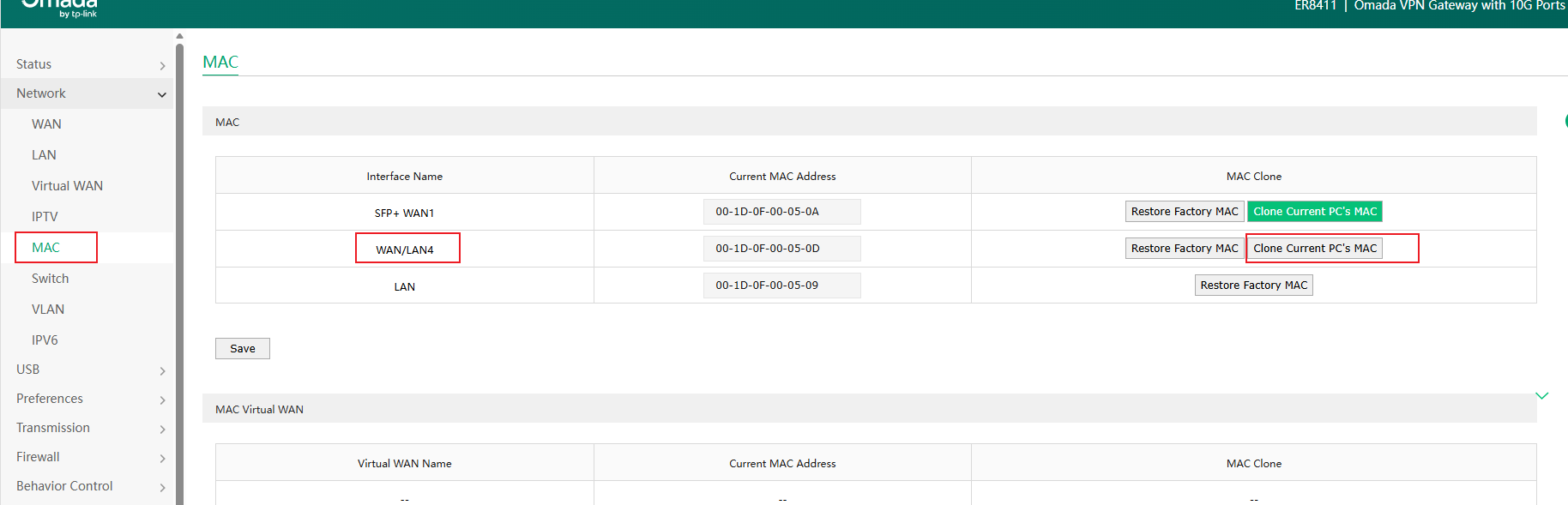
Additionally, we would like to ask: immediately after the firmware upgrade, did the ER8411 lose its WAN connection right away? Did you make any changes to the network settings?
- Copy Link
- Report Inappropriate Content
It appears 1.4.3 has some bugs. I reported a hard lock up in a thread from this weekend. Another person reported site to site tunnel errors. I found in my situation after the lockup and downgrade to 1.4.1 DNS DOT might be broke, also. Turned all of that off and setup basic DNS it's been fine for a couple of days on 1.4.1. TpLink might want to look at this level of code, I was running 1.3.6 for over a year with these features enabled and it ran perfect. Appears to be multiple issues in this code train.
- Copy Link
- Report Inappropriate Content
no downgrade is not possible:
1.4.3 Build 20260721 Rel. 67458
Release Note Important Notice: This firmware version does not support downgrade. If a downgrade is required, please contact Omada Technical Support.
- Copy Link
- Report Inappropriate Content
First of all, I’d like to point out that I installed an update. With version 1.3.6, everything ran stably for over a year, and the Draytek modem worked without any problems. It wasn’t until after the update that communication stopped. The advantage of the Draytek is that it has two ports, so you can test them. So if you mirror the port and monitor it with Wireshark, nothing happens—even if you initiate a connection via the Omadaportal. No communication. So I deleted the config and recreated it—same result. Then I switched the modem to router mode and configured the 8411 only as a dynamic receiver. The network is running, but with an internal IP and double NAT—not ideal. As a counter-test, I switched everything back. Still no communication. The 8411 isn’t dialing out.
- Copy Link
- Report Inappropriate Content
you should try, it works and downgrade to 1.4.1.
I don't know if it solves any problems but it's worth a try.
yvi74 wrote
no downgrade is not possible:
1.4.3 Build 20260721 Rel. 67458
Release Note Important Notice: This firmware version does not support downgrade. If a downgrade is required, please contact Omada Technical Support.
- Copy Link
- Report Inappropriate Content
Hi @papac0rn
Thank you for your reply.
Yes, I have noticed that you mentioned the new firmware issue in your post. However, we have not yet received any similar feedback from other users regarding the device freezing after the upgrade. Since your device is functioning normally after downgrading, and to maintain the stability of your network environment, we have refrained from providing further suggestions at this time.
If you would like us to further investigate the issue, please feel free to reply to your post at any time. We would be more than happy to assist you.
- Copy Link
- Report Inappropriate Content
Hi @yvi74
Thank you very much for providing the relevant information.
We still recommend trying MAC Clone to see if the PPPoE connection can be established successfully. If it still fails, you may also consider downgrading the firmware, as suggested by @MR.S, to see if that resolves the issue.
- Copy Link
- Report Inappropriate Content
So I want to emphasize that I haven’t received any help so far—I’ve found a workaround on my own. The fact is, I can’t perform a downgrade via the Omada Controller. I’ve already posted this message here, and I’d like to mention it again. I’ve tested the MAC address—to do this, I don’t need to clone anything in the router; instead, I simulate the address on my laptop: PADI (Initiation): I
PADO (Offer):
PADS (Session-Confirmation) is something I’m quite familiar with: I also didn’t say the device freezes. The router switches over to the second connection in the load balancer just fine. It’s only when you configure PPPoE that not a single bit is sent to the modem. If you configure Wan1 differently, then there’s activity. But not with the PPPoE configuration. Personally, I’m starting to get really annoyed when I buy a premium router that no longer works properly after an update. I’d be willing to downgrade, but the Omaha Controller won’t let me, and I spent the entire last weekend trying to find a technical solution. I expect to be taken seriously here—and not brushed off with “no one else here has had that kind of bad luck”—that’s absolutely unacceptable!!
- Copy Link
- Report Inappropriate Content
Hi @yvi74
We would be very happy to assist you.
To better help you, I have created a support ticket using your registered email address. Please kindly check your inbox to see if you have received the email.
(PS: One of my replies above was intended for @papac0rn. Perhaps there was some misunderstanding when you were reviewing the replies.)
- Copy Link
- Report Inappropriate Content
Information
Helpful: 0
Views: 1347
Replies: 16
Voters 0
No one has voted for it yet.