
WAN IPv4 flapping on the TP-Link Omada ER701-5G-Outdoor

I am using a U Mobile Business Ultra WiFi SIM card with a Fixed Public IP, upgrade from previous U Home 5G. When the SIM card is inserted into the Omada ER701-5G Outdoor router, the device fails to establish an internet connection.
The SIM card has been verified to be active and functions normally when tested in a smartphone. The router is able to detect the SIM card; however, the Cellular/WAN status remains disconnected, fails to obtain an IP address, and the WAN IPv4 connection continuously flaps while operating in Router Mode/IP Passtrough.
Detail Model :
- Model: Omada ER701-5G Outdoor
- Hardware Version: EU/1.0
- Firmware Version: 1.0.1 Build 20250910 Rel.69011(4555)
I have already performed the following troubleshooting steps:
- Verified that the SIM card is active and working on another device.
- Manually configured the APN using U Mobile's standard settings.
- Restarted and reset the router.
- Updated the router to the latest available firmware.
Despite these efforts, the issue remains unresolved.
- Copy Link
- Subscribe
- Bookmark
- Report Inappropriate Content


Hi @Rizal19
Thanks for posting here.
Is this your first time setting up the ER701-5G-Outdoor? Or did it work well with other SIM cards before?
WAN IPv4 connection continuously flaps while operating in Router Mode/IP Passtrough.
>>>What does flap mean? Is this occured when you plug a modem into the port of the ER701-5G-outdoor?
- Copy Link
- Report Inappropriate Content
This isn't the first time I've used this service, and I've previously tried several other service providers without experiencing this issue. The problem only started after I switched plans with the same ISP, from U Home 5G to U Ultra Business. Since the upgrade, the IP address assigned by the ISP has been extremely unstable. Under the default settings in the UI, the connection repeatedly drops and reconnects, causing the assigned IP address to become unstable. This happens continuously and makes the service unreliable for normal use.
I don't know whether this is related to the IP assignment, network configuration, routing, or the U Ultra Business service profile.
- Copy Link
- Report Inappropriate Content
Hi @Rizal19
Thanks for the reply.
We recently released firmware 1.0.4. Please update it and let us know whether the issue persists.
https://support.omadanetworks.com/en/product/er701-5g-outdoor/?resourceType=download

- Copy Link
- Report Inappropriate Content
Thank you for providing the firmware update, however the issue still persists. We have tested both the default and manual network settings, but none of them are working as expected. The only configuration that appears to be stable is the SIM dial-up setting in 4G mode. When using the manual 5G NSA/4G mode, only the N78 band is detected in the cellular information. As a result, the connection frequently cycles between link-up and link-down, resulting in an unstable network connection. For your information, my ISP supports both 5G NSA and SA networks. I have also performed multiple factory resets and retested the configuration in an attempt to establish a stable 5G NSA/4G connection using both Band 28 (B28) and Band 78 (N78).
- Copy Link
- Report Inappropriate Content
Hi @Rizal19
Thanks for the reply.
How do you manage the router? do you have use a controller?
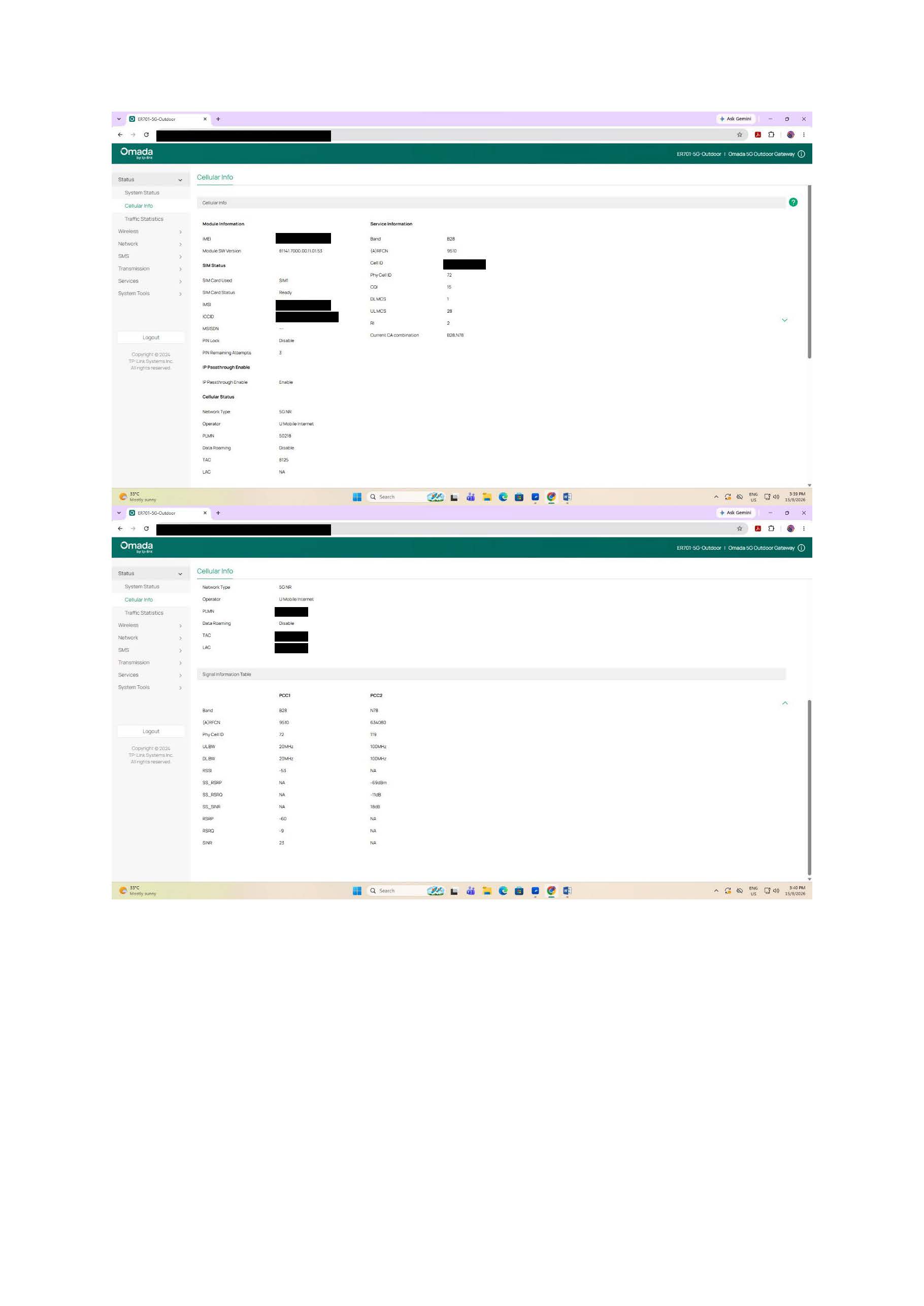
To better understand the situation, please share a screenshot of the cellular info page:
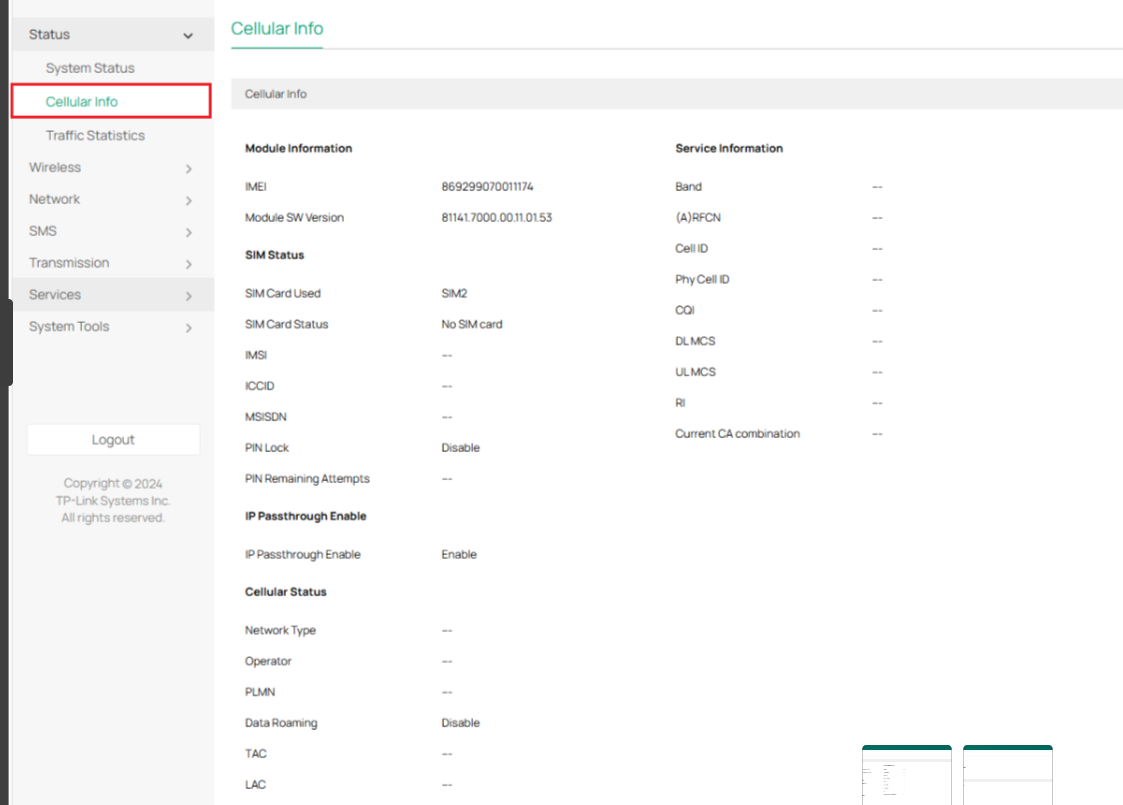
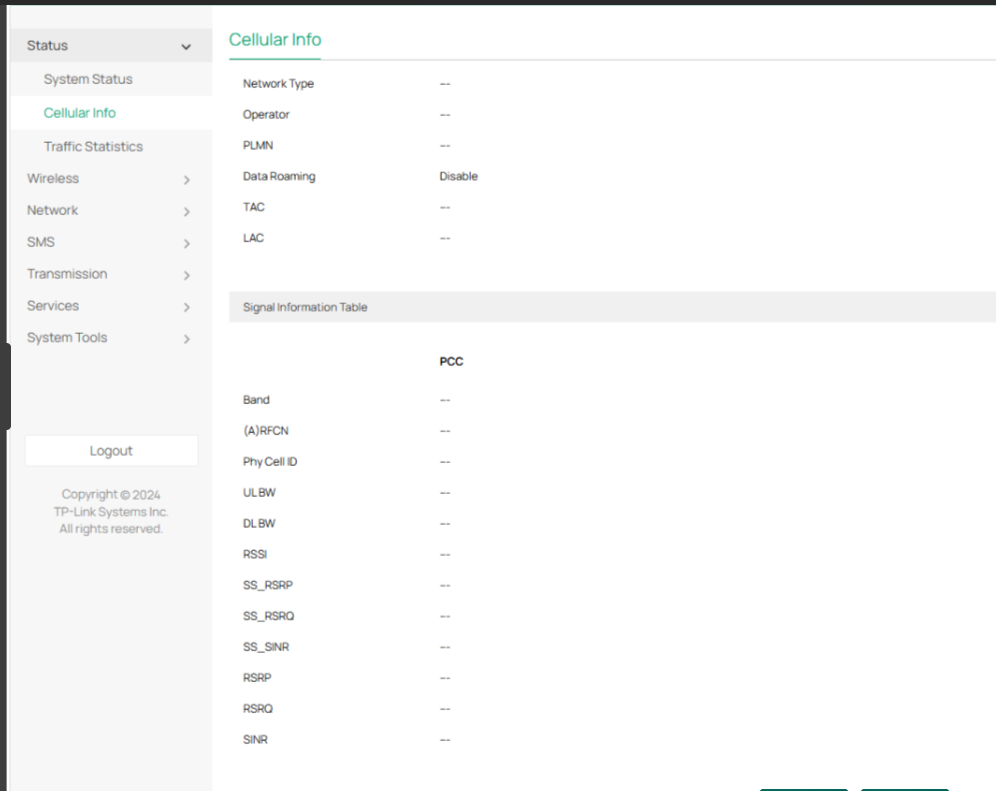
- Copy Link
- Report Inappropriate Content
ER701 system status after reset and manualy setup on sim 1 settings, only 5G NSA/4G or 4G have internet access and cellular info that your requested. Please check ticket ID 28225 that send i send to omada support.Tq
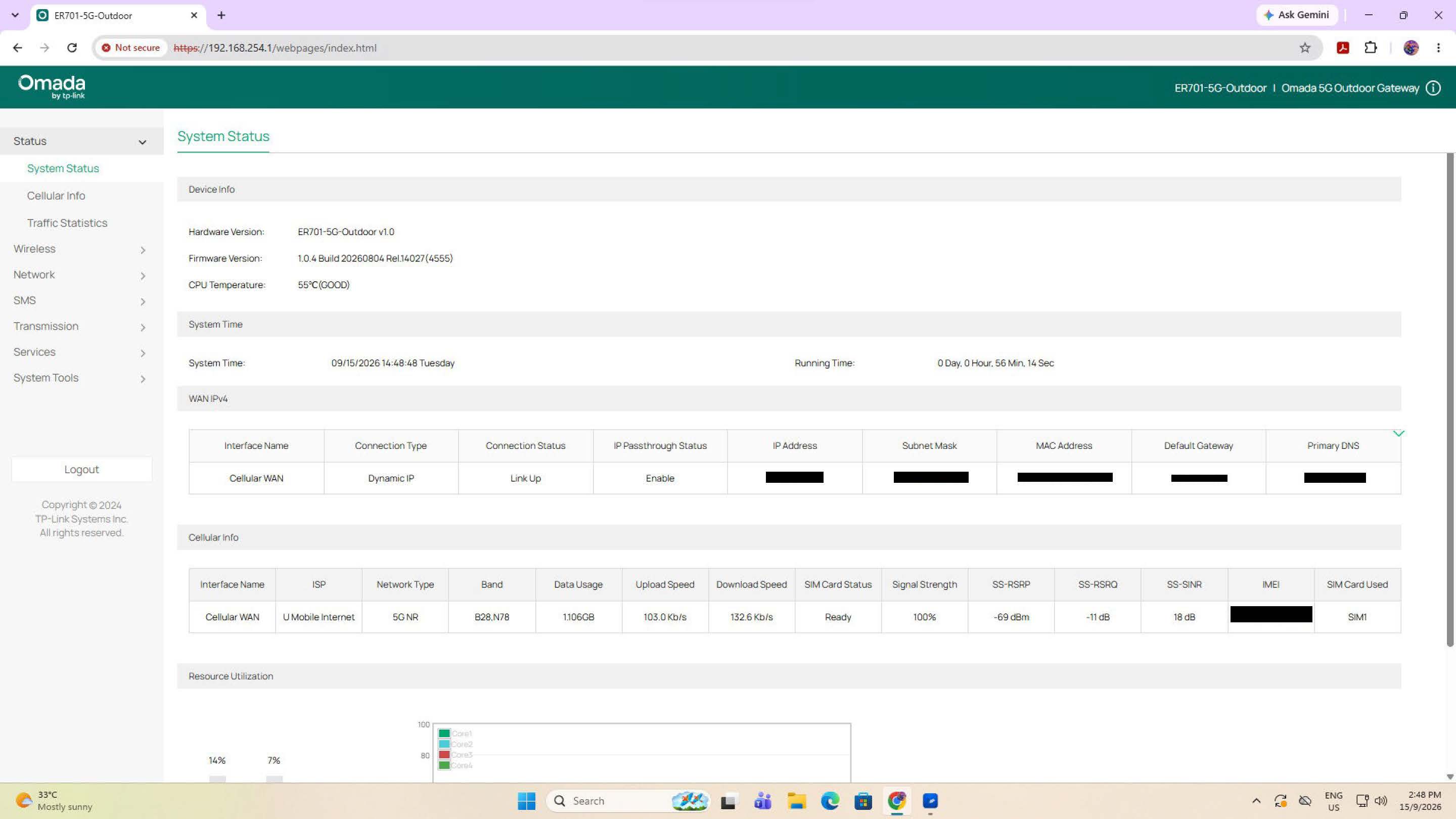
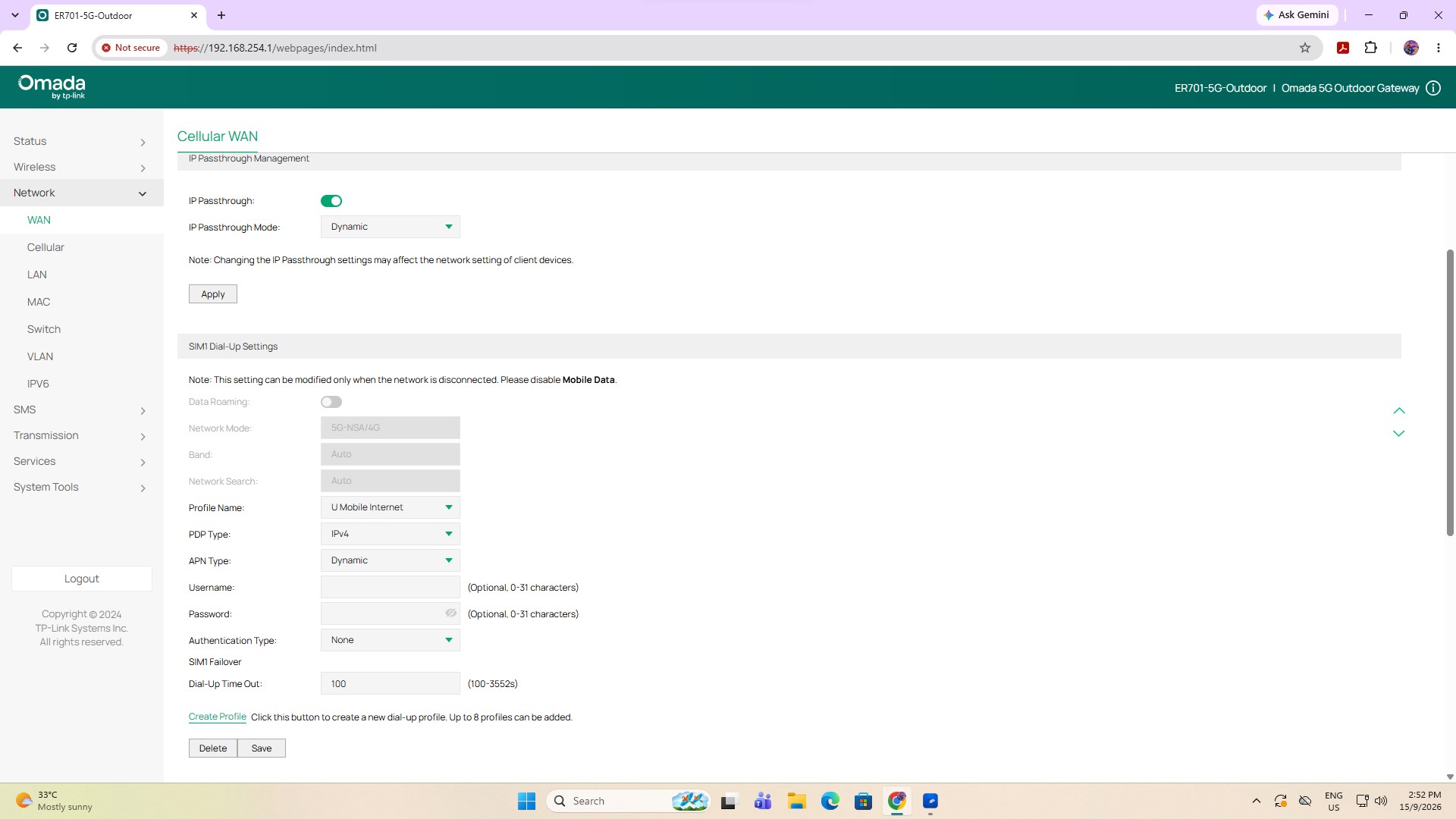
- Copy Link
- Report Inappropriate Content
Hi @Rizal19
Thanks for the reply.
I was about to suggest contacting the support department. The community team does not have permission to view tickets from the regional support department. Since you have already reached out to them, I recommend continuing to troubleshoot with them to avoid repeated communication.
Once the issue is resolved, please update this thread with your solution to help others who may encounter the same problem.
Many thanks for your excellent cooperation and patience!
- Copy Link
- Report Inappropriate Content
Thank you for your feedback. However, I am disappointed to note that Omada MY Technical Support has stopped responding to my emails regarding my support ticket since July 22, 2026, and I have not received any further updates or assistance since then. I sincerely regret my decision to purchase Omada devices, particularly given my experience with the current support situation. In contrast, I have previously used TP-Link SOHO products and have always been satisfied with the level of technical support provided whenever I encountered any issues. I hope Omada MY can take this matter seriously and provide a proper response and resolution to my outstanding support case. I believe that timely and consistent after-sales support is an essential part of a reliable product and customer experience.
- Copy Link
- Report Inappropriate Content
Hi @Rizal19
Sorry for the unpleasant experience. I will report this issue to the relevant department.
The screenshot you provided earlier was from when everything was working normally. Could you please capture a screenshot when the issue occurs?
Meanwhile, I have created another ticket for you to follow up on this case. The ID is TKID260934935. If you want, you can reply to that email to follow up this case.
Rizal19 wrote
Thank you for your feedback. However, I am disappointed to note that Omada MY Technical Support has stopped responding to my emails regarding my support ticket since July 22, 2026, and I have not received any further updates or assistance since then. I sincerely regret my decision to purchase Omada devices, particularly given my experience with the current support situation. In contrast, I have previously used TP-Link SOHO products and have always been satisfied with the level of technical support provided whenever I encountered any issues. I hope Omada MY can take this matter seriously and provide a proper response and resolution to my outstanding support case. I believe that timely and consistent after-sales support is an essential part of a reliable product and customer experience.
- Copy Link
- Report Inappropriate Content
Information
Helpful: 0
Views: 526
Replies: 9
Voters 0
No one has voted for it yet.