
Omada Setup for hotel - small buisness

Omada Setup for hotel - small buisness

Omada Setup for hotel - small buisness
2026-08-24 13:27:48 - last edited 2026-08-25 08:00:16

Good evening!


First off, I would like to mention that I am not a network expert and I am trying to understand how the system works.


This is a setup to be installed in a hotel spanning 2,000 square meters (approx. 0.5 acres), with plenty of open space, where the rooms are located on one side of the property.

Right now, as a temporary solution, we have placed the Decos (2x X50 and 5x P9) combined with a Raspberry Pi 2 (if I remember correctly), which runs a hotspot for speed limits, vouchers, etc. On the network, there is also a VIGI NVR with 4 cameras, which will become 8 in the future. The ISP is Starlink, since in the countryside whatever options we have are pretty much one worse than the other


The ideal scenario would be to place an access point in every room, but unfortunately, there is neither the budget nor the appropriate infrastructure at the moment. Definitely in the future, when all rooms are renovated, the necessary cabling provisions will be pulled. (I have thought about running ethernet to some rooms and placing an AP that would cover 2-3 rooms from the inside)


To the point: AI is nice, but it's always better to get an opinion from someone who has actual hands on experience in the field!


I've done some research on TP-Link Omada products, as they fit a more affordable budget. The entire setup starts at the reception, which is located at the entrance, and moves outwards/upwards with the access points. A rack will be created where the following will be placed:


  • Controller: OC200

  • Router: TL-ER7206 (VPN Router)

  • Switch: TP-Link TL-SG2016P Managed L2 PoE+ (I want it for cameras and certain access points, open to other suggestions in a similar budget)

  • The NVR

  • 2 Starlinks


As a central Access Point:

  • EAP650-Outdoor (above reception)

And then another 4 APs (with the potential to add more in the future, depending on needs):

  • EAP610-Outdoor (2 on the front side of the building and 2 on the back)

There will be 2 Starlink lines, as a single line is often not enough during the demanding summer months. Whichever access points can be hardwired will be, while the rest will operate wirelessly (Mesh).


My question is:

  • Do you agree with this setup, or would you suggest any changes/alternative configurations?

  • Suggest any ideas to improve the signal in the rooms

  • If you have tested any of this equipment, what issues or peculiarities have you encountered?

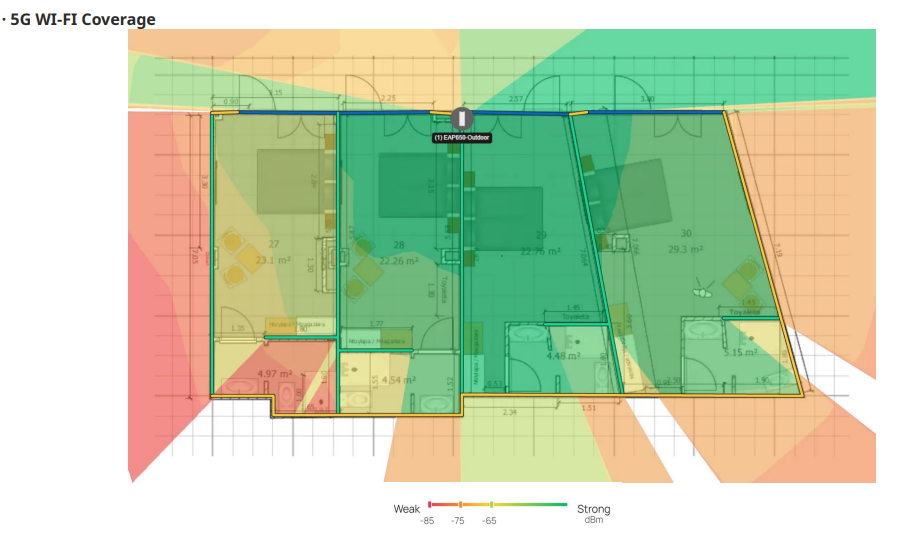
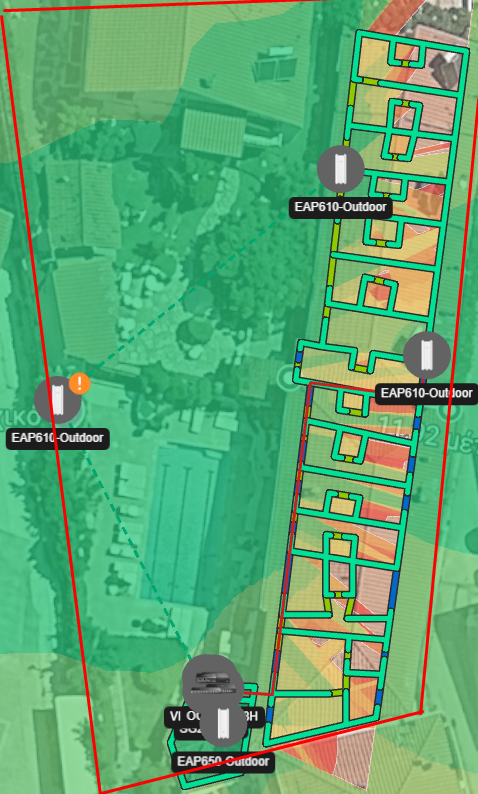
(I'm attaching two photos that will help visualize the idea, want to mention also that walls are out of concrete and betton)


Thank you very much!

  0      
0
#1
Options
1 Accepted Solution
Re:Omada Setup for hotel - small buisness -Solution
2026-08-25 08:00:04 - last edited 2026-08-25 08:00:16

Hi  @GabiSar 


Thanks for posting here.

For your reference, we have some solutions for hotels scenario:

https://www.omadanetworks.com/en/business-networking/solution/hotel/


It includes the recommended topology, the device models, and some cases.

Recommended Solution
  0  
0
#3
Options
5 Reply
Re:Omada Setup for hotel - small buisness
2026-08-25 01:50:07

  @GabiSar I would suggest you wire all your AP's and for the outdoor one, use an EAP211 Bridge Kit.  This will make for a more stable connection and give you more options.  I believe you will also need more AP's throughout since you have to keep in mind the guest devices need to be able to reach the AP's as well, wifi is a two way street.  You may want to consider a 24 port switch, especially if you want to put cameras on the system.  You lose 2 ports right away by connecting the router and the controller.  One Starlink connection may be able to handle more devices than you realize in this situation.  This is "free" wifi for your guests but it doesn't mean it has to be wide open.  You can put a limit of 6 Mbit down and 2 up (per device).  This still allows everyone to stream content and still use video calls.  If you do still think you need the added bandwidth of an additional Starlink connection, the router you listed can load balance the two connections very well.


Just my 2 cents, good luck.

  0  
0
#2
Options
Re:Omada Setup for hotel - small buisness -Solution
2026-08-25 08:00:04 - last edited 2026-08-25 08:00:16

Hi  @GabiSar 


Thanks for posting here.

For your reference, we have some solutions for hotels scenario:

https://www.omadanetworks.com/en/business-networking/solution/hotel/


It includes the recommended topology, the device models, and some cases.

Recommended Solution
  0  
0
#3
Options
Re:Omada Setup for hotel - small buisness
2026-08-25 12:10:30

  @Gnac Thank you for your suggestions! I'll try to wire up most of them! Probably in the future a 24 switch yes, but for now some of the cameras are already with wifi and a few more that i will add will be with ethernet! Also i was thinking about putting also another smaller 5 port switch on the back side of the building so to drag only 1 ethernet line to another managed switch and from there to wire up the rest of the aps! (seems a lot easier on my head and more beatuful for the front of the building to have less cables) it will have a little delay but i think it will provide better connection (or it is just in my head) 

also for budget option where i might have some issues ill put a few EAP225! or if you have any other suggestion! 


@Vincent-TP Thanks for providing the link! It helps a bit, but unfortunately many of the suggestions are a little over our budget, seems good, but not for our current sittuation! 

  0  
0
#4
Options
Re:Omada Setup for hotel - small buisness
2026-08-25 14:30:16

  @GabiSar you won't notice any delay by adding that second switch.  I would suggest using SG2005P-PD for that switch.  It can be powered by poe and it passes it through to your ap's you would have attached to it.  You can also control it through the Omada app, which allows you to power cycle any port in case an ap manages to get itself locked up.  I would seriously consider using only one Starlink account and putting a bandwidth limit on the devices connected to the guest network.  I think you will find that you won't need that second Starlink account, which will save you a lot of money over the long run and allow you to get better equipment.  Also, keep in mind that the older ap's (eap235) are only wifi 5.  The 610's are using wifi 6, which is significantly more efficient than wifi 5.

  0  
0
#5
Options
Re:Omada Setup for hotel - small buisness
2026-08-26 11:54:06

  @Gnac Thanks for your suggestions! I was looking for something smaller in budget as a second switch probably something like TL-SG105PE because there are a few storage units around that i can hide it inside so we have no issues from the weather! With that way i'll be able to carry around 1 cable till the switch and then 2-3 ethernets on cameras or repeater (always staying in the power limit that can be provided form the switch) But i keep your suggestion in mind! Yes i know that 225 are wifi 5, but they are also half the price of 610s and they can fit perfectly between 2 balconies or just outside of 2 entrance doors to provide that missing signal in these tight situations! Was also thinking for 613 or 650 to bring it inside the room with showing just a little of ethernet cable, and by placing it in the middle of 3 rooms to give signal to all 3! And believe it or not i've seen starlink hit 30-40mbps (directly connected on it) in busy summer days, with the hotel being empty! (everybody was on the beach, and with the decos i can see how many devices are connected). We are alredy running a hotspot on the pi with speed limitations! 

  0  
0
#6
Options