WireGuard on ER7406: VPN client can reach the gateway, but not all LAN devices

WireGuard on ER7406: VPN client can reach the gateway, but not all LAN devices

WireGuard on ER7406: VPN client can reach the gateway, but not all LAN devices
2026-08-28 15:45:38 - last edited 2026-09-08 09:36:58
Model: ER7406  
Hardware Version: V1
Firmware Version: 1.3.5

Hello,


I am having a problem with WireGuard on an Omada ER7406 v1.0.


Setup:


Internet → Fritz!Box → ER7406 → LAN 192.168.0.0/24


  • WAN of the ER7406: 192.168.3.2
  • LAN of the ER7406: 192.168.0.1
  • WireGuard Server: 10.10.0.1
  • WireGuard Client: 10.0.0.1
  • ER7406 Firmware: 1.3.5
  • Omada Controller: 6.2.14.12


The WireGuard tunnel itself works. From the remote PC, I can, for example, access the web interface of SolarLog (192.168.0.70) or various feeding machines.


However, there are devices that I cannot reach, for example I cannot connect to any PC via Remote Desktop. Via the Omada Console I can ping these devices, but from the VPN client I cannot.


Here is another curious issue: 192.168.0.114 is a device with a web interface. The ER7406 itself can ping 192.168.0.114 without any problems, but it cannot be pinged from the VPN PC.


There are no Gateway ACL rules configured.


I have already updated the controller and the ER7406 firmware and tested various WireGuard IP/Allowed-IP configurations, but the problem still remains


It seems that the forwarding from WireGuard → LAN on the ER7406 is not working correctly.


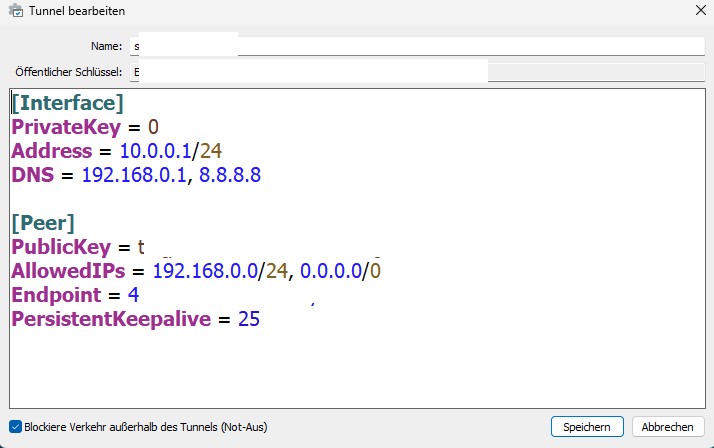
Here is a screenshot of my configuration:
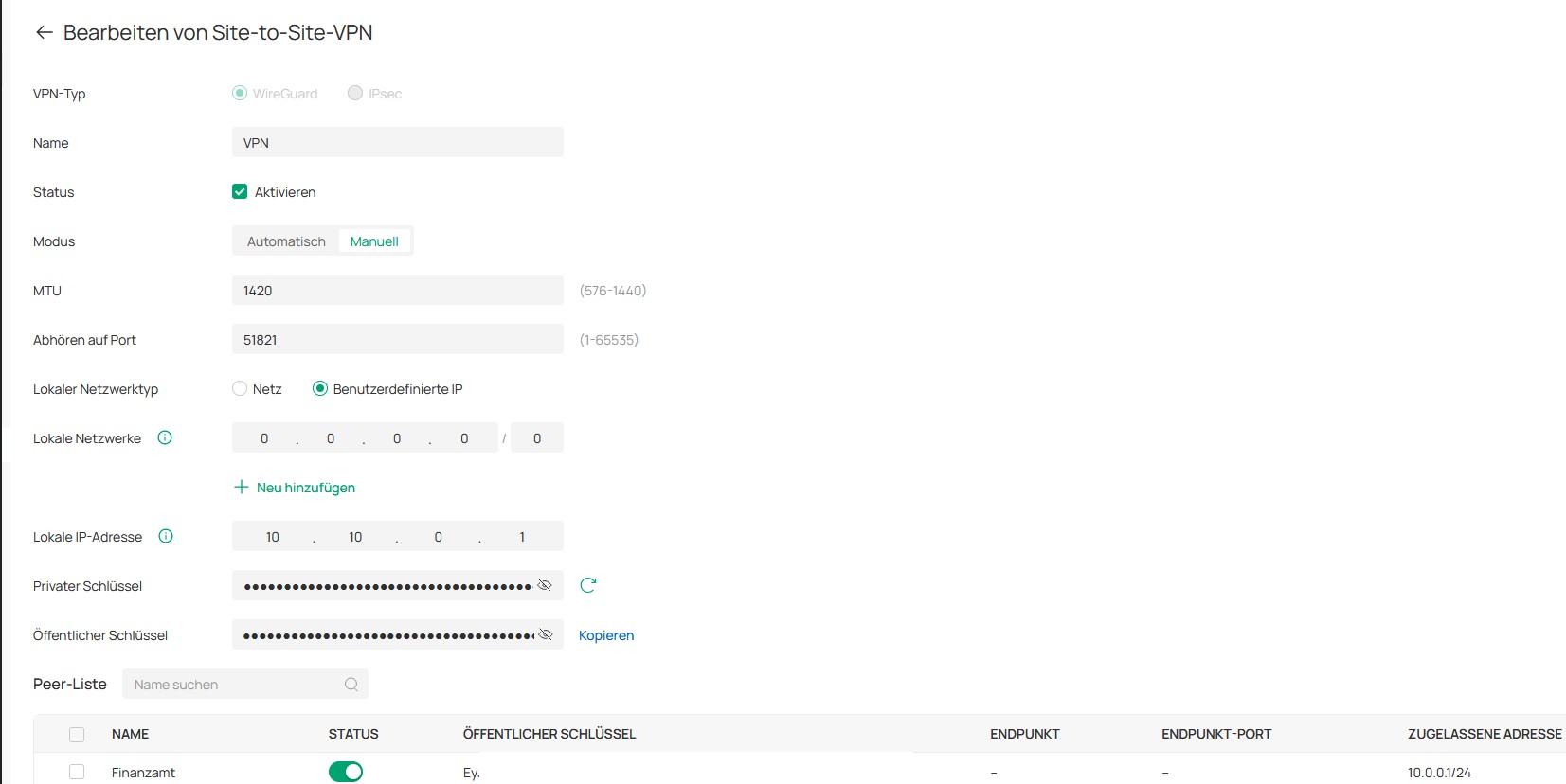


I am sure that I must have made a mistake somewhere, I just cannot find it unfortunately :/

  0      
0
#1
Options
1 Accepted Solution
Re:WireGuard on ER7406: VPN client can reach the gateway, but not all LAN devices-Solution
2026-09-04 09:23:35 - last edited 2026-09-08 09:36:58

  @Hary1337 


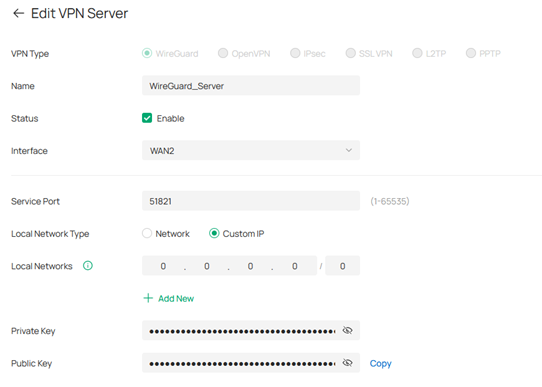
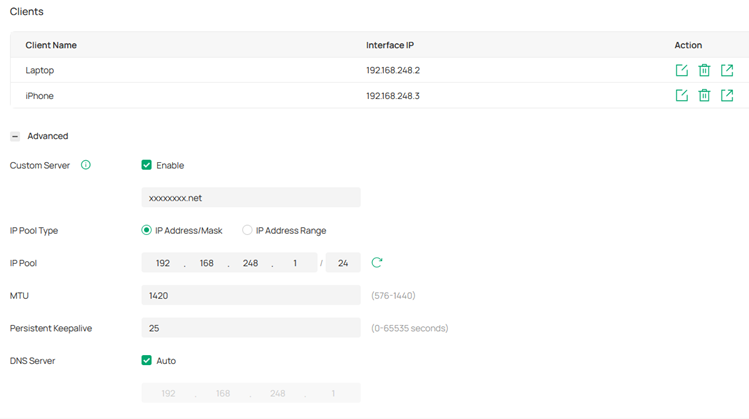
Here are the screenshots for the server configuration:


For the local server address, I am using 192.168.248.1/24.  Also note that you will have to port forward the WireGuard port on your FritzBox if the ER7406 is downstream.

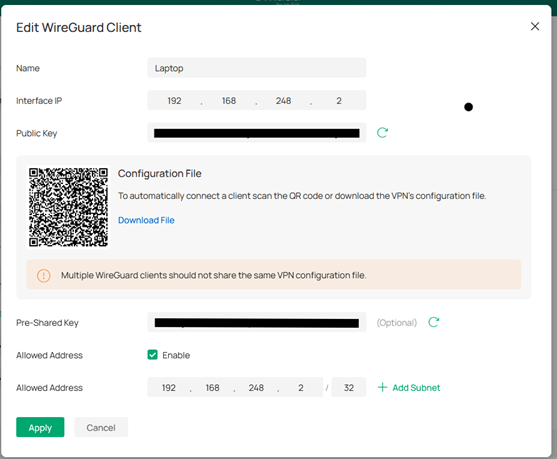
Now the client screenshot:


The downloaded file from this screen for the remote PC contains the following:

[Interface]
PrivateKey = xxxxxxxxxxxxxxxxxxxxxxxxxxxxxxxxxxxxxxxxxxxx
Address = 192.168.248.2/32
DNS = 192.168.248.1

[Peer]
PublicKey = xxxxxxxxxxxxxxxxxxxxxxxxxxxxxxxxxxxxxxxxxxxx
AllowedIPs = 0.0.0.0/0
Endpoint = xxxxxxxx -dot- net:51821
PersistentKeepalive = 25
PresharedKey = xxxxxxxxxxxxxxxxxxxxxxxxxxxxxxxxxxxxxxxxxxxx


Hope this helps!


1x ER7406 1x OC300 4x SG2008 1x EAP610 1x EAP727 3x EAP650-Desktop 1x EAP772-Outdoor
Recommended Solution
  1  
1
#6
Options
5 Reply
Re:WireGuard on ER7406: VPN client can reach the gateway, but not all LAN devices
2026-08-28 18:06:43

  @Hary1337 


Heading into the weekend, you might not get a response from one of the moderators until Monday.  I have a WireGuard server configured on my ER7406 but have not tried the Site-to-Site setup.  A support page that may help you can be found here.

1x ER7406 1x OC300 4x SG2008 1x EAP610 1x EAP727 3x EAP650-Desktop 1x EAP772-Outdoor
  0  
0
#2
Options
Re:WireGuard on ER7406: VPN client can reach the gateway, but not all LAN devices
2026-09-04 07:58:02
Thank you for the information. I had a look at the guide you linked. The side-by-side configuration shown there is different from my setup, but in principle I followed the instructions. Unfortunately, I still haven't been able to find a solution to my issue. I will have another look at the documentation and see if I am missing something.
  0  
0
#3
Options
Re:WireGuard on ER7406: VPN client can reach the gateway, but not all LAN devices
2026-09-04 08:40:50

  @Hary1337 


Not knowing exactly what your requirements are, let me ask "Why don't you try the WireGuard Server configuration instead of Site-to-Site?  If you want to test it, I can post some screenshots of my setup here which allows a remote PC to access all my LAN devices.


1x ER7406 1x OC300 4x SG2008 1x EAP610 1x EAP727 3x EAP650-Desktop 1x EAP772-Outdoor
  0  
0
#4
Options
Re:WireGuard on ER7406: VPN client can reach the gateway, but not all LAN devices
2026-09-04 08:55:28
I’m currently trying to access the LAN from a remote PC using WireGuard, but as described above, I cannot access the PCs via RDP from there. I would also like to use WireGuard on my phone to access certain PCs via RDP. I’d be happy to see some screenshots of your configuration so I can compare them with mine. Maybe there is a setting in my current configuration that is preventing access to the LAN devices I’m trying to reach. Thank you!
  0  
0
#5
Options
Re:WireGuard on ER7406: VPN client can reach the gateway, but not all LAN devices-Solution
2026-09-04 09:23:35 - last edited 2026-09-08 09:36:58

  @Hary1337 


Here are the screenshots for the server configuration:


For the local server address, I am using 192.168.248.1/24.  Also note that you will have to port forward the WireGuard port on your FritzBox if the ER7406 is downstream.

Now the client screenshot:


The downloaded file from this screen for the remote PC contains the following:

[Interface]
PrivateKey = xxxxxxxxxxxxxxxxxxxxxxxxxxxxxxxxxxxxxxxxxxxx
Address = 192.168.248.2/32
DNS = 192.168.248.1

[Peer]
PublicKey = xxxxxxxxxxxxxxxxxxxxxxxxxxxxxxxxxxxxxxxxxxxx
AllowedIPs = 0.0.0.0/0
Endpoint = xxxxxxxx -dot- net:51821
PersistentKeepalive = 25
PresharedKey = xxxxxxxxxxxxxxxxxxxxxxxxxxxxxxxxxxxxxxxxxxxx


Hope this helps!


1x ER7406 1x OC300 4x SG2008 1x EAP610 1x EAP727 3x EAP650-Desktop 1x EAP772-Outdoor
Recommended Solution
  1  
1
#6
Options