
Unable to upgrade to stable official FW version for EAP653v1
Unable to upgrade to stable official FW version for EAP653v1

Hi all,
all the time it's the same thing... You need to change the algorithm you use to determine if an update is suitable or not for a device...
This time, I have upgraded my EAP653v1 to 1.3.41 and then 1.3.42, which are both BETA, as you know, and now I want to upgrade to the official version 1.3.13, but Omada Controller OC300v1 says that it isn't permitted.
I don't know the criteria you use, but if you simply check if a version is greater than another, that doesn't work, because the BETA firmwares have a completely different numbering.
Pls do something! :)
Thank you,
Fra
- Copy Link
- Subscribe
- Bookmark
- Report Inappropriate Content
Hi Neil,
I was able to flash it by booting up in recovery mode...
But cannot be... I mean, you guys need to solve this problem.
Thank you,
Fra
- Copy Link
- Report Inappropriate Content
Ok so, I caved and updated through recovery mode. It was a little weird at first because it was on .254 and not .1, probably my mistake though. Everything updated successfully, and for anyone else wondering, my standalone config didn't get wiped. It rebooted after the upgrade with all previous settings. Additionally, the 1.3.13 firmware does fix the bluetooth issue!!!!
- Copy Link
- Report Inappropriate Content


@nicolati I see that there is this firmware note attached.
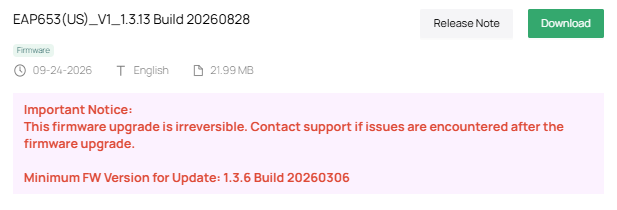
Can you try installing the 1.3.6 firmware first, and then installing the latest stable firmware?
- Copy Link
- Report Inappropriate Content
Hi Neil,
I can try, but I started from 1.3.11, before the BETAs, so that will be a downgrade for sure.
BTW, I have the EU version and that banner mentions 1.3.1 . I will try with that one.
BTW2, 1.3.1 is not available for download, so I tried 1.3.3, but the message is the same: impossible to upgrade. I have another EAP653, which I kept to 1.3.11, and ofc that was updated correctly to 1.3.13 :) .
I will let you know!
Thank you,
Fra
- Copy Link
- Report Inappropriate Content
@nicolati Yeah, good call. Reason I ask you to do this is because from what I've seen, when it says "minimum required version", it is looking specifically for that version number to be installed, and not anything later, to install the firmware.
- Copy Link
- Report Inappropriate Content
No, here the message is basically saying that the update file is invalid, but ofc I have used the same file on the other EAP653...
I have never seen 'minimum version required' message.
That's why I think it's a basic check, like versioning...
Thank you,
Fra
- Copy Link
- Report Inappropriate Content
Hi Neil,
I was able to flash it by booting up in recovery mode...
But cannot be... I mean, you guys need to solve this problem.
Thank you,
Fra
- Copy Link
- Report Inappropriate Content
Same issue with same firmware versions on the EAP670 v2 US. I am on the beta 1.3.42 and it keeps saying failed to check for new update when I try to upload the 1.3.13 bin. cant downgrade to 1.3.6 because I was on 1.3.7 before going to the beta, and I tried to update to 1.3.11 stable as well just in case that was an in between step, only to get the same error. I was looking to update to that stable as it lists a fix for the bluetooth always being on. Id rather not do the recovery mode option if I dont have to, so please let me know if there is a solution. In standalone mode if that makes a difference.
- Copy Link
- Report Inappropriate Content
Hi angrynerd,
I tried standalone before doing this. No way...
The recovery mode bypass the version check, so you can flash whatever you want. You have to be sure you select the correct one.
In this case, that was correct :) .
But, yes, I do agree Omada team has to fix this.
For example, the firmware needs to host the list of BETAs and have a table saying which official can be flashed on top of which BETAs.
Thank you,
Fra
- Copy Link
- Report Inappropriate Content
- Copy Link
- Report Inappropriate Content
Hi angrynerd,
I don't know for sure, but I think so.
I have the controller, so the config gets reapplied anyway automatically.
For the device specific settings, like IP, Management VLAN, and so on, I reapply them manually.
Both, even in stanalone mode, you can save the config and reapply.
But also this time I agree with you: it's better having a native fix for this.
Thank you,
Fra
- Copy Link
- Report Inappropriate Content
Ok so, I caved and updated through recovery mode. It was a little weird at first because it was on .254 and not .1, probably my mistake though. Everything updated successfully, and for anyone else wondering, my standalone config didn't get wiped. It rebooted after the upgrade with all previous settings. Additionally, the 1.3.13 firmware does fix the bluetooth issue!!!!
- Copy Link
- Report Inappropriate Content
Information
Helpful: 2
Views: 816
Replies: 12
Voters 1
