
Integrity at its Finest - Cybersecurity Awareness Month



In cybersecurity, integrity focuses on the reliability and correctness of data. This means that data is not changed by unauthorized parties. This covers all forms of alteration, including but not limited to deletion of data, insertion of data, and unintentional alterations caused by data transmission issues.
One way to ensure data integrity is to use digital signatures to confirm the message was not altered in transit. To create a digital signature, a hash is encrypted using a hashing algorithm like SHA2-512. When that digital signature is decrypted using the same hashing algorithm, the resulting hash should match the original.
Think of a digital signature as the modern equivalent of a wax seal on a document. In olden times, a messenger would seal a letter with wax, then press a ring into the wax to create a unique indent. If the wax seal was broken before reaching the intended recipient, that indicated someone other than the recipient had already read the information. The same holds true for a digital signature; if the decrypted hash does not match the original, the message is not from the expected sender or the data within was tampered with in transit.
But what does this have to do with networking?
VPNs help protect data as it travels across untrusted networks such as the internet. VPNs can use digital signatures to create an encrypted tunnel between endpoints, preventing anyone from intercepting or modifying data in transit. VPN protocols also use integrity checks, typically based on keyed hashes or authenticated encryption, to verify that packets were not altered in transit. If an integrity check fails, the receiving endpoint rejects the affected packet rather than treating modified data as valid.
Communication protocols like IPSec let you choose the algorithm used to encrypt the data, as shown below.
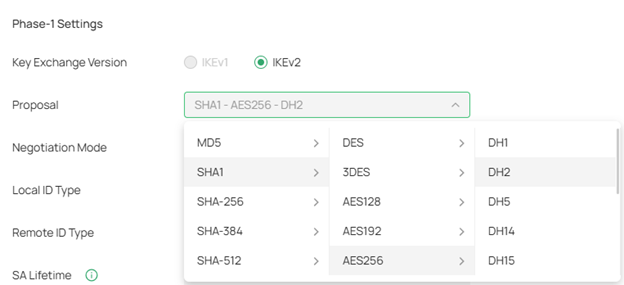
Both ends of the VPN must select the same settings for it to work.
Other network settings can help ensure integrity. Role Based Access Control (RBAC) prevents unauthorized users from making changes to settings or data. In Windows Server, this manifests in the form of File Security, using Active Directory to control group access to specific folders and files. In networking, this shows up as user permissions and Account Security. On the Omada controller, you can set a validity period for admin accounts to ensure support only has permission for a limited time.
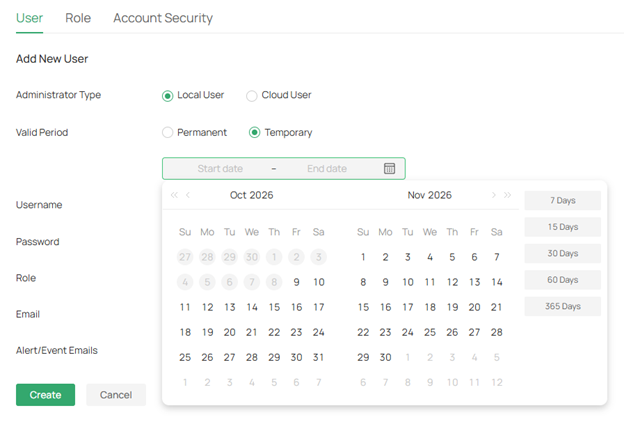
You can also set custom roles with specific permissions. For example, if you wanted to create a role to only allow management of the Hotspot feature on the controller, you can set up a custom role to block every feature except for the Hotspot manager.
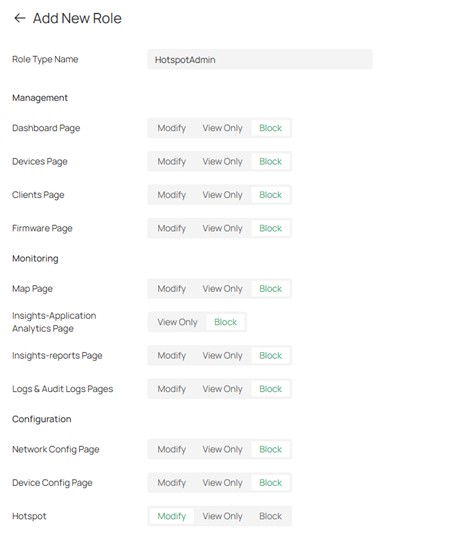
This ensures that someone with the HotspotAdmin role cannot make changes to network or device settings.
An Intrusion Prevention System (IPS) can help prevent external threats from accessing and making changes to your network. It uses a set of attack characteristics to determine if an attack is happening and can automatically block the connection for a set period. The Omada Controller’s IPS system is signature-based and, starting in Controller version 6.6 (estimated Q1 2027), will update the signatures daily.
Lastly, don’t underestimate physical security when it comes to preserving the integrity of your data. Disabling any unneeded ports will prevent an attacker from connecting to the network in the first place. Train your personnel to lock their computers when not in use, in case an attacker happens upon a privileged user’s computer. There are whole handbooks written on how to properly secure your business.
What steps do you take to ensure the integrity of your data?
Check out the next article in the series here! All Hands on Availability