
Omada Client Solutions 04: Vigilance Medical Group II
 NeilR_M


Omada Client Solutions 04 – Vigilance Medical Group II
This article series simulates real-world examples of network configurations completed with Omada equipment for home lab and/or business environments. Any similarities to real persons or organizations are purely coincidental.
Challenge
Vigilance Medical Group is a new client for Omar that previously tasked him with setting up their wireless coverage. They would also like him to set up their network configuration and require specific security measures to ensure that patient data is protected.
Project Requirements
- The guest network should be isolated from any patient data and any proprietary applications or servers. Guests should also not be able to impact the performance of the network for any other guests or staff.
- The staff network needs to provide access to the company’s servers located in the main building. Mitigate attack vectors as much as possible while still allowing sufficient access to applications and data in the main building.
- Only company devices should be able to access the Staff network. Staff should not be allowed to connect their personal devices to the network.
Implementation
Omar is added to the company’s Omada Controller as a Super Admin in order to make the changes necessary. He adds a site for the new Office so he can begin his configuration. The Board has purchased some equipment, but it will not arrive for physical setup for a few weeks.
He decides to do as much configuration as he can until the hardware arrives.
Pre-Configuration
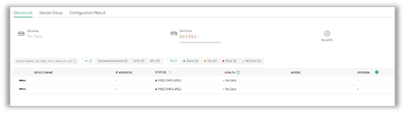
First, he requests the serial numbers from the vendor to be able to adopt the devices to the controller. After purchasing the network licenses for the Omada Cloud Standard Controller, he is able to adopt the devices.
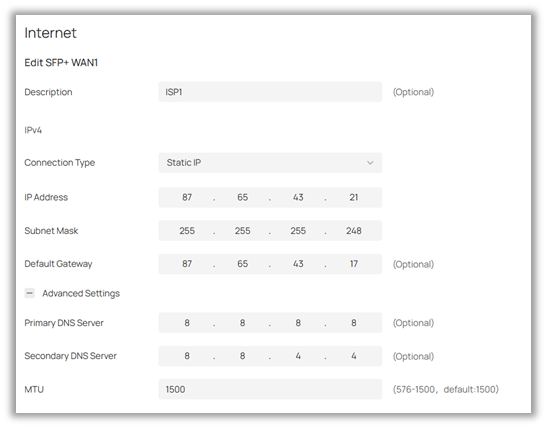
He then sets up the WAN information with the information provided by the ISP for the new building.
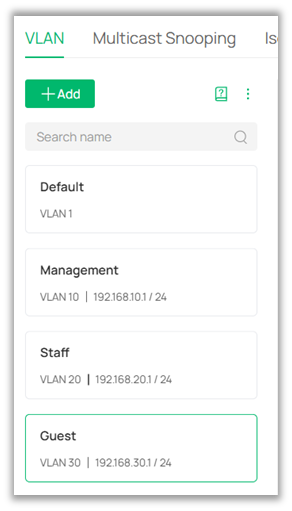
Next is to create the new VLANs. The staff need their own network for their computers, and the guests need their own network to access the internet for medical records and other documents.
Using official FAQs as reference documents Omar sets up the VLANs as follows.
VLAN10 – Management VLAN
VLAN20 – Staff VLAN
VLAN30 – Guest VLAN
He sets the new management VLAN he created as the Management VLAN on the switch settings.
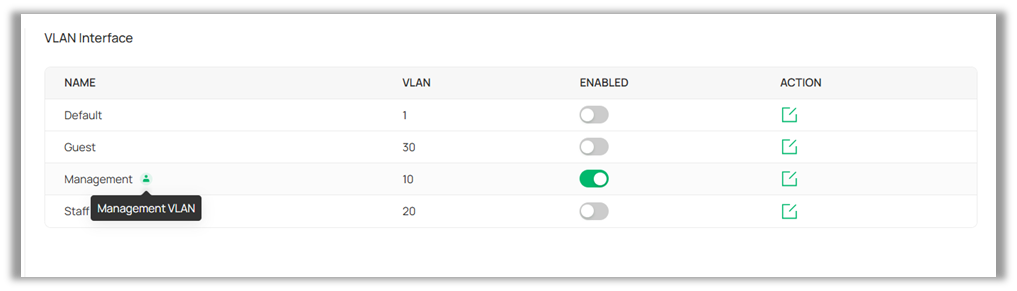
Omar then implements the following restrictions.
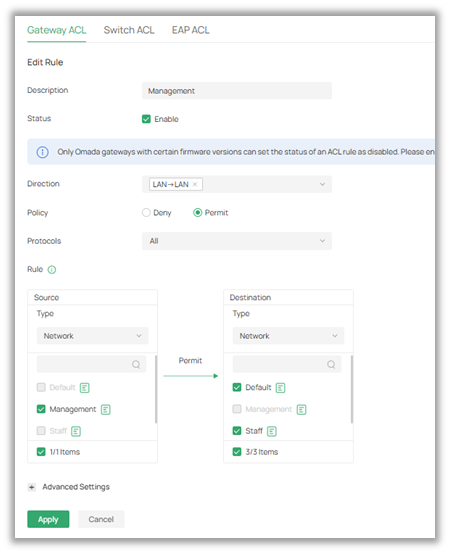
VLAN10 (Management) can access all VLANs.
He configures the permissions using Gateway ACLs and ensures that the Management LAN has access to all other VLANs.
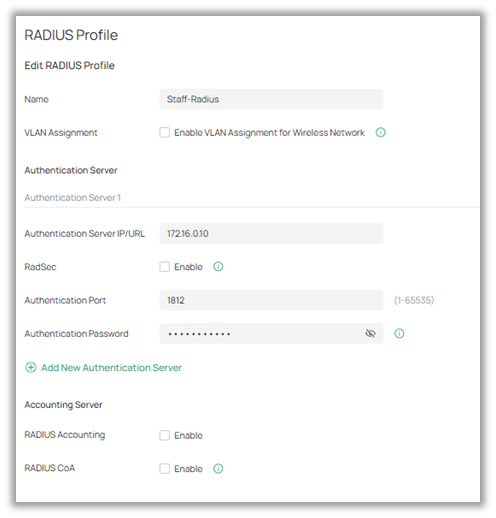
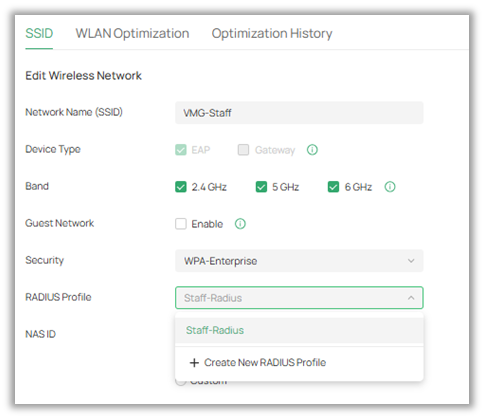
VLAN20 has RADIUS authentication enabled.
Omar sets up a RADIUS profile for the Staff VLAN, pointing to a RADIUS server in the main office.
|
|
|
VLAN30 is a guest VLAN with no access to any other VLAN.
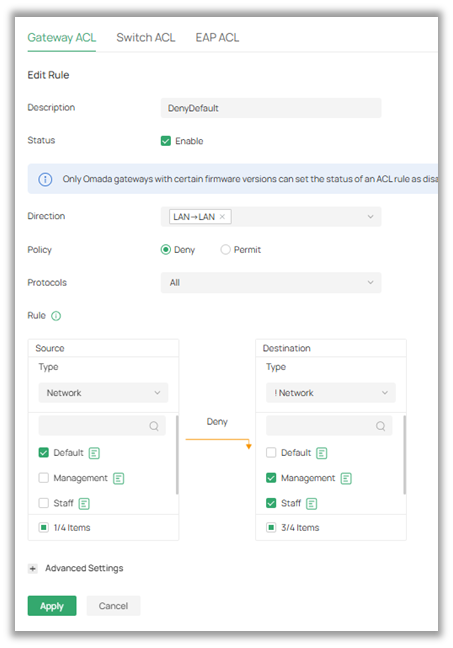
Finally, Omar configures a Gateway ACL to deny access from the original Default LAN to all other LANS, as well as a Gateway ACL that denies access from the Guest LAN to other LANs.
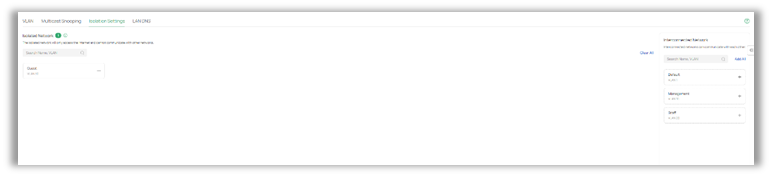
For good measure, he also isolates the Guest VLAN using the built-in isolation settings on the Omada Controller.
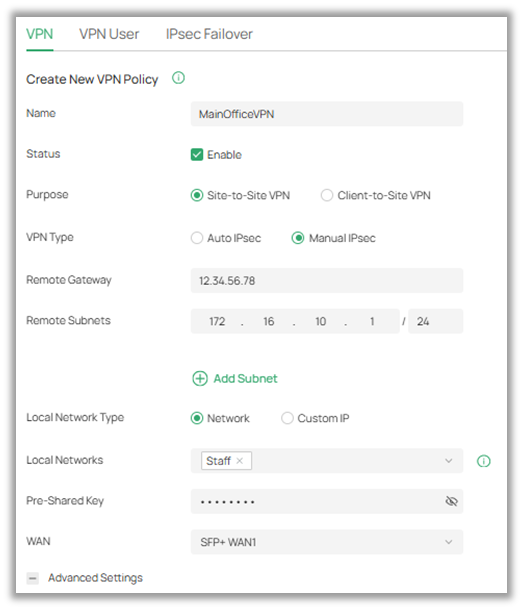
Lastly, he configures a manual Site-to-Site IPSec VPN to connect the new office to the servers in the main office.
He sets up the new office VPN up in Responder Mode, ensuring only the Staff network is allowed under “Local Networks.”
He then configures the main office side of the site-to-site VPN in Initiator Mode.
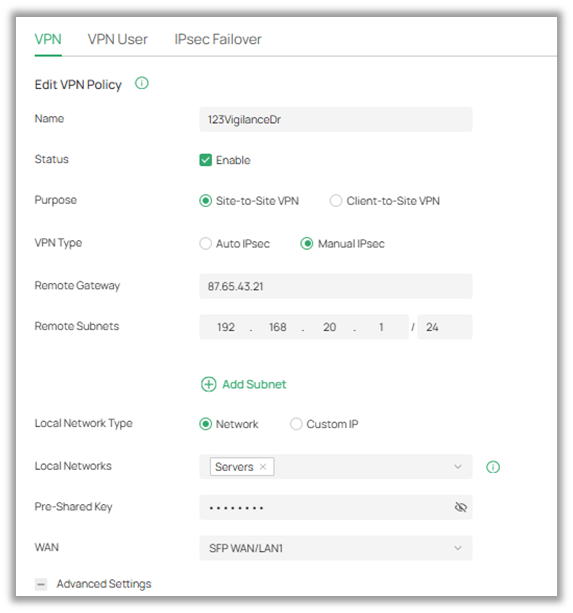
Note: Although it is not pictured here, when configuring a site-to-site VPN with manual IPsec, it is important that all Advanced Settings match between the two sites, with the exception of Negotiation Mode. Auto IPsec cannot be used with preconfigured devices.
With the settings configured, Omar waits for the hardware to arrive.
Testing
Once the hardware arrives, Omar is able to plug in the devices to the network and confirm his settings.
He tests the VLAN rules to ensure that the guest VLAN is isolated from the staff VLAN, and that the management VLAN can access all other VLANs. Success!
Next, Omar tests the Site-to-Site VPN, ensuring that a staff member can access the proprietary files in the main headquarters.
Lastly, he tests his personal device on the Wi-Fi, ensuring that only staff devices can connect to the network even with the correct SSID and password.
With everything confirmed, Omar relays to the customer that everything is ready for the building to open.
Technical Difficulties
A few months later, Omar gets another call from the client, asking for additional help with their network. The call roughly goes as follows.
“The network was functioning smoothly for the first couple of weeks, but suddenly started dropping at random times during the day. We’ve had to purchase mobile hotspots for customers to use in emergencies, but staff cannot access confidential records while the network is down.
We haven’t touched any of the networking equipment you set up for us, but can you take a look as soon as possible?”
Checking with his admin account, Omar notices that the new site is showing offline on the Omada Cloud portal. He decides to go to the new building to investigate.
As soon as he arrives in the server room, he notices a new device plugged into the main switch on one of the ports connected to the Staff LAN. It appears the company hired a security vendor to set up an NVR with cameras plugged into the main network.
He uses a packet capture tool to analyze the traffic coming from the NVR. What he found was a flood of ARP traffic coming from the cameras.
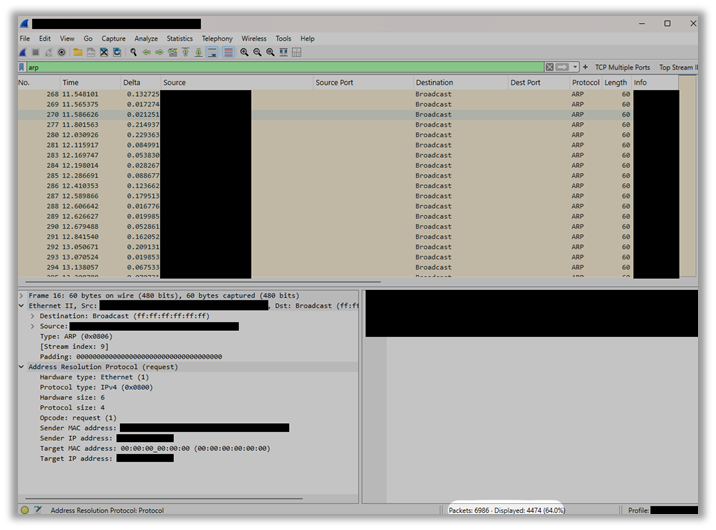
To resolve this issue, Omar proceeds to isolate the cameras onto their own VLAN. He configures the port on the switch to allow traffic on a new VLAN, VLAN40. He allows the management and Staff VLANs to pass traffic to and from the new camera VLAN, but ensures the Guest LAN stays isolated to prevent customers from being able to access the camera feeds.
After a few hours, the network is still up and running! It seems isolating all of the broadcast ARP traffic resolved the issue.
Why does this work?
VLANs allow logical segmentation of a physical network. By isolating the ARP broadcast traffic to its own VLAN, Omar has reduced the broadcast domain from the whole network to its own subnet, decreasing the strain on the rest of the network. What most likely occurred is the broadcast traffic overloaded the rest of the network, causing the periodic crashing throughout the day.
Reference FAQs
How to Maintain Management VLAN and Port Settings When Adopting Switches
How to Configure VLANs in Omada Network V6
How to configure MAC-Based Authentication on Omada Controller
What do you think? How would you have approached the issue in this scenario? Are there any configuration changes you would have made to improve security or network performance? Feel free to share your thoughts in the comments below!
Want to learn more? Check out the previous article, or join the community over at r/Omada_Networks!
| Previous Article | r/Omada_Networks |