Set Up recording mode

Set Up recording mode

Set Up recording mode
Friday
Model: VIGI NVR1004H-4P  
Hardware Version: V1
Firmware Version:

Hi,


My customer is required me to do continuous recording and event recording at the same day and time frame. 


For example, it shall start at 0000 and end on 2359hrs. Main stream set at 1080P, 25ips and sub stream set at 720p, 6 ips. 


First, I need to record at sub stream for continuous recording.


 If there is a motion detection, it shall switch to main stream and record at preset alarm duration. After the duration expired, it will switch back to sub stream for continuous recording till another motion detection triggered. Such arrangements is to.maximise.harddisk.space...so that event triggered, it will goes into real time recording with higher resolution.


I attempted to program such arrangements, but under the schedule in the NVR, I cannot create dual recording modes. It is either continuous recording or event recording, but not both.


Sorry for such a lengthy question, but appreciate any reply on this, whether can be done or not.


  0      
0
#1
Options
2 Reply
Re:Set Up recording mode
16 hours ago - last edited 16 hours ago

Hi,  @CCTV_2026 
Thank you for posting on our business forum.

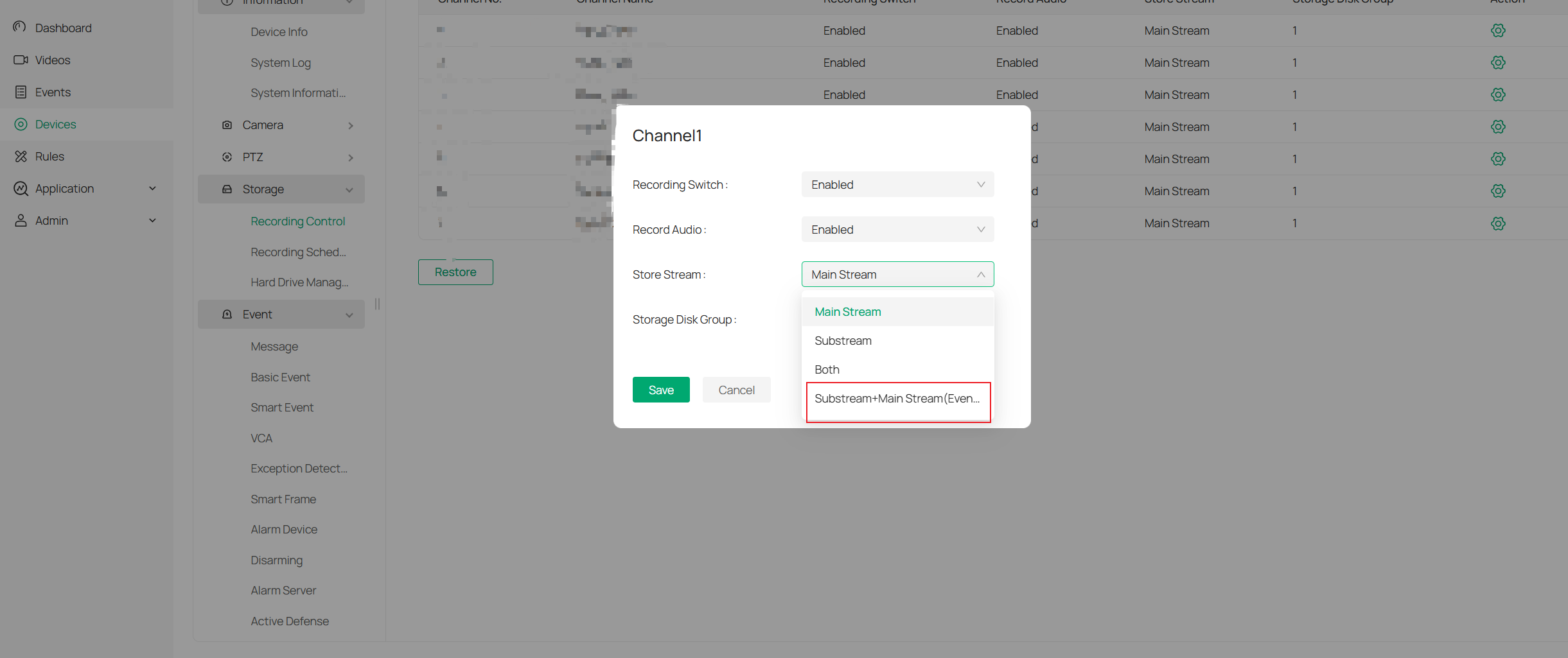
We have recently launched the Smart Storage feature: Substream + Mainstream (Event). This feature was rolled out as part of the v1.8 firmware iteration, and is only available after a compatible firmware upgrade. For your NVR1004H device, we recommend upgrading to the following firmware version:
NVR1004H(UN)_V1.1.2.2 Build 250930

After completing the upgrade, please navigate to your NVR management interface, and follow the path below to adjust settings:
Storage > Recording Control > Configuration button on the right pane — please attempt to modify the Store stream option here. If Substream + Mainstream (Event) appears as an available option, you may configure the feature directly. If this option does not show up after the upgrade, please kindly wait for the upcoming official firmware update that will include this feature.


  0  
0
#2
Options
Re:Set Up recording mode
13 hours ago

  @Nathan-TP 

Thank you for your reply.

Appreciate it.

Mine NVR is Vigi NVR1004H-4P. Is this model will have this new firmware that you mentioned will do the.atep.up recording?

  0  
0
#3
Options

Information

Helpful: 0

Views: 70

Replies: 2