
Beta Software New Driver for Archer TX20U Plus to Improve Network Stability and Fix Ping Spike


This Article applies to
Archer TX20U Plus V1
Driver Modification:
- Fixed the high ping spike when trying to ping the network gateway.
- Improved network stability.
Download Link:
Archer TX20U Plus_V1_5001.19.113
Additional Notice:
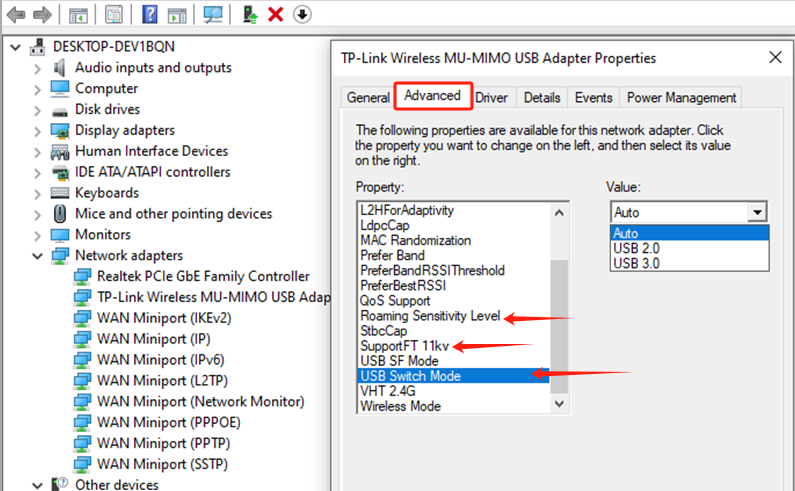
After installing the above driver, it is also suggested to change the following adapter advanced settings:
- Disable "SupportFT 11kv"
- Turn off "Roaming Sensitivity."
- Set "USB switch mode" to "USB 3.0"
Related Articles
- Copy Link
- Subscribe
- Bookmark
- Report Inappropriate Content

David-TP wrote
This Article applies to
Archer TX20U Plus V1
Driver Modification:
- Fixed the high ping spike when trying to ping the network gateway.
- Improved network stability.
Download Link:Archer TX20U Plus_V1_5001.19.113
Additional Notice:
After installing the above driver, it is also suggested to change the following adapter advanced settings:
- Disable "SupportFT 11kv"
- Turn off "Roaming Sensitivity."
- Set "USB switch mode" to "USB 3.0"
Related Articles
Even following all the recommendations, the problem still hasn't been resolved. I have an Archer T3U that works very well and doesn't have these ping spikes, but on the Archer Tx20U Plus, these spikes happen at least once an hour.
- Copy Link
- Report Inappropriate Content
Hi, welcome to the community.
May I know how long you have had Archer TX20u plus?
Can you help me send an email to support.forum@tp-link.com , with the following details:
- Some screenshots of the spikes
- The model number of the Home WiFi Router
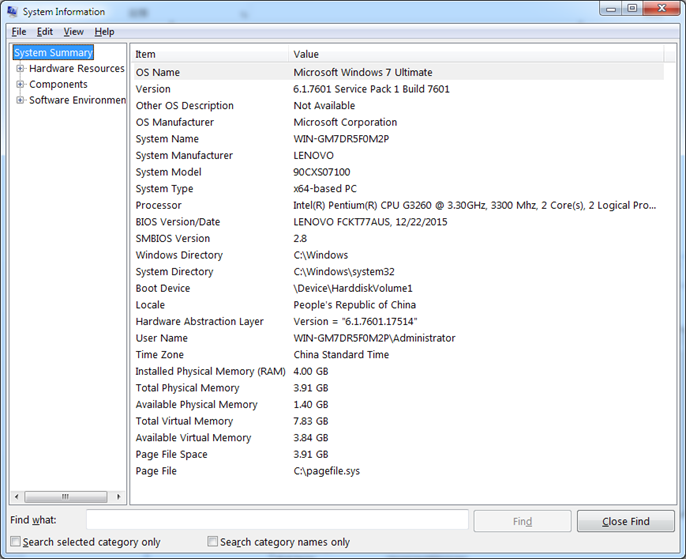
- A screenshot of the computer system info, such as:
Wait for your reply.
Best regards.
- Copy Link
- Report Inappropriate Content

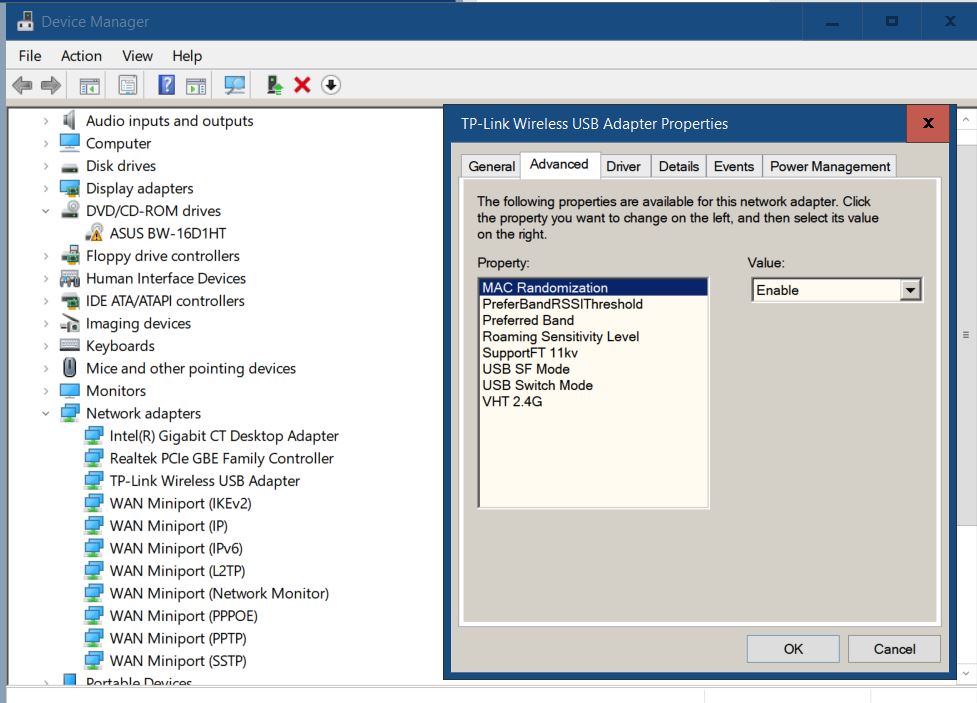
I updated my TX20U Plus to this latest driver.
But the Advanced Settings does not show all of the items shown in your post.
How do I get to display all of the settings?
- Copy Link
- Report Inappropriate Content
Hi, welcome to the community.
What is the operating system of your Windows PC?
Without the extra modification of the advanced settings, would the beta driver help with the network stability?
Wait for your reply.
Best regards.
- Copy Link
- Report Inappropriate Content
Using Windows 10 64 bit
Not sure I would need to use the other Advanced settings
Just curious why they are not showing up and how to get them to appear
I have been having problems with the TX20u periodically disconnecting on 5ghz even though router and signal strength are not the problem
I have other devices on 5ghz that do not disconnect even though their signal strength is less.
I can't say for sure whether the beta driver helps in this regard.
Anecdotally, it seems that the disconnects are much less frequent
- Copy Link
- Report Inappropriate Content

First of a all nice to see that this issue is taken serious!
A handy site fory everyone who wants to check to see how stable ping is
search in google for: packetstats and click probably 1st link
I checked it with this version: 5001.19.113.4 which shows a lot more stable ping:
I also tested with
5002.19.128.0_Beta and that one does NOT improve it.
My setup is: TP-link deco m5 and X50
with other versions i see spikes >300ms within 5 minutes.
To other users i would say - use "packetstats" and let it run for 5 - 10 mins with old driver and then use 5001.19.113.4 to see if it improves
- Copy Link
- Report Inappropriate Content

@David-TP Hello, so uhhh, ive been having this issue with random ping spikes for quite some time now, ive tried using that driver, older ones, realtek ones, changing usb port, even changing windows versions, a lot of stuff and i still havent found a solution. So yeah i want to know if you could help me a bit.
Thanks.
- Copy Link
- Report Inappropriate Content
Hi, may I know how long you have had the Archer TX20u Plus?
Were you able to constantly reproduce the issue of random ping spikes?
If you'd like to spend a little more time, you can start a ticket to The Local Technical Support with the following details:
- The driver and system info of the computer.
How to check driver version of TP-Link adapters and system information of your computer
- The model number of the home router.
Thank you very much.
Best regards.
- Copy Link
- Report Inappropriate Content

Hi, I'm also experiencing periodic ping spikes with my Archer TX20U Plus and the issue persists even after following all the recommended steps in this thread.
My setup:
ISP Huawei router → TP-Link Archer AX1800 router (wired) → Archer TX20U Plus USB adapter → Windows PC
The problem:
Every 5–15 minutes, ping spikes to 300–600ms for about 3–5 seconds, then immediately returns to normal. This happens consistently during gaming (Dota 2).
I used this exact same setup when I bought the adapter about 2 years ago with no issues at all. After a long break from gaming, I started playing again and the spikes appeared. Nothing in my physical setup has changed.
What I've already tried:
- Installed the driver: Archer TX20U Plus_V1_5001.19.113.4
- Disabled "SupportFT 11kv" in Advanced settings
- Set "Roaming Sensitivity" to off
- Set "USB Switch Mode" to USB 3.0
- Disabled USB power management in both Device Manager and Windows Power Options
- Tried different USB ports
- Fixed WiFi channel to 48 (no neighbors)
Key diagnostic finding: the problem is isolated to the adapter:
I ran simultaneous ping logs on both my Windows PC and a MacBook connected to the same network. During a spike on the PC, I also pinged the router gateway (192.168.0.1) separately from the internet (8.8.8.8). Here is what the data showed:
14:04:50 - Router: 102ms | Internet: 13ms
14:04:51 - Router: 540ms | Internet: 13ms
14:04:53 - Router: 475ms | Internet: 12ms
14:04:54 - Router: 1ms | Internet: 12ms
During the same period, the MacBook showed completely stable 15–20ms to the internet. This proves the issue is specifically between the PC and the USB adapter — not the router, not the ISP, not the internet connection.
System and device info:

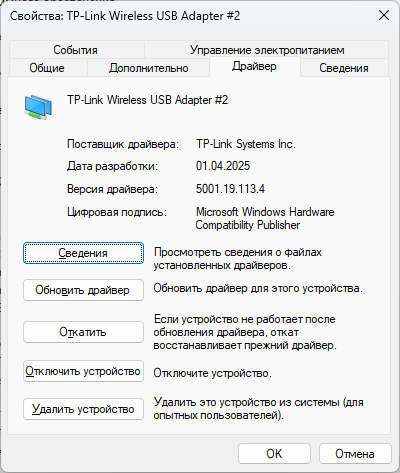
Could you please advise on next steps? Given that the MacBook test isolates the problem to the adapter itself, is this a known hardware defect?
Thank you.
- Copy Link
- Report Inappropriate Content
Information
Helpful: 2
Views: 14936
Replies: 9
Voters 0
No one has voted for it yet.