Issues With IoT (and 2.4ghz Guest) Network

Issues With IoT (and 2.4ghz Guest) Network

Issues With IoT (and 2.4ghz Guest) Network
2026-05-27 16:53:11
Model: Deco X55   Deco X50-Outdoor  
Hardware Version:
Firmware Version: 1.8.0 Build 25102213 Rel. 43970; 1.3.1 Build 20251030 Rel. 41614

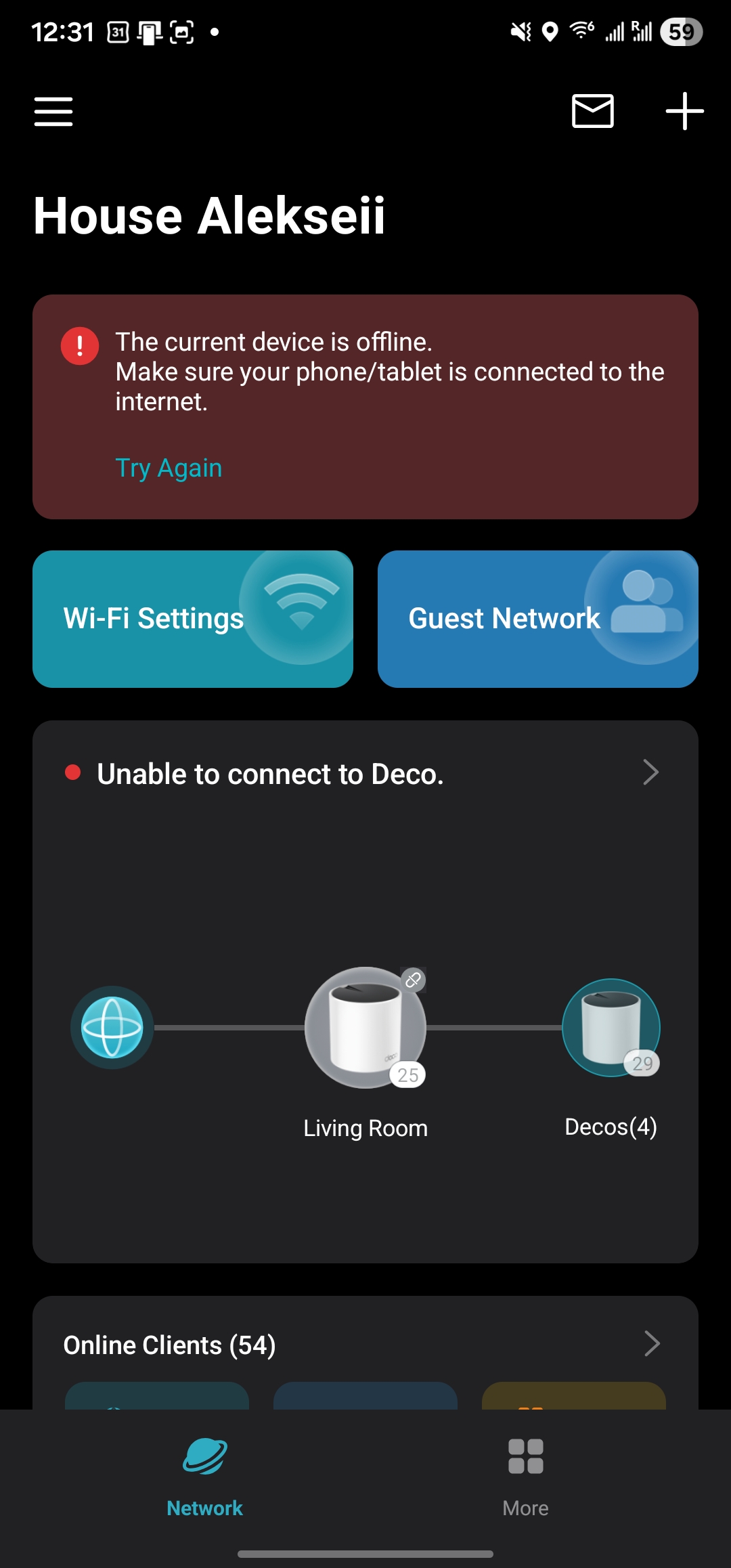
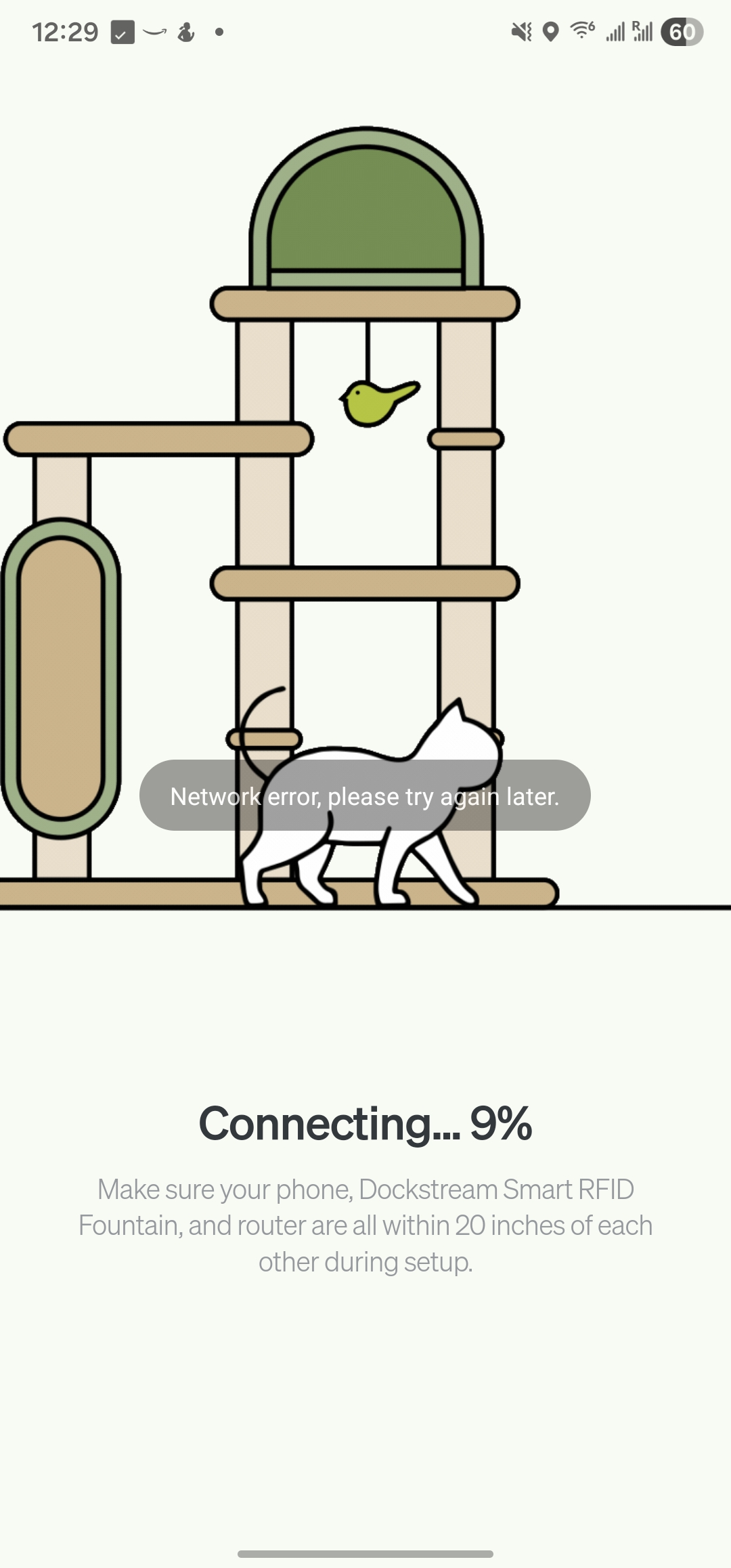
I have been having a frustrating issue where I am unable to connect my smart devices to my IoT network. When I connect to my IoT network in order to then set up those devices, both the apps I need to set up those devices and the Deco app itself list me as having a network error or not connected to the internet at all. Oddly, devices that have maintained their connection still maintain their connection when the system reboots nightly at 3AM. But any devices are disconnected and require a 2.4ghz connection to work, for some reason, are basically impossible to set back up. 


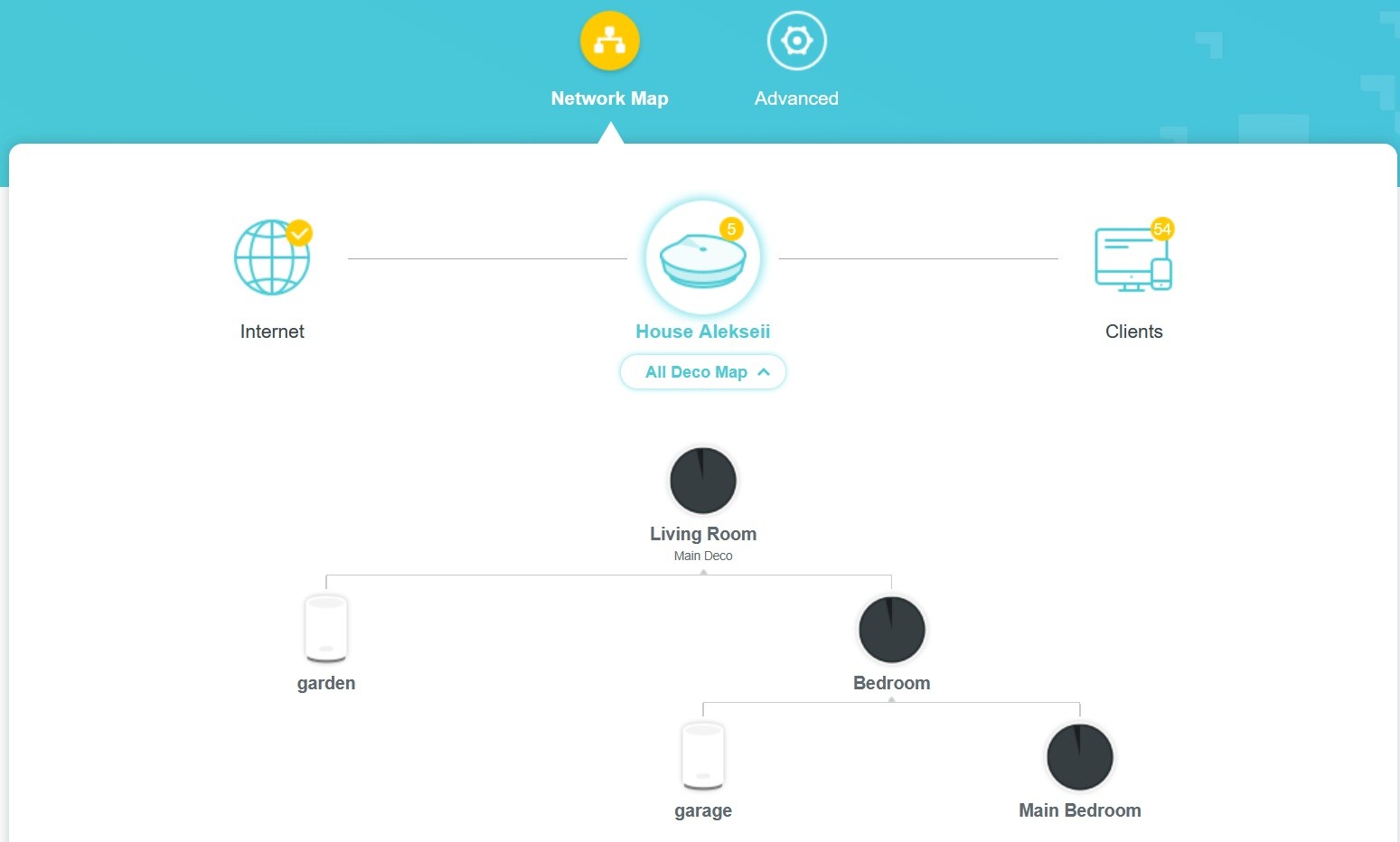
In order to assess whether this was just an issue with my IoT connection, I switched my Guest Network to just 2.4ghz and connected, and had the same issue. I don't seem to have issues being recognized by the Deco app on the Guest network, but apps like the ones needed to set up my smart devices continue to show a network error when on Guest wifi, even when the guest wifi is dual-band. I have no reason to believe that this is an issue of too many devices being connected to my IoT or to my wifi in general, because these devices were previously connected just fine and then got disconnected after a power outage, with only two of them refusing to reconnect. However, I suppose that is possible. I've tried to find support in the past about whether there is a limit to the number of devices that can be connected to a Deco network, to no avail. My attached Deco web screenshots show, though, that there are less than 100 devices total connected to my overall network, further making it unlikely to me that there is a bandwidth issue of some kind. 


I have switched off all advanced settings (Smart DHCP disabled, Fast Roaming disabled, Beamforming disabled, Smart Antennas Auto), and my Network Mode is set to 'Stable Mode'. All Deco nodes are up to date, as is the app itself (version 3.10.188). Any advice on how I could change or optimize my settings to get this to (finally, since I've been dealing with one issue or another since I got these about two years ago) would be greatly appreciated.


  0      
0
#1
Options
10 Reply
Re:Issues With IoT (and 2.4ghz Guest) Network
2026-05-28 08:27:55

  @House_Alekseii 

Hi, 
Below is a pre-release firmware for the Deco X50_V1. Please try downloading the new firmware from the link below, updating it on the Deco X50_V1 via the web UI, and check if it helps.
Deco X50/X55 V1/V1.6 Pre-Release Firmware 1.10.0 Enhanced Network Stability & Client Identification
How to Update TP-Link Deco Firmware 

Best Regards

  0  
0
#2
Options
Re:Issues With IoT (and 2.4ghz Guest) Network
2026-05-28 16:17:34
Just to be clear, does this firmware also apply to the X50-outdoor? Or just the regular X50?
  0  
0
#3
Options
Re:Issues With IoT (and 2.4ghz Guest) Network
2026-05-28 16:55:31 - last edited 2026-05-28 16:58:46

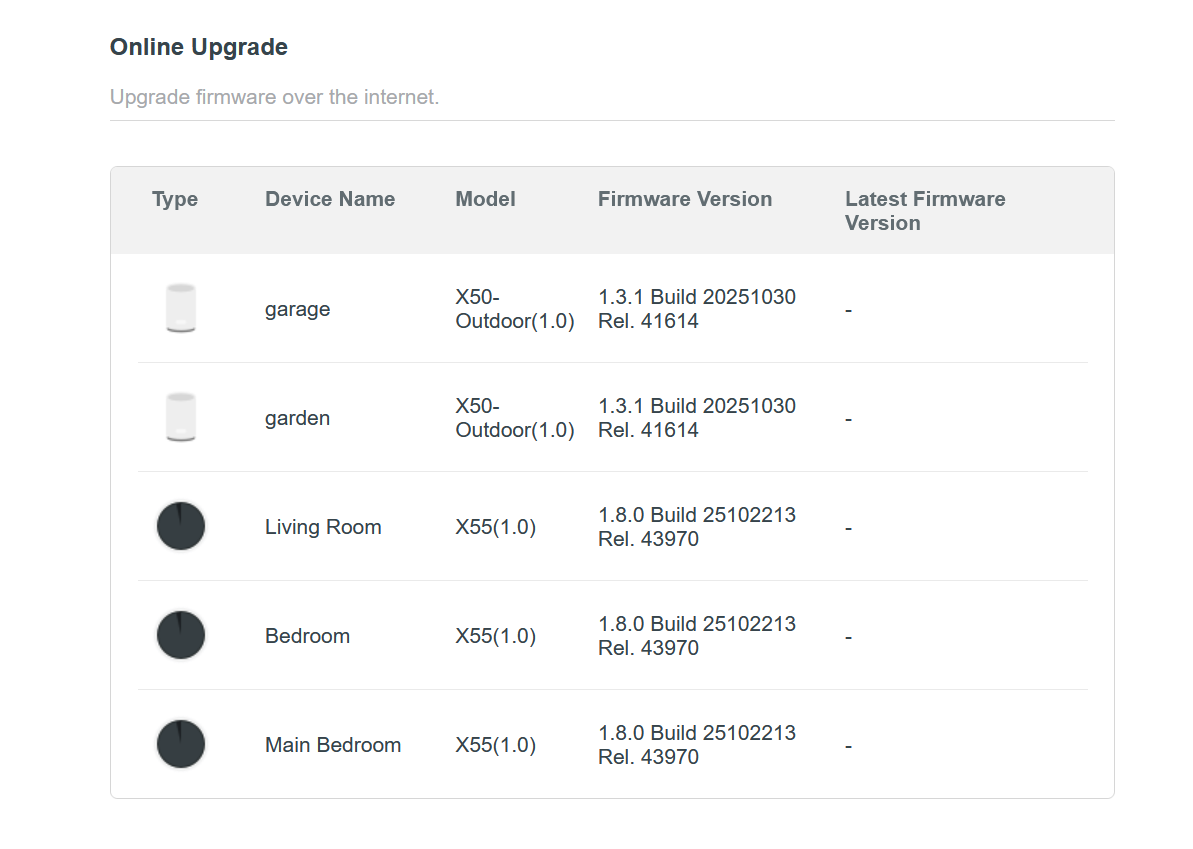
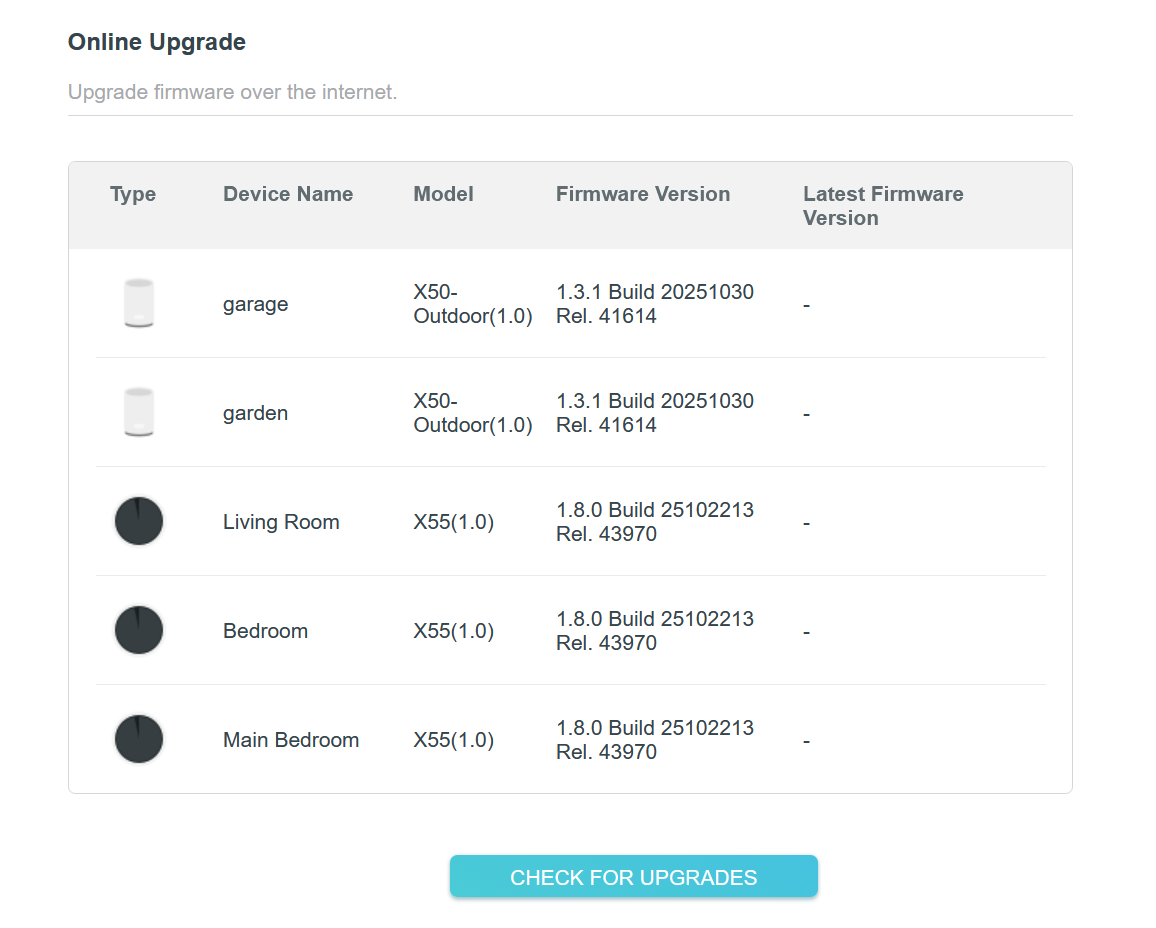
  @Solla-topee I actually attempted to update the firmware using the link provided, on both the X55 and X50 outdoor models, and it seems like there's been no change - the firmware versions previously stated have not changed. Below is a screenshot of the listed firmware versions, which are the same as previously stated, indicating to me there's been no actual update. I've also attempted to reconnect to the applications and devices that were at issue before, and the same issue persists. Is there an issue with the update process on the web UI, or is there some other issue?


  0  
0
#4
Options
Re:Issues With IoT (and 2.4ghz Guest) Network
2026-05-29 09:13:19

  @House_Alekseii 

Hi, 
The firmware in this thread is suited for the Deco X50 V1 only, not for Deco X50-Outdoor.
 

Please try turning off the Deco X50-Outdoor nodes and see if you can successfully update the firmware on the Deco X50. If the same phenomenon persists, try to reboot the Deco X50 nodes, change the browser on your device to log in to the Deco's web UI, and then test whether you can successfully update the firmware.


Best Regards

  0  
0
#5
Options
Re:Issues With IoT (and 2.4ghz Guest) Network
2026-06-01 23:55:49

  @Solla-topee after removing the two X50 Outdoor units from my network, I was able to update my X55 nodes to the prerelease firmware. However, unfortunately, I'm still having a problem where apps register network errors or seemingly not being online when I switch to my IoT network to connect devices. 

  0  
0
#6
Options
Re:Issues With IoT (and 2.4ghz Guest) Network
2026-06-02 12:57:51

  @House_Alekseii 

Hi, 
Please confirm the following information for the reported phenomenon.


  1. How many smart devices do you have? How many smart devices can't connect to the Deco's 2.4 GHz IoT or Guest network?


  2. What are the smart devices that can't connect to the Deco's IoT or Guest network? Please provide the model numbers for these devices.


  3. Do you mean when you connect your phone to the Deco's Wi-Fi, open the Deco app, the main Deco and satellite Deco are displayed in an offline state, but the Deco nodes have a solid green light, and the internet connection is working for most of your client devices?


Best Regards

  0  
0
#7
Options
Re:Issues With IoT (and 2.4ghz Guest) Network
2026-06-02 22:30:25

  @Solla-topee Good day,
In response to your questions;

  1. There are nineteen (19) smart devices connected to the IoT network, including other devices like this one I'm having issues with . In fact, this device was once connected to the network but got disconnected randomly and is unable to be reconnected.
  2. The specific device is a Petlibro Dockstream Smart RFID Water Fountain (model number PL-WF305)
  3. The issue itself is that, when I attempt to connect to the IoT wifi, I get an error message that I am in fact not connected to the network, much like the error displayed in the last image in my original post. When I switch to the IoT network, I get error messages saying that I am not actually connected to the Deco network, like with the second-to-last image in my original post. The Decos are still green and offline, and all other devices are connected to their respective networks. As a result, though, when I switch to my IoT network to complete setting up the disconnected device, it appears that I am not connected to the internet. Like I mention in my original post, advanced settings are turned off, and I am in Access Point mode.
  0  
0
#8
Options
Re:Issues With IoT (and 2.4ghz Guest) Network
2026-06-03 11:33:37

  @House_Alekseii 

Hi, 
I have escalated your case to our tech team, and they will contact you via email to assist you further. Please wait patiently.
Best Regards

  0  
0
#9
Options
Re:Issues With IoT (and 2.4ghz Guest) Network
2026-08-23 08:45:59

  @Solla-topee 


I am seeing what appears to be the same issue, although my Deco hardware is different.

My setup is:

  • 3 × Deco BE65 Pro
    • Firmware on all three: 1.3.1 Build 26042912 Rel. 66556
  • 1 × Deco X50-Outdoor
    • Firmware: 1.3.1 Build 20251030 Rel. 41614
  • The X50-Outdoor uses wireless backhaul to one of the BE65 Pro units over 2.4/5 GHz.
  • All Deco units and the Deco app report that they are up to date.
  • My main SSID is a normal multiband network and remains stable.
  • I also use the dedicated Deco IoT network, configured as 2.4 GHz only with WPA2.
  • There are currently approximately 57 total clients on the Deco system. I have not counted how many of those are IoT devices specifically, but multiple devices depend on 2.4 GHz Wi-Fi.

The most obvious affected device is outdoors and requires 2.4 GHz Wi-Fi. However, the problem is clearly not limited to this device, as. I can observe the IoT SSID itself disappearing from a phone or laptop's available Wi-Fi networks, and I can reproduce connectivity problems by connecting the phone directly to the IoT SSID.

The symptoms are:

  1. The dedicated IoT SSID will intermittently stop broadcasting entirely. It disappears from the available Wi-Fi networks on my phone while the main Deco SSID remains available and working normally.
  2. If I disable the IoT Network in the Deco app and then re-enable it, the IoT SSID immediately reappears. However, it may only remain functional briefly before failing again.
  3. On at least one occasion after doing this, the IoT SSID remained visible and my iPhone successfully associated with it, but iOS reported “No Internet Connection.”
  4. Throughout this, the main Deco SSID continues to work normally.
  5. The Deco app shows the Deco nodes online rather than the entire mesh going offline. So, in response to the question asked above: No, my symptom is not that the main and satellite Decos appear offline while their LEDs remain green. The nodes remain online in the Deco app and the main network continues providing internet access. It is specifically the secondary/IoT network that fails.

I have also done an A/B test with the X50-Outdoor:

  • With the X50-Outdoor connected, the IoT network is significantly less stable. I have observed the SSID disappearing and, separately, the SSID being available but having no internet connection.
  • With the X50-Outdoor powered off, the IoT network becomes noticeably more stable indoors.
  • As expected, with the X50-Outdoor powered off, 2.4 GHz coverage outdoors becomes inadequate, so removing the X50-Outdoor permanently is not a workable solution.

This makes the X50-Outdoor’s participation in the mesh appear relevant to the problem, although I cannot determine whether the underlying issue is specifically X50-Outdoor firmware, mixed-model Deco operation, or the way Deco propagates secondary/virtual 2.4 GHz SSIDs between nodes.

I have not attempted to install the X50/X55 prerelease firmware discussed above, since TP-Link has already clarified in this thread that it is not intended for the X50-Outdoor.

Given the reproducible A/B result with the X50-Outdoor, could TP-Link please escalate this to the engineering team and confirm whether there is current or prerelease X50-Outdoor firmware that addresses IoT/Guest secondary-SSID stability in a mixed Deco mesh?


  0  
0
#10
Options
Re:Issues With IoT (and 2.4ghz Guest) Network
2026-08-24 09:47:44

  @Yehaken 

Hi,
There is currently no firmware for the reported phenomenon. Please confirm the following information for further analysis.


  1. Please describe your network diagram. Are the Deco nodes connected via Wi-Fi to each other?
  2. How often does the IoT network disappear?
  3. Please refer to the instructions to collect the Deco's system log after reproducing the reported phenomenon.

Best Regards

  0  
0
#11
Options