
BE68, Access Point, Guest wifi : no internet
Hello,
I have 3 BE68 working great, and wanted to enable the guest network.
1 BE68 is directly plugged to my Freebox router (Free is a french ISP) and the other 2 BE68 are away, with unmanaged switch between them. (wired connection)
I use the access point mode, activated the wifi guest network and disabled the "authorize local access".
When I connect to this guest wifi network I don't have access to the Internet (from a laptop, a smartphone, ...)
But if I enable "authorize local access" everything is fine.
In this case I loose the interest of the guest mode ! To separate my internal network from my guest devices.
Question is : how to make it work ?
Regards,
Franck
- Copy Link
- Subscribe
- Bookmark
- Report Inappropriate Content


Hi,
Usually, client devices connected to the guest network can access the internet even if "authorize local access" is disabled. In your situation, please provide the following information for further analysis.
1. What's the model number of the switch?
2. Please turn off the satellite Deco nodes, connect your laptop and phone to the main Deco's guest network when "authorize local access" is disabled, and do you have an internet connection?
3. Turn on the satellite Deco nodes, connect your laptop/phone to the satellite Deco's guest network, and do you have an internet connection? If not, does your laptop/phone not have an IP address, or does it have an IP address but no internet?
4. Please test whether the guest network is working when the satellite Deco nodes connect to the main Deco via Wi-Fi (with "authorize local access" disabled).
Best Regards
- Copy Link
- Report Inappropriate Content
Hello @Solla-topee
I'm sorry for the delay, it's not easy to perform these tests when the wifi connection is used from dusk till down in the house...
But I managed to do it with no relevant results. And then it hit me : I have an AdGuard container acting as my DNS server.
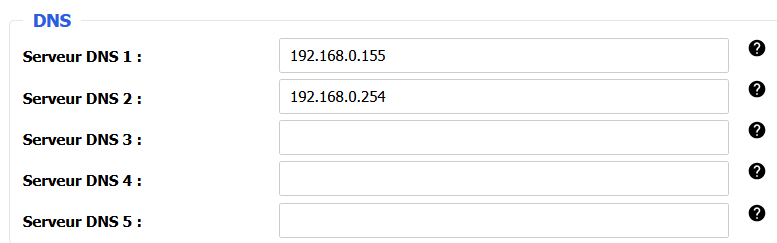
On my freebox (my ISP box) I only had the IP of this AdGuard server mentionned (DNS 1 in the screenshot), so when trying to resolve it with "Authorize Local Access" disabled it was normal that all connections failed.
Now I added a fallback the IP of the box itself (DNS 2 in the screenshot) and everything is working as expected !
Thank you for the help and the time you took, especially when the issue was 100% coming from a network configuration on my part.
- Copy Link
- Report Inappropriate Content

The issue you're describing is a known behavior/limitation with Deco systems (including BE68) in Access Point (AP) mode.
Why This Happens
- In Router mode, guest networks are properly isolated by default (guests get internet but can't access your main LAN devices).
- In AP mode (which you're using, with your Freebox as the main router), the Deco relies on a simpler "Allow Local Access" toggle.
- When disabled (for proper isolation), the guest network often loses internet access entirely for many users.
- When enabled, guests can reach the internet and your local devices (which defeats isolation).
This occurs because in AP mode the Deco isn't doing full routing/NAT/firewalling itself — it passes traffic back to the Freebox. The isolation feature can inadvertently block or break the path to the upstream router's internet/DNS for guest clients.
Your setup (main BE68 wired to Freebox + satellites via unmanaged switch) is standard for AP mode but can expose these quirks with guest networks.
Quick Fixes to Try
- Update Everything (most important first step)
- Update the Deco app and all BE68 units to the latest firmware.
- Restart all Decos after updating (power cycle main + satellites).
- Test Basic Connectivity on Guest
- Connect a device to Guest WiFi (with "Authorize Local Access" disabled).
- Check if it gets an IP address (from your Freebox).
- Try pinging 8.8.8.8 (tests internet without DNS). If that works but websites don't → DNS issue.
- Manually set DNS on the test device to 8.8.8.8 or 1.1.1.1 and retest.
- Workarounds
- Use an IoT Network instead (if available on BE68): Many Deco models have a separate IoT SSID that can be configured with better isolation options while still allowing internet. Check in the app under More > IoT or similar.
- Enable "Authorize Local Access" temporarily and handle isolation elsewhere (e.g., on the Freebox if it supports client isolation or firewall rules for guest devices).
- Switch one unit to Router mode (not ideal with Freebox, but would give proper guest isolation). You'd need to adjust your Freebox to bridge/modem-only if possible.
- Check your Freebox settings: Some ISP routers have strict firewall rules, MAC filtering, or client isolation that interfere with Deco's guest traffic.
- Advanced Troubleshooting
- Confirm the unmanaged switch isn't causing issues for backhaul (though it usually works fine).
- Reboot the entire chain: Freebox → Main Deco → satellites.
- Test with only the main Deco connected (bypass satellites/switch).
If Nothing Works
- As a last resort, some users add a cheap managed switch or separate access point that supports proper VLAN-based guest networks for better isolation.
This seems to be a recurring Deco AP-mode limitation rather than a unique BE68 defect.
- Copy Link
- Report Inappropriate Content
Hello @HelpFixDecoApp,
Thank you for the extensive answer.
I already tried was you are offering. I started with checking the update and the whole reboot phase.
I checked accessing 1.1.1.1 and it's working.
So I tried using the IoT network (called IdO network in the parameters) but it's the same outpout : devices can still see all ressources of local network.
And still, since this network doesn't offer the 7Ghz frequency it's not really future proof.
The situation is problematic because TP-Link is aware of the problem, so there are 2 ways to fix this :
1- Add the feature "isolation of guest and IoT network in AP mode" (as advertised)
2- It will not be added as a feature : modifiy the user manual and user interface to let the user know about this limitation
I'm disappointed in this situation : I spend a lot of time and energy on this. Using the AP mode was perfect for me as I don't want to migrate my network conf from the freebox to the Deco ecosystem.
The 3 Deco's were expensive and the wifi coverage is excellent, but it's this kind of issues that dammage the trust in the product and in the brand itself...
- Copy Link
- Report Inappropriate Content
Let me get a member of the tp-link staff involved with your problem maybe they will have some other ideas oh how to sort out your problem.
Please advise
Thanks.
- Copy Link
- Report Inappropriate Content
Thanks @HelpFixDecoApp !
- Copy Link
- Report Inappropriate Content
Hi,
Usually, client devices connected to the guest network can access the internet even if "authorize local access" is disabled. In your situation, please provide the following information for further analysis.
1. What's the model number of the switch?
2. Please turn off the satellite Deco nodes, connect your laptop and phone to the main Deco's guest network when "authorize local access" is disabled, and do you have an internet connection?
3. Turn on the satellite Deco nodes, connect your laptop/phone to the satellite Deco's guest network, and do you have an internet connection? If not, does your laptop/phone not have an IP address, or does it have an IP address but no internet?
4. Please test whether the guest network is working when the satellite Deco nodes connect to the main Deco via Wi-Fi (with "authorize local access" disabled).
Best Regards
- Copy Link
- Report Inappropriate Content
Hello,
Thanks for the reply, I will try that next week and let you know, I'm away from home for a few days.
- Copy Link
- Report Inappropriate Content
Hello @Solla-topee
I'm sorry for the delay, it's not easy to perform these tests when the wifi connection is used from dusk till down in the house...
But I managed to do it with no relevant results. And then it hit me : I have an AdGuard container acting as my DNS server.
On my freebox (my ISP box) I only had the IP of this AdGuard server mentionned (DNS 1 in the screenshot), so when trying to resolve it with "Authorize Local Access" disabled it was normal that all connections failed.
Now I added a fallback the IP of the box itself (DNS 2 in the screenshot) and everything is working as expected !
Thank you for the help and the time you took, especially when the issue was 100% coming from a network configuration on my part.
- Copy Link
- Report Inappropriate Content
Information
Helpful: 0
Views: 706
Replies: 7
Voters 0
No one has voted for it yet.