
Early Access Archer BE550 V1 Supports Guest and IoT Network Extension via EasyMesh, VPN Merge, and More
 This thread has been locked for further replies. You can start a new thread to share your ideas or ask questions.


Update on Oct 19th, 2026:
The official version for Archer BE550 V1, 1.3.1 Build 20260731, has been released publicly. Users can check for updates via the router's web interface or through the Tether App to install the latest version manually.
If you cannot find the latest version, please download the firmware from the official website and upgrade it manually:
https://www.tp-link.com/support/download/archer-be550/v1/#Firmware
We will manually lock this post to better focus on discussions regarding the new firmware. We also encourage all users to upgrade to the latest firmware for testing and to provide feedback.
--------------------------------------------------------------------------------
Hello everyone!
We are pleased to announce the latest firmware update for the Archer BE550 V1, which introduces a range of new features, especially significant enhancements to the VPN Feature and EasyMesh Network usage.
We encourage all users to upgrade to the latest firmware and share your feedback. Your feedback remains invaluable - please share your experience to help us continue refining our products.
Download the update now and explore all new features!
New Features/Enhancements:
1. Enhanced VPN feature
(1) VPN Merge
We have officially upgraded the previous VPN Client feature to the new, more powerful VPN Merge. This optimization significantly improves your network flexibility. With VPN Merge, you can now connect different devices on your network to multiple VPN servers simultaneously. For example, your work laptop can connect to a corporate VPN while your smart TV uses another VPN for video streaming. To use this feature, simply enable VPN Merge, add your desired servers to the Server List, and assign them to specific devices in the Client List.
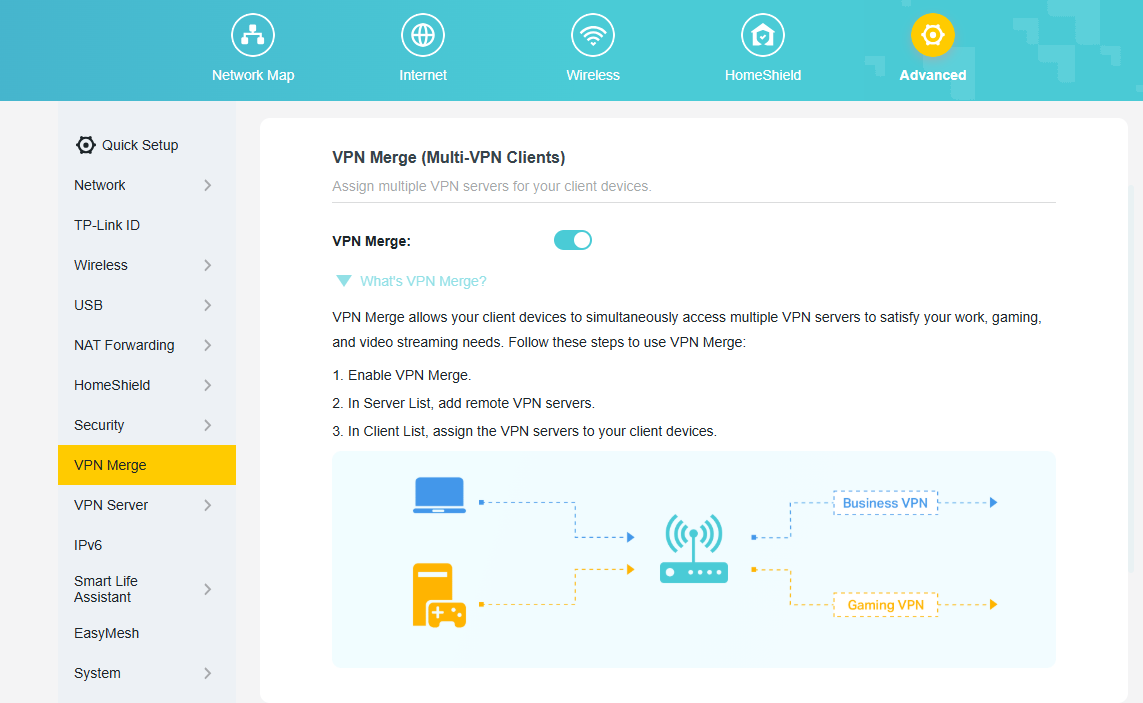
(2) VPN Kill Switch
The VPN Kill Switch improves your network security. When you enable this feature for a VPN server, it will continuously monitor the connection status. If your VPN connection drops unexpectedly, the Kill Switch will immediately block internet access for all devices using that VPN. This protection remains active until the connection to the VPN server is safely restored, preventing potential data leaks.
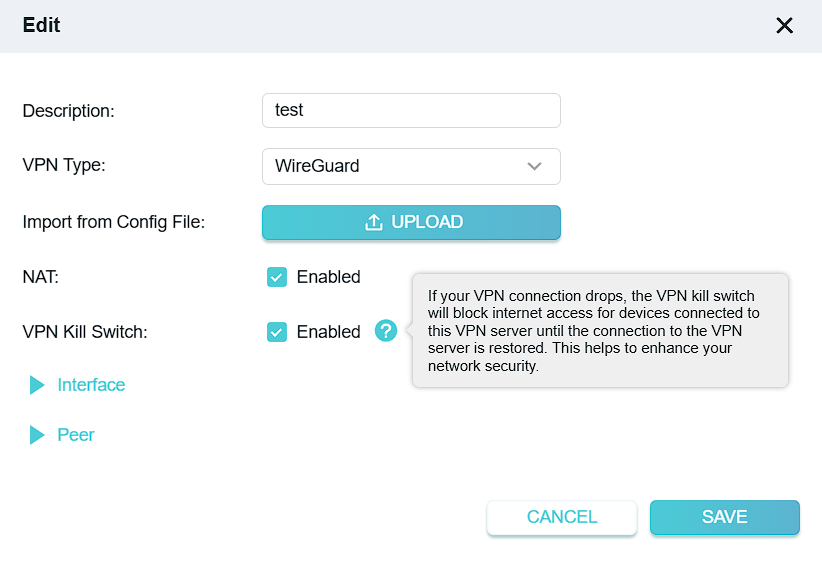
(3) Other Enhancements:
- Supports DDNS synchronization during OpenVPN server configuration.
- Add third-party VPN support when configuring the VPN Client: IPVanish, PureVPN.
2. Enhanced EasyMesh Network
(1) EasyMesh Traffic Separation (*Extend Guest Network)
We have introduced the Traffic Separation feature within the EasyMesh R3 protocol, enabling the synchronous extension of the main router's Guest Network capabilities to satellite devices. This enhances the security of your main network.
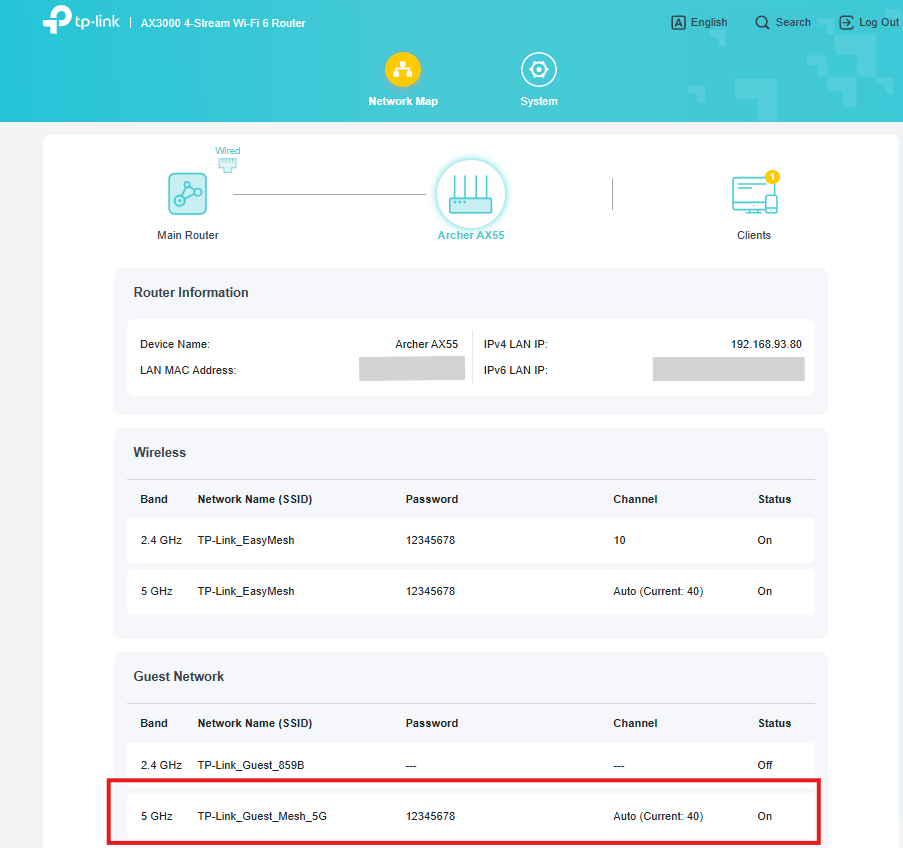
(2) Guest/IoT Network configuration synchronization
The introduction of these two features further enhances the performance of EasyMesh satellite units.
(3) EasyMesh Client Binding
EasyMesh Client Binding allows you to pin specific devices (e.g., smart TVs or IoT sensors) to a designated EasyMesh node, preventing unnecessary roaming and improving connection stability for latency-sensitive or stationary clients.
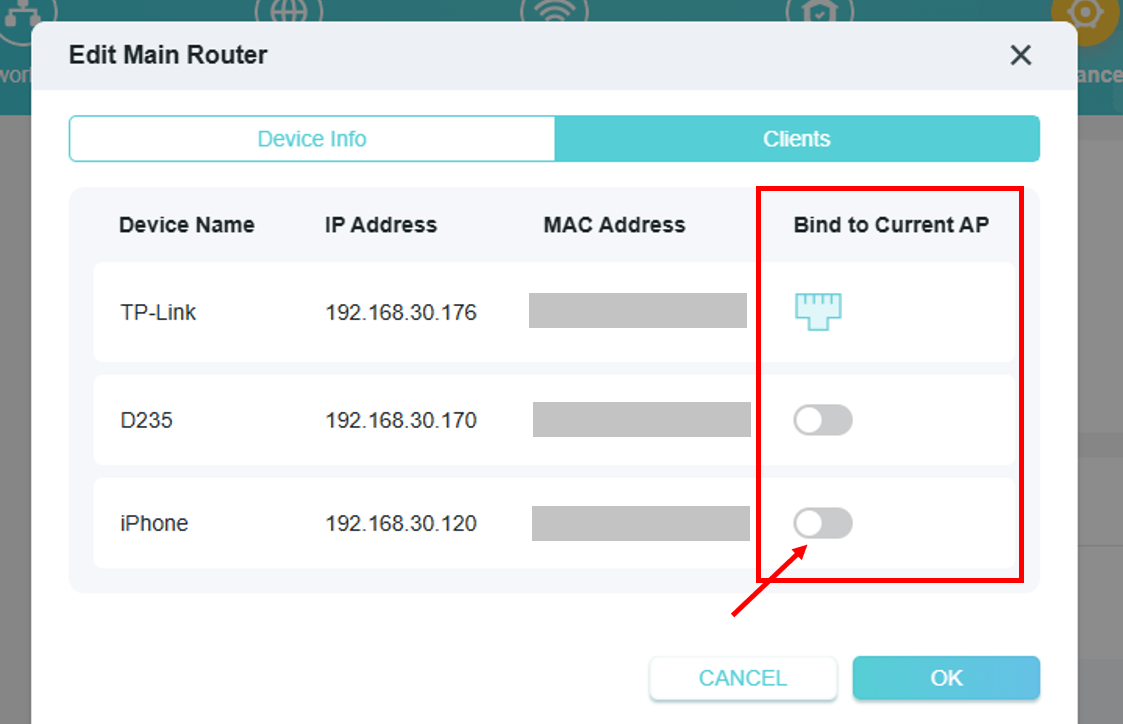
(4) EasyMesh Satellite Node Binding
EasyMesh Satellite Node Binding allows you to manually specify which upstream node a satellite should connect to.
3. ECO Mode V2
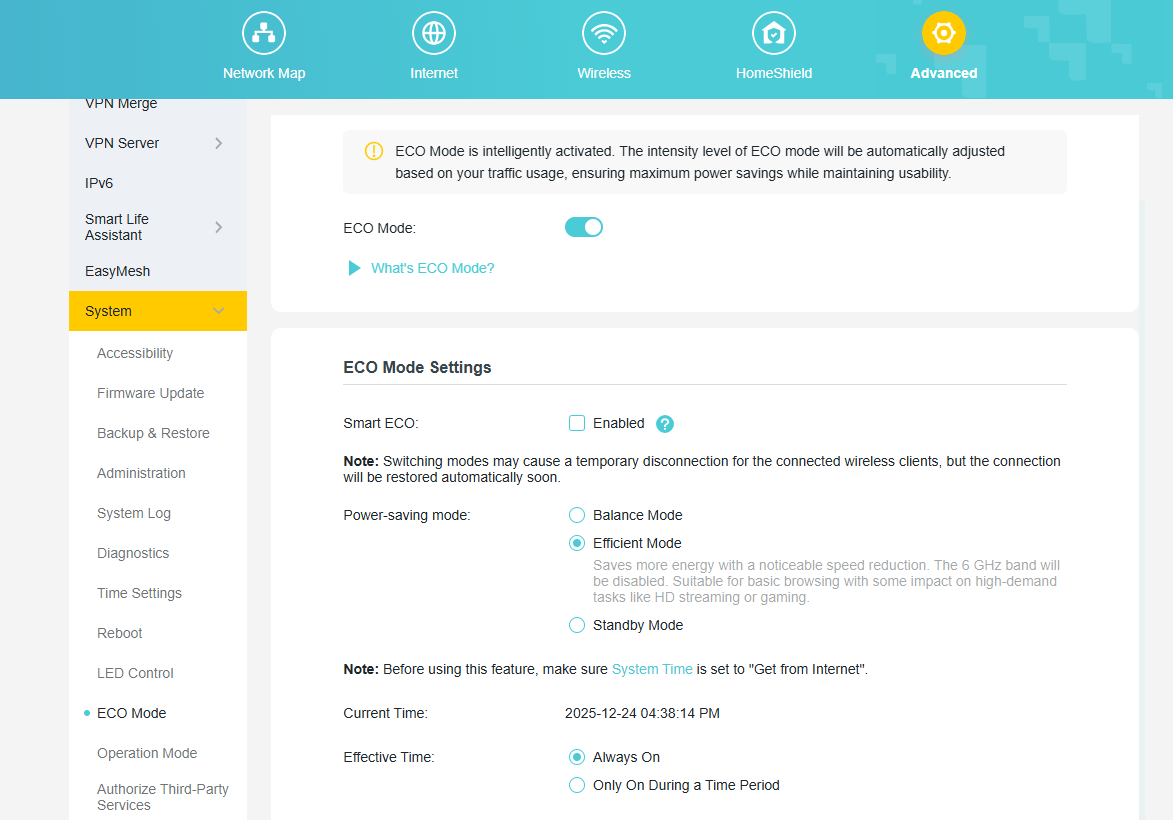
The new ECO Mode Feature is designed to help you save power intelligently. You can select the default Smart ECO mode, which automatically adjusts power consumption based on your real-time traffic usage and turns off the LEDs. This minimizes the impact on your regular internet activities while reducing energy use. For more personalized control, you can also choose from several other power-saving modes and even schedule them to be active only during a specific time period.
4. Admin Password Recovery
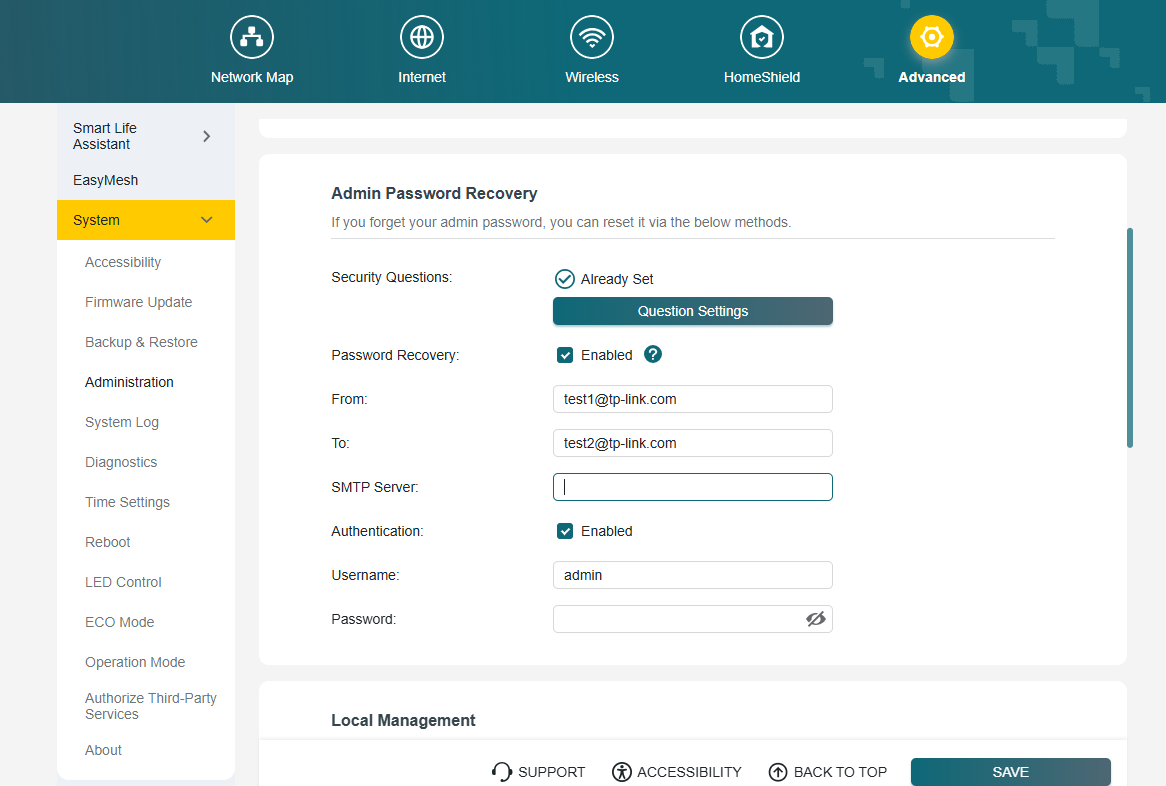
We have introduced new methods to recover your local administrator password, ensuring you never lose access to your router's settings. You can now choose between two secure recovery options. You can enable and configure these options under System > Administration.
(1) Security Questions
Set up answers to predefined security questions. This allows you to verify your identity and reset your password quickly.
(2) Email Recovery
Configure a designated email address and your own SMTP server to receive password recovery instructions directly to your inbox.
5. Advanced USB Feature
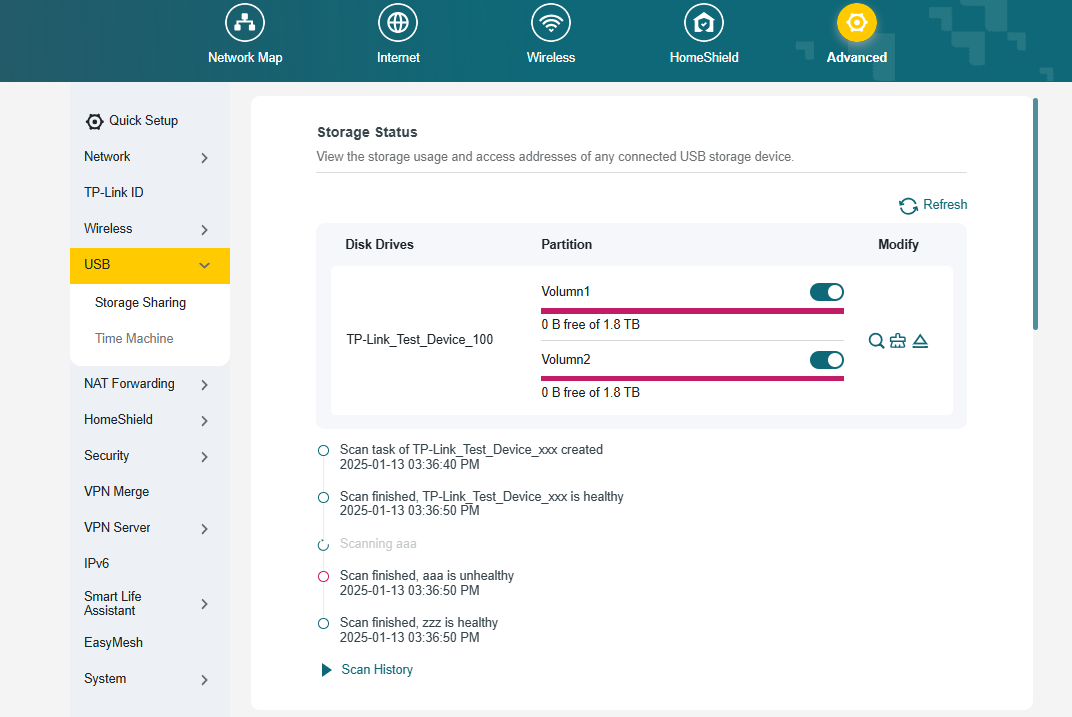
We have upgraded the USB Sharing feature with two powerful new management tools. First, you can now perform a Disk Scan to verify the health of your connected drive. This can be triggered manually or scheduled to run automatically at regular intervals for proactive data protection. Second, we have integrated a Format function, allowing you to format a USB drive directly from the router's interface without the need for a computer. These features provide greater convenience and control over your network storage.
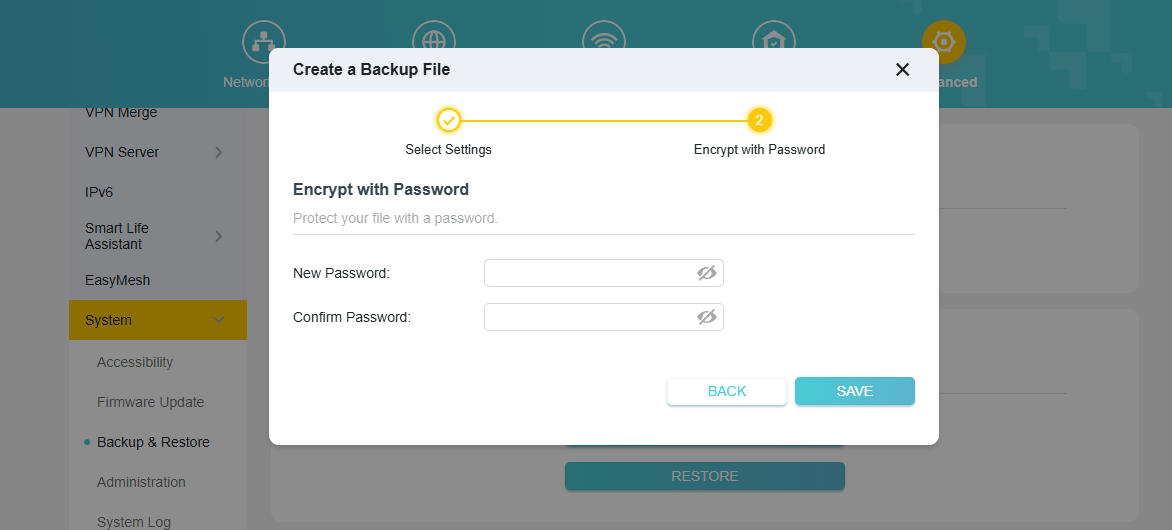
6. Backup & Restore
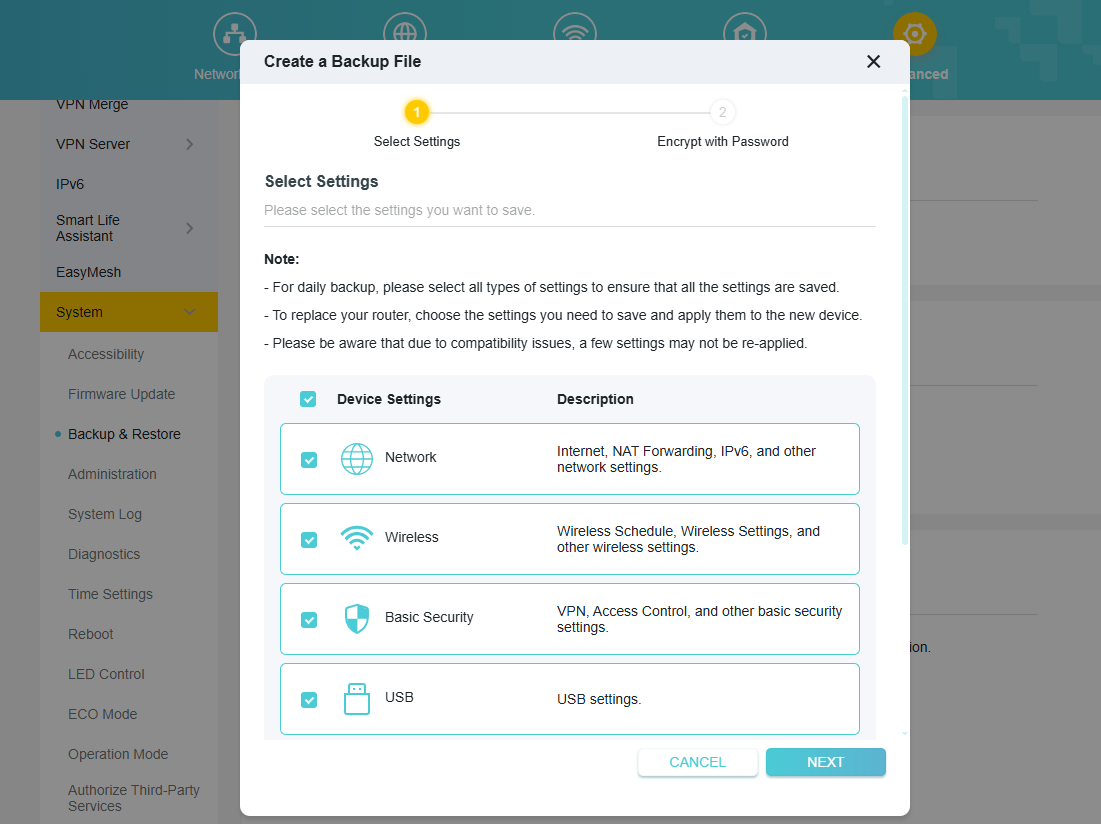
We have significantly upgraded the router's backup functionality for greater control and security. You can now perform a Selective Backup, allowing you to choose specific configuration modules to save, such as Network, Wireless, or Security settings. Additionally, you can now encrypt the backup file with a password, ensuring your sensitive configuration data is protected from unauthorized access.
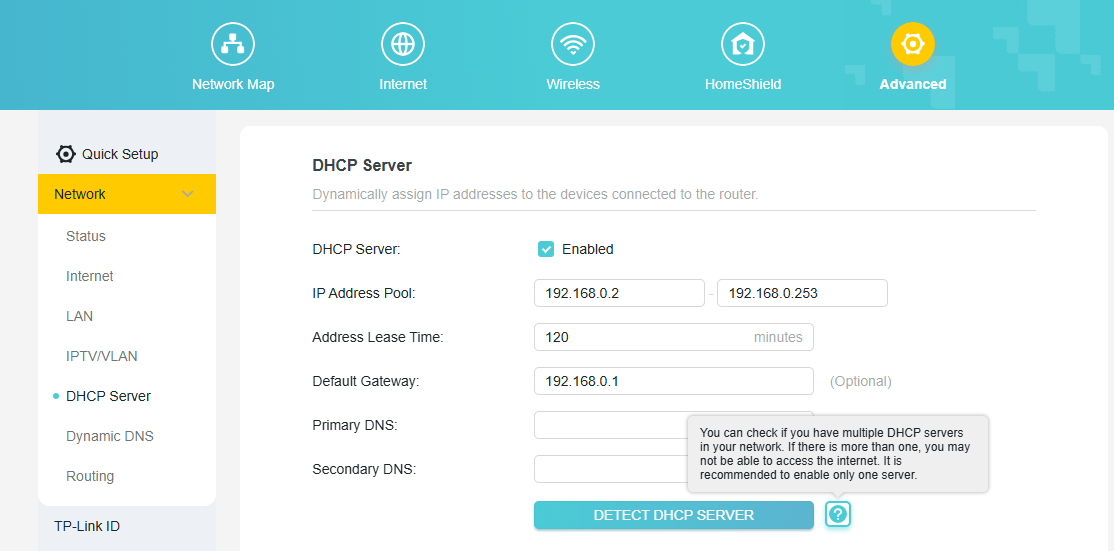
7. DHCP Detection
To help you troubleshoot common network issues, we have added a DHCP Server Detection tool. Having more than one DHCP server active on a network can cause IP address conflicts and prevent devices from accessing the internet. This new one-click tool allows you to scan your local network to easily identify any other active DHCP servers, helping you resolve conflicts to ensure a stable and reliable connection.
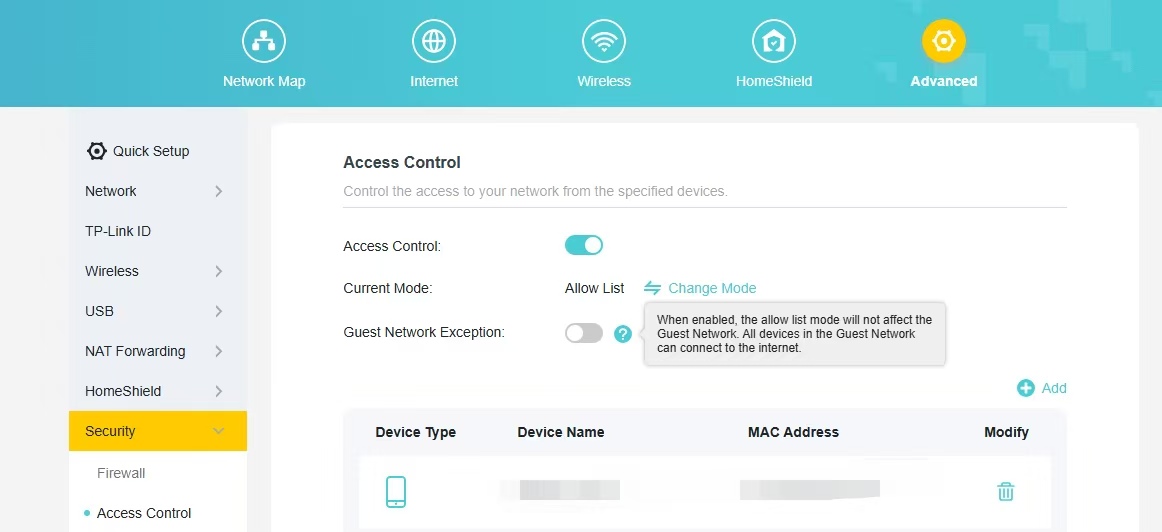
8. Guest Network Exception Button
Add a button to the Access Control whitelist that does not apply to the Guest Network. When enabled, the allow list mode will not affect the Guest Network. All devices in the Guest Network can connect to the internet.
9. New features on Tether App
(1) Added support for TSS (TP-Link Simple Setup) Auto Discovery & Quick Configuration of Tether App.
(2) Added support for QoS (Quality of Service) configuration within the Tether App.
Other Enhancements/Bug Fixes:
(1) Optimizations of IPv6 Dial-Up Methods and Functional Experience.
(2) Enhanced system security, stability, and performance.
Firmware Download:
Before the Upgrade
(1) Please be sure you have read the Beta Test Agreement before upgrading the pre-release firmware!
(2) For the sake of insurance, it's always recommended to save a copy of the router's Backup Config file before upgrading or downgrading.
(3) This pre-release firmware for Archer BE550 V1 is available for all versions (EU/US/AU/CA/etc).
(4) You may follow the guide to upgrade the firmware of your router. How to Upgrade the Firmware on the TP-Link Wi-Fi Routers.
(5) This version of the software can't be degraded to the previous 1.2.x official version.
Direct Firmware Download Link
| Archer BE550_V1 | Archer BE550_V1_1.3.1 Build 20260731 (Pre-release version) |
Additional Information
As always, we value your feedback. If you happen to encounter any concerns during or after the router firmware upgrade, please leave a message below and provide the following information. Your feedback helps us continuously improve and provide you with better products and support.
Please provide detailed information, including but not limited to:
- A complete network topology diagram.
- The device's connection method, whether EasyMesh networking is enabled, the list of involved EasyMesh devices, and their hardware and firmware versions.
- Screenshots of relevant error messages, etc.
Thank you for your continued support and for being a member of our community.
- Copy Link
- Subscribe
- Bookmark
- Report Inappropriate Content

Hi Kevin.
Yes all V1.2.
They are well out of the retun window as I started off with AX1800 and as the network grew, added tne BE550 as it seems the AX1800 as main router with 5 satellites was struggling.
If you can get some info that would be great. Hoepfully as its already done for the AX55, the AX range is possible to expand the scope.
I do feel that concentrating on the BE range alone might not be an idea situation as someone having all the mesh devices in the BE range would out it in the Deco price band which is (so I am told) a vastly superior product.
Thank you for your prompt replies.
- Copy Link
- Report Inappropriate Content

hello Kevin,
the topology is simple (no switches or other mesh or easy mesh devices). Here is a complete description:
MAIN ROUTER
runs noip ddns update and a wireguard server. No eco mode, no third party apps, no terher, no connection to tplink cloud...
DHCP points to 2 piholes for DNS wich use the routers DOH dns for upstream
INTERNET
connects to internet through a fiber 500/250 mbit PPPOE connection passing through the isp's router (no bridging, PPPOE passthrough).
onlly ipv4 (ipv6 is off), TX/RX flow control is off, DNS is set to cloudflare and google DOH exclusive.
LAN
LAN2: Backhaul to satellite router at 2.5gbit
LAN1: rpi4b running pi hole and wireguard server (gigabit)
LAN3: tapo h200 hub with a d230s1 doorbell linked to it (100 mbit)
LAN4: Devolo ac 1200+ powerline controller connected to a ac 1200+ wifi in the basement (mesh o devolo is turned off) (gigabit)
TX/RX flow control is OFF
WIFI
no smart connect, ofdma+mu-mimo on, no MLO
2.4 GHz: wpa3 protocol up to AX, no device
5 GHz: wpa3 protocol up to BE, roaming mobile iphones and ipads with wifi calling
6 Ghz: wpa3 protocol up to BE, one win11 htpc with a BE200 nic (driver 2.40.0.0)
IOT2.4 GHz: wpa2-AES protocol, TAPO pugs, bulbs, and hubs, a sricam 1080p ipcam, a levoit air purifier and a mi robot vacume
IOT5 GHz: wpa2-AES protocol, 2 reolink E330 3M ipcams and a Samsung QN90A smart tv connect
SATELLITE
LAN
LAN2: Backhaul to main router at 2.5gbit
LAN1: WD my cloud backup nas (gigabit)
LAN3: Asustor main nas running a backup pihole and a backup wireguard server (2.5 gbit)
LAN4: main win 11 pc (2.5 gbit)
WAN: Brother network printer (100 mbit)
WIFI
2.4 GHz: no device
5 GHz: roaming mobile iphones and ipads with wifi calling
6 Ghz: one lenovo laptop to AX
IOT2.4 GHz: TAPO pugs, 2 sricam 1080p ipcam
IOT5 GHz: 2 reolink E330 3M ipcams and a lireelec rpi4B as a tv headend server
As for the file i will upload it as soon as i get home (you mean the configuration backup file i presume)
BR
Stavros
- Copy Link
- Report Inappropriate Content
concerning the UDP packets issue i did another test.
i openen 2 browsers side by side one running the packetlosstest#com and the other running the cloudflare speed test.
When each one was running alone the results were fine (0 packet loss on both)
When they run together the packetlosstest#com lost the 0,7% of the packets and the cloudflare packet loss test did not even start with the message "unable to perform measurement. ICE connection timeout" (actually this kept happening for cloudflare running alone within half a minute after the other test ended).
So latelly it seems something is droping or blocking UDP packets when there is a burst of them but i dont know what (pc, router, isp, cloudflare...)
Strange thing jitter measurment (which also use UDP) is steady between 1 and 2 msec
- Copy Link
- Report Inappropriate Content

Brilliant stuff with the new Beta firmware, thank you!
I applied it to my main BE550 v1 and mesh BE550 v1 (Ethernet backhaul) shortly after receiving your heads-up three weeks ago, and I must say that everything is working smooth as silk.
For me, the ability to manage HDDs attached to both routers is a game changer.


- Copy Link
- Report Inappropriate Content
- Copy Link
- Report Inappropriate Content

Hello TP-Link Support,
I am experiencing an issue with the WireGuard VPN Client on my TP-Link Archer BE550 Pro V1.
Firmware version:
1.2.1 Build 20260519 rel.28685
The WireGuard VPN connection initially works correctly. However, after several hours of operation, the VPN Client sometimes gets stuck in the "Connecting" state and does not recover automatically.
For example:
-
At approximately 00:20, the WireGuard VPN was connected and working normally.
-
At approximately 07:20, I checked the router and the VPN status was stuck on "Connecting".
-
A PC connected via Ethernet and configured to use this VPN had no Internet access.
-
At the same time, my phone connected via Wi-Fi and not using this VPN still had normal Internet access.
-
Manually disabling and re-enabling the WireGuard VPN profile immediately restored the connection and Internet access on the PC.
The WireGuard configuration uses:
-
Client address: 10.2.0.2/32
-
DNS: 10.2.0.1
-
MTU: 1420
-
Allowed IPs: 0.0.0.0/0
-
Endpoint: IP address (not hostname)
-
Port: 51820
-
Persistent Keepalive: 25
The VPN works normally after being manually restarted, so the configuration itself appears to be valid.
I also noticed the following entries in the router system log during the night:
2026-09-29 00:59:47 nat[21740]: <6> 211501 Initialization succeeded
2026-09-29 00:59:47 nat[21740]: <6> 211501 Initialization succeeded
There were also several NAT and network service initialization events earlier at approximately 23:04.
Could you please investigate whether there is a known issue with the WireGuard VPN Client failing to reconnect automatically after a WAN/NAT/network event?
In particular, I would like to know:
-
Is this a known issue in firmware 1.2.1 Build 20260519 rel.28685?
-
Is there a newer firmware or beta firmware for the Archer BE550 Pro V1 that addresses WireGuard VPN Client stability or automatic reconnection?
-
Are there any additional logs or diagnostic information I can collect when the VPN becomes stuck on "Connecting"?
-
Is there a way to enable more detailed WireGuard/VPN logging on the router?
I can reproduce the issue and provide additional system logs, screenshots, and the WireGuard configuration with all private keys removed if necessary.
Additionally, when can I finally expect a GLOBAL firmware update for the TP-Link Archer BE550 Pro V1?
I’m ready to join the beta testing program right now, if necessary. I just want to get access to a newer firmware version as soon as possible.
Thank you.
- Copy Link
- Report Inappropriate Content
@Rayan_JD got it
- Copy Link
- Report Inappropriate Content

@Spawn_e_git поддерживаю. хорошая идея
- Copy Link
- Report Inappropriate Content

@Rayan_JD согласен, это надо добавить срочно
- Copy Link
- Report Inappropriate Content
- Copy Link
- Report Inappropriate Content
Information
Helpful: 6
Views: 6207
Replies: 41
Voters 1