Early Access Deco BE85 V1/V2 Pre-release Firmware 1.3.0 Introduces DoH/DoT, Internet Backup, and More!
 This thread has been locked for further replies. You can start a new thread to share your ideas or ask questions.


Update on Oct 19, 2026:
The official firmware version for Deco BE85 V1/V2 has been released publicly. Users can check for updates via the Deco's web interface or through the Deco App to install the latest version manually.
How to Update TP-Link Deco Firmware
If you cannot find the latest firmware version, please download the firmware (v1.3.0) here and upgrade it manually.
1.3.0 Build 26090112
We will manually lock this post to better focus on discussions regarding the new firmware. Please feel free to start a new thread here if you need assistance.
Best Regards
----------------------------------
Hey All,
We're excited to share early access to a new firmware update for Deco BE85 V1/V2, packed with new features and enhancements designed to elevate your Deco Mesh Home Networking experience. This firmware is currently in pre-release; however, your testing and feedback may help accelerate its official release!
This Article Applies to:
Deco BE85 V1/V2
Firmware Modifications:
New Features/Enhancements:
1. Supported fixing a specific port as the WAN port.
2. Added Hybrid Mesh feature.
3. Added Internet Backup feature.
4. Added DoH & DoT feature.
5. Added Speed Limit feature for client devices.
6. Optimized HomeShield feature.
7. Improved stability and security of the system.
Firmware Download Link:
| Deco BE85 V1/V2 | 1.3.0 Build 26080612 Rel 48751 (Pre-release Firmware) |
Attention: Please do not upgrade directly to Pre-Release Version 1.3.0. First, check for any available updates via the Deco app to see if v1.2.4 is available and if so, install it. If it is not yet available to you via the Deco app, follow these steps:
- After downloading and opening the compressed file, open the included text file.
- Follow the text instructions and manually upgrade to version 1.2.4 first, then proceed with version 1.3.0.
Notes:
- Please be sure you have read the Beta Test Agreement before upgrading the Pre-release firmware!
- Please ensure your Deco app is fully up-to-date.
- This firmware cannot be reverted directly to the previous official version.
- There will be an official firmware release in the future. If you are not comfortable using beta firmware, please wait for the official release or contact our support team for assistance.
- For detailed instructions on how to install the firmware on your Deco Mesh System, visit: How to manually update the firmware via web UI.
Additional Information
As always, we value your feedback. If you happen to encounter any concerns during or after the firmware upgrade, please feel free to comment below with the following information. Your input helps us continue to improve and provide the best possible products and support.
- Provide a detailed network layout, including how the devices are connected.
- Include a detailed description of the issue and as much information as possible regarding the specific conditions that seem to trigger the behavior.
Thank you for your continued support and for being part of our community.
- Copy Link
- Subscribe
- Bookmark
- Report Inappropriate Content

@Solla-topee
DoT doesn't work for ipv6, but only for ipv4.
Easy to check by :
dig -6 AAAA google.com
, which uses privider's ipv6 DNS but NOT BE85 ipv6 address.
- Copy Link
- Report Inappropriate Content
Solla-topee wrote
Hey All,
We're excited to share early access to a new firmware update for Deco BE85 V1/V2, packed with new features and enhancements designed to elevate your Deco Mesh Home Networking experience. This firmware is currently in pre-release; however, your testing and feedback may help accelerate its official release!
This Article Applies to:
Deco BE85 V1/V2
Firmware Modifications:
New Features/Enhancements:
1. Supported fixing a specific port as the WAN port.
2. Added Hybrid Mesh feature.
3. Added Internet Backup feature.
4. Added DoH & DoT feature.
5. Added Speed Limit feature for client devices.
6. Optimized HomeShield feature.
7. Improved stability and security of the system.
Firmware Download Link:
Deco BE85 V1/V2 1.3.0 Build 26080612 Rel 48751 (Pre-release Firmware)
Attention: Please do not upgrade directly to Pre-Release Version 1.3.0. First, check for any available updates via the Deco app to see if v1.2.4 is available and if so, install it. If it is not yet available to you via the Deco app, follow these steps:
- After downloading and opening the compressed file, open the included text file.
- Follow the text instructions and manually upgrade to version 1.2.4 first, then proceed with version 1.3.0.
Notes:
- Please be sure you have read the Beta Test Agreement before upgrading the Pre-release firmware!
- Please ensure your Deco app is fully up-to-date.
- This firmware cannot be reverted directly to the previous official version.
- There will be an official firmware release in the future. If you are not comfortable using beta firmware, please wait for the official release or contact our support team for assistance.
- For detailed instructions on how to install the firmware on your Deco Mesh System, visit: How to manually update the firmware via web UI.
Additional Information
As always, we value your feedback. If you happen to encounter any concerns during or after the firmware upgrade, please feel free to comment below with the following information. Your input helps us continue to improve and provide the best possible products and support.
- Provide a detailed network layout, including how the devices are connected.
- Include a detailed description of the issue and as much information as possible regarding the specific conditions that seem to trigger the behavior.
Thank you for your continued support and for being part of our community.
- Copy Link
- Report Inappropriate Content
Hi,
The Deco BE85 currently doesn't support DoH/DoT for IPv6; however, support for IPv6 DoT/DoH will be integrated into future official production firmware updates. If encrypted DNS (DoT/DoH) is critical for your network environment prior to receiving the update, you may temporarily disable IPv6 in the Deco app to ensure all DNS traffic remains strictly encrypted over IPv4.
Best Regards
- Copy Link
- Report Inappropriate Content
Hello,
IPTV VLAN (bridge mode) OK on my main Deco BE85 but when I select a secondary Deco (BE25 FW 1.99) for the port, it doesn't seem to be working (test with direct cable beetween main Deco et secondary Deco, not with my switchs)
The TV works without needing to configure an IPTV VLAN with my ISP, but there is a delay of a few seconds when changing channels (due to preloading). When I configure the IPTV VLAN (bridge mode), the switch is instantaneous. My ISP use RASH and DASH for TV flows. When RASH is unreachable, it preloads for a few seconds and then switches to DASH automatically, and then it works fine.
PS : first time testing this: I can't say if this was already the case with the previous firmware...
- Copy Link
- Report Inappropriate Content
Hi,
Please confirm the following information for the reported phenomenon.
1. Please describe your network diagram. How many Deco nodes do you have? How are they connected, via Wi-Fi or an Ethernet cable?
2. What are the model number, hardware, and firmware versions of your Deco nodes?
3. Does your IPTV have internet when connected to the satellite Deco BE25 with the IPTV/VLAN option disabled, but it does not have internet when the IPTV/VLAN option is enabled?
4. How about when connecting your IPTV to other satellite Deco nodes with/without the IPTV/VLAN option enabled?
Best Regards
- Copy Link
- Report Inappropriate Content
Solla-topee wrote
Hi,
Please confirm the following information for the reported phenomenon.
1. Please describe your network diagram. How many Deco nodes do you have? How are they connected, via Wi-Fi or an Ethernet cable?
2. What are the model number, hardware, and firmware versions of your Deco nodes?
3. Does your IPTV have internet when connected to the satellite Deco BE25 with the IPTV/VLAN option disabled, but it does not have internet when the IPTV/VLAN option is enabled?
4. How about when connecting your IPTV to other satellite Deco nodes with/without the IPTV/VLAN option enabled?
Best Regards
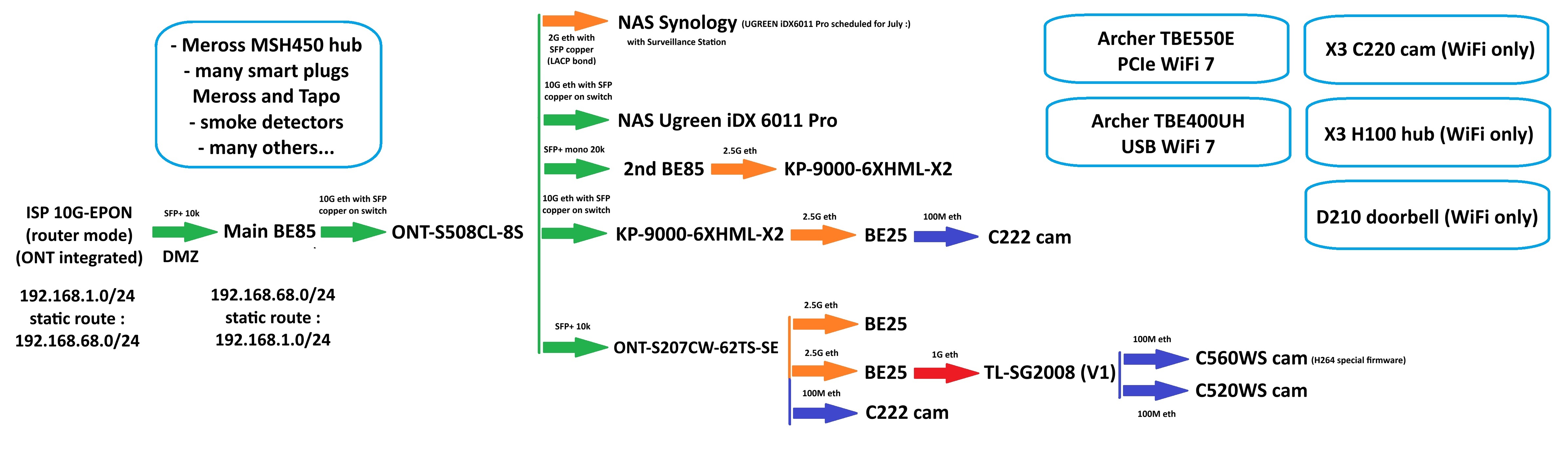
- 2 X BE85 V1 FW BETA 1.3.0 and 3 X BE25 V1 FW BETA 1.99 --> all ethernet backhaul
- internet OK on my Nvidia SHIED pro (ethernet, YouTube tested) when IPTV/VLAN enabled or disabled (connected to Deco satellite, BE25 or BE85, same problem of preload. No preload when Nvidia SHIELD pro connected to main BE85 with IPTV/VLAN enabled. Only with RASH, DASH OK. With IPTV/VLAN disabled on my main BE85, preload :)
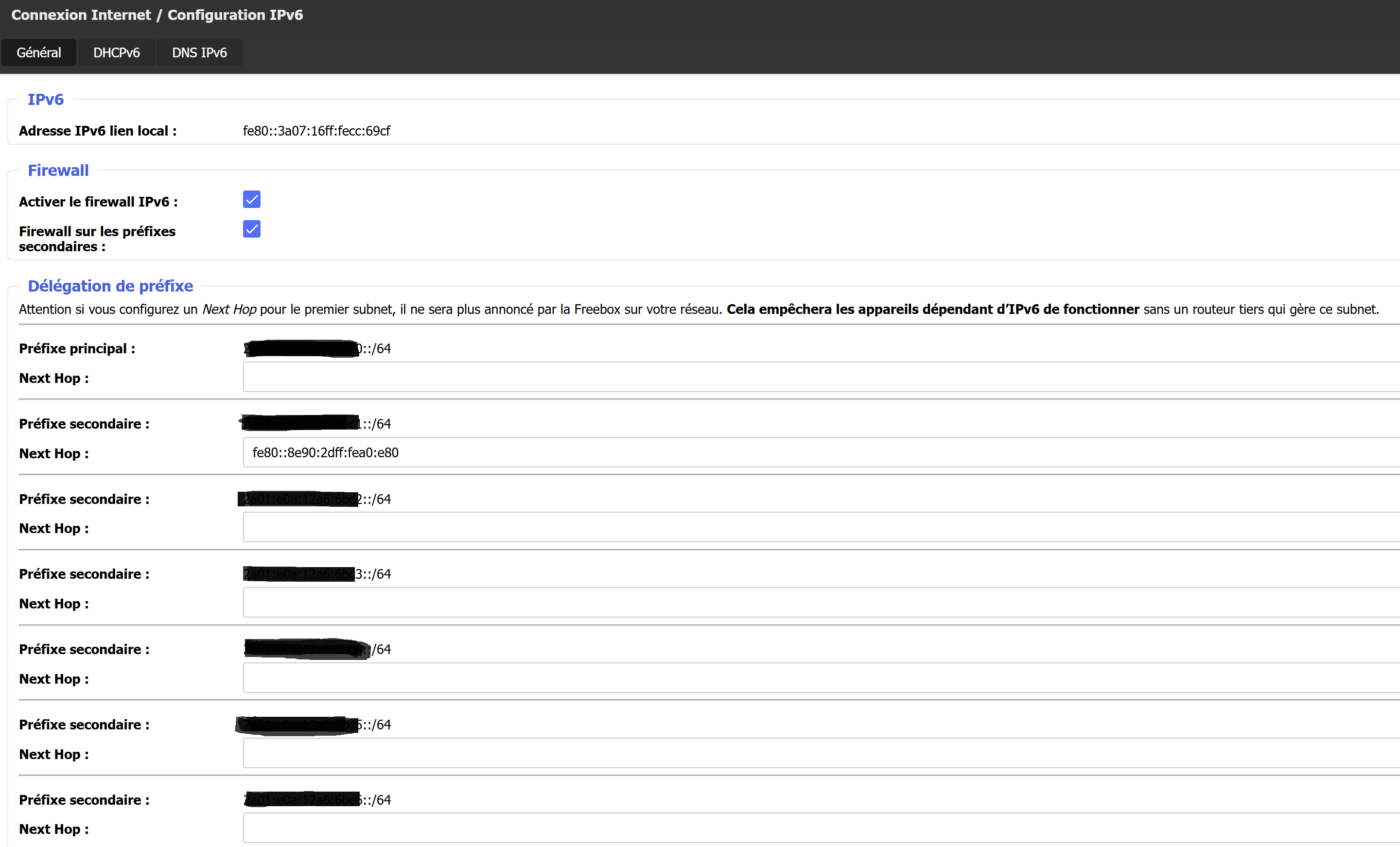
- IPv6 OK on my Nvidia SHIELD (bridge mode on main BE85, my FAI router handles all the IPv6 on my network because the BE85 doesn't offer the necessary features to handle my ISP's IPv6 implementation. I could enable DHCPv6 on my ISP's router, but that causes issues with Android devices... Ideally, I'd be able to configure a static IPv6 address using SLAAC + RDNSS). Incidentally, it would be nice to display the link-local address of the main Deco in the app...
ISP Free (France)
- Copy Link
- Report Inappropriate Content
Hi,
Thank you for the information provided. There is currently no option in the Deco App to improve the reported phenomenon. It's suggested that you contact your ISP to see whether using DASH for TV flows only is possible.
Best Regards
- Copy Link
- Report Inappropriate Content
Hello,
They’ve already stated on their forum that it will remain this way for the main French channels using RASH (with DASH as a fallback)
However, the situation with the Deco units doesn't make sense, it works on the main Deco, so it ought to work on the secondary ones too... Personally, I’d call that a bug, not a missing feature 
Also, something must be happening with the secondary Decos when the IPTV/VLAN bridge setting is applied, given that their indicator lights turn red a few seconds after confirming the option...
- Copy Link
- Report Inappropriate Content

Hi everyone,
I wanted to share my recent experiences with the 1.3.0 firmware on my Deco BE85 setup (2-node topology using a wired Ethernet backhaul). While I've managed to get the system completely stable, it required several manual workarounds. I am sharing these here in hopes that the TP-Link R&D team can address the underlying firmware behaviors in a future release.
Here are the technical issues encountered and the workarounds applied:
1. QoS Performance Degradation & Firmware Bugs
- The Issue: Leaving Quality of Service (QoS) enabled on this firmware version caused noticeable performance drops and erratic routing behavior. It appears there is a conflict or bug within the QoS engine in this build.
- The Workaround: I had to completely disable QoS. Once turned off, overall network performance stabilized and throughput normalized.
- Feedback for R&D: Please investigate the QoS implementation in 1.3.0. Enabling it shouldn't degrade the baseline performance of a flagship Wi-Fi 7 router.
2. IoT Network Stability (802.11r & Mesh Roaming)
- The Issue: Using logically separated VLANs/SSIDs for IoT devices, I noticed that stationary 2.4 GHz smart devices struggled with stability. The aggressive Fast Roaming (802.11r) and Mesh switching logic seem incompatible with many standard IoT chipsets, causing intermittent drops.
- The Workaround: I had to manually disable 802.11r and Mesh Technology on a strict per-device basis for all stationary IoT hardware. Additionally, I assigned them static IPs and locked the IoT devices to a clean, fixed 2.4 GHz channel (Channel 11) to stop the auto-channel logic from causing disconnects.
- Feedback for R&D: It would be a massive quality-of-life improvement if the firmware allowed us to disable 802.11r and Mesh globally for the dedicated IoT SSID, rather than forcing users to toggle these settings individually per client. The auto-channel logic for the IoT network could also use refinement to avoid disrupting legacy 2.4 GHz clients.
3. IPv6 Provisioning across VLANs
- The Issue: Getting IPv6 to route correctly across the separated logical networks (Main, Guest, IoT) and over the wired backhaul required specific manual in-tuning before it functioned as intended.
- Feedback for R&D: The IPv6 setup flow and management within the Deco app could be more robust, especially when dealing with separated subnets and wired backhaul environments.
4. Excessive Log Spam: ai-center Unknown Duplex
- The Issue: The system logs are being aggressively spammed (multiple times per minute) with the following error:
daemon.err ai-center: [eth_get_linkrate:103]: Unknown Duplex! (255) - Feedback for R&D: While this doesn't seem to cause immediate critical network failures, it constantly fills up the system logs with error flags, making it extremely difficult to troubleshoot actual issues. It appears the
ai-centerdaemon is failing to correctly poll the duplex state of the Ethernet ports (likely related to the wired backhaul). Please patch this polling mechanism so it accurately reads the link state or at least stops flooding the logs.
The system performs exceptionally well with these manual adjustments, but fixing the QoS bug, improving the IoT network logic, and cleaning up the log spam would make 1.3.0 a much more solid release. Hope this helps anyone else debugging their BE85 setup!
Thanks & kind regards,
W_nld
- Copy Link
- Report Inappropriate Content
Thanks... some thought provoking info in your post.
- Copy Link
- Report Inappropriate Content
Information
Helpful: 5
Views: 8735
Replies: 56
Voters 1