Early Access Deco BE85 V1/V2 Pre-release Firmware 1.3.0 Introduces DoH/DoT, Internet Backup, and More!
 This thread has been locked for further replies. You can start a new thread to share your ideas or ask questions.


Update on Oct 19, 2026:
The official firmware version for Deco BE85 V1/V2 has been released publicly. Users can check for updates via the Deco's web interface or through the Deco App to install the latest version manually.
How to Update TP-Link Deco Firmware
If you cannot find the latest firmware version, please download the firmware (v1.3.0) here and upgrade it manually.
1.3.0 Build 26090112
We will manually lock this post to better focus on discussions regarding the new firmware. Please feel free to start a new thread here if you need assistance.
Best Regards
----------------------------------
Hey All,
We're excited to share early access to a new firmware update for Deco BE85 V1/V2, packed with new features and enhancements designed to elevate your Deco Mesh Home Networking experience. This firmware is currently in pre-release; however, your testing and feedback may help accelerate its official release!
This Article Applies to:
Deco BE85 V1/V2
Firmware Modifications:
New Features/Enhancements:
1. Supported fixing a specific port as the WAN port.
2. Added Hybrid Mesh feature.
3. Added Internet Backup feature.
4. Added DoH & DoT feature.
5. Added Speed Limit feature for client devices.
6. Optimized HomeShield feature.
7. Improved stability and security of the system.
Firmware Download Link:
| Deco BE85 V1/V2 | 1.3.0 Build 26080612 Rel 48751 (Pre-release Firmware) |
Attention: Please do not upgrade directly to Pre-Release Version 1.3.0. First, check for any available updates via the Deco app to see if v1.2.4 is available and if so, install it. If it is not yet available to you via the Deco app, follow these steps:
- After downloading and opening the compressed file, open the included text file.
- Follow the text instructions and manually upgrade to version 1.2.4 first, then proceed with version 1.3.0.
Notes:
- Please be sure you have read the Beta Test Agreement before upgrading the Pre-release firmware!
- Please ensure your Deco app is fully up-to-date.
- This firmware cannot be reverted directly to the previous official version.
- There will be an official firmware release in the future. If you are not comfortable using beta firmware, please wait for the official release or contact our support team for assistance.
- For detailed instructions on how to install the firmware on your Deco Mesh System, visit: How to manually update the firmware via web UI.
Additional Information
As always, we value your feedback. If you happen to encounter any concerns during or after the firmware upgrade, please feel free to comment below with the following information. Your input helps us continue to improve and provide the best possible products and support.
- Provide a detailed network layout, including how the devices are connected.
- Include a detailed description of the issue and as much information as possible regarding the specific conditions that seem to trigger the behavior.
Thank you for your continued support and for being part of our community.
- Copy Link
- Subscribe
- Bookmark
- Report Inappropriate Content
- 1. Unable to change 2.4 GHz channel and bandwidth:
I am unable to manually adjust the channel and channel bandwidth for the 2.4 GHz band. It remains permanently stuck on Channel 10 and 20 MHz, regardless of which channel I select or if I try to activate 40 MHz. However, manual selection works perfectly fine for the 5 GHz and 6 GHz bands. When using Firmware 1.2.4 with a wired internet connection via SFP+ Fiber, changing the 2.4 GHz channel and bandwidth worked without any issues. This restriction seems to be triggered specifically by using the Wi-Fi Hotspot backup. - 2. Manual channel selection UI bug when disabling frequencies in the main network:
If I disable a specific frequency in the Main Network (e.g., disabling 6 GHz but keeping 2.4 GHz + 5 GHz active), the option to manually change the channel and bandwidth for that disabled frequency completely disappears from the menu. However, in my case, 6 GHz remains active under the MLO network alongside 5 GHz. Because of this UI behavior, I lose the ability to manually change the 6 GHz channel. The same issue occurs if you disable any frequency in the main network but keep it active in the MLO, Guest, or IoT networks.- Suggestion: Manual channel selection should not depend on the Main Network status. Instead, there should be a dedicated, independent menu under Wi-Fi Settings to manage manual channels for all supported frequencies globally.
- 3. Inconsistent frequency selection in Client Connection Preferences:
In the client list, when configuring the connection preference for individual clients, all frequencies are displayed as selectable options—even if that specific frequency is disabled in the network the client is connected to. Logically, if my Main Network only has 2.4 GHz and 5 GHz enabled, only these two should be visible in the preference list. The Guest and IoT network lists should similarly only show their respective active frequencies. - 4. Missing German localization for Push Notifications:
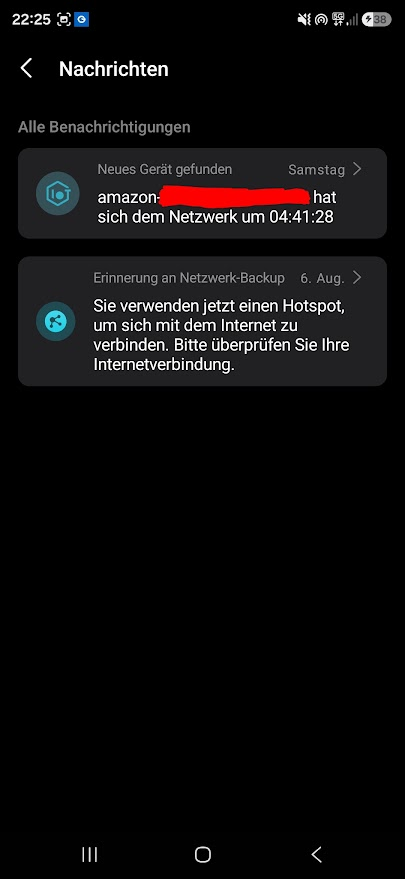
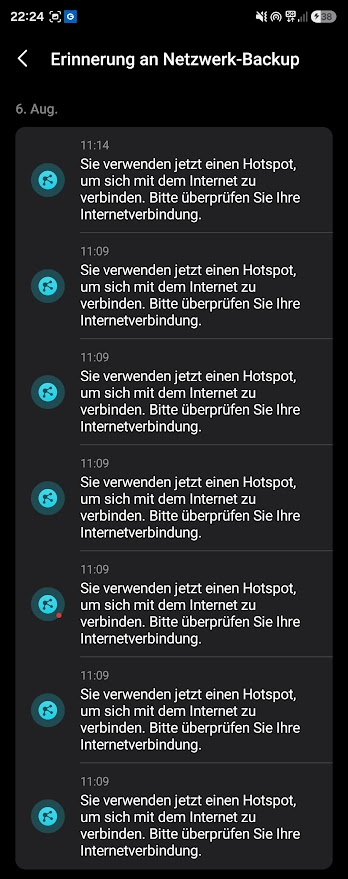
The push notification informing the user that the internet connection has switched to the Hotspot Backup is not translated into German and appears in English. Interestingly, when viewing the exact same message inside the Deco App's built-in message center, the notification is correctly displayed in German. - 5. Missing German ISP Profiles (specifically Fiber/FTTH):
There is a lack of pre-configured German ISP profiles (especially for fiber-to-the-home connections like Telekom, Vodafone, Deutsche Glasfaser, etc.). Since these providers require specific VLAN IDs (e.g., VLAN 7 for Telekom), having pre-defined German ISP profiles in the setup wizard would greatly improve the user experience.
- Copy Link
- Report Inappropriate Content
delong91 wrote
Bug Report & Optimization Feedback: Deco App 3.10.645 & Deco BE85 (Standalone / Hotspot Mode)Hello TP-Link Team,I would like to report a few bugs and optimization opportunities regarding the Deco Android App (v3.10.645) and the Deco BE85.My current setup consists of a single standalone Deco BE85 (no additional Decos). The internet connection is currently provided via my smartphone's Wi-Fi hotspot.Here is the detailed feedback:
- 1. Unable to change 2.4 GHz channel and bandwidth:
I am unable to manually adjust the channel and channel bandwidth for the 2.4 GHz band. It remains permanently stuck on Channel 10 and 20 MHz, regardless of which channel I select or if I try to activate 40 MHz. However, manual selection works perfectly fine for the 5 GHz and 6 GHz bands. When using Firmware 1.2.4 with a wired internet connection via SFP+ Fiber, changing the 2.4 GHz channel and bandwidth worked without any issues. This restriction seems to be triggered specifically by using the Wi-Fi Hotspot backup.- 2. Manual channel selection UI bug when disabling frequencies in the main network:
If I disable a specific frequency in the Main Network (e.g., disabling 6 GHz but keeping 2.4 GHz + 5 GHz active), the option to manually change the channel and bandwidth for that disabled frequency completely disappears from the menu. However, in my case, 6 GHz remains active under the MLO network alongside 5 GHz. Because of this UI behavior, I lose the ability to manually change the 6 GHz channel. The same issue occurs if you disable any frequency in the main network but keep it active in the MLO, Guest, or IoT networks.
- Suggestion: Manual channel selection should not depend on the Main Network status. Instead, there should be a dedicated, independent menu under Wi-Fi Settings to manage manual channels for all supported frequencies globally.
- 3. Inconsistent frequency selection in Client Connection Preferences:
In the client list, when configuring the connection preference for individual clients, all frequencies are displayed as selectable options—even if that specific frequency is disabled in the network the client is connected to. Logically, if my Main Network only has 2.4 GHz and 5 GHz enabled, only these two should be visible in the preference list. The Guest and IoT network lists should similarly only show their respective active frequencies.- 4. Missing German localization for Push Notifications:
The push notification informing the user that the internet connection has switched to the Hotspot Backup is not translated into German and appears in English. Interestingly, when viewing the exact same message inside the Deco App's built-in message center, the notification is correctly displayed in German.- 5. Missing German ISP Profiles (specifically Fiber/FTTH):
There is a lack of pre-configured German ISP profiles (especially for fiber-to-the-home connections like Telekom, Vodafone, Deutsche Glasfaser, etc.). Since these providers require specific VLAN IDs (e.g., VLAN 7 for Telekom), having pre-defined German ISP profiles in the setup wizard would greatly improve the user experience.I hope this feedback helps your development team to improve future app and firmware versions.Best regards
Addendum to 4: The date and time of the notification stating that the router is connected via hotspot backup is incorrect. It is always set to August 6th at 11 a.m.
- Copy Link
- Report Inappropriate Content
Hi,
Just to confirm, you mentioned that "something must be happening with the secondary Decos when the IPTV/VLAN bridge setting is applied, given that their indicator lights turn red a few seconds after confirming the option..."
--Does the LED status on the secondary Deco eventually turn solid green after flashing red for a few seconds, or does it keep flashing red?
Best Regards
- Copy Link
- Report Inappropriate Content
Hi,
Thank you very much for your feedback. I would like to confirm the following information with you to better understand the situation you described.
1. Would you please send us a screenshot of the QoS page after enabling it? Please describe the phenomenon you encountered in detail after enabling the QoS feature. Thanks!
2. Usually, the Deco's main network, IoT network, and wired network are not isolated by default. What do you mean by "using logically separated VLANs/SSIDs for IoT devices"? Please describe your network diagram in detail. For the smart device dropping phenomenon, you can usually refer to the instructions below to troubleshoot: Deco Smart Home Setup: Settings to Prevent & Fix Connection / Dropping Issues
3. Deco's 2.4G Wi-Fi channel for different Wi-Fi networks (such as main, IoT, and guest networks) is the same, and you can usually refer to the instructions to change the Wi-Fi channel on the Deco. What requirements do you have for improving the Deco channel settings?
Best Regards
- Copy Link
- Report Inappropriate Content
Hi,
Thank you very much for your detailed description and feedback. I'll log your feature requests and forward them to the relevant team for evaluation.
Regarding the phenomenon "1. Unable to change 2.4 GHz channel and bandwidth", it may be that your Deco BE85 is connected to the hotspot Wi-Fi via the 2.4 GHz band, so the Deco's 2.4 GHz channel and channel width should be the same as the hotspot Wi-Fi and can't be changed.
If the notification date and time are incorrect, go to the Deco App > System > System Time page to select the correct time zone, and check whether the Deco has the correct date and time.
Best Regards
- Copy Link
- Report Inappropriate Content
- Copy Link
- Report Inappropriate Content
Solla-topee wrote
Hi,
Thank you very much for your detailed description and feedback. I'll log your feature requests and forward them to the relevant team for evaluation.
Regarding the phenomenon "1. Unable to change 2.4 GHz channel and bandwidth", it may be that your Deco BE85 is connected to the hotspot Wi-Fi via the 2.4 GHz band, so the Deco's 2.4 GHz channel and channel width should be the same as the hotspot Wi-Fi and can't be changed.
If the notification date and time are incorrect, go to the Deco App > System > System Time page to select the correct time zone, and check whether the Deco has the correct date and time.
Best Regards
Hi @Solla-topee
Yes, that would explain the phenomenon where the 2.4 GHz network channel doesn't change.
The correct time zone and time are set in the Deco app. Notifications about new devices on the network also display the correct date and time. It is only the notifications regarding the hotspot backup connection that always show up for me with the date August 6th and the time 11:09 AM.
I have also noticed that reports are still being generated even though the reporting feature is disabled. Unfortunately, there is no function to delete these reports either. I previously raised this issue about two years ago regarding the Deco X60 V3.20, but sadly, nothing has improved since then. Could you please look into this problem?
Best Regards
- Copy Link
- Report Inappropriate Content
Hi,
Are the notifications about the hotspot backup connection on the Deco App > Network tab > Message (top-right corner) page?
Do you mean the monthly and weekly reports are being generated in the Deco App > More > Reports page even when the Reports option is disabled? Please let us know where you disable the Reports feature.
Best Regards
- Copy Link
- Report Inappropriate Content
Solla-topee wrote
Hi,
Are the notifications about the hotspot backup connection on the Deco App > Network tab > Message (top-right corner) page?
Do you mean the monthly and weekly reports are being generated in the Deco App > More > Reports page even when the Reports option is disabled? Please let us know where you disable the Reports feature.
Best Regards
Hi,
yes there are the notifications. The notification regarding the hotspot backup is generated after every restart of the BE85.
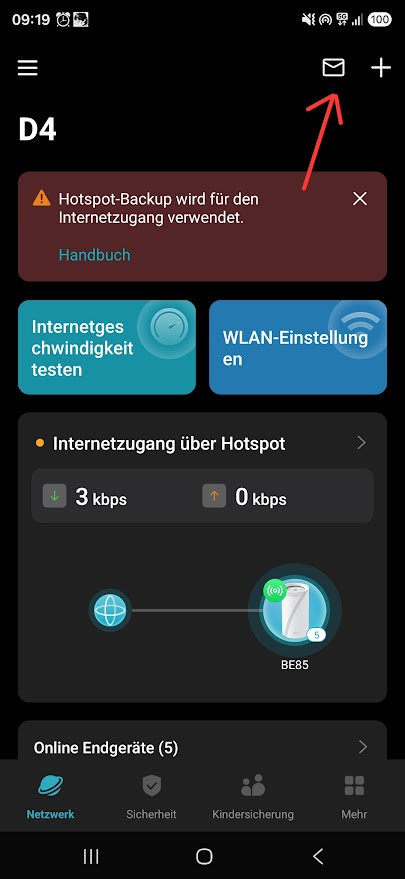
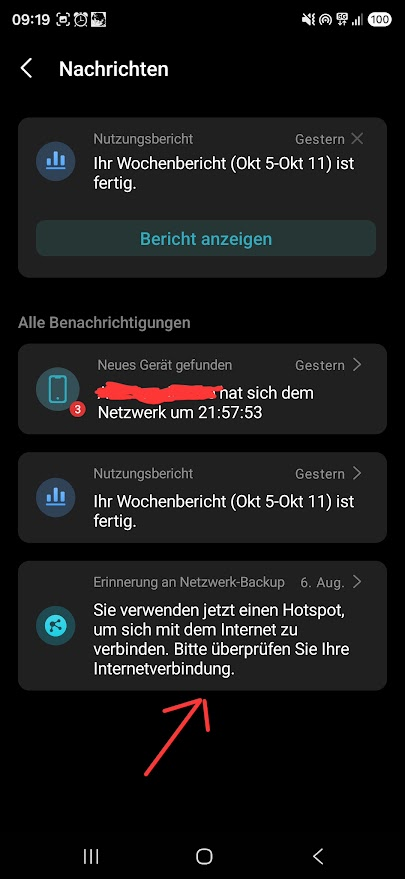
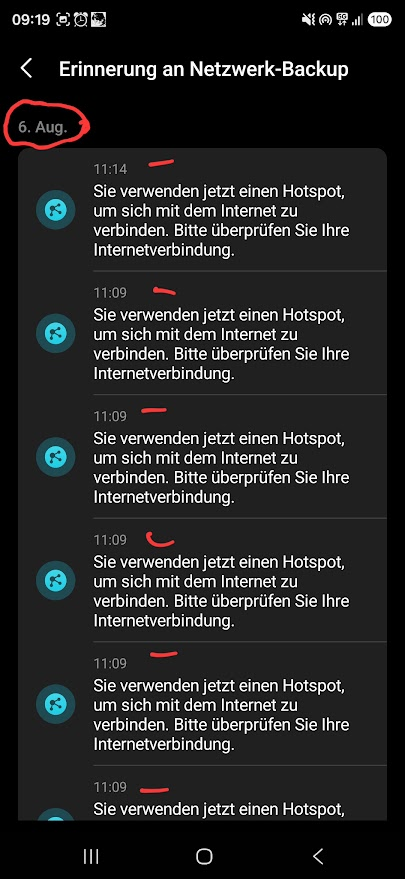
Yes i mean the weekly and monthly reports. I have disabled the reports function here:
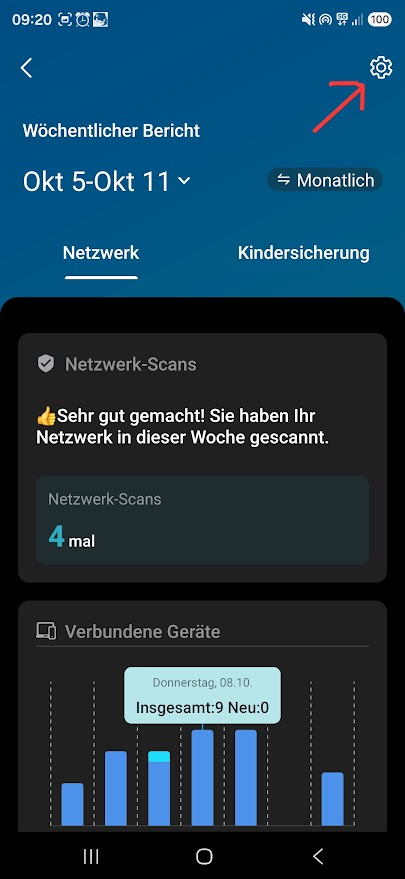
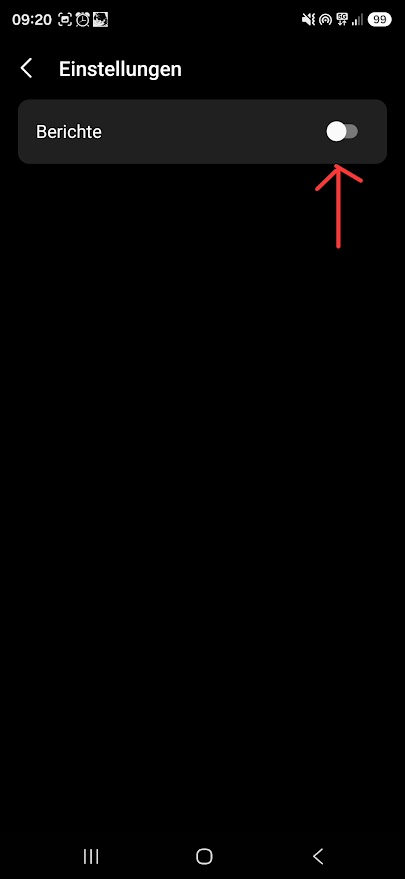
Best Regards
- Copy Link
- Report Inappropriate Content
Hello,
Regarding the Sure PetCare Hub : there are issues with auto-negotiation. I encountered the same problem when plugging it directly into my ISP's router, but the router allows me to force the Ethernet port negotiation mode to 100 Mbps, and it works fine that way.
Is it not possible to configure speed (10/100/1000/2500/...) and duplex settings (Full/Half) on the Deco units ? Being able to do so could resolve many issues with IoT devices that have 100 Mbps ports...
Thanks !
- Copy Link
- Report Inappropriate Content
Information
Helpful: 5
Views: 8736
Replies: 56
Voters 1