New Firmware for Archer BE600 V1/BE9700 V1/BE550 Pro V2 Introduces AI QoS and AI ECO mode

New Firmware for Archer BE600 V1/BE9700 V1/BE550 Pro V2 Introduces AI QoS and AI ECO mode

New Firmware for Archer BE600 V1/BE9700 V1/BE550 Pro V2 Introduces AI QoS and AI ECO mode
2026-09-04 10:26:33 - last edited 2026-09-07 07:14:23
Hardware Version:
Firmware Version: 1.4.1 Build 20260830 Pre-Release version

Hello, All Users!


We are pleased to announce the release of a firmware update for the Archer BE600 V1/BE9700 V1/BE550 Pro V2! This update introduces AI QoS and AI ECO modes.

All users are encouraged to upgrade to the latest firmware and share your feedback. This is crucial for our continuous product improvement! We look forward to your experience!

Download the update now and experience your router's new features!


New Features:  


1. AI QoS

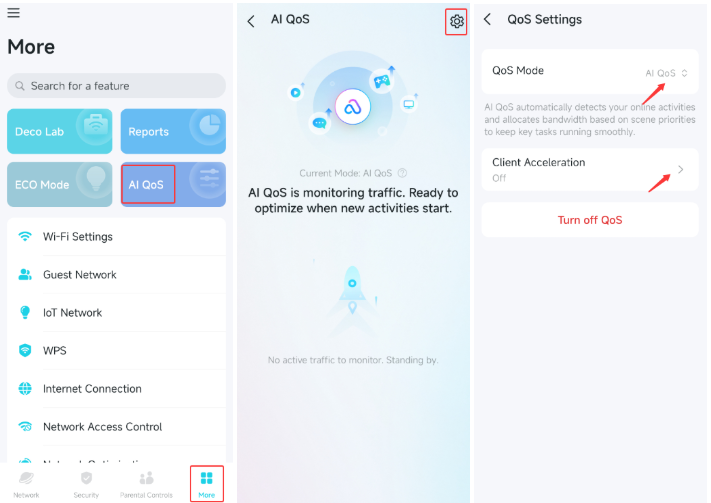
AI QoS automatically detects your online activities and allocates bandwidth based on scenario priorities to ensure key tasks run smoothly. 


Follow the steps below to use this feature.
  1. Go to the Tether App > More > AI QoS to enable this feature.
  2. Tap the Settings icon at the top right corner to adjust the relevant settings. For example, go to Client Acceleration to select the clients you want to prioritize for speed acceleration; tap QoS Mode to select Manual QoS mode; and turn off QoS.


2. AI ECO Mode

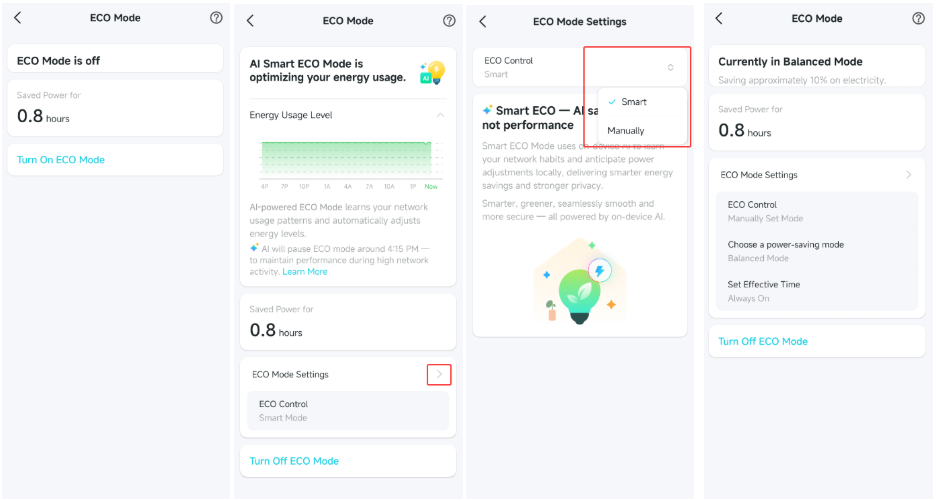
ECO mode lowers the energy consumption of your Router by reducing its power and controlling how long the Wi-Fi and LEDs last, saving you more on your electricity bills.
AI Smart ECO Mode uses on-device AI to learn how you use the network and anticipate when to adjust power usage - all processed locally without sending data to the cloud.


Follow the steps below to use this feature.
  1. Go to the Tether App > More > ECO Mode to enable this feature.
  2. Tap ECO Mode Settings > ECO Control to change the ECO mode to Manual if you want. In Manual ECO Mode, Router offers three adjustable power-saving levels (Balanced Mode, Efficient Mode, and Standby Mode), letting you tailor your energy plan to fit your internet usage.


Optimizations: 

Improved the stability and security of the system.


Firmware Download:

Before the Upgrade

(1) Please be sure you have read the Beta Test Agreement before upgrading the pre-release firmware!

(2) For the sake of insurance, it's always recommended to save a copy of the router's Backup Config file before upgrading or downgrading.

(3) You may follow the guide to upgrade the firmware of your router. How to Upgrade the Firmware on the TP-Link Wi-Fi Routers.

(4) This version upgrade is irreversible, and you cannot downgrade to the previous firmware after the upgrade.


Model Direct Download Link
Archer BE600 V1/BE9700 V1/BE550 Pro V2  1.4.1 Build 20260830(Pre-release Firmware) 


Additional Information

As always, we value your feedback. If you encounter any issues during or after the router firmware upgrade, please leave a message below and include the following information. Your feedback helps us continuously improve and provide you with better products and support.


Please provide detailed information, including but not limited to:

  • A complete network topology diagram.
  • The device's connection method and whether EasyMesh networking is enabled.
  • Screenshots of relevant error messages, etc.


Thank you for your continued support and for being a member of our community.


Related Article:

Deco BE65/BE63/BE11000 V2 Pre-release Firmware 1.3.3 Improved System Stability

 

Welcome to our Community! Latest Pre-Release firmware: ▷Archer BE550 V2 Enhances EasyMesh Support with Guest/IoT/MLO Extension ▷Archer GE550/GE650 V2 Introduces AI QoS, VPN Enhancements More posts, please see: ▷Get the Ongoing Pre-release Firmware for Wi-Fi Routers Here! Contact via Messages or @Joesph-TP in your new post for urgent problems (not online 24/7). Click Recommended Solution if the post/answer helps.
  1      
1
#1
Options
19 Reply
Re:New Firmware for Archer BE600 V1/BE9700 V1/BE550 Pro V2 Introduces AI QoS and AI ECO mode
2026-10-10 01:57:27

  @Joseph-TP On this firmware and the prior 2-3 releases been getting an issue with 6ghz and apple macbook air m4 wifi. It will either be very slow or just stop working and toggling the wifi on/off on the mac fixes it. I already reset the router to factory, also reset the network config and deleted the plists on the mac. Happens on both macbooks. Sometimes also happens on my Pixel 10 pro. It just randomly happens.

  0  
0
#2
Options
Re:New Firmware for Archer BE600 V1/BE9700 V1/BE550 Pro V2 Introduces AI QoS and AI ECO mode
2026-10-10 22:26:44 - last edited 2026-10-10 22:58:22

  @Joseph-TP 


I have noticed that since updating my BE550 Pro V2 mesh router system (made out of 3 units) to Archer BE550 Pro(CA)_V2_1.3.5 Build 20260630 and now Archer BE550 Pro(CA)_V2_1.3.6 Build 20260721 that I have to reset each unit at least once a week, if not more or, I get like 8.5 Mbps instead of the normal 1 Gbps. Obviously, this is extremely annoying and especially because whenever it happens I am the one that is complained to that whoever in the house can't stream this or do that and I need to reboot the router then everything works fine again for maybe a couple of days and then the same thing happens. I have literally never had to reboot a router more than maybe once or twice a year in my 20+ years of using them and now I have to every couple of days. So, I am wondering if the new beta firmware adressess whatever is causing this issue or if, at the very least, when the next firmware releases that this is a known bug with the system that is being worked on? It is getting to the point where it almost seems like the rtrouble isn't worth it and the family is thinking that maybe we should switch to a company that has reliably working mesh systems even though this one is relatively new and should work perfectly for at least a decade before thinking of upgrading, which is quite upsetting. I am wondering if this is a fixed bug in the beta firmware or an active one that is being worked on to be fixed in the next stable release?


TL;DR The last 2 official firmware versions has made it so I have to reboot the 3 x BE550 Pro units making a mesh network at least a couple times a week as the speed goes from the usual 1Gbps down to about 8.5 Mbps if it isn't reboot regularily, this should not be a requirement for a working internet system. The problem seems to have started with firmware V2_1.3.5 Build 20260630 and has persisted with V2_1.3.6 Build 20260721.


Any comment from the TP-Link team on this?


Update on reboot behaviour:


I just learned that the BE550 V2 Pro units that are set as wireless mesh nodes don't follow the reboot schedule set into the main router and don't have their own option for automatic reboot schedules in their own limited configuration settings which quite frankly seems absolytely ridiculous to me and explains why I have to manually reboot each of the wireless modems even after I clicked reboot in the main router menu in order to get speeds back to normal. How can this oversight have taken place? I have to either manually reboot the mesh nodes or put them on smart plugs and set those to turn off for a minute at certain times in order to reboot the mesh routers automatically which seems absolutely ridiculous. How could anyone design a system with such a glaring oversight and is this going to be fixed in upcoming firmware as it is no doubt a source of a lot of people's problems as I would assume most people think making a reboor schedule so the system can cycle in the middle of the night would do it for all units and not just the main one. Please, if this isn't a planned feature then make it one as it is absolutely crazy that this is even something I have to bring up as it should have been in version 1.0 of easymesh. At the aboslute very least, it should be explained on the automatic reboot schedule page so people can understand this behaviour if it persists. 

  0  
0
#3
Options
Re:New Firmware for Archer BE600 V1/BE9700 V1/BE550 Pro V2 Introduces AI QoS and AI ECO mode
2026-10-13 07:49:41 - last edited 2026-10-13 08:00:19

Hello @sevenalive ,

Would you provide the router model?


Do you recall which version this abnormal behavior started with?
It appears that the Apple MacBook Air M4 frequently experiences unexpected issues on the 6GHz band, such as speed drops or sudden connection failures; the Pixel 10 Pro also occasionally exhibits this anomaly.
Could you please confirm how often this issue occurs?
Do you have any other 6GHz devices available for comparison?


Additionally, please try the following steps:

1. Temporarily disable the MLO Network and check if it improves performance. 

2. Lock onto a specific 6GHz channel and bandwidth to observe whether stability improves.

3. Disable "Networking & Wireless" in Location Services.


Welcome to our Community! Latest Pre-Release firmware: ▷Archer BE550 V2 Enhances EasyMesh Support with Guest/IoT/MLO Extension ▷Archer GE550/GE650 V2 Introduces AI QoS, VPN Enhancements More posts, please see: ▷Get the Ongoing Pre-release Firmware for Wi-Fi Routers Here! Contact via Messages or @Joesph-TP in your new post for urgent problems (not online 24/7). Click Recommended Solution if the post/answer helps.
  0  
0
#4
Options
Re:New Firmware for Archer BE600 V1/BE9700 V1/BE550 Pro V2 Introduces AI QoS and AI ECO mode
2026-10-13 08:19:40

  @Joseph-TP 


1.4.1 Build 20260830 rel.29152(5553)

Hardware Version:

Archer BE550 Pro v2.0


I want to say March or May.

I don't have the MLO enabled, I disabled it thinking it would help but it doesn't and just left it off. I've done a few factory resets as well as changing various settings like the channel and TWT and such. Makes no difference. It might even happen on 5ghz, but I'm usually on 6ghz. It's like it loses DNS or DNS stalls. Once you toggle the wifi on the device off/on it's fine. It happens extrememly often, many times a day usually. I have 2 pixel 10 pros and 2 different macbook air m4's. I have a intel wifi desktop with 6ghz, doesn't seem to happen on it. I use seperate bands/SSIDs. The wifi itself doesn't drop or anything. Downloads willl stall, pages won't load. I think it's DNS but not sure.


I use cloudflare DoH DNS secure mode. I disabled IPV6. My internet connection itself is stable, it's cable internet and I have excellent signal with 0 uncorrectables - network quality is excellent. Using another router I don't have this issue. 

  0  
0
#5
Options
Re:New Firmware for Archer BE600 V1/BE9700 V1/BE550 Pro V2 Introduces AI QoS and AI ECO mode
2026-10-13 08:53:47

Hi @Exostenza ,

We fully understand your frustration; the issue appears to be linked to a specific firmware version. To investigate further, we need to escalate this to our engineering team. Please note that this process may require additional testing and that your network environment must support remote access. Would this be convenient for you?
Alternatively, if this isn't convenient right now, you can contact your local technical support team at any time for assistance tailored to your situation.

Welcome to our Community! Latest Pre-Release firmware: ▷Archer BE550 V2 Enhances EasyMesh Support with Guest/IoT/MLO Extension ▷Archer GE550/GE650 V2 Introduces AI QoS, VPN Enhancements More posts, please see: ▷Get the Ongoing Pre-release Firmware for Wi-Fi Routers Here! Contact via Messages or @Joesph-TP in your new post for urgent problems (not online 24/7). Click Recommended Solution if the post/answer helps.
  0  
0
#6
Options
Re:New Firmware for Archer BE600 V1/BE9700 V1/BE550 Pro V2 Introduces AI QoS and AI ECO mode
2026-10-14 05:42:39

Hello  @Exostenza & @sevenalive 

Have you enabled the QoS on the router?  If so, please try disabling the QoS function to see if there is a difference.
Alternatively, set the QoS values ​​slightly higher than the actual speed measured when the PC bypasses the BE550 Pro and connects directly to the modem.


Welcome to our Community! Latest Pre-Release firmware: ▷Archer BE550 V2 Enhances EasyMesh Support with Guest/IoT/MLO Extension ▷Archer GE550/GE650 V2 Introduces AI QoS, VPN Enhancements More posts, please see: ▷Get the Ongoing Pre-release Firmware for Wi-Fi Routers Here! Contact via Messages or @Joesph-TP in your new post for urgent problems (not online 24/7). Click Recommended Solution if the post/answer helps.
  0  
0
#7
Options
Re:New Firmware for Archer BE600 V1/BE9700 V1/BE550 Pro V2 Introduces AI QoS and AI ECO mode
2026-10-14 09:30:49 - last edited 3 weeks ago

  @Joseph-TP I have QoS disabled. IPv6 Disabled. Wireguard Server Enabled.  No easymesh or extender. UPnP enabled. 

Flow Control: RX & TX Enabled.

TWT: Enabled


OFDMA/MU-MIMO


Smart Connect: Disabled


2.4 GHz: Enabled

2.4 GHz Advanced Settings

Transmit Power: High

Channel Width: 20/40 MHz

Channel: Auto

Mode: 802.11b/g/n/ax/be mixed

5 GHz: Enabled

5 GHz Advanced Settings

Transmit Power: High

Channel Width: 20/40/80/160 MHz

Channel: Auto

Mode: 802.11a/n/ac/ax/be mixed

6 GHz: Enabled

6 GHz Advanced Settings

Transmit Power: High

Channel Width: 20/40/80/160/320 MHz

Channel: Enable PSC

802.11ax/be mixed

MLO Network: Disabled


DNS Privacy:

DoT Secure Mode: https://cloudflare-dns.com/dns-query


  1  
1
#8
Options
Re:New Firmware for Archer BE600 V1/BE9700 V1/BE550 Pro V2 Introduces AI QoS and AI ECO mode
2026-10-14 16:22:19 - last edited 2026-10-14 16:44:42

  @Joseph-TP 


Are you saying you want to remote access into my system in order to check my settings for the purpose of fixing the firmware or fixing my specific network? If it's for the firmware I can help no problem and if it's just to help me then I don't need the help as I've put in my own measures to mitigate the problem until it's fixed in the firmware. I bought smart plugs and put the two satellite mesh node be550 pro v2 units on them where the smart plugs turn off every Monday at 02:58 and back on at 02:59 thus "rebooting" them right before the main router reboots at 03:00. It's too early yet to tell if it's going to work until tp-link can fix the firmware and also add the feature that syncs the mesh nodes reboot schedule to the one set on the main router and/or provides the setting for a reboot schedule in the limited configuration interface that the be550 pro v2 units expose to the user in mesh mode (preferably the former but the latter would better than nothing like it is now).


Also, I believe I have QoS on as I put in speed values which I figured out had to be 10% faster than my actual speeds in order to hit the maximum on one device. I also put the two desktop PCs and two TVs that do all the downloading/streaming on the high priority always accelerate list. 


The thing is that the main router's Wi-Fi never slows down, it's only the Wi-Fi of the satellite routers in the mesh system - but that might just be because it was rebooting on schedule while the mesh nodes weren't and I was unaware of that behaviour as it made no sense to think the entire system wouldn't reboot as there's no way to set it individually. It seems to be an issue in the firmware that slows the mesh satellite routers to crawl in under a week if they don't get rebooted. It's unacceptable that this happens in the first place, so it needs to be fixed. While it's doubly unacceptable that there is no way to set an automatic reboot schedule for the satellite mesh routers, which forced me to spend money on a DIY solution, which is a baffling oversight that also should be corrected ASAP.


Thanks for taking the time to engage with me and the issues present on these routers. I hope the engineering team is able to fix the bug that is creating this problem and implement the necessary features mentioned, which really should have been present in the first place. 

  0  
0
#9
Options
Re:New Firmware for Archer BE600 V1/BE9700 V1/BE550 Pro V2 Introduces AI QoS and AI ECO mode
2026-10-20 02:44:58

  @Exostenza ,

Generally, after a support case is escalated, engineers may need to collect information—such as backup files or system logs—for further analysis.
In some scenarios, they might also need to request your permission to remotely access your network environment to verify whether specific trigger conditions are present.
These details are essential for reproducing the issue and identifying its root cause, which ultimately enables an effective firmware fix.

Welcome to our Community! Latest Pre-Release firmware: ▷Archer BE550 V2 Enhances EasyMesh Support with Guest/IoT/MLO Extension ▷Archer GE550/GE650 V2 Introduces AI QoS, VPN Enhancements More posts, please see: ▷Get the Ongoing Pre-release Firmware for Wi-Fi Routers Here! Contact via Messages or @Joesph-TP in your new post for urgent problems (not online 24/7). Click Recommended Solution if the post/answer helps.
  0  
0
#10
Options
Re:New Firmware for Archer BE600 V1/BE9700 V1/BE550 Pro V2 Introduces AI QoS and AI ECO mode
2026-10-20 03:24:21

Hi @sevenalive ,

Just a heads-up: the MacBook Air M4 tops out at Wi-Fi 6E, meaning it doesn't support Wi-Fi 7 features like MLO. 


Notice that you have "Smart Connect" and an MLO network enabled. Could you disable these features and assign distinct SSIDs for the 2.4 GHz, 5 GHz, and 6 GHz bands? Then, ensure the MacBook Air connects exclusively to the 6 GHz band.

sevenalive wrote

Smart Connect: Enabled

MLO Network:Enabled


It is highly recommended trying these quick adjustments in your router settings:

  • Lock the 6 GHz Channel Width to 160 MHz: This helps your MacBook Air maintain a perfectly smooth and steady connection speed.
  • Fix the Channel to 5 or 37: Change the 6 GHz channel from 'Auto' to a fixed channel like 5 or 37 so your Mac can instantly find and log back into your network every time it wakes up.
  • Keep a Clear Line of Sight: Since 6 GHz signals are quite sensitive to walls and physical obstacles, you'll get the most stable results if you use the MacBook in the same room or closer to the router.


Please try these steps and let us know if they help. We are always here to help you get this sorted out!


Welcome to our Community! Latest Pre-Release firmware: ▷Archer BE550 V2 Enhances EasyMesh Support with Guest/IoT/MLO Extension ▷Archer GE550/GE650 V2 Introduces AI QoS, VPN Enhancements More posts, please see: ▷Get the Ongoing Pre-release Firmware for Wi-Fi Routers Here! Contact via Messages or @Joesph-TP in your new post for urgent problems (not online 24/7). Click Recommended Solution if the post/answer helps.
  0  
0
#11
Options