Weird behavior from TP-Link AX55 v1.0 - Security issue or bug?

Weird behavior from TP-Link AX55 v1.0 - Security issue or bug?

Weird behavior from TP-Link AX55 v1.0 - Security issue or bug?
2026-09-17 15:31:29 - last edited 2026-10-16 06:03:15
Model: Archer AX55  
Hardware Version: V1
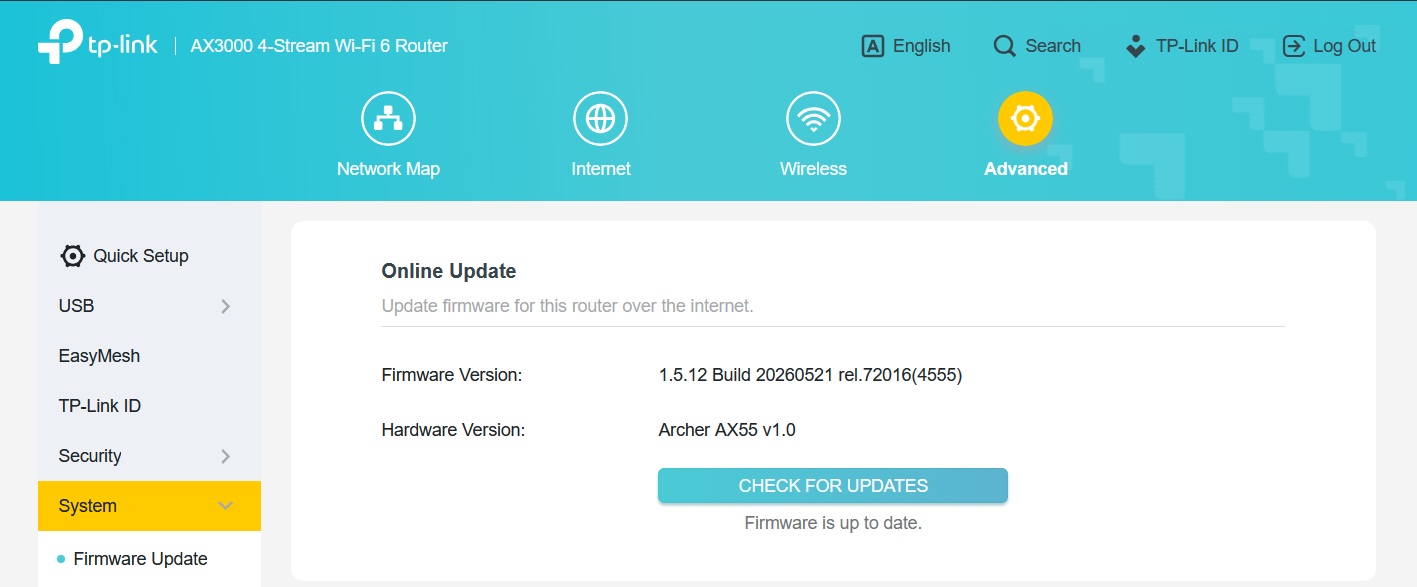
Firmware Version: 1.5.12 Build 20260521 rel.72016(4555)

Hi all.


Today I noticed that both my smartphone (connected via WiFi) and a browser on my desktop PC (connected via wired) gave me a notification that I would need to "authenticate" to use my own network. I found this strange. After some investigation, I discovered that for some websites, like e.g. example (dot) org, (note: http, not https) that my router would intercept this traffic and inject its own HTML and some JS to refresh to its own IP-address to login. 

I have no idea why this happened. I have no captive portal feature enabled. I had not updated the router before (I don't recall why, I believe it was reported some feature I liked would disappear upon updating, so I refrained) which is obviously poor maintenance on my part. I had remote management disabled. I had VPN enabled on port 7501.

This was not a DNS problem or anything else: I verified that DNS sent me to the right IP and I verified what happened in terms of injection in my browser's Developer Tools in the Network tab. I checked the request headers, response headers and the response body. By the way, I'm a programmer and a networking specialist. (Of course, this makes not updating the router even worse, I understand wink)


I decided that I needed to act quickly and tried to upgrade the firmware, thinking that if there had been a security incident, a firmware upgrade may wipe a device infection. I got an error message along the lines of "cloud server not available". My internet connection was otherwise working fine, by the way. I decided to reboot the router first. This worked, and the HTTP intercept behavior vanished instantly. I then upgraded the firmware and changed my password and WiFi keys and disabled VPN. 

However, my current firmware version is now listed as: 1.5.12 Build 20260521 rel.72016(4555)

I just got off the phone with TP-Link support Netherlands and they confirmed that this version is newer than any version they know about. It's also not listed for download on the website. The newest version listed there is: 
Archer AX55(EU)_V1_1.5.10 Build 20251119. The support agent then recommended I come here and start a thread. 

So, here it is. Does this ring any bells for anyone? Was this a likely security incident? Was it a bug? Does anybody have my firmware version? 

Cheers, Mike

  0      
0
#1
Options
1 Accepted Solution
Re:Weird behavior from TP-Link AX55 v1.0 - Security issue or bug?-Solution
2026-09-18 08:36:59 - last edited 2026-10-16 06:03:15

Hello @AnotherMike ,

If the firmware is pushed via the standard Firmware Update page, you can download it with confidence.
As terziyski noted, there may be a delay between the time firmware is pushed via the cloud and the time it is uploaded to regional official websites.


For the first issue you mentioned, it seems to have disappeared after restarting the router. We suggest monitoring the situation for a while longer. If the problem recurs, please feel free to contact us at any time.

Welcome to our Community! Latest Pre-Release firmware: ▷Archer BE550 V2 Enhances EasyMesh Support with Guest/IoT/MLO Extension ▷Archer GE550/GE650 V2 Introduces AI QoS, VPN Enhancements More posts, please see: ▷Get the Ongoing Pre-release Firmware for Wi-Fi Routers Here! Contact via Messages or @Joesph-TP in your new post for urgent problems (not online 24/7). Click Recommended Solution if the post/answer helps.
Recommended Solution
  1  
1
#4
Options
5 Reply
Re:Weird behavior from TP-Link AX55 v1.0 - Security issue or bug?
2026-09-17 16:11:30 - last edited 2026-09-17 16:12:32

  @AnotherMike 
Don't worry, the firmware version 1.5.12 Build 20260521 rel.72016(4555) that your Archer AX55 v1.0 automatically updated to is actually the latest version.

I also have that version of the firmware, and that update appeared more than two months ago.


TRUST NO ONE, THE TRUTH IS OUT THERE!
  3  
3
#2
Options
Re:Weird behavior from TP-Link AX55 v1.0 - Security issue or bug?
2026-09-17 19:50:35

  @AnotherMike 


In many cases a new FW release is issued through the cloud update channel, before even the release is published on the support portal So this a pretty normal and expected behaviour.

If this was helpful click on the arrow pointing upward to make it blue. If this solves your issue, click the star to make it blue as a "Recommended Solution". BTC:149wubkkfoLmNDjDbiTxx4ZU8mpcMA5CJt
  3  
3
#3
Options
Re:Weird behavior from TP-Link AX55 v1.0 - Security issue or bug?-Solution
2026-09-18 08:36:59 - last edited 2026-10-16 06:03:15

Hello @AnotherMike ,

If the firmware is pushed via the standard Firmware Update page, you can download it with confidence.
As terziyski noted, there may be a delay between the time firmware is pushed via the cloud and the time it is uploaded to regional official websites.


For the first issue you mentioned, it seems to have disappeared after restarting the router. We suggest monitoring the situation for a while longer. If the problem recurs, please feel free to contact us at any time.

Welcome to our Community! Latest Pre-Release firmware: ▷Archer BE550 V2 Enhances EasyMesh Support with Guest/IoT/MLO Extension ▷Archer GE550/GE650 V2 Introduces AI QoS, VPN Enhancements More posts, please see: ▷Get the Ongoing Pre-release Firmware for Wi-Fi Routers Here! Contact via Messages or @Joesph-TP in your new post for urgent problems (not online 24/7). Click Recommended Solution if the post/answer helps.
Recommended Solution
  1  
1
#4
Options
Re:Weird behavior from TP-Link AX55 v1.0 - Security issue or bug?
2026-09-18 17:13:02

Thanks so much everyone for responding and advising. Good to know I can trust my firmware knowing that others have this version as well. I wouldn't have considered checking it had it not been for the preceding incident. Consider it from the point of view of being uncertain if your router may have been compromised: you'll want to make sure the firmware subsequently installed is genuine.


About that incident: it did find it somewhat unsettling to have my router intercept http traffic as if I were dealing with a transparent proxy. Sure, it wasn't all that interesting: it was a redirect to the router's login screen and the incident was resolved on reboot, but it's too bad we'll likely never know what caused it. 


  0  
0
#5
Options
Re:Weird behavior from TP-Link AX55 v1.0 - Security issue or bug?
2026-09-20 10:48:44

  @AnotherMike ,

Please continue to observe for a while. If you have any questions, please feel free to contact us.

Or you can contact our local support team if you need a faster response.

Welcome to our Community! Latest Pre-Release firmware: ▷Archer BE550 V2 Enhances EasyMesh Support with Guest/IoT/MLO Extension ▷Archer GE550/GE650 V2 Introduces AI QoS, VPN Enhancements More posts, please see: ▷Get the Ongoing Pre-release Firmware for Wi-Fi Routers Here! Contact via Messages or @Joesph-TP in your new post for urgent problems (not online 24/7). Click Recommended Solution if the post/answer helps.
  0  
0
#6
Options