Critical Issue: No Internet on XC220-G3v (V2.0) after Firmware Change to 250317

Critical Issue: No Internet on XC220-G3v (V2.0) after Firmware Change to 250317

Critical Issue: No Internet on XC220-G3v (V2.0) after Firmware Change to 250317
2026-09-28 17:31:08 - last edited 3 weeks ago
Model: XC220-G3v  
Hardware Version: V2
Firmware Version: XC220-G3v_(US)_V2_1.14.0_0.8.0 Build 250317

Hi Support Team,

I am writing to request assistance with my XC220-G3v (Hardware V2.0) router, which has lost internet connectivity following a firmware change.

Here is a summary of the issue:

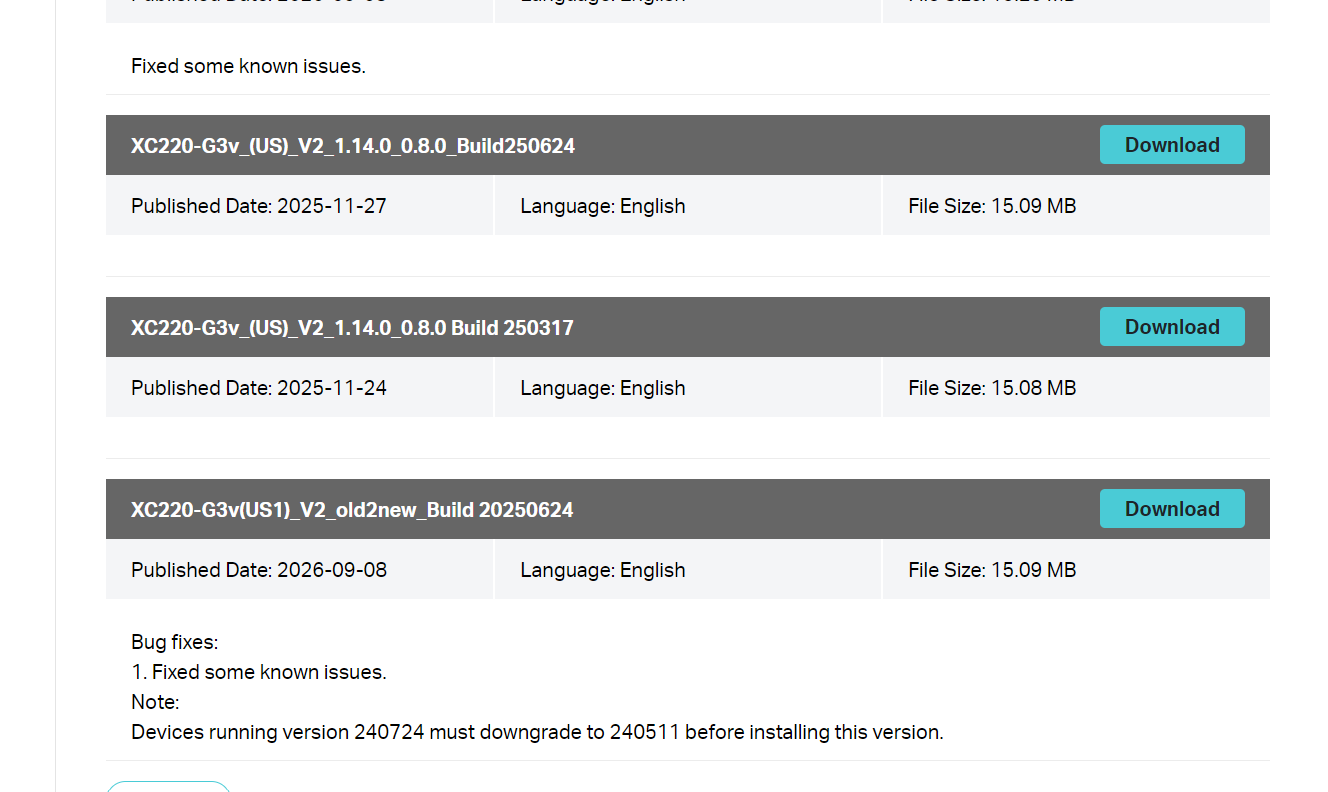
  • Previous Working Firmware: Build 250624 (Internet worked perfectly).

  • Current Firmware: Build 250317 (Internet is not working).

  • The Problem: I attempted to upgrade back to Build 250624 to restore my connection, but the installation fails and returns "Error Code 1."


my isp is bsnl i connected internet in ppp0e but after firmware change i am unable to connect to internet. currently i am using old slow router for internet.


I noticed that Build 250317 is a UP Boot package, 250317 firmware . I downloaded the packages from the official firmware page.

Could you please provide a stable firmware file and the necessary steps to resolve this error so I can get my router working again?


below is the screen shot of tp link india page with 250317
  0      
0
#1
Options
1 Accepted Solution
Re:Critical Issue: No Internet on XC220-G3v (V2.0) after Firmware Change to 250317 -Solution
3 weeks ago - last edited 3 weeks ago

Hello  @raja_K and @ItsTatsuya 


Thank you both for posting in the community, and apologize for my delayed response.


This 1.14.0_0.8.0 Build 250317 seems to be only available for the BR version. Did you download it from the Brazil website?


I'm not sure whether there are any limitations to upgrading from this BR version to a generic version. 


Since you both can't upgrade now, we suggest contacting local technical support to confirm how to proceed.

Nice to Meet You in Our TP-Link Community. Check Out the Latest Posts: Join TP-Link's WiFi 8 Launch Event | Ask Your Questions Here New 1.4.1 Firmware for BE550 V2 Enhancing EasyMesh Support with Extended Guest/IoT/MLO Networking Connect TP-Link Archer Routers to Germany's DS-Lite (Dual Stack Lite) Internet via WAN If you found a post or response helpful, please click Helpful (arrow pointing upward icon). If you are the author of a topic, remember to mark a helpful reply as the "Recommended Solution" (star icon) so that others can benefit from it.
Recommended Solution
  1  
1
#3
Options
2 Reply
Re:Critical Issue: No Internet on XC220-G3v (V2.0) after Firmware Change to 250317
2026-10-01 06:59:57
having similar issue with updating firmware after downgrading to 250317, but i dont have connection issues
  0  
0
#2
Options
Re:Critical Issue: No Internet on XC220-G3v (V2.0) after Firmware Change to 250317 -Solution
3 weeks ago - last edited 3 weeks ago

Hello  @raja_K and @ItsTatsuya 


Thank you both for posting in the community, and apologize for my delayed response.


This 1.14.0_0.8.0 Build 250317 seems to be only available for the BR version. Did you download it from the Brazil website?


I'm not sure whether there are any limitations to upgrading from this BR version to a generic version. 


Since you both can't upgrade now, we suggest contacting local technical support to confirm how to proceed.

Nice to Meet You in Our TP-Link Community. Check Out the Latest Posts: Join TP-Link's WiFi 8 Launch Event | Ask Your Questions Here New 1.4.1 Firmware for BE550 V2 Enhancing EasyMesh Support with Extended Guest/IoT/MLO Networking Connect TP-Link Archer Routers to Germany's DS-Lite (Dual Stack Lite) Internet via WAN If you found a post or response helpful, please click Helpful (arrow pointing upward icon). If you are the author of a topic, remember to mark a helpful reply as the "Recommended Solution" (star icon) so that others can benefit from it.
Recommended Solution
  1  
1
#3
Options