set up static IP for DHCP

set up static IP for DHCP

set up static IP for DHCP
2026-10-05 23:22:30 - last edited Wednesday
Model: TL-WR741ND  
Hardware Version: V4
Firmware Version: 3.13.2 Build 130529 Rel.73629n

I'm trying to set up static IP for my old TP-link to turn it as a repeater for my main router using thiese guides https://youtu.be/iVca4TKaEqc https://youtu.be/FZv3wYSCxWQ
Just in case you're to lazy to watch it: they set up the static IP as 192.168.0.2 and switch off DHCP. Then they connect main router and a repeater by a cable and everything automaticaly works.

The problems begins when I turn off DHCP. I can't connect to repeater's network.

1) It seems to me that I can't change dynamic IP adress into static. It shows that my repeater's IP is dynamic and it's 192.168.0.84. 

2) When i enter 192.168.0.84 from main network I can't access admin panel settings anyway.


3) By default everything works perfectly maybe I can leave just dynamic IP and don't switch off DHCP?????


  0      
0
#1
Options
1 Accepted Solution
Re:set up static IP for DHCP-Solution
2026-10-06 22:41:02 - last edited Wednesday

  @imtpusinglink 


The procedure in the video is describing basically Method 2 from this guide.

If this was helpful click on the arrow pointing upward to make it blue. If this solves your issue, click the star to make it blue as a "Recommended Solution". BTC:149wubkkfoLmNDjDbiTxx4ZU8mpcMA5CJt
Recommended Solution
  0  
0
#3
Options
2 Reply
Re:set up static IP for DHCP
2026-10-06 21:24:56

  @imtpusinglink 


Hi,


for #1) If you are seeing "dynamic" and "static", then this sounds to me like you are in the "WAN" menu of the TL-WR741ND.

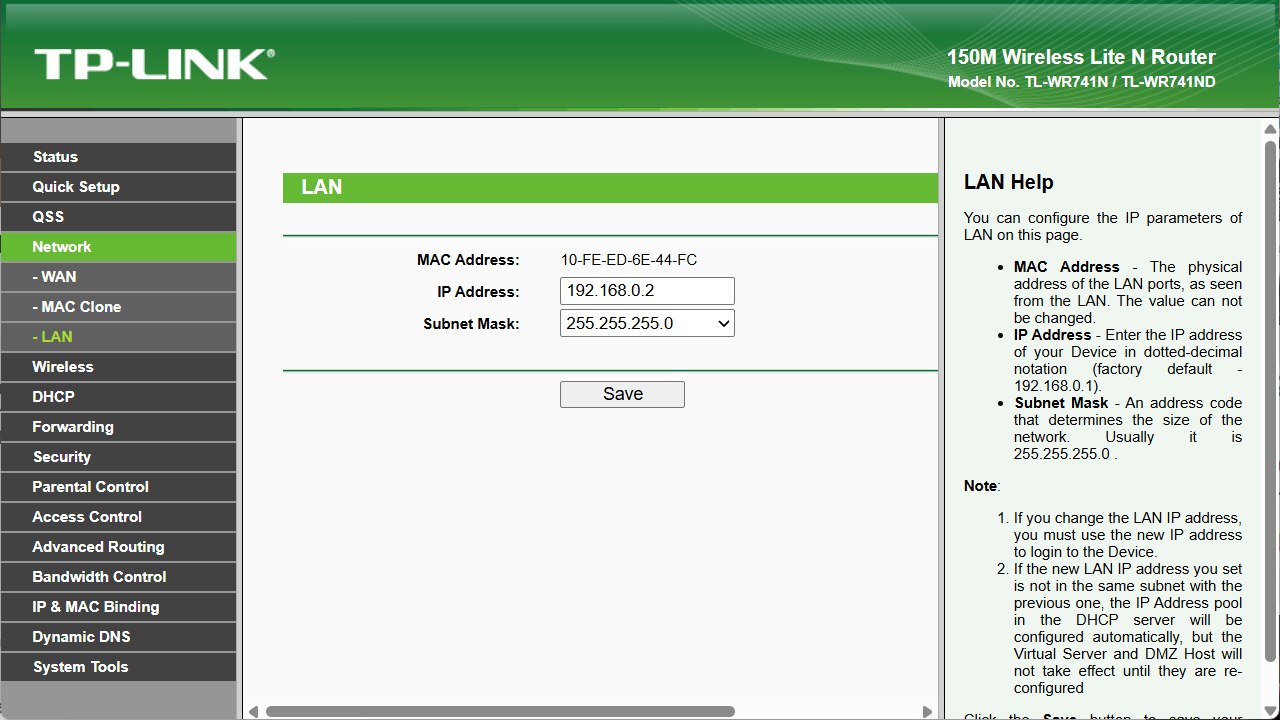
Make sure you enter the IP address of the TL-WR741ND (i.e the "repeater") in its "LAN" menu, like shown in the YT video you liked to. And connect the Ethernet cable into one of the TL-WR741ND's yellow "LAN" ports.


For example, if the IP address of your main router was 192.168.0.1, then you could set the TL-WR741ND to 192.168.0.2, like shown in the screenshot below. After that switch the TL-WR741ND's DHCP off and connect an Ethernet cable from your main router's LAN port to a yellow LAN port on the TL-WR741ND. You should then be able to log into the TL-WR741ND via 192.168.0.2.


for #3) This sounds to me you may be using the TL-WR741ND as a normal router. Of course that will also work, as long as you only use it to provide Internet to connected client devices. But this setup does not create a single local network for all your client devices at your home.
 

  0  
0
#2
Options
Re:set up static IP for DHCP-Solution
2026-10-06 22:41:02 - last edited Wednesday

  @imtpusinglink 


The procedure in the video is describing basically Method 2 from this guide.

If this was helpful click on the arrow pointing upward to make it blue. If this solves your issue, click the star to make it blue as a "Recommended Solution". BTC:149wubkkfoLmNDjDbiTxx4ZU8mpcMA5CJt
Recommended Solution
  0  
0
#3
Options