
Tapo C113 cannot turn off lights

This camera is recording through a window. It's fine during the day but at night the white LEDs or infrared LEDs come on and get reflected in the window which prevents the camera seeing anything. I cannot see a way to disable night mode or turn off the lights. The most I can do is select the infrared lights in night mode rather than the white LEDs. Tapping the lightbulb icon in the camera's home screen just turns on the white LEDs for 5 minutes and doesn't toggle the infrared lights off. I have 3 of these cameras but they're effectively useless at night because of this and if there's no fix I'll just need to return them. Does anyone have any suggestions?
Thanks
- Copy Link
- Subscribe
- Bookmark
- Report Inappropriate Content


Thanks for sharing your approach — and you’re right, we definitely wouldn’t recommend opening up the camera or modifying the hardware, as it will void the warranty. But we appreciate you being upfront about that!
Just curious — after making those modifications, is everything working as expected with the external IR light?
Also, just a quick note: the Tapo C113 is actually designed for both indoor and outdoor use. So if you’re placing it facing outward through a window, you could also consider mounting it directly outdoors — just make sure the power adapter stays indoors, and you should be good to go. That way you won’t need to worry about the IR reflection issue or any warranty concerns.
- Copy Link
- Report Inappropriate Content
Hi,
Thank you for your message. Unfortunately, we do not recommend placing the camera facing a window or glass surface, as this can cause reflections from the IR LEDs or white LEDs at night, which significantly affects the image quality.
If you need to use the camera in this setup and want to avoid the reflection issue, you can try the following:
Disable Night Mode: You can set the camera to Day Mode only (disable the automatic switch to Night Mode). This will keep the IR LEDs and white LEDs off at night. However, please note that without any ambient light source, the image will appear completely dark.
- Copy Link
- Report Inappropriate Content
Can you please tell me how to do this in the app? I couldn't see a way
- Copy Link
- Report Inappropriate Content
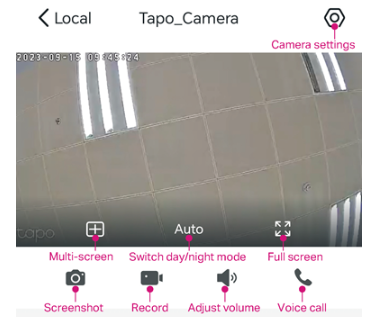
To do this in the app, please open the live view of your camera. Below the live stream, you should see an Auto option. Tap on it, and then select Day Mode from the list. That will keep the camera in day mode and prevent it from switching to night mode.
- Copy Link
- Report Inappropriate Content
@Hilbert-TP thanks for the info. In the end I opened up the camera and covered the IR LEDs with 3 layers of electrical tape which will allow me to use an external IR light and have the camera inside the window. I realise you won't advise anyone does this and that it will invalidate the warranty but hey! It's just a shame this can't be addressed via a firmware fix.
- Copy Link
- Report Inappropriate Content
Thanks for sharing your approach — and you’re right, we definitely wouldn’t recommend opening up the camera or modifying the hardware, as it will void the warranty. But we appreciate you being upfront about that!
Just curious — after making those modifications, is everything working as expected with the external IR light?
Also, just a quick note: the Tapo C113 is actually designed for both indoor and outdoor use. So if you’re placing it facing outward through a window, you could also consider mounting it directly outdoors — just make sure the power adapter stays indoors, and you should be good to go. That way you won’t need to worry about the IR reflection issue or any warranty concerns.
- Copy Link
- Report Inappropriate Content
@Hilbert-TP I fitted the external IR light today and it works very well with the Tapo indoors with its IR LEDs blacked out.
- Copy Link
- Report Inappropriate Content
Great to hear that! Glad the external IR light is working well with your Tapo indoor camera, especially with the built-in IR LEDs blacked out. That’s a clever setup for better nighttime visibility without the typical IR glow.
- Copy Link
- Report Inappropriate Content
Information
Helpful: 0
Views: 571
Replies: 7
Voters 0
No one has voted for it yet.