
Human detection? It's a fog!!!
Hello.
It’s not pleasant to be woken up by a camera notification triggered by human detection, only to see that it’s just a bit of fog!
How is such an error possible?
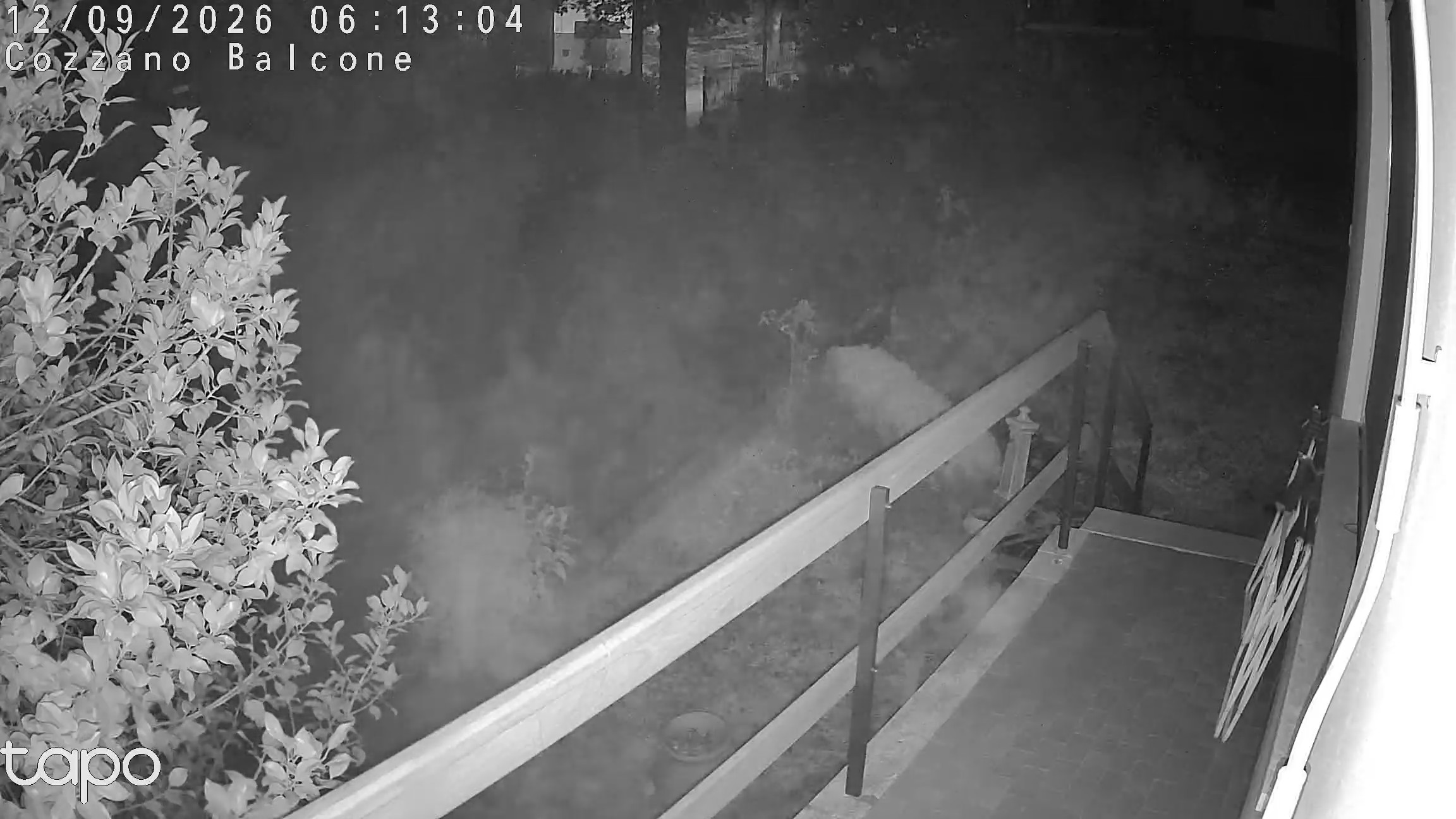
Here is the video:
https://1drv.ms/v/c/24592a3d932d39cc/IQDFPEVwtTnJQ5aKA2pxudAhAURy2TWLTUMqpktk4HXksrM?e=HqK5g1
(Sorry, I need to write just the video URL and not insert it as a link, because otherwise I get an error.)
I would like to point out that the camera interpreted the movement as "Person Detection."
- Copy Link
- Subscribe
- Bookmark
- Report Inappropriate Content


Sorry to hear that your previous support experience wasn’t ideal. But in order to improve the detection performance of your camera, the support team's involvement is essential because there are no other suggestions available.
How frequently does this issue occur? If it doesn’t happen often, say, it’s only happened once or twice, it could be considered a typical false detection. After all, AI detection algorithms aren’t always 100% accurate. In this case, I’d recommend keeping an eye on the camera’s behavior for now. However, if the issue becomes more frequent and adjusting the camera settings doesn’t lead to noticeable improvement, then it’s something the support team will need to investigate further. Unfortunately, I don’t have any additional suggestions to offer on my end at this point.
Did you reach out to them this time? Just so you know, when you submit a support request via email, you’ll usually get an automated reply. That email not only confirms that we’ve received your request, but it also typically includes some suggestions related to your issue. This is meant to help you resolve things more quickly. However, if those suggestions don’t fix the problem, you can simply reply to that email and let them know the issue is still there — that way, a support agent will take it from there.
If you didn’t reply to that email asking for further assistance, it’s possible that no one followed up. And if a support agent hasn’t gotten back to you in a while, feel free to send a follow-up email or contact them through another channel to remind them about your case.
If you’ve already tried reaching out to support several times this time and still haven’t heard back, please share your ticket ID with me, and I’ll help reminding them about your case.
- Copy Link
- Report Inappropriate Content
@PaRi53 Try to reduce the detection sensitivity. Higher detection sensitivity can lead to more false alerts.
- Copy Link
- Report Inappropriate Content
@PaRi53 By the way, i have to say, the fog really looks creepy...
- Copy Link
- Report Inappropriate Content
Hello and thanks for your reply.
I’ve already tried, but with lower sensitivity, the camera doesn’t detect human presence at 3–4 meters.
- Copy Link
- Report Inappropriate Content
Does this happen often? If it does, I’d recommend reaching out to our support team so they can look into it further. Contact Technical Support
To help with the investigation, please include as many details as possible. For example:
1. Mac address of your camrea.
2. Screenshots of the camera's detection settings.
3. Some video clips of the false detection, along with a screenshot of the playback page that lists the events corresponding to the videos you provided, so the support team can see what kind of events are being marked.
- Copy Link
- Report Inappropriate Content
Your link directs me to Italian technical support.
Italian technical support almost never responds.
I’ve stopped contacting them.
- Copy Link
- Report Inappropriate Content
Sorry to hear that your previous support experience wasn’t ideal. But in order to improve the detection performance of your camera, the support team's involvement is essential because there are no other suggestions available.
How frequently does this issue occur? If it doesn’t happen often, say, it’s only happened once or twice, it could be considered a typical false detection. After all, AI detection algorithms aren’t always 100% accurate. In this case, I’d recommend keeping an eye on the camera’s behavior for now. However, if the issue becomes more frequent and adjusting the camera settings doesn’t lead to noticeable improvement, then it’s something the support team will need to investigate further. Unfortunately, I don’t have any additional suggestions to offer on my end at this point.
Did you reach out to them this time? Just so you know, when you submit a support request via email, you’ll usually get an automated reply. That email not only confirms that we’ve received your request, but it also typically includes some suggestions related to your issue. This is meant to help you resolve things more quickly. However, if those suggestions don’t fix the problem, you can simply reply to that email and let them know the issue is still there — that way, a support agent will take it from there.
If you didn’t reply to that email asking for further assistance, it’s possible that no one followed up. And if a support agent hasn’t gotten back to you in a while, feel free to send a follow-up email or contact them through another channel to remind them about your case.
If you’ve already tried reaching out to support several times this time and still haven’t heard back, please share your ticket ID with me, and I’ll help reminding them about your case.
- Copy Link
- Report Inappropriate Content
Following your post, I tried contacting Italian support.
We'll see how (and if) they respond.
- Copy Link
- Report Inappropriate Content
Information
Helpful: 0
Views: 345
Replies: 7
Voters 0
No one has voted for it yet.