Defaillance D210 depuis MAJ 1.1.5

Defaillance D210 depuis MAJ 1.1.5

Defaillance D210 depuis MAJ 1.1.5
Wednesday - last edited Thursday
Model: Tapo D210  
Hardware Version: V2
Firmware Version: 1.1.5

Hello everyone,


I am posting here because I have been experiencing a serious issue with my Tapo D210 doorbell for the past two weeks.

The battery now drains completely in about two days, whereas before that it easily lasted around six months under the same usage conditions.


I noticed that the problem started after the firmware update from version 1.1.2 to 1.1.5. Since this update, the LED ring around the doorbell button remains permanently illuminated, even though the LED mode is set to Auto. Disabling the LED seems to improve the battery life somewhat, but it does not fully resolve the issue.


I have already performed a factory reset twice, with no improvement. To rule out a hardware problem, I even purchased a second D210 doorbell, and it exhibits exactly the same behavior and battery drain.

Because the issue affects two different devices and appeared immediately after the firmware update, I believe this is more likely a firmware-related issue rather than a hardware failure. The previous firmware version worked perfectly, and I never experienced any battery-life issues before.


Has anyone else encountered this problem?

Does Tapo have any information regarding this issue, or is a firmware fix currently being investigated?


Thank you in advance for your feedback.


Freddy SORLI

  0      
0
#1
Options
5 Reply
Re:Defaillance D210 depuis MAJ 1.1.5
Thursday

  @fredo30 


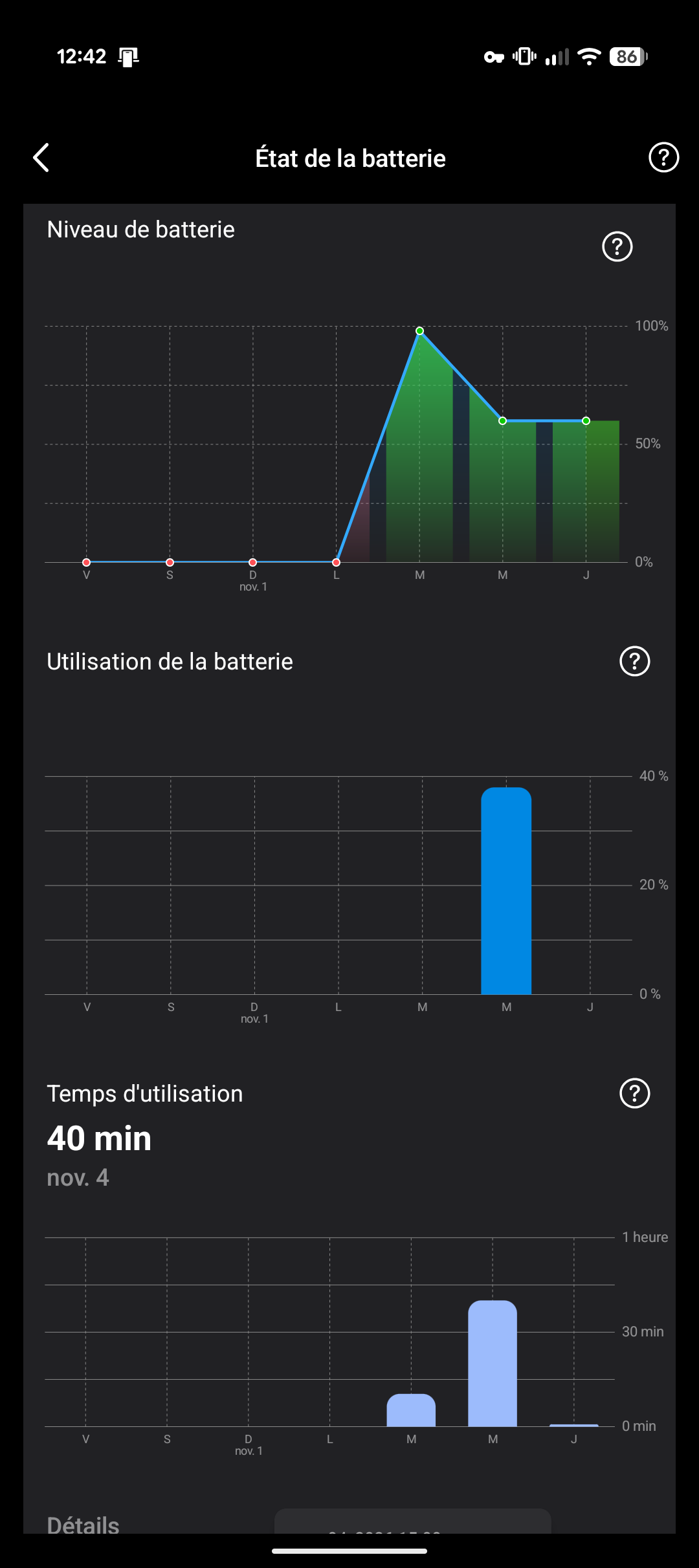
What does your doorbell's Battery Status say? Please share some screenshots of that page here. For example, if the doorbell gets woken up too often, that also drains the battery.


When the doorbell’s LED is set to auto-on, it lights up whenever activity is detected or someone views the live feed. While you were observing, were you doing either of those things? I’d suggest keeping your distance from the doorbell and staying still during the observation, and making sure neither you nor anyone else with access to the doorbell views its live feed, then wait a while and check whether the LED is still on.

  0  
0
#2
Options
Re:Defaillance D210 depuis MAJ 1.1.5
Thursday

 Hi @Wayne-TP,


As you can see in the attached screenshots, the LED was initially set to Auto. During this period, I noticed that the battery level dropped by approximately 40%. As the battery continued to drain quickly, I changed the LED setting from Auto to Off.

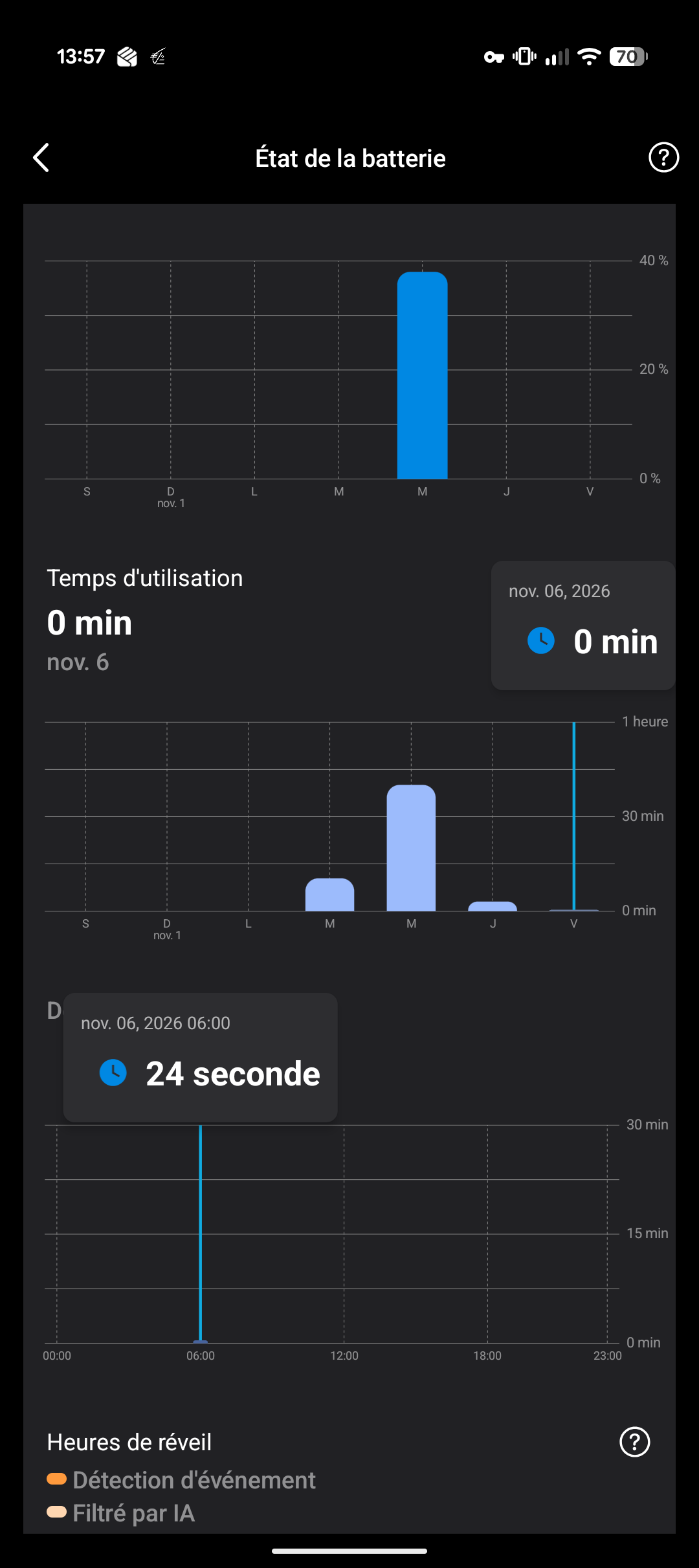
Since disabling the LED, the battery has remained stable and is no longer draining by itself. This seems to indicate that the issue is related to the LED when Auto mode is enabled.

I would also like to point out that I have disabled person detection, motion detection, presence detection, and vehicle detection. In addition, I very rarely access the doorbell's live view, so the battery drain cannot be explained by frequent use of the device.

I would also like to highlight another point shown in the screenshots. The usage statistics indicate approximately 40 minutes of activity, even though I did not access the live view during that period. Furthermore, no one passed in front of the camera, as person detection, motion detection, presence detection, and vehicle detection were all disabled at the time. This makes the reported usage difficult to explain and may be related to the same issue causing the excessive battery drain when the LED is set to Auto.

The attached screenshots show both the battery level decrease while the LED was set to Auto and the current stable battery level after disabling the LED.

Thank you for your help, and please let me know if you need any additional information.


Best regards,


Fredo30

  0  
0
#3
Options
Re:Defaillance D210 depuis MAJ 1.1.5
Thursday

I would like to add some additional information.

This issue only started occurring after the most recent firmware update. Before that update, I did not experience any abnormal battery drain.

To rule out a hardware problem, I tested the same firmware and settings on two different doorbells, and both devices showed the exact same behavior:

  • Significant battery drain when the LED is set to Auto.
  • Normal and stable battery consumption when the LED is set to Off.

Because the problem is reproducible on two separate doorbells, it appears to be related to the firmware rather than a defect affecting a single device.

In addition, the usage statistics shown in the screenshots report approximately 40 minutes of usage, even though I did not access the live view during that period and nobody passed in front of the camera. All detection features (person, motion, presence, and vehicle detection) were disabled at the time.

I hope this information helps with the investigation.

Best regards,
Fredo30

  0  
0
#4
Options
Re:Defaillance D210 depuis MAJ 1.1.5
Yesterday

  @fredo30  How often is your doorbell being woken up? Please share a screenshot of that data -- Wake-up Times.

  0  
0
#5
Options
Re:Defaillance D210 depuis MAJ 1.1.5
Yesterday

  @Wayne-TP 


  0  
0
#6
Options

Information

Helpful: 0

Views: 120

Replies: 5