Archer GE800 upload speed degrades after firmware 1.4.1 Build 20260728

Archer GE800 upload speed degrades after firmware 1.4.1 Build 20260728

Archer GE800 upload speed degrades after firmware 1.4.1 Build 20260728
2026-09-12 15:06:52
Model: Archer GE800  
Hardware Version: V1
Firmware Version: 1.4.1 Build 20260728

Since updating my Archer GE800 to firmware 1.4.1 Build 20260728, I have been seeing a significant degradation in upload performance over time.

My internet connection is 8 Gbps symmetrical. Historically I would typically see around 6–7.5 Gbps download and upload.

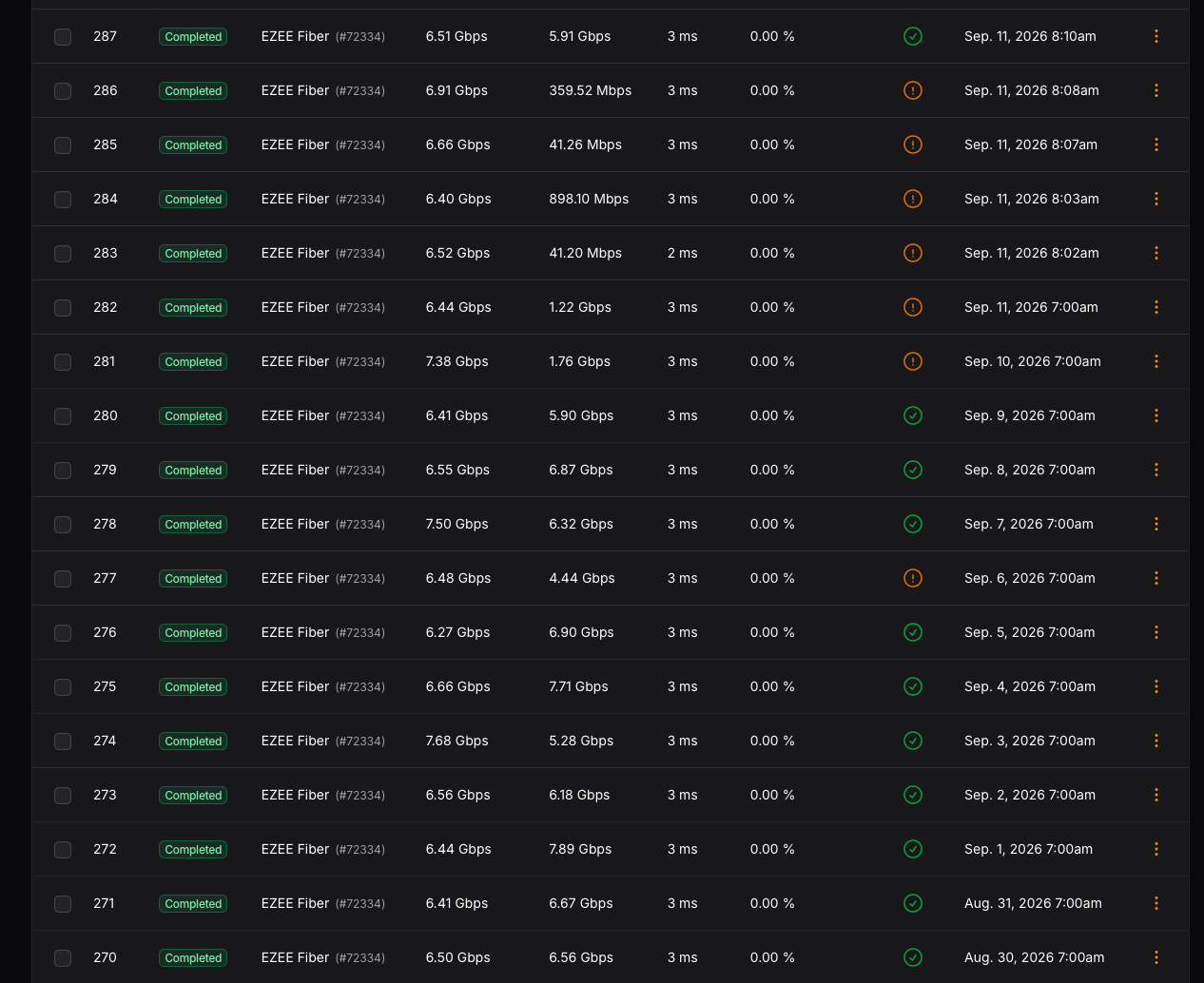
Since the firmware update, upload speed will eventually drop to approximately 300 Mbps–1.5 Gbps, while download performance remains unaffected..

Rebooting only the GE800 immediately improves upload speed to around 4 Gbps, but the upload performance gradually degrades again with router uptime. I have reproduced this behavior multiple times over the last several days.

My network topology is:

Mac & Linux server → 10GbE switch → Archer GE800 → ISP ONT/modem

Both my Mac and Linux server show the same WAN upload behavior. I also verified over 9 Gbps LAN throughput between the Mac and Linux serer using iperf3, so the local 10GbE network is operating normally.

I also tested the GE800 Flow Controller setting under Advanced → Network → LAN. It was originally disabled; enabling it did not improve the issue.

Because rebooting only the GE800 consistently restores several gigabits of upload performance and the degradation then returns over time, this appears to be a router/firmware issue rather than an ISP or LAN throughput limitation.

Has anyone else seen similar behavior with 1.4.1 Build 20260728?


TP-Link support: is there a known issue with this firmware affecting WAN upload throughput or hardware acceleration? If so, is there an engineering/hotfix firmware available? Since this firmware is marked as non-downgradable, is there an officially supported rollback or recovery path if needed?

  2      
2
#1
Options
3 Reply
Re:Archer GE800 upload speed degrades after firmware 1.4.1 Build 20260728
2026-09-14 07:40:04

Hello  @squelching ,

Welcome to our community.


Besides updating the firmware, have you changed any other settings?
If you enable QoS and set the upload and download speeds to match, does the upload speed still drop unexpectedly and gradually?


The Archer GE800-v1-1.4.1 was released only recently, so we have not yet received any relevant feedback. We recommend sending an email to forumsupport.usa@tp-link.com  with the following information:


Subject: [Forum Escalation][ID 872138] Archer GE800 upload speed degrades after firmware 1.4.1 Build 20260728

Forum Nickname: squelching

Thread URL: https://community.tp-link.com/us/home/forum/topic/872138

Model&Version: Archer GE800-v1-1.4.1 

Description: [User Provided]

Any Other Relevant Information: Please attach the configuration file and system log on your router for further investigation.

How to view and save the system log of TP-Link wireless router

How to create and restore from a backup file on your TP-Link Router


Once sent, a ticket will be created in our support system, and a team member will follow up to gather more information or troubleshoot the case.


You are welcome to share the latest updates and solutions at any time.heart

Welcome to our Community! Latest Pre-Release firmware: ▷Archer BE550 V2 Enhances EasyMesh Support with Guest/IoT/MLO Extension ▷Archer GE550/GE650 V2 Introduces AI QoS, VPN Enhancements More posts, please see: ▷Get the Ongoing Pre-release Firmware for Wi-Fi Routers Here! Contact via Messages or @Joesph-TP in your new post for urgent problems (not online 24/7). Click Recommended Solution if the post/answer helps.
  0  
0
#2
Options
Re:Archer GE800 upload speed degrades after firmware 1.4.1 Build 20260728
2026-09-14 12:17:43

  @Joseph-TP 


I didn't change any settings. Performance was fine, then I updated the firmware and started having issues. Here is a small sample showing performance was fine for over a week prior to the firmware update, then consistent low upload speed until a reboot. The speed degrades again within a few hours. I sent the email with logs and a configuration backup as requested.


2b43543dbad244f59428a540a8102640

  2  
2
#3
Options
Re:Archer GE800 upload speed degrades after firmware 1.4.1 Build 20260728
2026-09-17 01:11:49

Hi @squelching ,

Thank you for sharing this information. You are welcome to come back anytime with progress updates or any solutions you find.

Welcome to our Community! Latest Pre-Release firmware: ▷Archer BE550 V2 Enhances EasyMesh Support with Guest/IoT/MLO Extension ▷Archer GE550/GE650 V2 Introduces AI QoS, VPN Enhancements More posts, please see: ▷Get the Ongoing Pre-release Firmware for Wi-Fi Routers Here! Contact via Messages or @Joesph-TP in your new post for urgent problems (not online 24/7). Click Recommended Solution if the post/answer helps.
  0  
0
#4
Options