Deco BE67, Deco BE68, Deco BE13000 (V1.0/V1.6) Pre-release Firmware 1.3.7 Improves System Stability

Deco BE67, Deco BE68, Deco BE13000 (V1.0/V1.6) Pre-release Firmware 1.3.7 Improves System Stability

Deco BE67, Deco BE68, Deco BE13000 (V1.0/V1.6) Pre-release Firmware 1.3.7 Improves System Stability
2026-09-16 16:56:46 - last edited 2 weeks ago
Model: Deco BE68   Deco BE67   Deco BE13000  
Hardware Version: V1
Firmware Version: 1.3.7 Build 26091412 rel.27421 (Pre-release Version)

Hey everyone,

We're excited to share early access to a new firmware update for Deco BE67, BE68, BE13000 V1/V1.6 that improves system stability and fixes bugs.

This firmware is currently in pre-release; however, your testing and feedback may help accelerate its official release!

 
Applies to:


Deco BE67, Deco BE68, Deco BE13000 (V1.0/V1.6)


Firmware Modifications:


New Features/Enhancements


  1. Improved stability and security of the system.


Bugfixes


  1. Fixed a bug where the L2TP server doesn't work in certain special scenarios.
  2. Fixed a bug where the Deco may unexpectedly restart in certain special scenarios.
  3. Fixed a bug where only the 5 GHz backhaul may be established after Network Optimization in certain scenarios.
  4. Fixed a bug where upload speed is limited to 2.5 Gbps when QoS is enabled.


Firmware Download Link:


  Deco BE67/BE68/BE13000 V1.0/V1.6     1.3.7 Build 26102012 rel.36061 (Pre-release Firmware)   


Note:

  • Pre-release and Beta firmware should be used at your own discretion. We cannot guarantee the functionality of features or technical support for Pre-Release or Beta Firmware. Features and support vary by model and Internet connection type.
  • Please ensure your Deco app is fully up-to-date.
  • There will be an official firmware release in the future. If you are not comfortable using beta firmware, please wait for the official release or contact our support teams for assistance.
  • For detailed instructions on how to install this beta firmware on your Deco Mesh System, visit: How to manually update the firmware via web UI.
  • This Pre-Release Firmware can be reverted to the previous official version 1.3.6.


As always, we value your feedback. If you happen to encounter any concerns during or after the firmware upgrade, please feel free to comment below with the following information. Your input helps us continue to improve and provide the best possible products and support.
 

  • Provide a detailed network layout, including how the devices are connected.
     
  • Include a detailed description of the issue and as much information as possible regarding the specific conditions that seem to trigger the behavior.


Thank you for your continued support and for being part of our community.


Update Log:


10/28/2026: 

  • A new pre-release firmware version (v1.3.7 Build 26102012 rel.36061) has been released for the Deco BE67/BE68/BE13000 V1.0/V1.6.
  • This firmware version improves Deco system stability.
  0      
0
#1
Options
25 Reply
Re:Deco BE67, Deco BE68, Deco BE13000 (V1.0/V1.6) Pre-release Firmware 1.3.7 Improves System Stability
2026-09-18 11:03:29

  @Ryan 


I've got the 3 unit BE68. Hit a few 'speed bumps' along the way.


I unzipped the file and then, using FireFox and the web GUI, went to Advanced and then System, Update. Selected the BIN file, 
09/15/2026  10:50 PM        49,683,600 be68v1_be67v1_be13000v1_be13000v2_be77v1_be75v2-RSA2048--US_EU_JP_SG_HK_CA_AU-up-ver1-3-7-P1[26091412-rel27421]_2026-09-14_00.46.47.bin


Started the update and it failed? Said I needed to select a newer file?


Did it again, and it Updated???


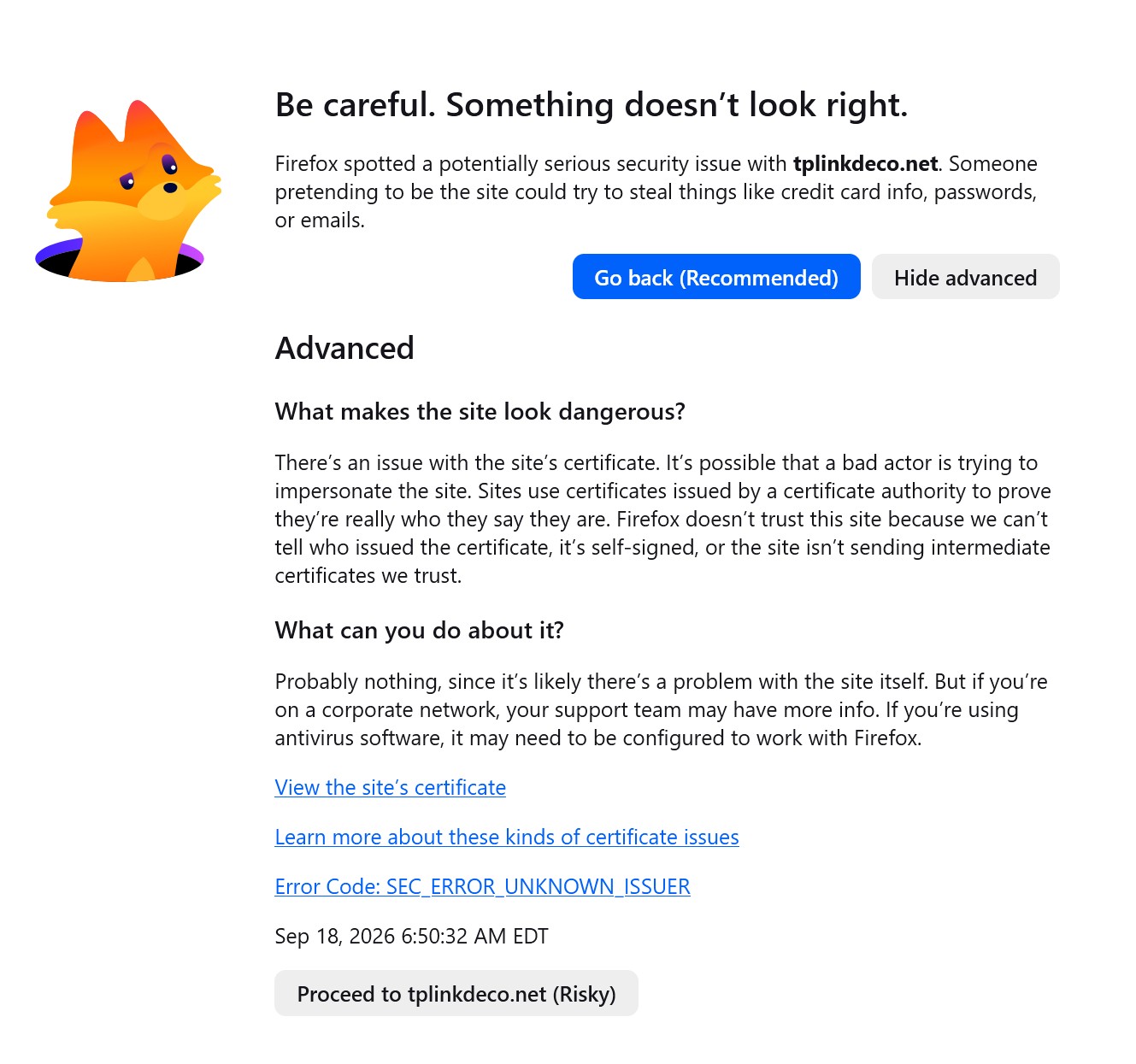
OK, then when the REBOOT was finished, FireFox gave me this:


7c5942b5edd14ab597e593f2dd3dace1

However when I selected PROCEED, it worked fine?


I normally log into the Deco though with this URL --> http://192.168.68.1/webpages/index.html#networkMap


If I use 'tplinkdeco.net' as the url, it gets changed to this ---> https://tplinkdeco.net/webpages/index.html#networkMap and no error is presented with this either?

  0  
0
#2
Options
Re:Deco BE67, Deco BE68, Deco BE13000 (V1.0/V1.6) Pre-release Firmware 1.3.7 Improves System Stability
2026-09-19 13:50:35

  @Ryan Installed yesterday and seems good so far.

  1  
1
#3
Options
Re:Deco BE67, Deco BE68, Deco BE13000 (V1.0/V1.6) Pre-release Firmware 1.3.7 Improves System Stability
2026-09-19 13:54:06
That warning is simply due to the local redirect that they do from the tplinkdeco.net to whatever the IP is of your router. They make the warning look worse than it is in this case. Nothing of concern.
  0  
0
#4
Options
Re:Deco BE67, Deco BE68, Deco BE13000 (V1.0/V1.6) Pre-release Firmware 1.3.7 Improves System Stability
2026-09-19 14:20:19

  @Larry-R 


Yeah, knew that, but only reason I posted about it is because I never got that before?

  0  
0
#5
Options
Re:Deco BE67, Deco BE68, Deco BE13000 (V1.0/V1.6) Pre-release Firmware 1.3.7 Improves System Stability
2026-09-19 14:22:51

  @IrvSp Ah, I think I've always seen that message, or similar when it tried to redirect to the URL vs just the IP.

  0  
0
#6
Options
Re:Deco BE67, Deco BE68, Deco BE13000 (V1.0/V1.6) Pre-release Firmware 1.3.7 Improves System Stability
2026-09-21 12:40:11

  @IrvSp 


Hmm, I'm not quite sure why Firefox would show the encryption cert message only after a reboot following the update. Also odd about the "newer file" message. I didn't get that when I updated my BE68s to this firmware recently. Maybe a browser cache thing?


That said, for anyone wondering why the message appears and why browsers may present it when logging into router web interfaces: Understanding the TP-Link HTTPS Not Secure Warning


@Larry-R 


Thanks for the feedback! I also installed it on my BE68 network (3 nodes), and it has been smooth so far.


  0  
0
#7
Options
Re:Deco BE67, Deco BE68, Deco BE13000 (V1.0/V1.6) Pre-release Firmware 1.3.7 Improves System Stability
2026-09-26 13:30:29

  @Ryan hello! I installed this on my BE13000. So far, no major issues - however when I checked the logs in the webUI, I noticed they are a lot less busy than they used to be. It seems that maybe they are only showing logs with ACK now, not sure if that's intentional or a bug.

  0  
0
#8
Options
Re:Deco BE67, Deco BE68, Deco BE13000 (V1.0/V1.6) Pre-release Firmware 1.3.7 Improves System Stability
2026-09-28 08:21:14

  @Nashvillejoe 

Hi,
Thank you for reporting this. Please first verify that the Log Type on the Web UI's System Log page is set to All.


Even if All is selected, seeing fewer log entries than before is not necessarily a bug. Log contents and verbosity can differ between firmware versions. If your Deco is working fine now, you can enjoy the internet.


If you observe any abnormal operation in addition to the logging change, please share more details, and we'll be glad to take a look.


Best Regards

  0  
0
#9
Options
Re:Deco BE67, Deco BE68, Deco BE13000 (V1.0/V1.6) Pre-release Firmware 1.3.7 Improves System Stability
2026-09-28 15:16:06

Hi  @Solla-topee, Thanks for the response. I can confirm that Log Type was set to ALL when I noticed the reduced logging.


I have now noticed an issue since installing the 1.3.7 beta that I’m trying to troubleshoot. One of my Google Nest thermostats has been repeatedly going offline/disconnecting from Wi-Fi. It has always been on the separate IoT 2.4ghz only network, but the behavior is continuing.


The problem is that the System Log is now so sparse that I can’t really correlate the thermostat going offline with anything happening on the Deco. With the log set to ALL, I’m mostly seeing DHCP entries such as DISCOVER/OFFER/ACK, whereas previous firmware versions appeared to provide considerably more detail about network/client activity.


I’m not certain yet that the beta firmware is causing the Nest disconnects, but the reduced logging makes it much more difficult to determine what is happening when the device goes offline.

  0  
0
#10
Options
Re:Deco BE67, Deco BE68, Deco BE13000 (V1.0/V1.6) Pre-release Firmware 1.3.7 Improves System Stability
2026-09-28 17:38:26

  @Ryan 


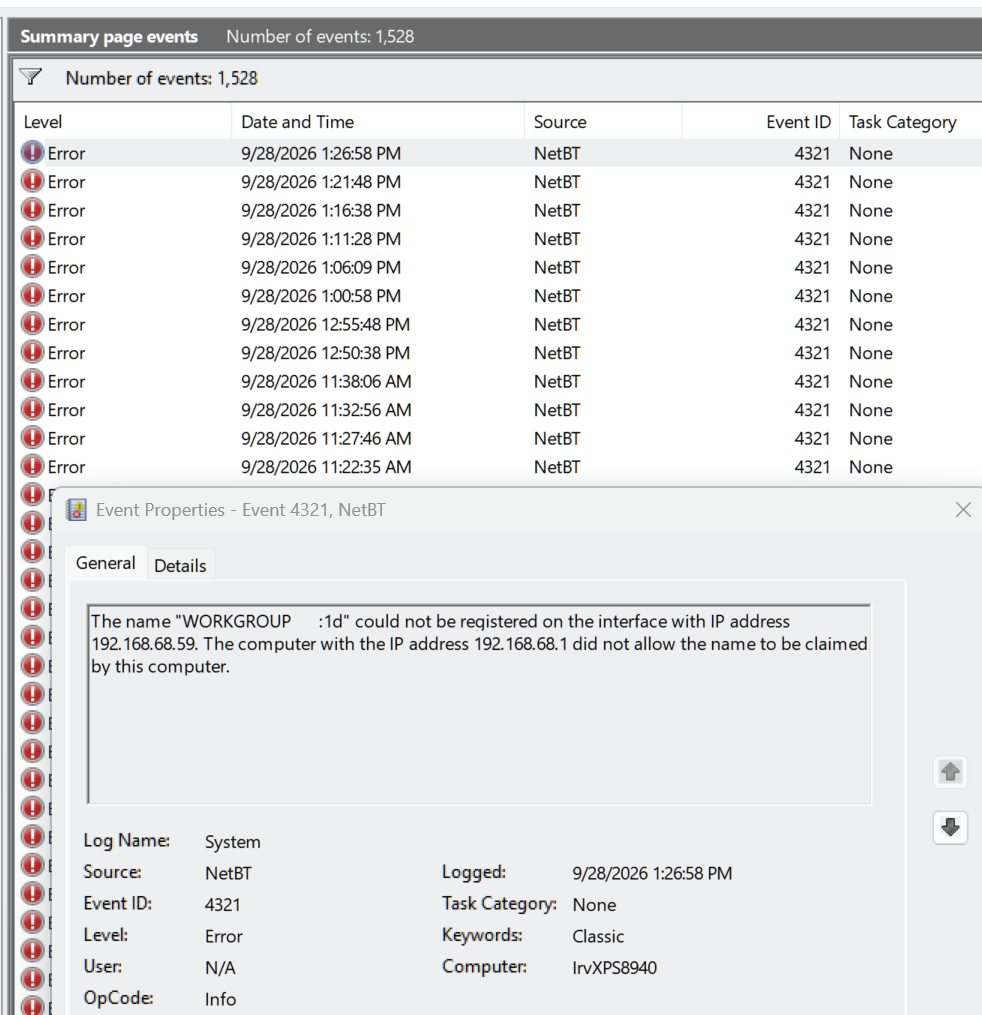
I was looking at my Event Viewer for another problem. I noticed these though:


f842bf7212ce44edaa677a01bbd3deb9


I am NOT 100% sure if this is an MS problem? Master Browser was depricated by MS. If I'm reading this correctly, the BE68 is :


 Default Gateway . . . . . . . . . : fe80::be07:1dff:fe6d:7e90%17
                                       192.168.68.1
   DHCP Server . . . . . . . . . . . : 192.168.68.1


and  my PC is:


 IPv4 Address. . . . . . . . . . . : 192.168.68.59(Preferred)


To me, this indicates that the BE68 thinks IT is the Master Browser and will not release the rights?


This happens every 5 minutes or so, and no, I don't know if other F/W did this as well.


I 'see' no ill effects from this, but it does seem to be something that should not be happening?


MS problem I'd think, but not sure?


  0  
0
#11
Options