
Early Access Deco X50/X55 V1, X20/X25/W3600/X60 V4, W6000 V2.6 Firmware 1.11.1 Brings Network Mode, WoL, and More
 This thread has been locked for further replies. You can start a new thread to share your ideas or ask questions.


Hey All,
We're excited to share early access to a new firmware update for the Deco X50 and Deco X55 V1, Deco X20, Deco X25, Deco W3600, and Deco X60 V4, as well as the Deco W6000 v2.6! This pre-release firmware is packed with new features and enhancements designed to elevate your Deco Mesh Home Networking experience.
This firmware is currently in pre-release; however, your testing and feedback may help accelerate its official release!
Update: The Official Release Version of this Firmware is Now Available. Please use the Deco App to Update Your Deco to the Latest Firmware Version.
Release Notes:
1. Added Wake-on-LAN (WoL) support
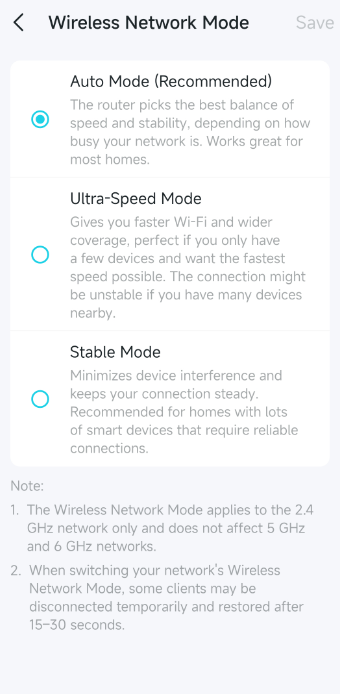
2. Added Auto mode to the Wireless Network Mode feature.
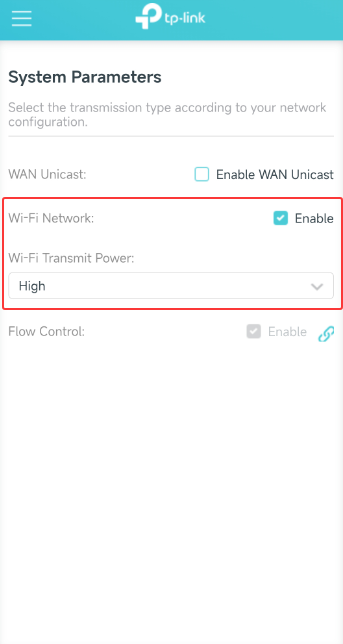
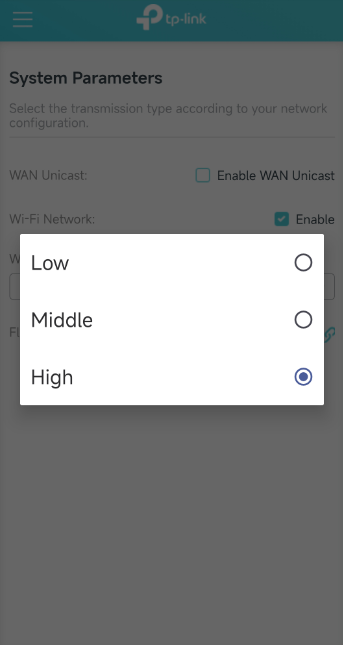
3. Added Wi-Fi power control in the Web UI
4. Added a flow control toggle switch in the Web UI
5. Optimized default client naming logic
6. Optimized the SafeSearch function.
Introducing New Wireless Network Mode Function - Auto Mode
When you select Auto Mode on the Wireless Network Mode page (Deco App > More > Advanced), the Deco picks the best balance of speed and stability, depending on how busy your network is. Works great for most homes.
Note: Wireless Network Mode appears in the Deco App when all Deco nodes in the Mesh network support this feature, and there are at least 2 Deco nodes in the network.
Introducing Wi-Fi Transmit Power Controls in Web UI
After logging in to the Deco web UI, go to Advanced > System > System Parameters, where you will find options to either enable/disable the Deco Wi-Fi network or adjust Wi-Fi Transmit Power.
Firmware Download Link:
| Deco X50/X55 V1 Deco X20/X25/W3600/X60 V4 Deco W6000 V2.6 |
Note:
- Pre-release and Beta firmware should be used at your own discretion. We cannot guarantee the functionality of features or technical support for Pre-Release or Beta Firmware. Features and support vary by model and Internet connection type.
- Please ensure your Deco app is fully up-to-date.
- There will be an official firmware release in the future. If you are not comfortable using beta firmware, please wait for the official release or contact our support teams for assistance.
- For detailed instructions on how to install this beta firmware on your Deco Mesh System, visit: How to manually update the firmware via web UI.
- This Pre-Release Firmware cannot be reverted to the previous official version.
As always, we value your feedback. If you happen to encounter any concerns during or after the firmware upgrade, please feel free to comment below with the following information. Your input helps us continue to improve and provide the best possible products and support.
- Provide a detailed network layout, including how the devices are connected.
- Include a detailed description of the issue and as much information as possible regarding the specific conditions that seem to trigger the behavior.
Thank you for your continued support and for being part of our community.