
Comparing Robot Vacuums and Mops from Tapo (RV50 Pro Omni, RV30Max Plus, RV20Max Plus)


Comparing Robot Vacuums and Mops from Tapo (RV20Max Plus, RV30Max Plus, RV50 Pro Omni)
With Tapo Now offering a full lineup of robot vacuums and mops, we figure it is time to provide a comparison on our forums. The models differ in several ways, with the biggest changes coming from the RV50 Pro Omni.
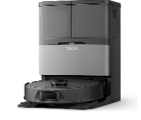 Tapo RV50 Pro Omni (Overview)
The RV50 Pro Omni is our most powerful vacuum/mop, with an even more powerful dock. The RV50 was designed to tackle common robot vacuum frustrations, including automatic hair cutting, self-cleaning mop heads, pet zones, water storage/maintenance, and intelligent obstacle avoidance.
Introducing the Tapo RV50 Pro Omni - The Vacuum that Can Handle it All!
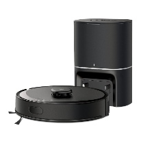 RV30Max Series: The Tapo RV30 Max and RV30 Max Plus are our latest releases, featuring new 3D Real-Time Whole-Home Mapping and Improved Navigation to achieve the most accurate map and path of any of our robot vacuums.
You may also see a newer version of the RV30 (typically Turbo or Gen 2). This is a vacuum-only model that is able to benefit from a more powerful vacuum, at the cost of its mop. This model is not available in every region.
See the RV30Max and RV30Max Plus on our Product Overview Page or Buy Now on Amazon
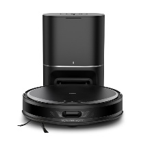 RV20 Series: The Tapo RV20 Series is much the same. However, it does not feature the latest 3D Mapping technology, but it still uses LiDAR for path navigation and obstacle avoidance. If your home is not as complex, not as messy, or you just need an everyday-driver – the RV20 series is still a great option!
See the RV20Max and RV20Max Plus on our Product Overview Page or Buy Now on Amazon
Find our Previous Models and Overviews Here:
Tapo RV30C and RV30C Plus Robot Vacuum - Smart Home Community
* Features depend on Your Model of Vacuum. Models such as the RV50 offer more thorough options for cleaning, map customization, and pathing through a new interface.
| RV50 Pro Omni |
RV30 Max Plus |
RV20 Max Plus |
|
| Image |
|
|
|
| Overview |
|||
| Navigation |
Dual-laser + LiDAR |
LiDAR |
MagSlim LiDAR |
| Smart Home Integration |
Matter, Alexa+, Google |
Alexa, Google, Matter |
Alexa, Google |
|
|
|
|
|
| Suction Power |
15,000 Pa |
5,300 Pa |
5,300 Pa |
| Mop Lift / Detachment |
Yes |
— |
— |
| Hair Cutting at Dock |
Yes |
— |
— |
| Auto Detergent Refill |
Yes |
— |
— |
| Hot-Water Wash & Dry |
140°F / 122°F |
— |
— |
|
|
|
|
|
| Dock Features |
Auto-Empty Dustbin Clean and Dirty Water Storage Mop Washing and Drying |
Auto-Empty Dustbin |
Auto-Empty Dustbin |
| Cleaning Settings |
Route Density Water Level Suction Level Perfect Fit Mode |
Water Level Suction Level |
Water Level Suction Level |
| Map Editing |
Hide Mapped Rooms Carpet Recommendations |
|
|
| Buy Now |
Related Articles
Welcome and General Tips for the Latest Robot Vacuums
Getting Started with Your Robot Vacuum – See What Our Team Recommends When Getting Started
Comparing Robot Vacuums and Mops from Tapo (RV20Max Plus, RV30Max Plus, RV50 Pro Omni)
Customizing Your Home’s Map – Setting Cleaning Directions, Carpets, Suction Levels and More!
Clean with Your Voice – Starting Cleaning Routines for Amazon Alexa, Samsung SmartThings, and Google Home
Automate Your Robot Vacuum and Mop – Smart Actions and Geofencing for an Always-Clean Home
What Should I Do If I Need to Move My Dock After Mapping My Home?
Introducing the Tapo RV50 Pro Omni - The Vacuum that Can Handle it All!
Contact Support or Join our Official Subreddits: r/tapo, r/tplink, r/omada_networks