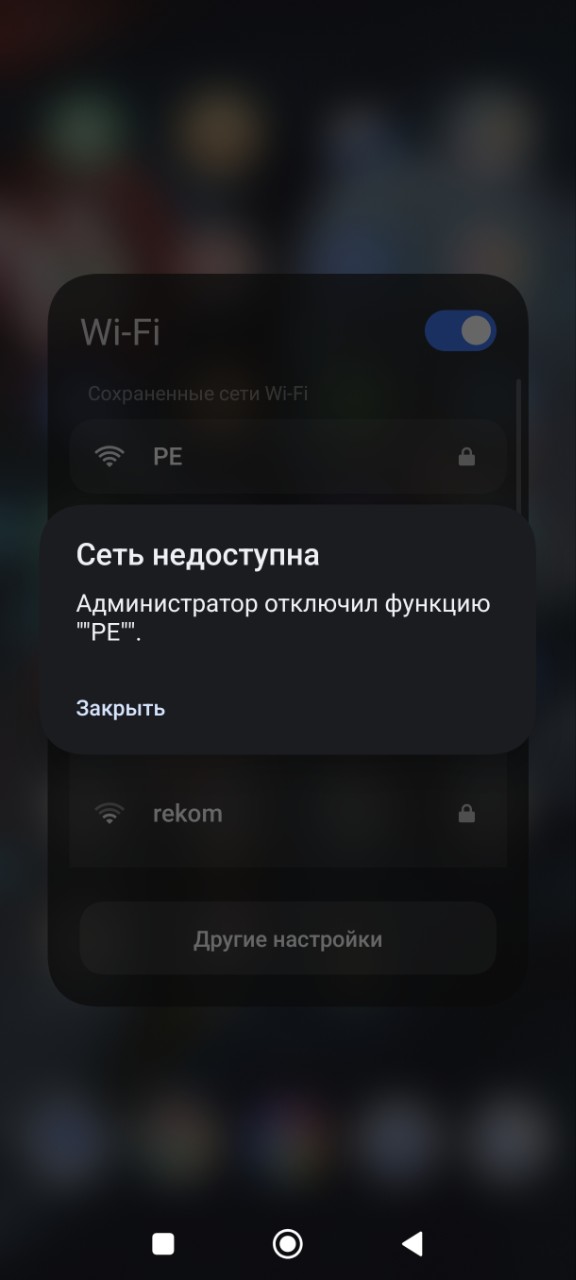
Network has been blocked by administrator EAP 613

Network has been blocked by administrator EAP 613

Network has been blocked by administrator EAP 613
Friday
Model: EAP613  
Hardware Version: V1
Firmware Version: 1.6.0

Good afternoon!

I had a network consisting of 24 EAP HD265 access points. After installing 4 EAP 613 access points for clients with Wi-Fi 6-enabled smartphones, they started receiving the “Network has been blocked” message.

The following troubleshooting steps were attempted without success:

  • Enabling and disabling the 802.11r standard

  • Moving the EAP613 access points to a separate location

Both the OMADA controller and the access points themselves are running the latest firmware available as of today.

Please advise on how to resolve this issue.

  0      
  0      
#1
Options
2 Reply
Re:Network has been blocked by administrator EAP 613
21 hours ago

Hi  @r.tsirkin 


Thanks for posting here.


they started receiving the “Network has been blocked” message.

>>>Does this message show on your phones? Could you please share with a screenshot of the error message page?

Does this happen on all wireless clients?


Moving the EAP613 access points to a separate location

>>>What's the result? Can client connects to the EAP613?

If manage an EAP613 via standalone mode, will it work?


What kind of controller are you using?

  0  
  0  
#2
Options
Re:Network has been blocked by administrator EAP 613
20 hours ago

  @r.tsirkin 

Hello,

Good afternoon,

There is a screenshot available, but it is in Russian.

The EAP613 point works without errors when tested separately from the location. However, errors occur with Wi‑Fi clients that support Wi‑Fi 6. Clients without this technology work fine.

The administrator has disabled the "PE" function. The network is unavailable.


  0  
  0  
#3
Options