
Firmware T1500G-10MPS v2.0 in OC300

Hi all,
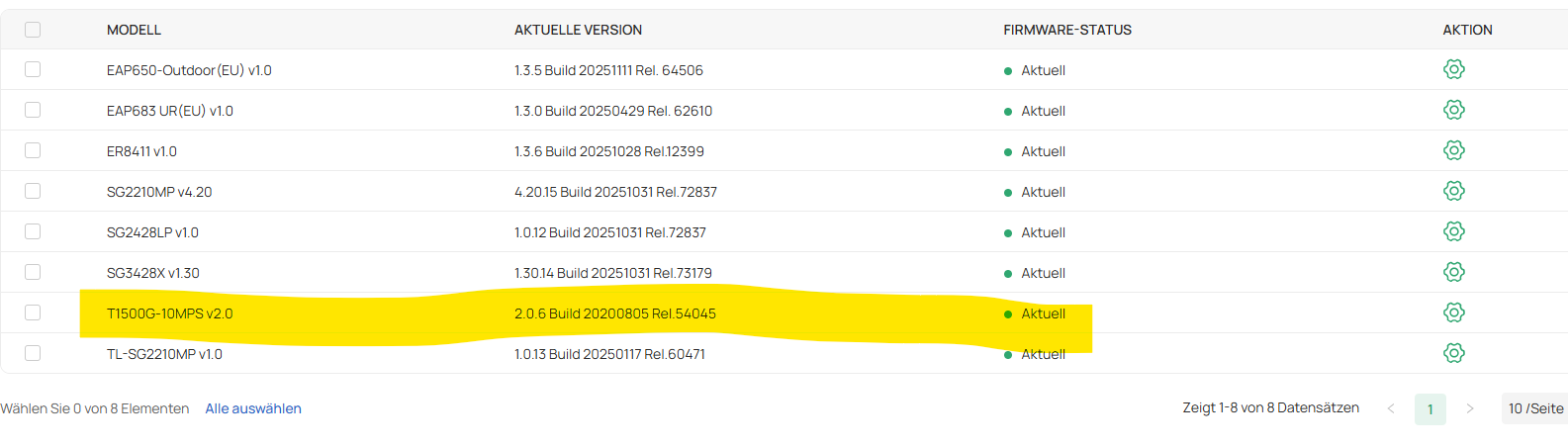
I got the information in OC300 that the Firmware of the T1500G-10MPS v2.0 is not actual. And that I should update these device.
But if i look on "firmware" in the OC300 it says that the device is actual.
On the TP-Link Homepage I don't find a newer version.
What shall I do?

- Copy Link
- Subscribe
- Bookmark
- Report Inappropriate Content

@GuWen, I've seen this warning after upgrading to Omada v6. From a different thread, "Omada 6.x maintains full backward compatibility with all EAP models supported in Omada 5.x." Regarding switches, it was a try it and see response and yours seems to be working. (https://community.tp-link.com/en/business/forum/topic/848342)
I assume this is a warning you can ignore unless you're having problems, but it would be nice if it would go away unless there are firmware updates planned for the older devices. My T1600G-28TS v3.0 didn't like the Omada V6 beta or initial release, but I tried again on my OC200 with the 2.22.10 Build 20251118 Rel.34511 release and no major issues since.
- Copy Link
- Report Inappropriate Content
@GuWen, I've seen this warning after upgrading to Omada v6. From a different thread, "Omada 6.x maintains full backward compatibility with all EAP models supported in Omada 5.x." Regarding switches, it was a try it and see response and yours seems to be working. (https://community.tp-link.com/en/business/forum/topic/848342)
I assume this is a warning you can ignore unless you're having problems, but it would be nice if it would go away unless there are firmware updates planned for the older devices. My T1600G-28TS v3.0 didn't like the Omada V6 beta or initial release, but I tried again on my OC200 with the 2.22.10 Build 20251118 Rel.34511 release and no major issues since.
- Copy Link
- Report Inappropriate Content
OK. Thanks.
Yes, I got the message the first time after updating to v6.
And it would be fine if the message is not showing any more. It always makes me nervous a little bit.
I will replay on the other thread.
- Copy Link
- Report Inappropriate Content

@TP-Link
How can ignoring an error message be a recommended solution?
How about fixing the false report or provide a software upgrade for the affected devices (in my case the EAP225Wall)
- Copy Link
- Report Inappropriate Content
Hi @ErikF,
I guess it's recommended because there's nothing you can do and it appears that End of Life devices will likely stop being supported in a future controller update.
TP Link added an article that explains things: https://support.omadanetworks.com/en/document/109772/
- Copy Link
- Report Inappropriate Content
Information
Helpful: 0
Views: 887
Replies: 4
Voters 0
No one has voted for it yet.