
Request for Firmware Update to Support Additional Wireless Modes (802.11 b/g/n/ax/be) in 2.4 GHz

Dear TP-Link Support Team,
I hope you are doing well. I am writing to request assistance regarding the wireless mode support for my TP-Link device.
Device Model: EAP773
Hardware Version: 1.0
Current Firmware Version: 1.0.14 Build 20240801 Rel. 78844(5553)
At present, the firmware of this device supports 802.11 b/g/n/ax modes; however, I require support for additional wireless modes in 2.4 GHz, specifically: 802.11be (Wi-Fi 7)
I would like to know whether there is an available firmware update or an upcoming release that will enable these modes 802.11be (Wi-Fi 7) on my device. Enabling these modes would greatly improve wireless performance and compatibility with modern devices.
Could you kindly provide:
Confirmation on whether TP-Link plans to release firmware supporting 802.11be (Wi-Fi 7) modes for my device model.
Estimated timeline for such firmware release (if available).
Any steps or resources I should follow for receiving and installing the update.
Thank you in advance for your assistance. I look forward to your response.
- Copy Link
- Subscribe
- Bookmark
- Report Inappropriate Content


Thanks for posting here.
EAP773 MLO SSID does not support 2.4 GHz selection.
Actually, 802.11be (Wi-Fi 7) technically supports the 2.4GHz band in its standard, but this is primarily for backward compatibility with older devices. Due to the band’s narrow bandwidth and high interference, it cannot deliver Wi-Fi 7’s core features (such as a 320 MHz channel width and 4096-QAM modulation). Its actual performance remains similar to previous Wi-Fi generations. To experience Wi-Fi 7’s high speed and low latency, connecting to the 5GHz or 6GHz network is essential.
If you have some 2.4 GHz clients, you may create a separate 2.4 GHz-only SSID for them.
- Copy Link
- Report Inappropriate Content

@ExplorerZone just try out the pre-release
https://community.tp-link.com/en/business/forum/topic/838452
I have it since August 2025 installed, never experienced any issues.
- Copy Link
- Report Inappropriate Content
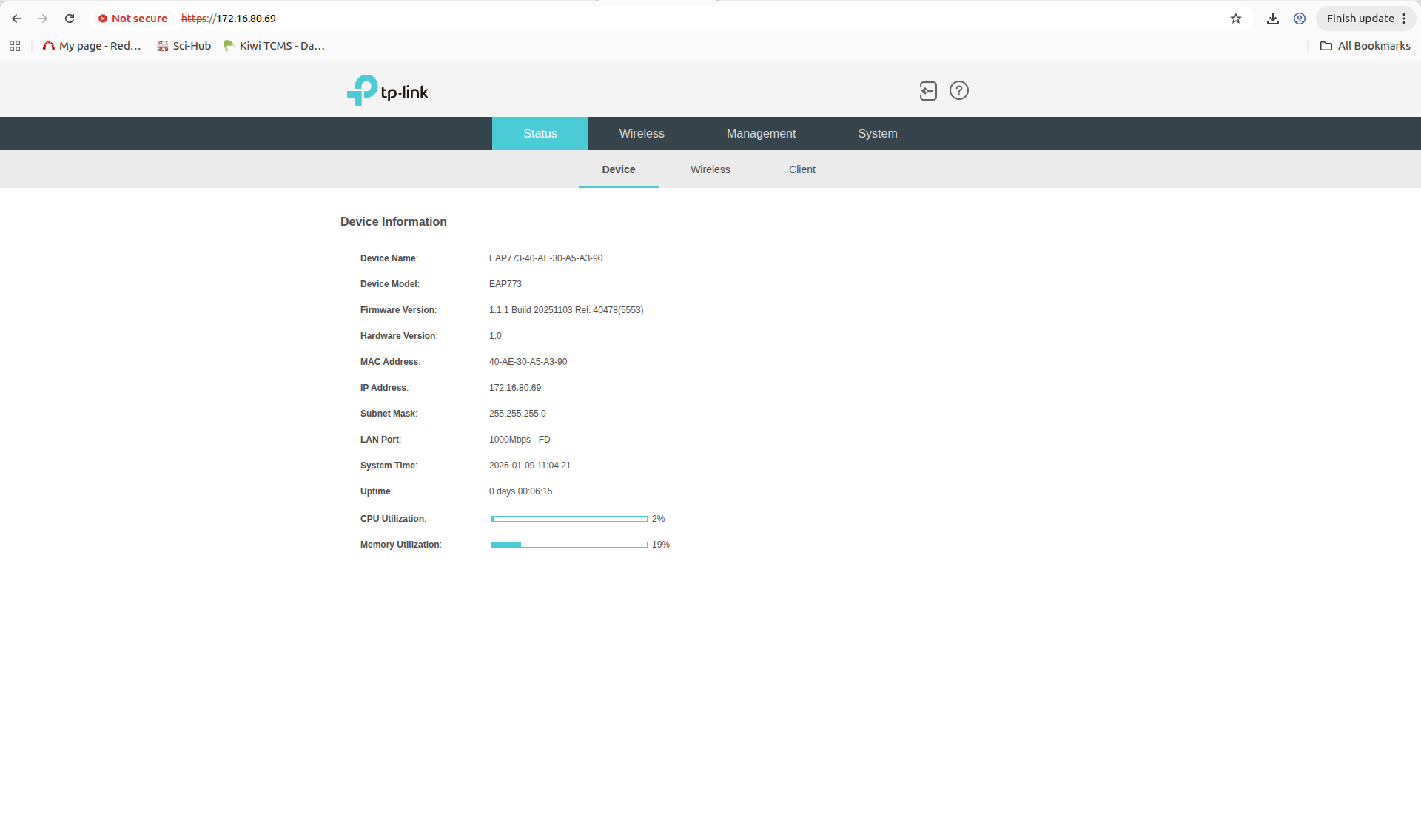
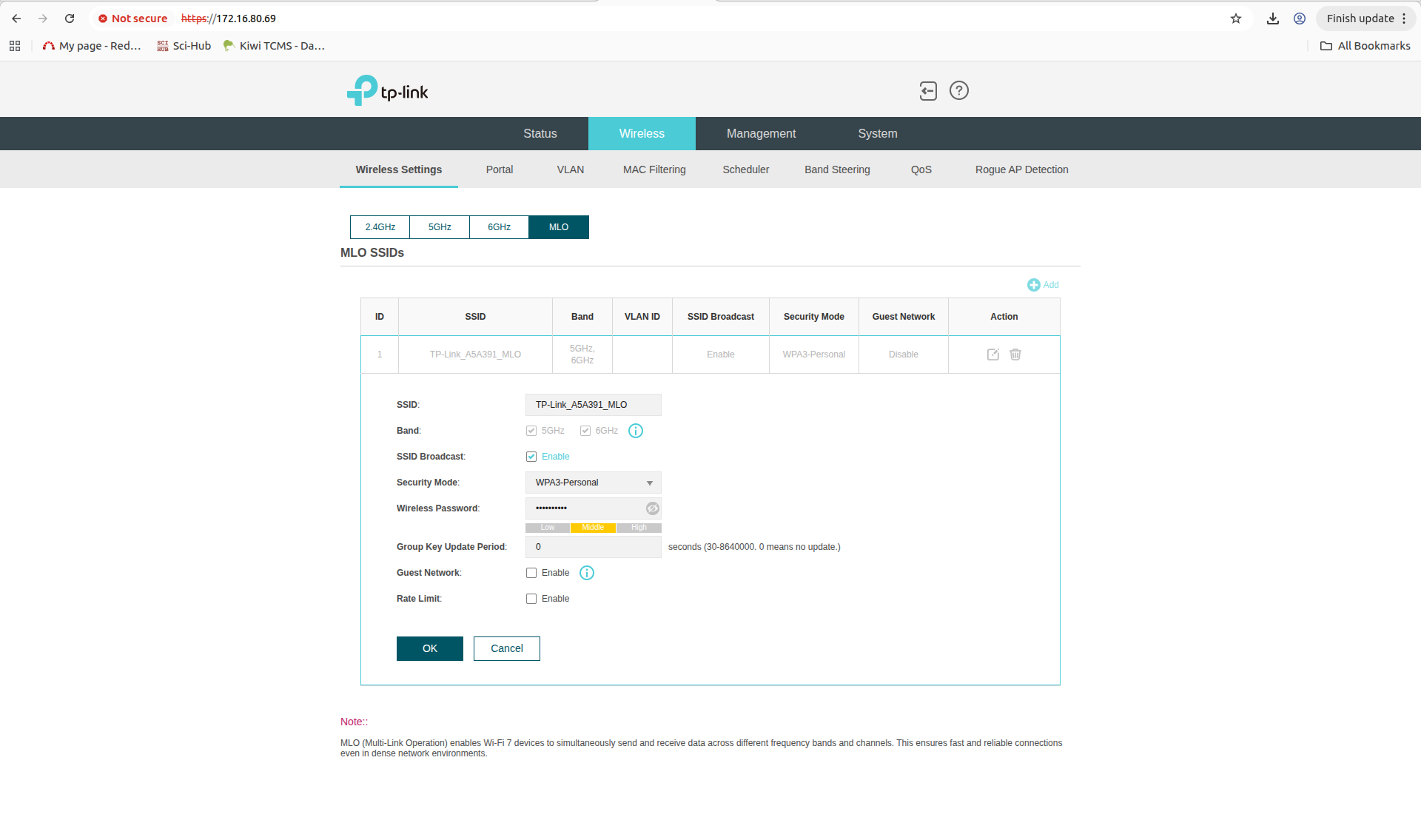
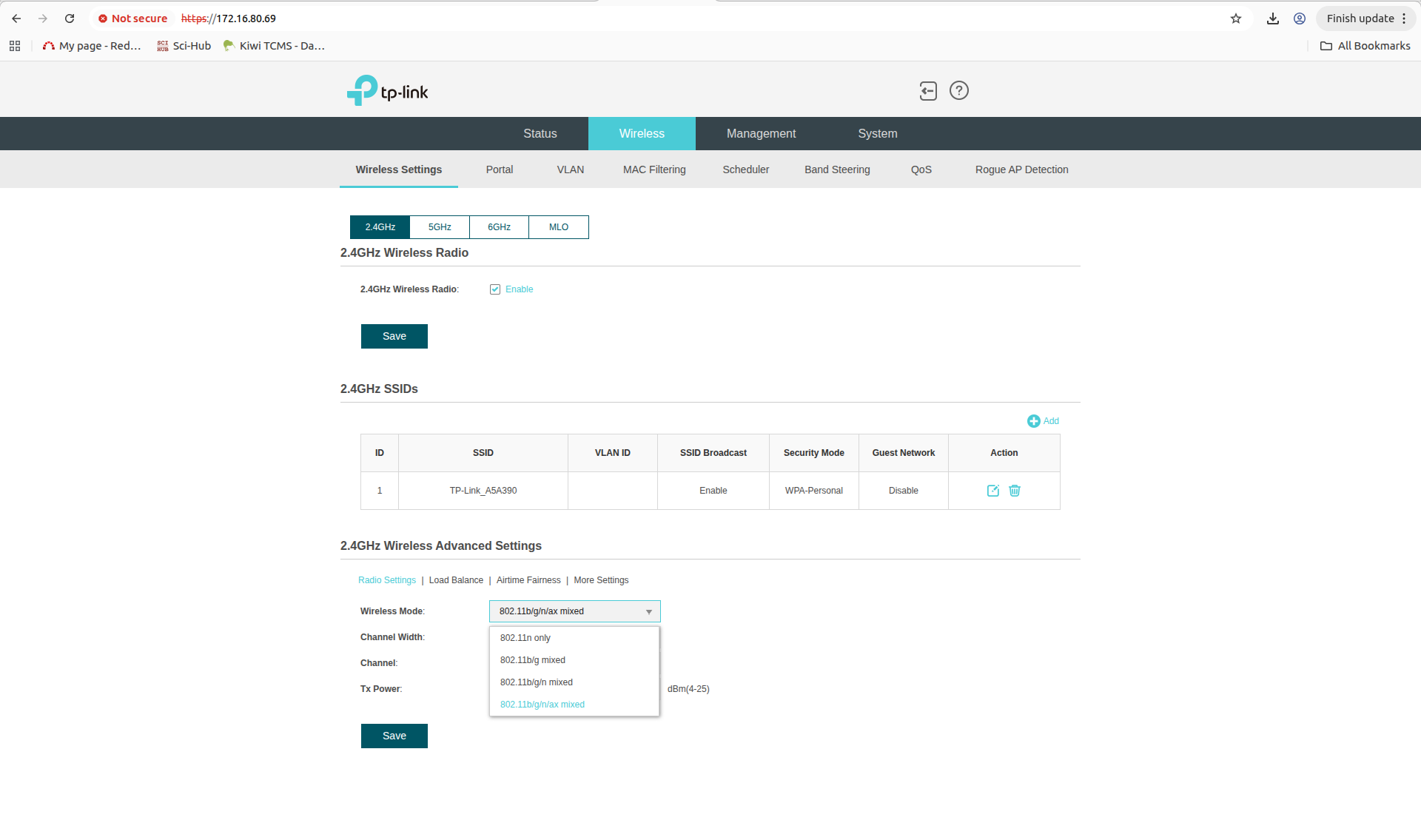
i have downloaded the firmware from the given link https://community.tp-link.com/en/business/forum/topic/838452 (EAP783v1_1.1.1_[20251103-rel40478].zip) and upgrade the AP, still i cannot see option Wireless Modes (802.11 b/g/n/ax/be) in 2.4 GHz and there is no triband MLO support (2.4+5+6 GHz), only i can see MLO support (5+6 GHz).
attached the screen shots for reference.
- Copy Link
- Report Inappropriate Content
@ExplorerZone Oh really? Sorry, I thought it actually fixed that. Then only the support can help I guess.
- Copy Link
- Report Inappropriate Content
Thanks for posting here.
EAP773 MLO SSID does not support 2.4 GHz selection.
Actually, 802.11be (Wi-Fi 7) technically supports the 2.4GHz band in its standard, but this is primarily for backward compatibility with older devices. Due to the band’s narrow bandwidth and high interference, it cannot deliver Wi-Fi 7’s core features (such as a 320 MHz channel width and 4096-QAM modulation). Its actual performance remains similar to previous Wi-Fi generations. To experience Wi-Fi 7’s high speed and low latency, connecting to the 5GHz or 6GHz network is essential.
If you have some 2.4 GHz clients, you may create a separate 2.4 GHz-only SSID for them.
- Copy Link
- Report Inappropriate Content
Thanks for the clarification.
I understand that the EAP773 MLO SSID does not support the 2.4 GHz band for full Wi-Fi 7 functionality.
However, for our product testing purposes, we would like to explore the 2.4 GHz band with Wi-Fi 7,
even if the performance is more limited compared to the 5GHz or 6GHz bands.
Could you please provide any additional guidance or possible solutions for this request?
Looking forward to your response.
- Copy Link
- Report Inappropriate Content
We understand that you want to explore the testing requirements for Wi-Fi 7 in the 2.4 GHz band. However, it is essential to clarify that the EAP773 is designed in strict compliance with the Wi-Fi 7 (802.11be) technical specifications for MLO (Multi-Link Operation). The MLO feature aggregates links across multiple distinct frequency bands (e.g., 5 GHz and 6 GHz) to deliver core Wi-Fi 7 advantages, including high throughput and low latency.
Due to the inherently limited bandwidth and higher interference in the 2.4 GHz band, and because the Wi-Fi 7 standard does not designate 2.4 GHz as a required band for MLO, the MLO SSID on the EAP773 does not enable Wi-Fi 7 functionality in the 2.4 GHz band. Even if enabled in this band, its performance would be constrained by the frequency's physical limitations, preventing the full realization of Wi-Fi 7’s benefits.
Challenges of Testing Full Wi-Fi 7 Performance on the 2.4 GHz Band
Testing whole Wi-Fi 7 performance on the 2.4 GHz band faces several fundamental challenges:
- Insufficient Spectrum Width: Key Wi-Fi 7 features (such as 320MHz channel bandwidth and Multi-Link Operation) require continuous and wide spectrum blocks. The 2.4 GHz band has a narrow total bandwidth, with only three non-overlapping 20MHz channels. It cannot support the higher channel widths (e.g., 40MHz or above, which are already extremely congested) required for Wi-Fi 7.
- Severe Interference: This band is crowded with numerous non-Wi-Fi devices (e.g., Bluetooth, Zigbee, microwaves), leading to channel congestion and high latency, which contradicts Wi-Fi 7’s goals of high reliability and low latency.
- Standard Limitations: The IEEE 802.11be (Wi-Fi 7) standard itself does not designate the 2.4 GHz band as the primary carrier for MLO and key new features. Therefore, even if Wi-Fi 7 mode is enabled on 2.4 GHz, its actual performance will be limited to levels similar to Wi-Fi 4/6, failing to demonstrate the core advantages.
In short, the physical and spectrum limitations of the 2.4 GHz band make it the least ideal environment for showcasing Wi-Fi 7’s capabilities, and test results would not accurately reflect the technology’s true potential.
- Copy Link
- Report Inappropriate Content
Information
Helpful: 0
Views: 860
Replies: 6
Voters 0
No one has voted for it yet.