
Unable to get sg2210xmp-M2 to negotiate EAP 772 with POE to 2.5GB

I have a brand new sg2210mp-M2. I also have 2 brand new EAP 772 APs. I'm having an issue where the APs will not connect at 2.5 GB. I thought it was wiring but if I take a short (5ft cable/cat6) and plug it directly into the switch it only negotiates at 1GB. I've tried different cables with different ports. The same thing happens. I've also tried 2 different APs. They both act the same way. I've also tried to force the port to 2.5GB. If I do that, the APs just hang until I go back to auto and then they negotiate back to 1 GB. I read I could turn off EEE but the setting does not exist in the controller. I'm at a loss at what to do next. I have 2 PCs connected to the same switch at 2.5GB. Any ideas?
- Copy Link
- Subscribe
- Bookmark
- Report Inappropriate Content

Hello @Hank21
I deeply apologize for my premature conclusions regarding a possible hardware fault on the switch ports.
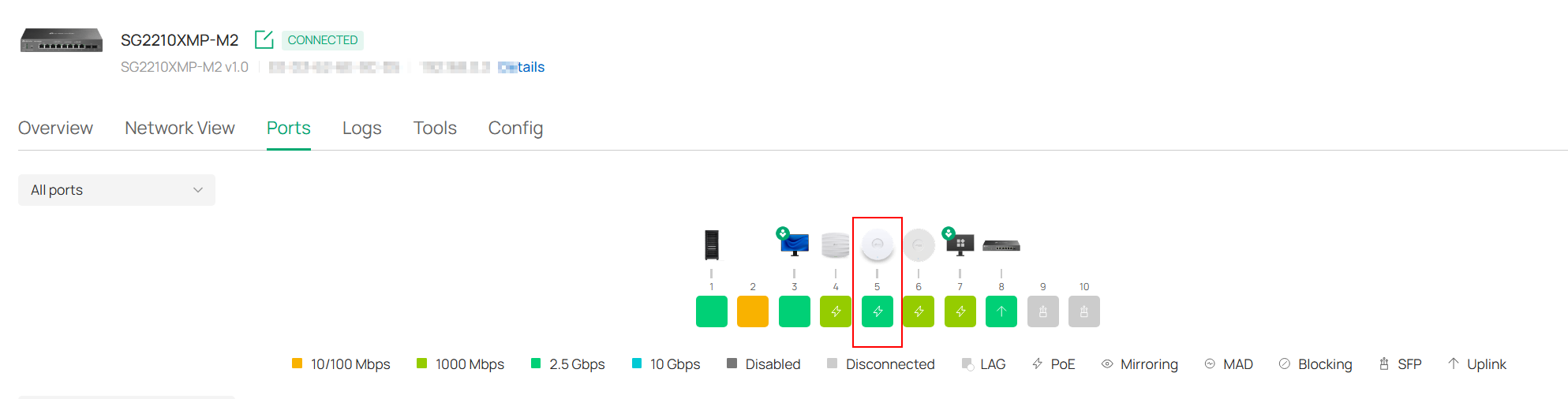
My EAP773 v1 arrived this morning, and although I originally planned to connect it via SFP+ and a 10 Gbps MikroTik adapter, I ultimately decided to use standard 2.5 Gbps LAN with PoE+.
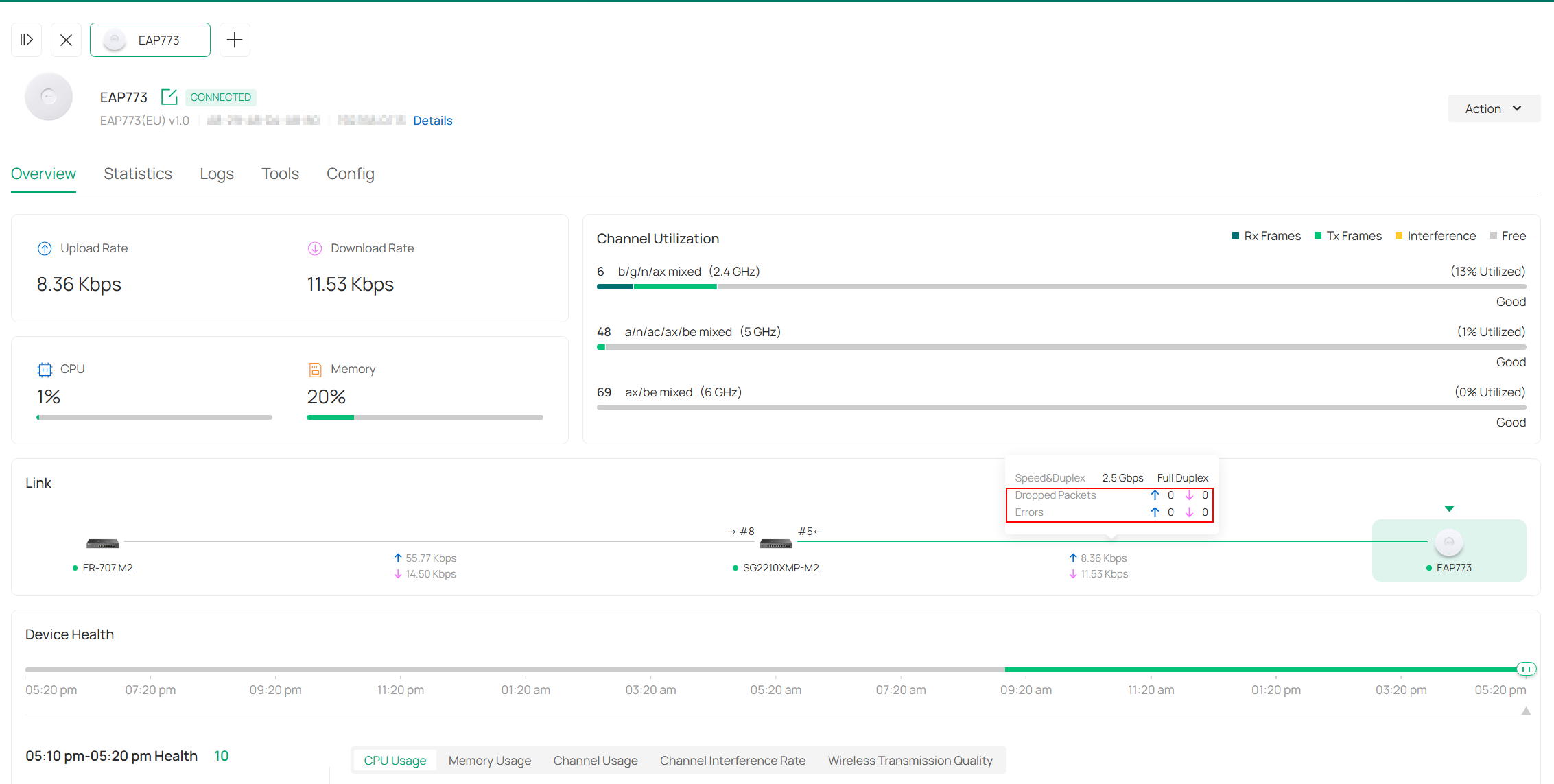
I tested it on ports 4 and 5 to see if any transmission errors would occur between the switch and the EAP.
In both cases, everything is stable and no errors have appeared. It has been connected for about 6 hours now.
In the previous case with the EAP772, there were already billions of errors and the port had dropped to 1 Gbps.
I can therefore confirm that both the SG2210XMP-M2 v1 switch and the EAP773 v1 work together absolutely without any issues.
I will also write this comment as a reply to the email regarding the TP-Link support ticket.
Pavel
- Copy Link
- Report Inappropriate Content
Hello, @Ch98
After about a week of testing the EAP773(EU) v1.0 with the ER707-M2 v1.20 gateway, I would like to share my findings.
I initially tested the AP in Port 6 and later moved it to Port 4.
-
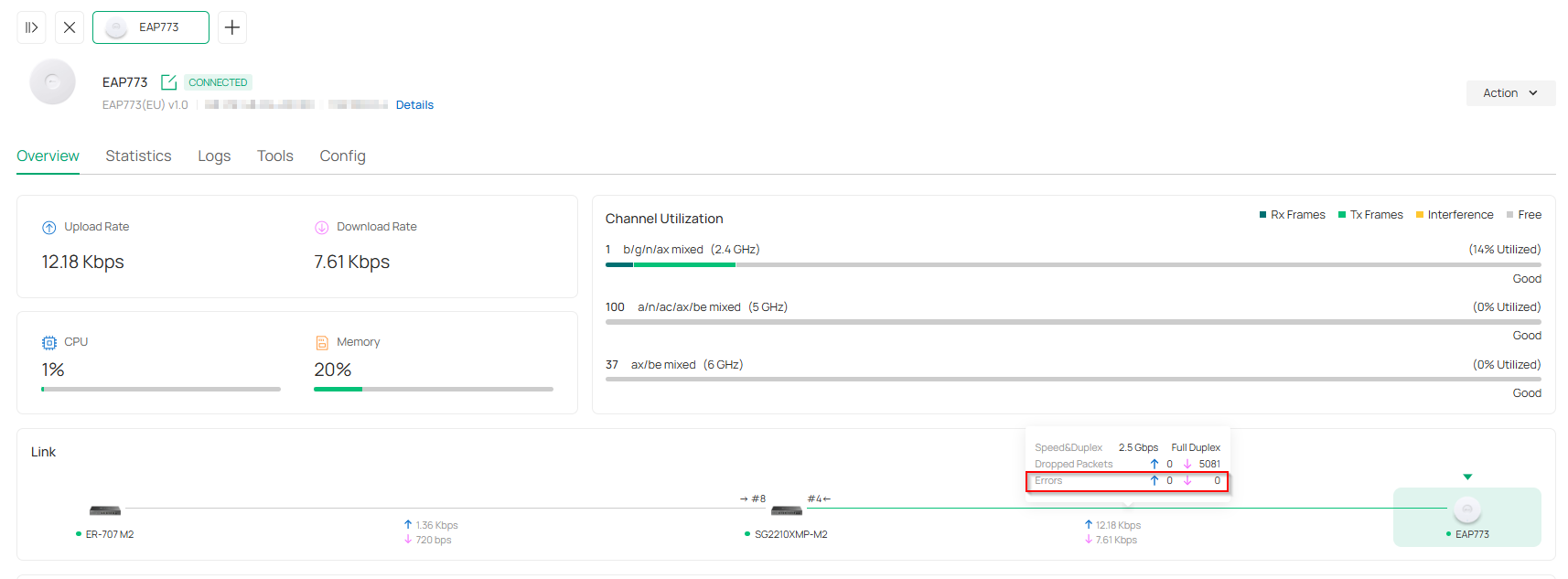
Port 6 observations: I noticed occasional transmission errors, though not in large numbers (approx. 30 per day). However, there were more dropped packets, averaging around 3,000 per day. I tried enabling Flow Control on the ports, but it made no difference.
-
Port 4 observations: After moving the EAP773 to Port 4, the error count dropped to 0. The number of dropped packets remains roughly the same as it was on Port 6.
It appears that the first four LAN ports are more stable for 2.5Gbps connections when utilizing PoE+. Since I only have one AP that requires PoE+ and 2.5Gbps, I do not intend to investigate this further at this time.
- Copy Link
- Report Inappropriate Content


Hi @Ch98
Thanks for posting in our business forum.
To help assist and streamline the identification of the behavior, we recommend sending an email to forumsupport.usa@tp-link.com with the following information:
Subject: [Forum Escalation][ID 856204]
Forum Nickname:
Thread URL: https://community.tp-link.com/en/business/forum/topic/856204
Model&Version:
Description:
Any Other Relevant Information (Logs, Config Files, Images, etc.):
Once sent, a ticket will be created in our support system, and a member of the team will follow up to gather more information or troubleshoot a cause.
- Copy Link
- Report Inappropriate Content
@Ch98 Hello,
I have just ordered the same AP and I own the same switch as well. I'll be testing it over the weekend. However, it looks like a bug in the switch, see: https://community.tp-link.com/en/business/forum/topic/857038
In any case, I would try updating the firmware to version 1.0.19; I assume you have nothing to lose in this case.

Pavel
- Copy Link
- Report Inappropriate Content
The weird thing is that I talked with support and they had me return both APs and buy 2 new 772's. The new APs are now both connecting at 2.5GB. The tech said it might have been a "bad batch." I've really never heard of that, but it's working now. I'm not updating to 1.0.19 for the time being. Thanks for replying.
- Copy Link
- Report Inappropriate Content
Hello,
do you happen to know which versions the original EAP772s were?
Which market were they for, and what was the hardware revision?
I ordered mine in the Czech Republic, so I hope I won't run into this issue. Also, it occurred to me—would it help to manually set the port speed on the switch to 2.5Gbps Full Duplex?
Pavel
- Copy Link
- Report Inappropriate Content
@PavelV my versions were 2.6 (both old and new). I'm in the United States.
In my case, when I forced the port to 2.5GB, the AP would hang and not connect at all. It would go back to 1GB when I put it back at auto.
If I were you, I'd contact support. They were really helpful.
Good luck!
Chad
- Copy Link
- Report Inappropriate Content
Hi,
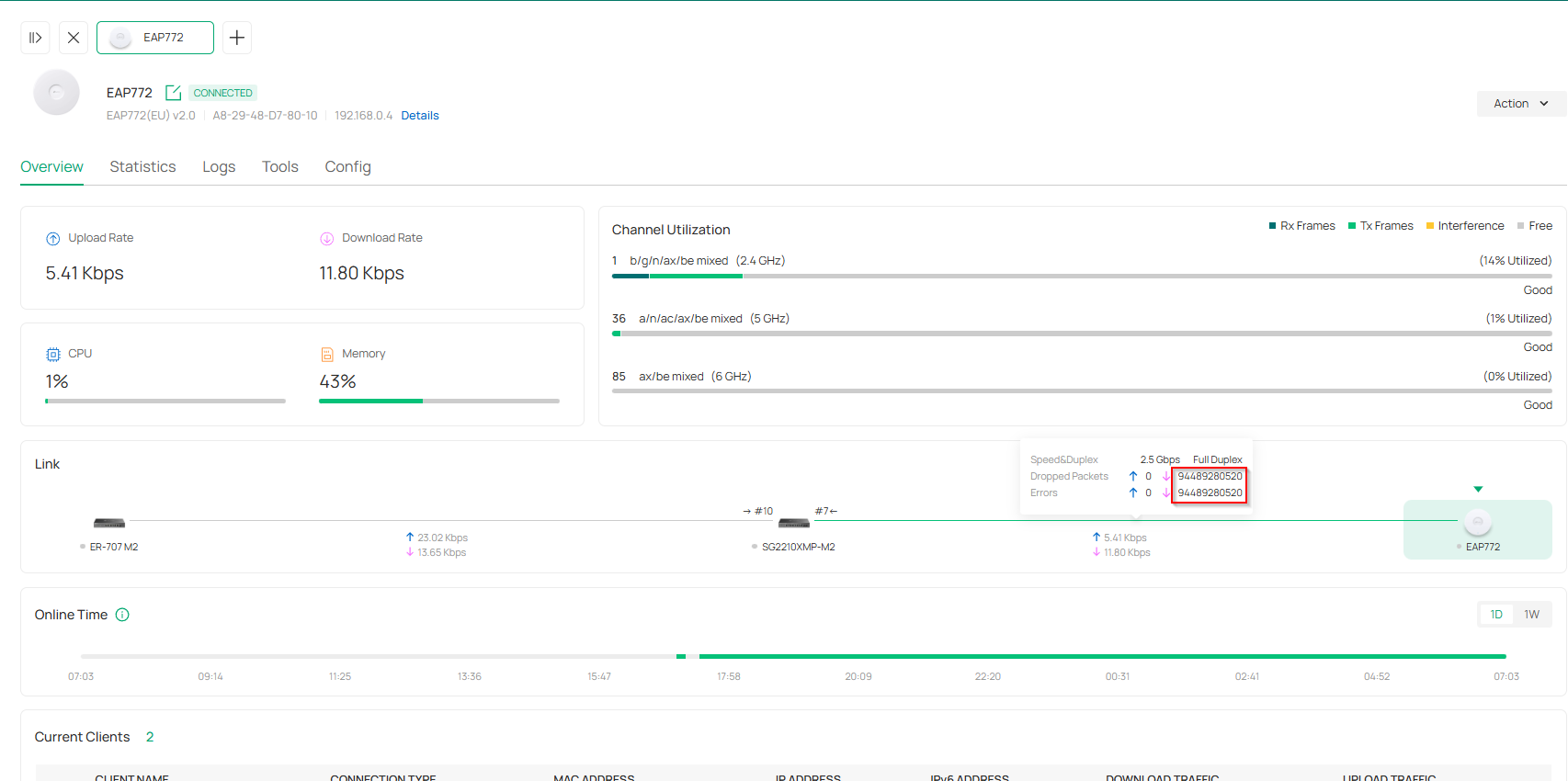
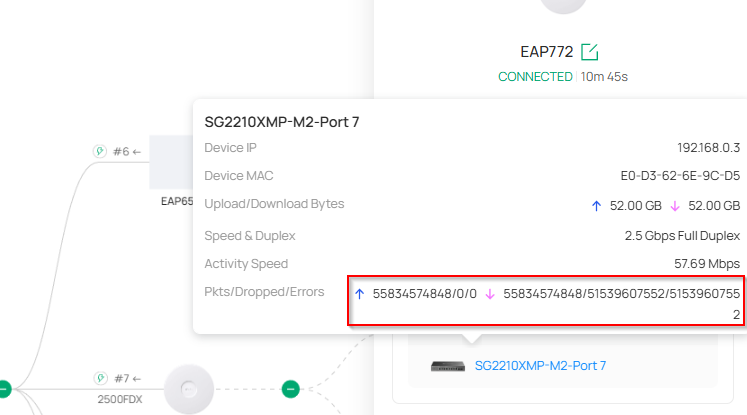
I have the same problem with my new EAP772. The link drops from 2.5Gbps to 1Gbps. Setting it to manual 2.5Gbps results in massive packet errors.
I've already tried re-crimping my CAT6 cable with no success. I bought a new factory-molded CAT6 patch cable to test. If that fails, I'm returning the unit.
Firmware is up to date on all devices.
SG2210XMP-M2 v1.0 fw 1.0.19 Build 20260121 Rel.53314
EAP772(EU) v2.0 fw 1.3.13 Build 20251222 Rel. 40029
Pavel
manual setting 2,5Gbps:
- Copy Link
- Report Inappropriate Content
Hello @Hank21
I have performed extensive troubleshooting to stabilize the 2.5G connection. I updated all devices to the latest firmware versions (SG2210XMP-M2 v1.0: fw 1.0.19 Build 20260121 Rel. 53314; EAP772(EU) v2.0: fw 1.3.13 Build 20251222 Rel. 40029). I used the original 5m Cat6 UTP cable, tested multiple ports, and even removed potential sources of electromagnetic interference from the enclosure. While the link functioned correctly for a short period, it eventually reverted to reporting billions of errors. I have already invested a significant amount of time into diagnosing this issue and have ruled out all external factors on my side.
Pavel
- Copy Link
- Report Inappropriate Content
Thanks for doing that. I actually ordered a 3rd EAP772 and plugged it in last week. It negotiated to 2.5GB just fine and worked for about a day and a half. When I checked it a few days ago it was back down to 1GB. I did some of the same troubleshooting as you. I tried different ports, different cables, new short cat6 cables and it won't go back to 2.5GB. All of my FW is up today except the switch is on the 1.0.16. I'm really tired of this. This is the first time I've used the Omada level equipment and this really is not acceptable. I'm stuck because we've already made the investment to install these in ceilings, and I can't return the other two (those are still connecting at 2.5GB by the way with runs of about 70 and 90 feet) I'm really frustrated. I even disconnected the other two EAP 772's and just connected the one and it sitll didn't connect at 2.5GB. I'm returning this one that won't negotiate and trying a swap out one more time. I'm really wondering if these will last.
I'll wait for the new device to come and see if that works before contacting support again. I spent around 3 hours on the chat with them and ended up just returning the first 2 units for new ones. The first two are working. The 3rd one is not.
- Copy Link
- Report Inappropriate Content
Hello @Ch98
I'm still not giving up on Wi-Fi 7. Instead of the unstable 2.5Gbps LAN on the EAP772, I'm now considering the EAP773, which features a 10Gbps port. It should be more robust and should function correctly even when running on a 2.5Gbps link.
Pavel
- Copy Link
- Report Inappropriate Content
Hi @PavelV
Thanks for the valuable feedback.
May I ask your complete network topology currently?
It is noticed that you are trying to use the EAP773 as well, may I know if this model can work with your SG2210XMP-M2 to 2.5GB properly?
- Copy Link
- Report Inappropriate Content
Information
Helpful: 0
Views: 17
Replies: 0
Voters 0
No one has voted for it yet.