
Unable to get sg2210xmp-M2 to negotiate EAP 772 with POE to 2.5GB

I have a brand new sg2210mp-M2. I also have 2 brand new EAP 772 APs. I'm having an issue where the APs will not connect at 2.5 GB. I thought it was wiring but if I take a short (5ft cable/cat6) and plug it directly into the switch it only negotiates at 1GB. I've tried different cables with different ports. The same thing happens. I've also tried 2 different APs. They both act the same way. I've also tried to force the port to 2.5GB. If I do that, the APs just hang until I go back to auto and then they negotiate back to 1 GB. I read I could turn off EEE but the setting does not exist in the controller. I'm at a loss at what to do next. I have 2 PCs connected to the same switch at 2.5GB. Any ideas?
- Copy Link
- Subscribe
- Bookmark
- Report Inappropriate Content

Hello @Ch98
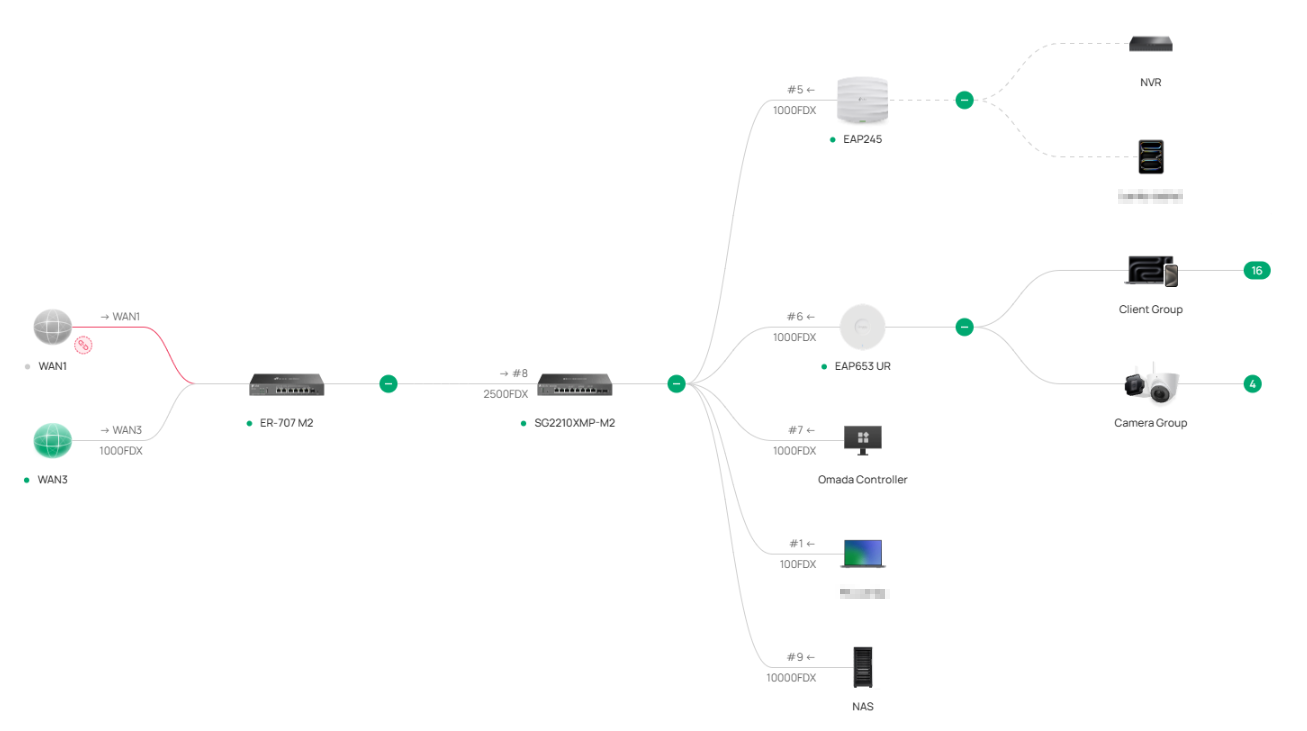
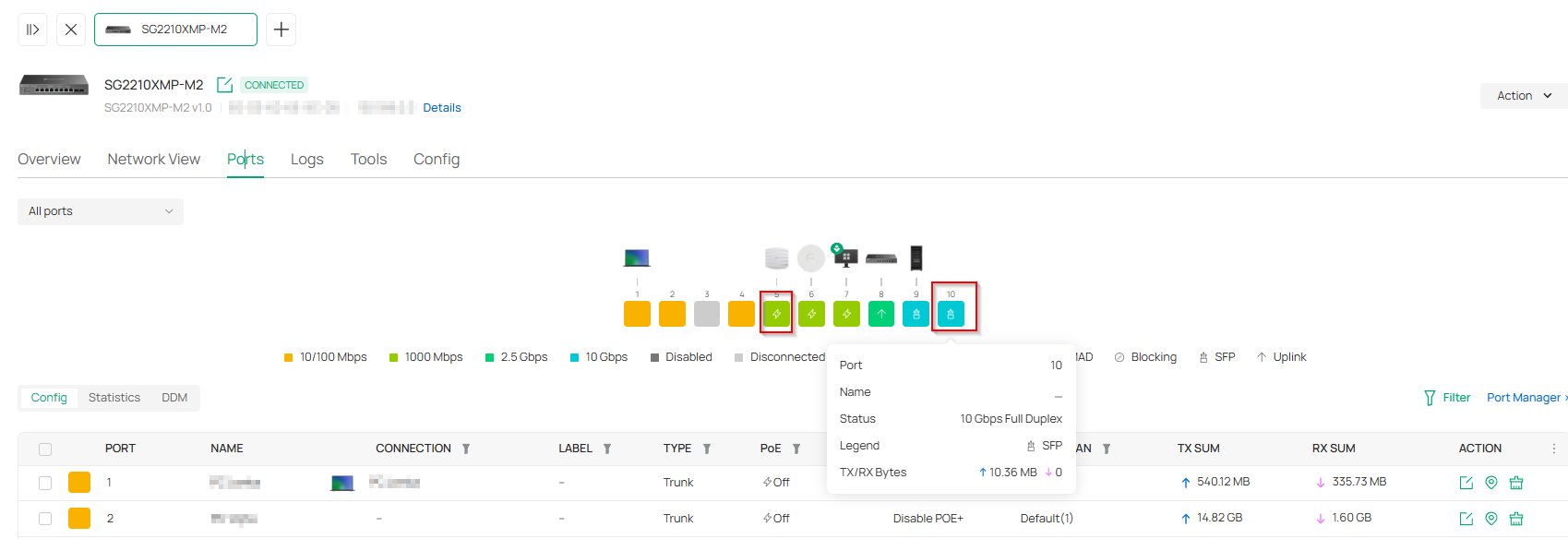
EAP773 will arrive later this week. I plan to connect it using a MikroTik S+RJ10 r2 SFP+ module (it runs cooler, but I will still attach 12x12x12mm passive heatsinks to it).
Once I verify it is working correctly, I will decommission the EAP245 and replace it with the EAP773. I will move the NAS from SFP+ port 9 to port 5, where the EAP245 is currently connected. My NAS is a Synology DS224+ with a 2.5Gbps USB LAN adapter, which works well. It cannot utilize the 10Gbps speed.
Just for clarification, I decided to power the EAP773 with a 12V 2.5A adapter to reduce heat. Furthermore, it would be a shame not to utilize the full 10 Gbps and settle for 2.5 Gbps, considering that powering it via PoE+ is right on the limit and could potentially lead to performance throttling of the EAP773.
I have attached a screenshot of my network topology.
Pavel
- Copy Link
- Report Inappropriate Content
So after all the troubleshooting and replacing all the EAP 772's. The problem was with the switch. I finally got TPlink to RMA the switch. As soon as I got the replacement, I plugged everything in and things came up just like they should.
I found that they have had issues with these switches and the PHY chips. For me, I plugged all the EAPs into ports 1-3 and they came up fine. If I had them plugged into 5-8, they would have a hard time negotiating and then would finally come up. When I had 1 772 plugged into port 5 and the other 772 plugged into port 8, I took an empty cable that was plugged into nothing and plugged it into port 6 or port 7 and the 772's would both renegotiate. It was the weirdest thing. As soon as I saw that I called support and they RMA'd the switch. Things are working fine now.
- Copy Link
- Report Inappropriate Content
Hello @Ch98
that’s interesting. I had a PC with 2.5 Gbps LAN connected to port 4 and a NAS with 2.5 Gbps connected to port 7, and it worked perfectly without any issues.
I'm hoping that the EAP773, powered by a 12V 2.5A adapter and connected via a 10 Gbps MikroTik SFP+ module, will function correctly.
I also have a 2.5 Gbps gateway connected to port 8, and it is also working correctly.
It also occurred to me that I definitely tried other ports as well, and the result was the same.
I no longer have the energy to test whether the fault was in the EAP772 or the switch.
Pavel
- Copy Link
- Report Inappropriate Content
Hello @Hank21
Am I to understand from the latest comment by user Ch98 that the problem wasn't in the EAP772 but in the switch? Does this mean I'll have to go through the lengthy process of a warranty claim?
Pavel
- Copy Link
- Report Inappropriate Content
Yes, I had PC's and other items connected at 2.5 that worked fine. They were not POE though. I'm not sure what is causing interference on the chip or why it's that way. The PC's and my other 2.5 GB switch worked fine in ports 5-8. I hear you. I bet I put 20+ hours of troubleshooting, etc to find this out. Really annoying! I'm also not sure if you use the 12V adapter on a POE AP if it will make a difference. It did not with mine. In fact, the AP support person told me not to, as long as I was under budget. Good luck.
- Copy Link
- Report Inappropriate Content
Hello @Ch98
You've really ruined my evening; I’ll go to sleep and spend the whole night overthinking what's going to go wrong tomorrow. I’ve already put so much time into this, and I’m starting to see that building a network on TP-Link was a mistake that’s only costing me my nerves. Knowing myself, I’ll try the EAP773 with PoE instead of the EAP245. It should run, even if the transmission power ends up being lower. If it fails to maintain 2.5 Gbps, I’m going to be extremely frustrated. It’s no fun having to return or claim warranty on network components that are supposed to just work.
Pavel
- Copy Link
- Report Inappropriate Content


Hi @PavelV
We would like to follow this up via ticket with the ID TKID260322995, please check your inbox and feel free to get back to us with the requested information.
- Copy Link
- Report Inappropriate Content
Hello @Hank21
I deeply apologize for my premature conclusions regarding a possible hardware fault on the switch ports.
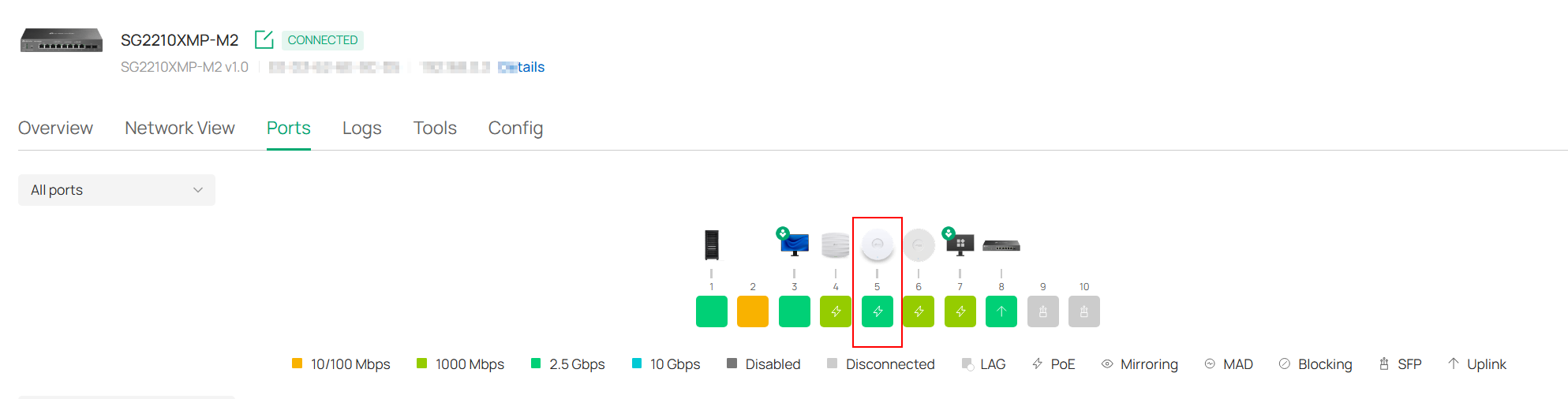
My EAP773 v1 arrived this morning, and although I originally planned to connect it via SFP+ and a 10 Gbps MikroTik adapter, I ultimately decided to use standard 2.5 Gbps LAN with PoE+.
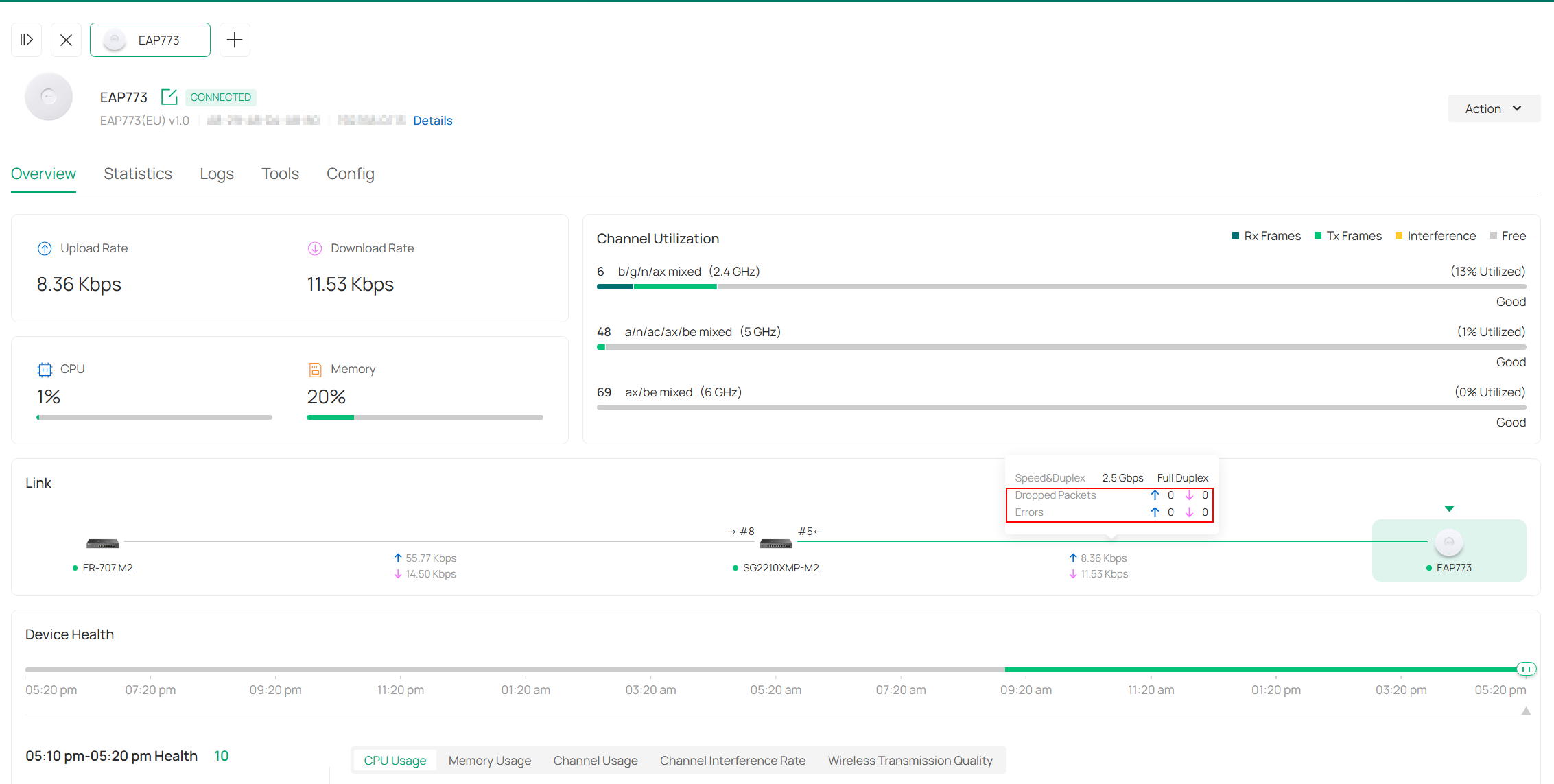
I tested it on ports 4 and 5 to see if any transmission errors would occur between the switch and the EAP.
In both cases, everything is stable and no errors have appeared. It has been connected for about 6 hours now.
In the previous case with the EAP772, there were already billions of errors and the port had dropped to 1 Gbps.
I can therefore confirm that both the SG2210XMP-M2 v1 switch and the EAP773 v1 work together absolutely without any issues.
I will also write this comment as a reply to the email regarding the TP-Link support ticket.
Pavel
- Copy Link
- Report Inappropriate Content
I'm so glad it's working for you. Are you using POE without the 12V adapter? Hopefully my message didn't cause you to lose sleep!
- Copy Link
- Report Inappropriate Content
Hello @Ch98
I’m also glad that everything is working correctly. Yes, I’m only using PoE+ from the LAN port. It’s true that I spent a good part of the night overthinking whether the EAP773 would actually work! 
Pavel
- Copy Link
- Report Inappropriate Content
Information
Helpful: 0
Views: 2398
Replies: 21
Voters 0
No one has voted for it yet.