
ES208G v1.0 (NEW PRODUCT) - IP addresses not display against clients in Omada Software Controller
ES208G v1.0 (NEW PRODUCT) - IP addresses not display against clients in Omada Software Controller

Ok so this is kind of frustrating.
My Omada Software Controller (Linux Docker) 6.1.0.19 seems to work fine.
The Gateway seams to work fine as well...but...i recently added the NEW PRODUCT in my network, hoping that it will help me :
ES208G v1.0 Firmware 1.0.2 Build 20250609 Rel.74647
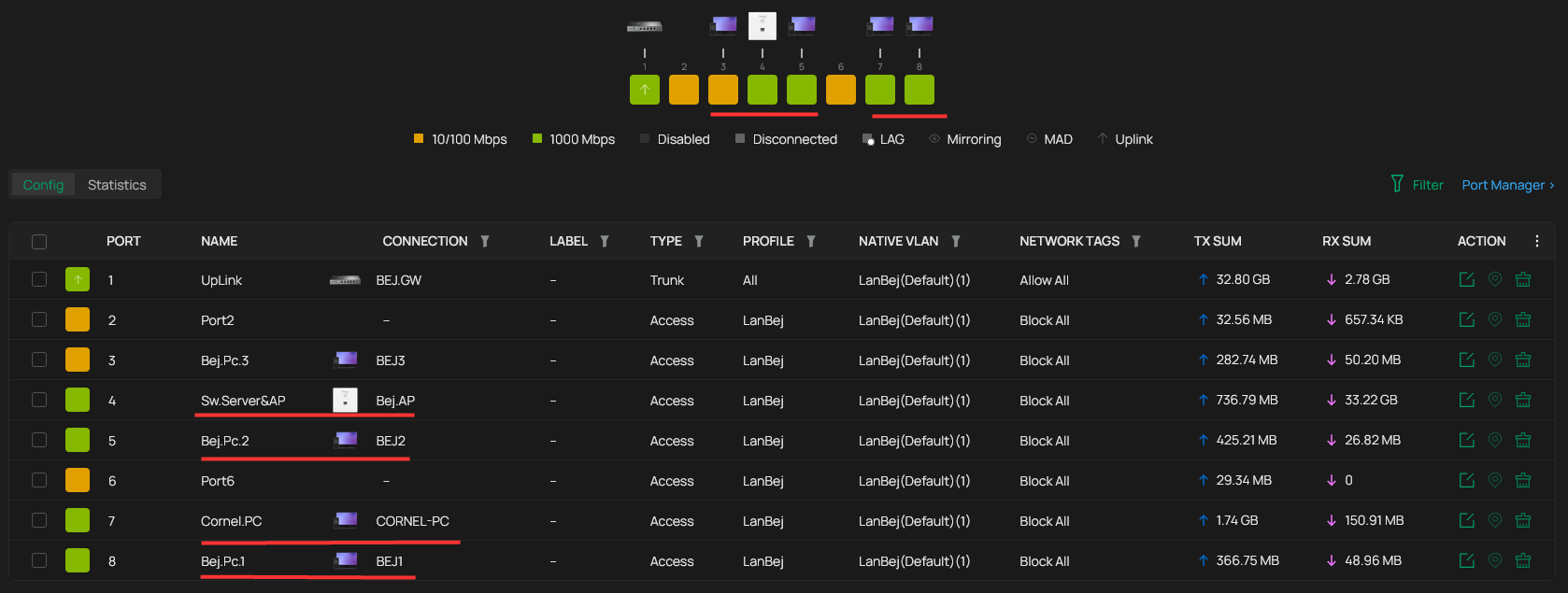
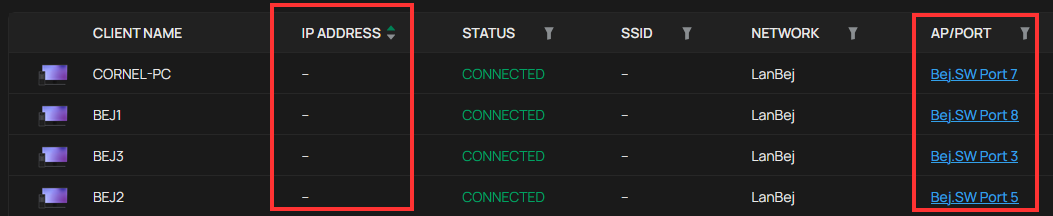
But it looks like this switch can not display the IP addresses of the clients and ports that are connected to him ...and this is not cool because it is labeled as NEW PRODUCT so how comes a NEW PRODUCT has bugs or limitations ?
Unless i set DHPC ip for that host/MAC...i don't know what IP dose that client have, connected in that port, of this Switch :(
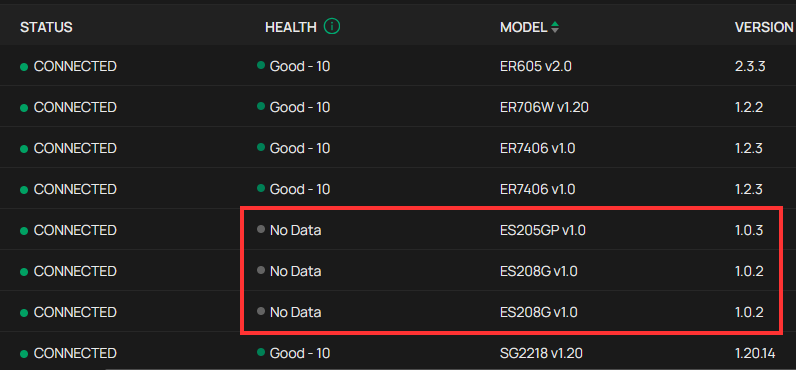
Also, there is NO DATA for HEALTH for this NEW PRODUCT
Please do something, i have 3 switches "ES20...." unless there will be no firmware update (the hardware i hope it is new, as log as they say NEW PRODUCT)...i will have to return them and stick with the non management switches
- Copy Link
- Subscribe
- Bookmark
- Report Inappropriate Content


Hi @AlexPdx007
You are using an Omada gateway, and we are planning to display it in future firmware updates.
You may have a look at the following post:
https://community.tp-link.com/en/business/forum/topic/719468?replyId=1497932
- Copy Link
- Report Inappropriate Content

@AlexPdx007 Can you make sure LLDP is enabled across your network? Go to your Site > Network Config > Site Settings > General Config and make sure LLDP is checked across all devices.
- Copy Link
- Report Inappropriate Content

All these switches like ES205G, ES205GP, ES206 series and ES208 Series lack this support. Very bad done by TP-Link. If they do not add all this you can also not call it OMADA switch..!
Only the ES210 series has now better support for this I believe with a beta firmware. But I do not know this for 100% sure.
- Copy Link
- Report Inappropriate Content
@NeilR_M Yes, i can comfim this is enabled...
- Copy Link
- Report Inappropriate Content
@TheMuk ...you are right...so then, why do we buy "smart" switch, wen the Gateway dose all the necessary job (display ip, MAC address, and port connected) ? :( In my case (and i think other users as well), i just need 3 or 4 VLAN's , 3 or 4 AP connected in the 8port Switch, one UpLink Trunk to the Gateway, and the rest of the terminals connected in the remaining ports of the so called "Smart Switch" ...so now i have to go over that terminal to find out what IP has the DHCP given...i know i can just set it, but....what if i don't. So now if i want to know what ip has the Gateway DHCP given, i have to connect a "stupid" switch directly to the Gateway, not thru the Smart Switch :(
- Copy Link
- Report Inappropriate Content
@AlexPdx007 Yes, unfortunately, after checking, it seems all ES models do not maintain an ARP table, so they will not support this feature. These switches were intended for Layer 2 functionality only. I recommend upgrading those switches to an Access Series model if you require this functionality. | Access Series Switches
- Copy Link
- Report Inappropriate Content
@NeilR_M oh ...for real ? It is just, one, small, but essential, Little, Feature = ARP. At least, perhaps, make an update to the Omada Controller so the IP is forwarded from the client directly to the Gateway or the Controller so it will be displayed next to the client MAC. I know it's a a lot for engineering behind all of this, but here me out : if I connect one port from the Gateway, as UpLink, to a "normal switch" ....I can still see all of the IP addresses in the Omada Controller, even if they all are on the same port (the Gateway UpLink port) ...so just do that instead, if you don't want to update the firmware of the ES, so called "managed" switch, for this basic normal L3 feature :( ... It's just not fair, we buy this managed switches and we just want to see the IP of the client. If there is another workout, please let me know, I've enabled all of the features I could find but no results, and how comes that on the same ES switch, it I connect an AP, I can see the IP and MAC of that AP on that port ? Ok I'll just try something else : connect each client directly to the Gateway and wait a little so the MAC and IP is displayed, the, put that client back to the ES switch, meby this way, the controller will remember that MAC and designated IP :( (I will try this tomorrow, it's late now overe here) and now I'm just saying, if none of my trying works out, I have no there options...i have a 30 days return policy, and I'll just stick with my normal stupid old OtherBrand switch, that at least shows me WHAT IPs I HAVE ON MY NETWORK
- Copy Link
- Report Inappropriate Content
Hi @AlexPdx007
You are using an Omada gateway, and we are planning to display it in future firmware updates.
You may have a look at the following post:
https://community.tp-link.com/en/business/forum/topic/719468?replyId=1497932
- Copy Link
- Report Inappropriate Content
@Vincent-TP I really wish you to do this, update the Omada Controller and maybe the firmware of some Gateways. I think that ARP and displaying IPs is a job of the Gateway and/or DHCP server, so somehow, through the switch port the information passes to the Gateway, so the Gateway or the controller should store and display this essential information: IP and MAC, regardless of which port or which switch it is connected to, probably it should be just like this: the client passes through the switch (whether with or without management) and reaches the Gateway, those informations should be reported further to the Controller, so that the MAC and IP of that client are displayed in the Client tab, regardless of whether it is an unmanaged, L2, L2+ or L3 switch, as long as the Switch does not give IP to client (and it does not have a DHCP function). It really seems strange to me, honestly, in 2026 to have a smart switch with management and an equally smart gateway with management, but not be able to see what IP and MAC a client has in your own network :(
- Copy Link
- Report Inappropriate Content

The strange thing is that the IP is displayed when the switch is not adopted, as soon as it is adopted the IP address disappears. scary 
- Copy Link
- Report Inappropriate Content
@MR.S hmmm....that's interesting 🤔, I haven't tried this , I'll give it a shot, but this info hardens my believe that it can be a Gateway-to-Controller job, more that a L3 switch issue. I guess that this would be a workaround if we want/need to see the IP of connected clients regardless of where or what port is that client connected, but loose the ability to manage the switch from the Controller and if we need to set up VLANS on the switch ports, this could be done only from the web page of that switch.
- Copy Link
- Report Inappropriate Content
Information
Helpful: 0
Views: 1383
Replies: 12
Voters 0
No one has voted for it yet.