
dns request for "omada" every 10 seconds
dns request for "omada" every 10 seconds

Why does my EAP773 AP router send a DNS request for "omada" (an unqualified name) every 10 seconds? How do I turn off this spam/malware?
- Copy Link
- Subscribe
- Bookmark
- Report Inappropriate Content

- Copy Link
- Report Inappropriate Content

I was offering a technical explanation, yet you refuse to accept it, and much prefer to stoop to unnecessary and insulting, comments (all reported by the way)
Because you don't accept an explanation, and a refute to your clearly incorrect points....The first responder to your thread, and myself have both offered the exact same feedback to your original question. Just because you consider something as spam or malware, doesnt mean it actually is.
- Copy Link
- Report Inappropriate Content
GRL wrote
I was offering a technical explanation, yet you refuse to accept it, and much prefer to stoop to unnecessary and insulting, comments (all reported by the way)
Because you don't accept an explanation, and a refute to your clearly incorrect points....The first responder to your thread, and myself have both offered the exact same feedback to your original question. Just because you consider something as spam or malware, doesnt mean it actually is.
No one asked for your explanations, lmao. Please stop bothering me and other readers of this thread. Mr. "Thousands of DNS queries for one webpage" xD
- Copy Link
- Report Inappropriate Content
- Copy Link
- Report Inappropriate Content

@GRL Sorry, I don't mean to jump in on this discussion, but I have a question about this. When I noticed these queries via AdGuard Home (like Pihole if you are more familliar with that), They were actually being forwarded to upstream servers. This is partially due to a configuration in AdGuard which doesn't block non fqdn forwarding (there isn't a setting for it). I think this may also be an issue on the EAP side, as the reason its being treated like a non local domain is it's not appending my dns suffix of ".internal" to the "omada" requests. This should ideally happen automatically if the EAP is getting DHCP option 015 from the router (ASUS for reference), or if it isn't able to be appended automatically, perhaps there should be a way to set that both in controller or standalone. I understand this isn't a big deal technically as upstream servers will just return nxdomain and move on, but technically that is leaking information (that an Omada device is being used in the network). If there is a different way I am supposed to be handling this, or if this is better made into its own post, please let me know!
- Copy Link
- Report Inappropriate Content
It might be possible to block this leaking through adguard with a gateway ACL [block eap ip, port 53 > wan] but it depends which port it output on. I would suggest another thread so it doesnt get mixed up in here. I suspect a FW will fix it soon anyway
- Copy Link
- Report Inappropriate Content


Thank you for your interest in the Omada product series and for the technical discussion. Regarding the topic you are discussing, here I want to provide some explanation:
This DNS request is normal behavior for SDN devices, which actively probe for available Omada controllers within the local network when a controller has not been deployed. Its design purpose is to automatically discover available Omada Controllers for centralized network management. This behavior is not advertising or malicious traffic and does not have a substantial impact on network performance. The explanation provided by GRL is technically correct:
- This request is only periodic probing within the local area network and is not transmitted to the wide area network.
- A single DNS request involves minimal data volume and does not consume network bandwidth or affect device performance.
- Its design purpose is to automatically discover available Omada Controllers for centralized network management. It is not intended to promote products or embedded with harmful intent.
We understand the importance users place on autonomous network management. Currently, this probing mechanism is a built-in system design.
In the latest firmware upgrade, we have added a feature, Remote Adoption, to avoid these DNS queries. First, please update your EAP to the following version:
https://community.tp-link.com/en/business/forum/topic/854656?moduleId=1
And you will see the option on the system page:
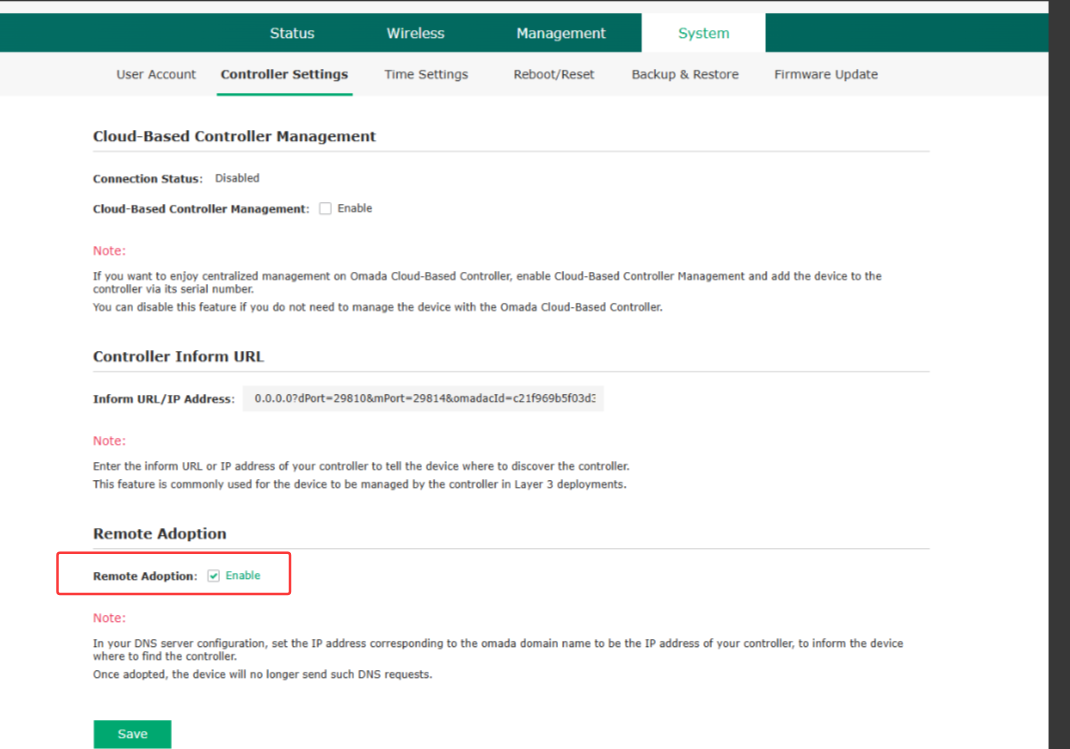
Uncheck it, and the EAP won't send the DNS request anymore.
Community Communication Guidelines
We respect every user’s right to express their views, but the exercise of free speech must be premised on respect for others. Technical discussions should focus on the issues at hand and not devolve into personal disputes. The community management team will take appropriate measures against inappropriate remarks in accordance with the “User Conduct Guidelines.” For more details, please refer to TP-Link Community Forum Guidelines.
Thank you for your support and cooperation.
- Copy Link
- Report Inappropriate Content
Information
Helpful: 4
Views: 253
Replies: 17
Voters 1