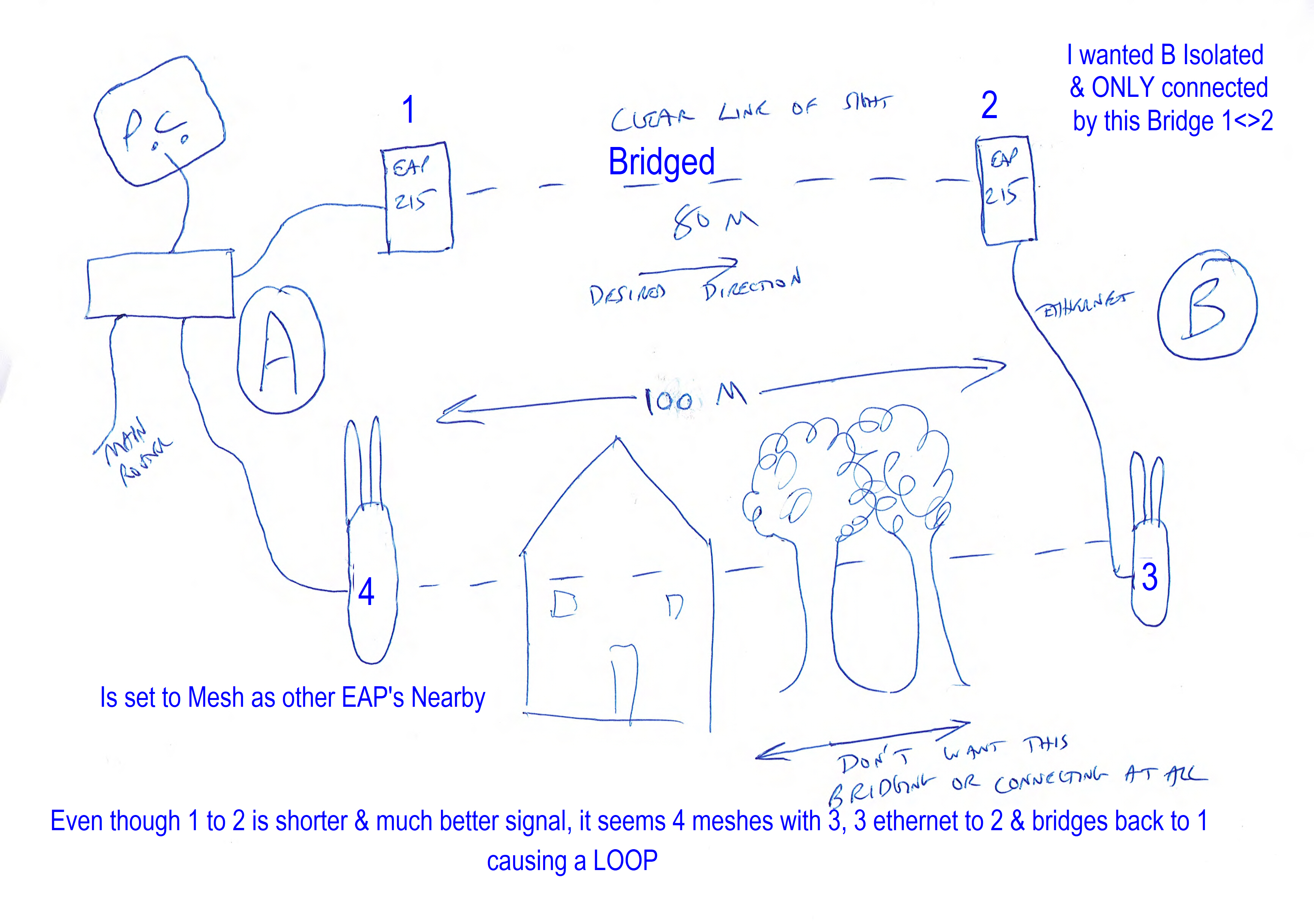
Internet/LAN LOOPING

I have many more EAP units controlled via Omada & always worked well & amazed I have not come across this problem before
I have the PC as shown & want it connected to the LAN & internet etc. via the direct ethernet fast connection.
However for some reason is often connects via the AP (1) which bizarrely has got it connection via a Loop all the way from (4) to (3) to (2) back to (1)
The idea was to give access from (A) to (B) via a fast pure bridge P2P (not sure it is P2P now as being controlled via Omada) but either way a good signal then ethernet to another AP (3) for local wifi connection.
I am amazed that (3) & (4) connect as 100m with partial bulidings & big tree's in the way, is a poor signal but not in my wildest dreams have I ever managed such a wifi range in those circumstances.
Anyway the PC often chooses the 3 to 4 Mbps connection to the 500Mbps LAN.
Currently disconnected (2) but would like it up and running. No sure if I am being stupid & missing something.