Onvif compatibility for NVR
I have tried a VIGI S355 and I'm impressed, so decided to give its NVR a go. (cloud VMS service is nice too)
But current cameras do not have high sensibility, so decided to use a couple of Hikvision DS-2CD2087G3-LI2UY (.0005 lux + new generation detection)
Sadly, the mix seems not to be working that good. The NVR has a menu for basic events and another for smart events, and some logic filters which cameras (channels)
are able to be used for smart event categories (Human/Vehicle/Intrusion/... detection).
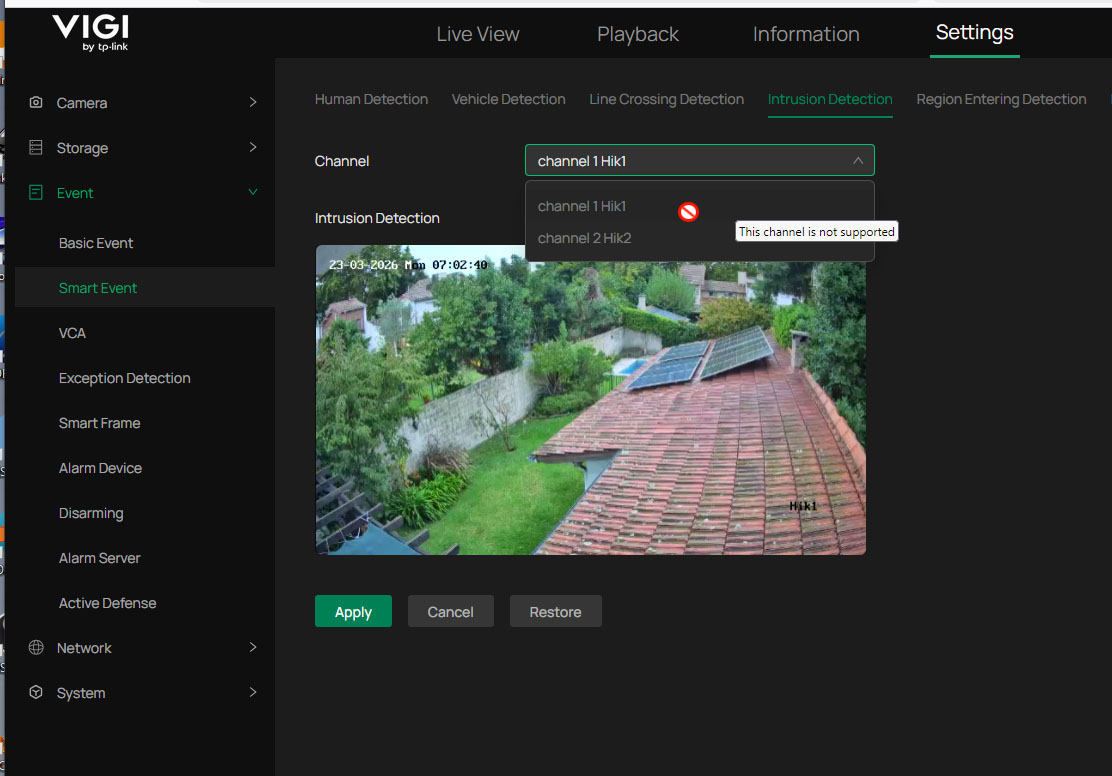
These cameras only show in intrusion detection, but even so, when I try to apply a configuration, the apply button is disabled. Even the selection does not work.
Is there a way to have a ws event to trigger recording ?
The NVR does have full time or event based recording schedules, the cameras are generating the events, just need a way to link those...
TIA
-Carlos
- Copy Link
- Subscribe
- Bookmark
- Report Inappropriate Content
Hi, @tronar
Thank you for posting your query on our business forum.
All VIGI NVR models support both Profile T and Profile S. However, it should be noted that full compatibility with both profiles is only guaranteed when the NVR is used in conjunction with VIGI brand cameras. When connecting a third-party camera to the NVR, only Profile S is supported, which enables just basic functionalities including recording, motion detection and playback.
We sincerely appreciate you bringing this feedback to us.
- Copy Link
- Report Inappropriate Content
Hi @tronar
If you use the third party camera with the NVR, then they can only use the motion detection due to ONVIF profile S protocol.
Regarding the grey buttion, it would be much appreciated if you could provide any screenshot.
- Copy Link
- Report Inappropriate Content
Hi @Hank21 , thank you for your reply.
Does that mean that the NVR does not support profile T ?
Is there any way to soft trigger an event to the NVR then ?
Please see attached pic where smart event intrusion configuration channel selector "offers" both cameras but considers them as invalid.
- Copy Link
- Report Inappropriate Content
Hi @tronar
That is correct as the VIGI NVR only supports ONVIF profile S currently with third party cameras, causing the IPC can only use basic features including motion detection and camera tampering.
- Copy Link
- Report Inappropriate Content
@Hank21 That's a lame excuse, not to call it a bug ?
Protocols are there to support integration. To support a protocol just for same brand devices... is like doing "your own protocol" and abusing the name ?
Anyways, I'll end up putting an arduino to receive the camera alarm via webhook and close an alarm contact.
Hope the NVR does recognize the S355 alerts though. I'll soon discover...
- Copy Link
- Report Inappropriate Content
Hi, @tronar
Thank you for posting your query on our business forum.
All VIGI NVR models support both Profile T and Profile S. However, it should be noted that full compatibility with both profiles is only guaranteed when the NVR is used in conjunction with VIGI brand cameras. When connecting a third-party camera to the NVR, only Profile S is supported, which enables just basic functionalities including recording, motion detection and playback.
We sincerely appreciate you bringing this feedback to us.
- Copy Link
- Report Inappropriate Content
Information
Helpful: 0
Views: 834
Replies: 5
Voters 0
No one has voted for it yet.