Problema acessos IPV6 (serviços do google)

Problema acessos IPV6 (serviços do google)

Problema acessos IPV6 (serviços do google)
3 weeks ago - last edited 2 weeks ago
Tags: #IPV6
Model: ER605 (TL-R605)  
Hardware Version: V2
Firmware Version: 2.3.3

além o Gateway a rede toda é:

EAP610(US) v3.0

1.6.0

2x


EAP615-Wall(US) v1.0

1.5.4

1  


Trouxe esta situação sobre minha rede e minhas configurações, se precisarem de mais detalhes posso enviar para conseguirmos compreender, toda ajuda é bem vinda.


Links de Internet tenho 2 (Ligga e Vivo) fazendo redundância e balanceamento de carga 1:1 - Porém por DHCP vindo direto do roteador das operadoras.


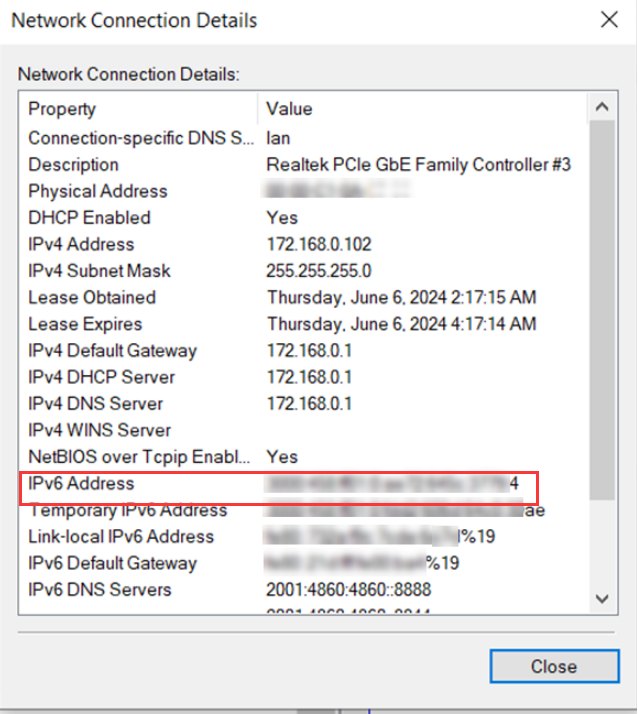
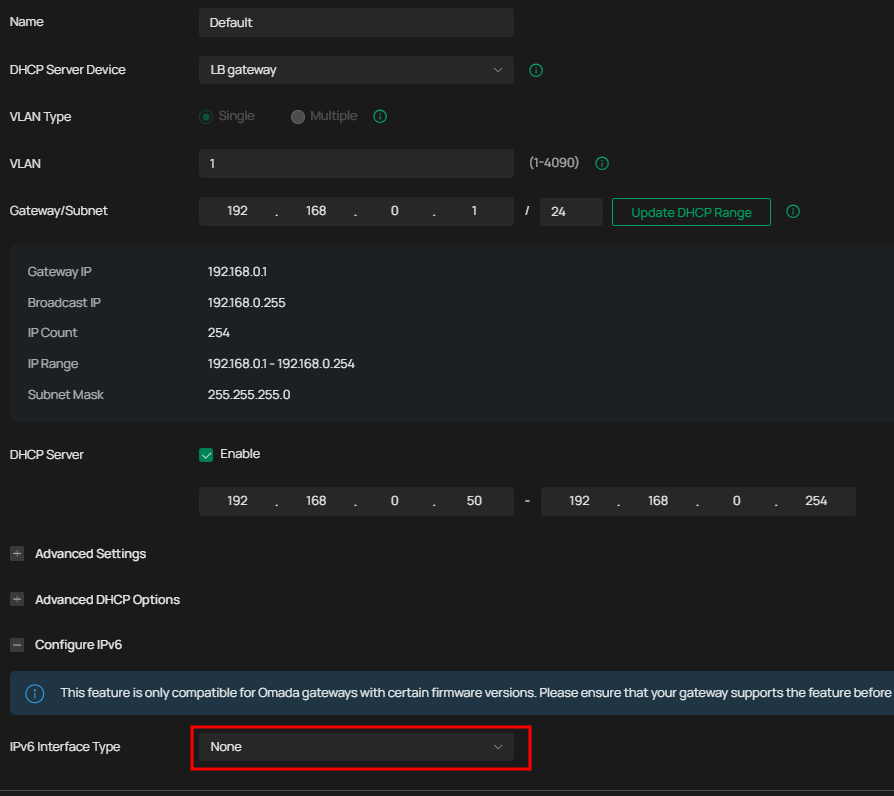
Por ter 2 links tentei desabilitar a navegação por IPv6 desabilitando no servidor de DHCP, o que tenho observado que computadores que tenham alguma forma de IPV6 configurada, não conseguem acessar serviços do google como google agenda, ou meet, e desativando manualente o IPv6 do notebook ou PC eles conseguem entrar e navegar normalmente.

já revi todo o DHCP e não estou conseguindo encontrar o que posso ter feito errado.tenho apenas 1 Vlan 
 

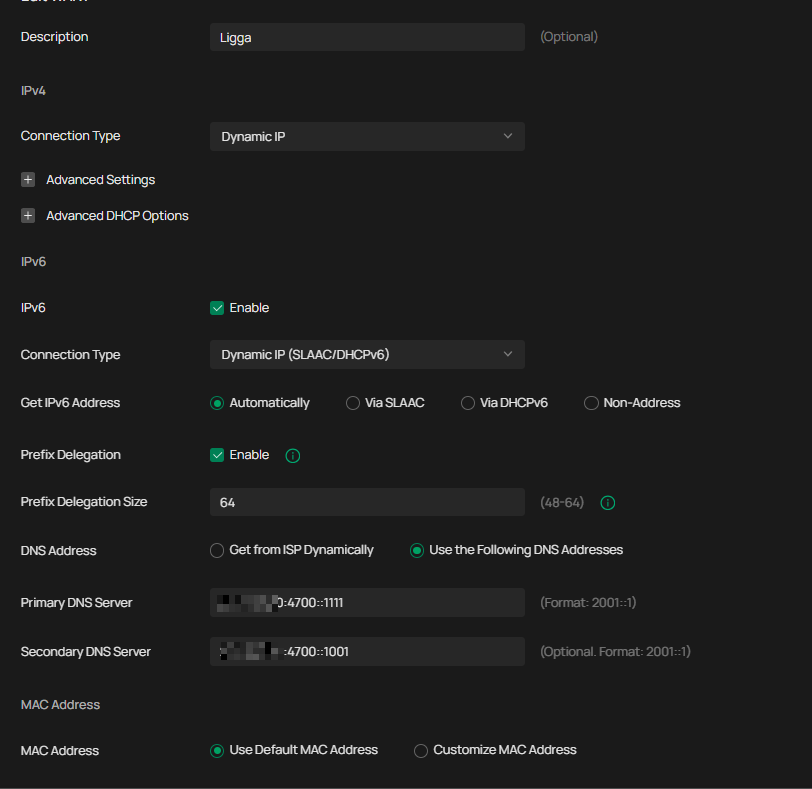
na configuração da WAN da Ligga constam ainda as configurações do IPV6 , porém aqui, não funcionou quando deixei o IPV6 funcionando na rede o que me fez tirar do dhcp interno, não sei se preciso desativar aqui tbm o IPV6 mas tenho umas questões que não compreendo.


  0      
  0      
#1
Options
1 Accepted Solution
Re:Problema acessos IPV6 (serviços do google)-Solution
2 weeks ago - last edited 2 weeks ago

 Hi,@CarlosSa 
Thank you for posting on our business forum.
 

If you do not need IPv6 functionality, we recommend that you completely disable IPv6 on both of your WAN ports, and also disable IPv6 for your internal local area network. After completing this setup, please test whether your client devices can access Google services normally.
 

If you do need to use IPv6 services, please first confirm that your Internet Service Provider (ISP) has assigned IPv6 addressing to your connection and provided you with the corresponding configuration information.

Next, please ensure IPv6 is configured correctly on your Omada Gateway: After logging into the router's web-based management interface, navigate to the menu path Network > IPv6 > WAN/LAN1 for setup:

  • WAN Configuration:

In the General section, enable IPv6 and click Save.
In the Internet section, select the correct Internet Connection Type, configure the parameters in accordance with your ISP's requirements, then click Save.
The gateway supports 5 connection types: Static IP, Dynamic IP (SLAAC/DHCPv6), PPPoE, 6to4 Tunnel, Pass-Through (Bridge), please select the matching type based on the service provided by your ISP.

  • LAN Configuration:

Navigate to the menu Network > IPv6 > LAN, then click the edit icon. In the General section, select the appropriate Assigned Type based on the IPv6 compatibility of your local network clients, configure the parameters per your ISP's requirements, then click OK.


After you finish the full IPv6 configuration, please connect a client device behind the router and verify that it has obtained a valid IPv6 address.

Once the configuration is confirmed, we suggest you enable only one WAN port and disable the other non-IPv6 WAN port, then test whether your client devices can access Google services normally.


Recommended Solution
  0  
  0  
#2
Options
2 Reply
Re:Problema acessos IPV6 (serviços do google)-Solution
2 weeks ago - last edited 2 weeks ago

 Hi,@CarlosSa 
Thank you for posting on our business forum.
 

If you do not need IPv6 functionality, we recommend that you completely disable IPv6 on both of your WAN ports, and also disable IPv6 for your internal local area network. After completing this setup, please test whether your client devices can access Google services normally.
 

If you do need to use IPv6 services, please first confirm that your Internet Service Provider (ISP) has assigned IPv6 addressing to your connection and provided you with the corresponding configuration information.

Next, please ensure IPv6 is configured correctly on your Omada Gateway: After logging into the router's web-based management interface, navigate to the menu path Network > IPv6 > WAN/LAN1 for setup:

  • WAN Configuration:

In the General section, enable IPv6 and click Save.
In the Internet section, select the correct Internet Connection Type, configure the parameters in accordance with your ISP's requirements, then click Save.
The gateway supports 5 connection types: Static IP, Dynamic IP (SLAAC/DHCPv6), PPPoE, 6to4 Tunnel, Pass-Through (Bridge), please select the matching type based on the service provided by your ISP.

  • LAN Configuration:

Navigate to the menu Network > IPv6 > LAN, then click the edit icon. In the General section, select the appropriate Assigned Type based on the IPv6 compatibility of your local network clients, configure the parameters per your ISP's requirements, then click OK.


After you finish the full IPv6 configuration, please connect a client device behind the router and verify that it has obtained a valid IPv6 address.

Once the configuration is confirmed, we suggest you enable only one WAN port and disable the other non-IPv6 WAN port, then test whether your client devices can access Google services normally.


Recommended Solution
  0  
  0  
#2
Options
Re:Problema acessos IPV6 (serviços do google)
2 weeks ago

@Jeremy_12 

Thanks for the reply. 

I'll go ahead and disable IPv6 completely. The weird thing is that some endpoints are still pulling IPv6 addresses somehow, despite being disabled in the settings. 

It looks like certain Google services are forcing IPv6 usage. My goal is to get IPv6 actually working on my network, but enabling it causes sites like meet.google.com to hang every single time. 

I'll run some tests by disabling IPv6 on the WAN interface only to see if that works around the issue. 

I'll keep you posted.

  0  
  0  
#3
Options