
vlan isolation
vlan isolation

I'm struggling with gateway, switch and eap type of acl rules.
I'm trying to find a way of isolating 2 vlans from the rest.
Meaning only internet traffic is allowed for these 2 vlans.
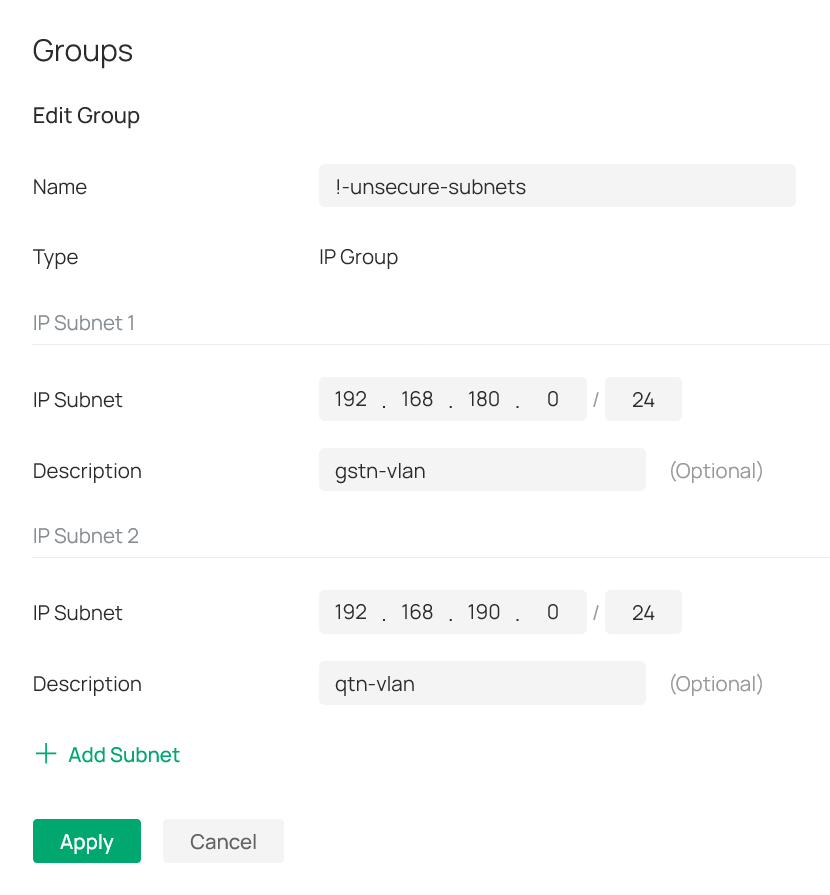
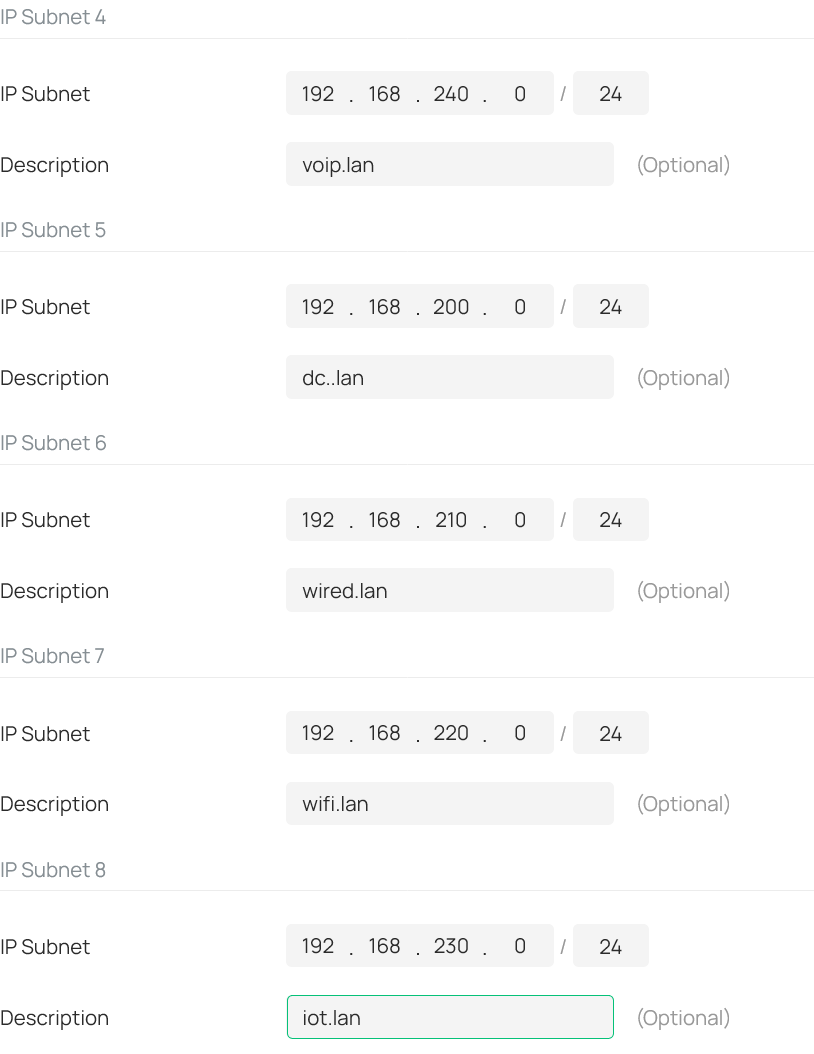
For that I have created 2 ip-groups (see attached pictures).
One has the 2 subnets I'm trying to isolate ( labeled as !-unsecure-subnets): 192.168.180.0/24 and 192.168.190.0/24.
And the other has all other subnets (labeled as !-secure-subnets): 192.168.2x0.0/24. Where x equals 0-4; meaning the 3-th otctet is 200, 210, 220, 230 and 240.
See also attached picture: I then created a deny rule for the gateway-acl (i.e. lan->lan), switch-acl and eap-acl.
All three with the same content as seen in the screenshot from the eap-acl.
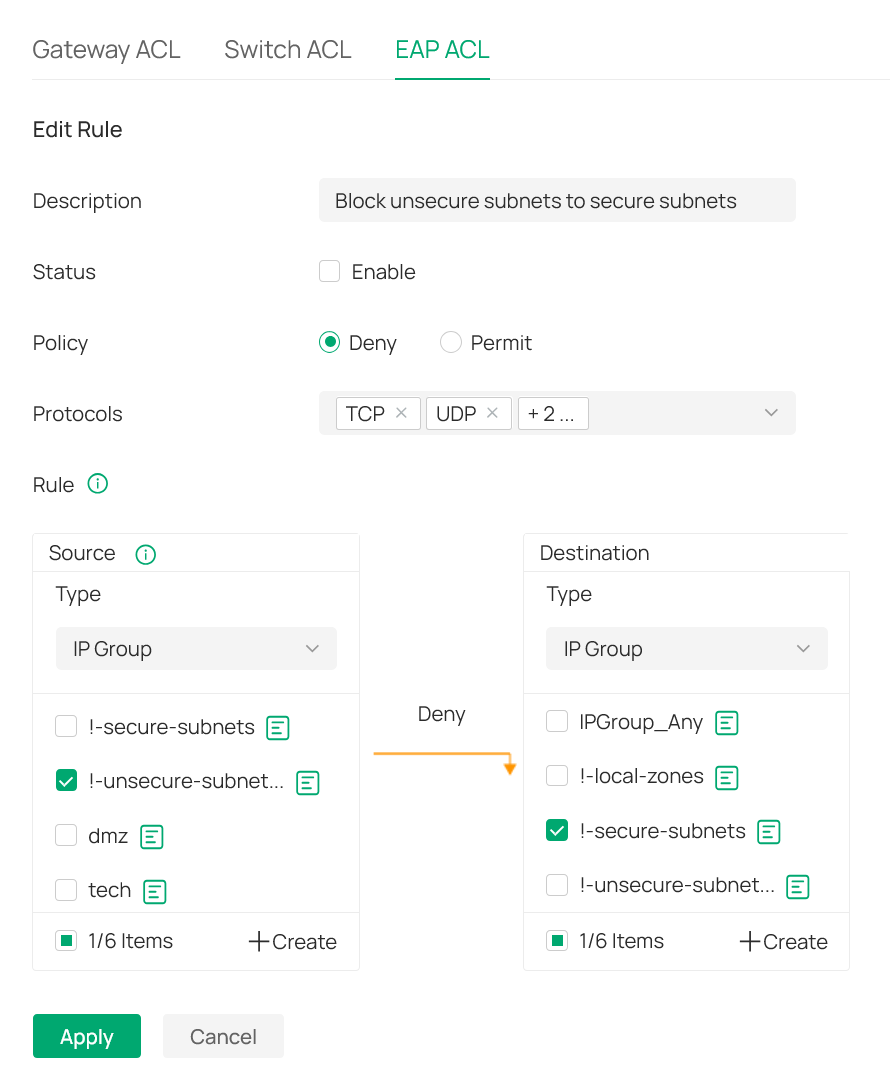
As a result all traffic is blocked?!
What am I overlooking in this setup?
- Copy Link
- Subscribe
- Bookmark
- Report Inappropriate Content

@ITV ,
This is getting complicated. If there are two interfaces for each VLAN, then an ACL is needed for each interface. A deny rule is needed to prevent the VLAN(s) from accessing other VLANs. One rule should be sufficient to block traffic while two rules are needed to allow traffic. If one of the interfaces is on a non-Omada device, then you will have to figure out the needed configuration.
- Copy Link
- Report Inappropriate Content

I switch route all my vlans, and its very easy to isolate them with switch ACLs
Ignore the fact that mine are listed as "networks" since i use the gateway for DHCP and ARP scanning features, everything is still actually routed on the switches, the same methodology applied using ipgroups
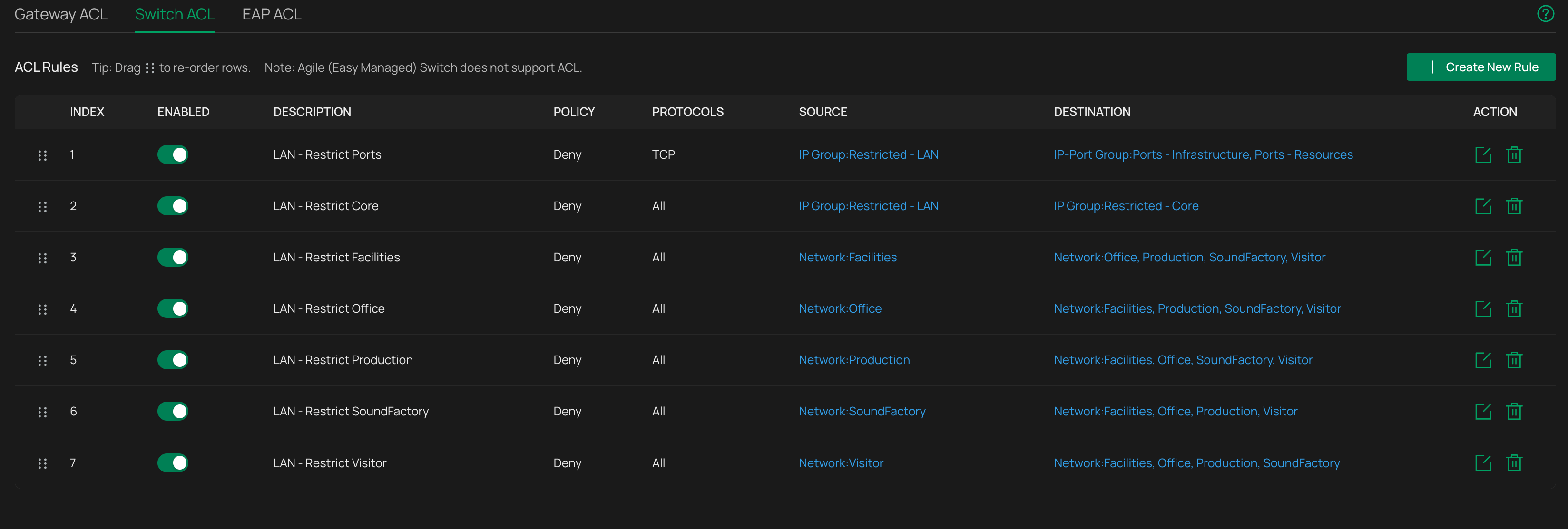
Its simply a case of making sure you correctly isolate them from each other, but what you dont want to do is include what any of them use as a gateway IP or they cant route anywhere
Mine are structured in a way that allows a subset of the management vlan (where IT DHCP is for my laptop etc, nothing else goes in that range) to communicate out to other networks and back which is why the second rule is an IPGroup destination rather than the network as a whole, but otherwise, very simple.
One thing to not that might be tripping you up - switch rules are not stateful - if you block one direction it inherently block the other direction because you are either blocking the reach-out or the response, it doesnt track the state of "this ip reached out to here, so we will allow the response"
As for the routing tables question
Lets say you have these vlans as switch only, no gateway interfaces
192.168.10.0/24
192.168.20.0/24
192.168.30.0/24
and your management vlans (and main switch SVI) are on
192.168.0.0/24
For correct routing you only need this:
Gateway route - 192.168.10.0/24 + 192.168.20.0/24 + 192.168.30.0/24 > 192.168.0.250 (switch IP on management vlan)
Switch route - 0.0.0.0/0 > 192.168.0.254 (gateway IP on management vlan)
Technically you dont even need the second route on the switch if its gateway IP already points to the the actual gateway in its management vlan interface config
- Copy Link
- Report Inappropriate Content
@jra11500 - below my 0,500 Euro...
To make sure we are on the same page:
By default, a vlan is nothing more then some number attached to an identifier.
Everything else is up to the vendor followed by the network administrator.
With that in mind (again - just to make sure we are on the same page):
The factory defaults for Omada devices is that vlan 1 is always the management vlan and attached to subnet 192.168.0.1/24.
In addition the system is not really designed to use a different vlan id for this - changing it is really challenging and not recommended.
However, using a different subnet for the management vlan is pretty straight forward.
All other vlans can be created with or without an interface - it is just used for (un)tagging packets depending on the port settings.
In my humble opinion: assigning an ip address to any other vlan interface of a switch makes only sense for L3 routing/switching.
So in terms of acl-rules on switches: by default any acl rule is applied to ports.
Meaning that it processes packets for each port based on source and destination ip details.
Alternatively there is the vlan option - which is confusing.
This is because the help-page talks about vlan interface assignments - which may not be the case.
Hence my choice to use the all-ports option.
- Copy Link
- Report Inappropriate Content
@GRL - thank you for your help.
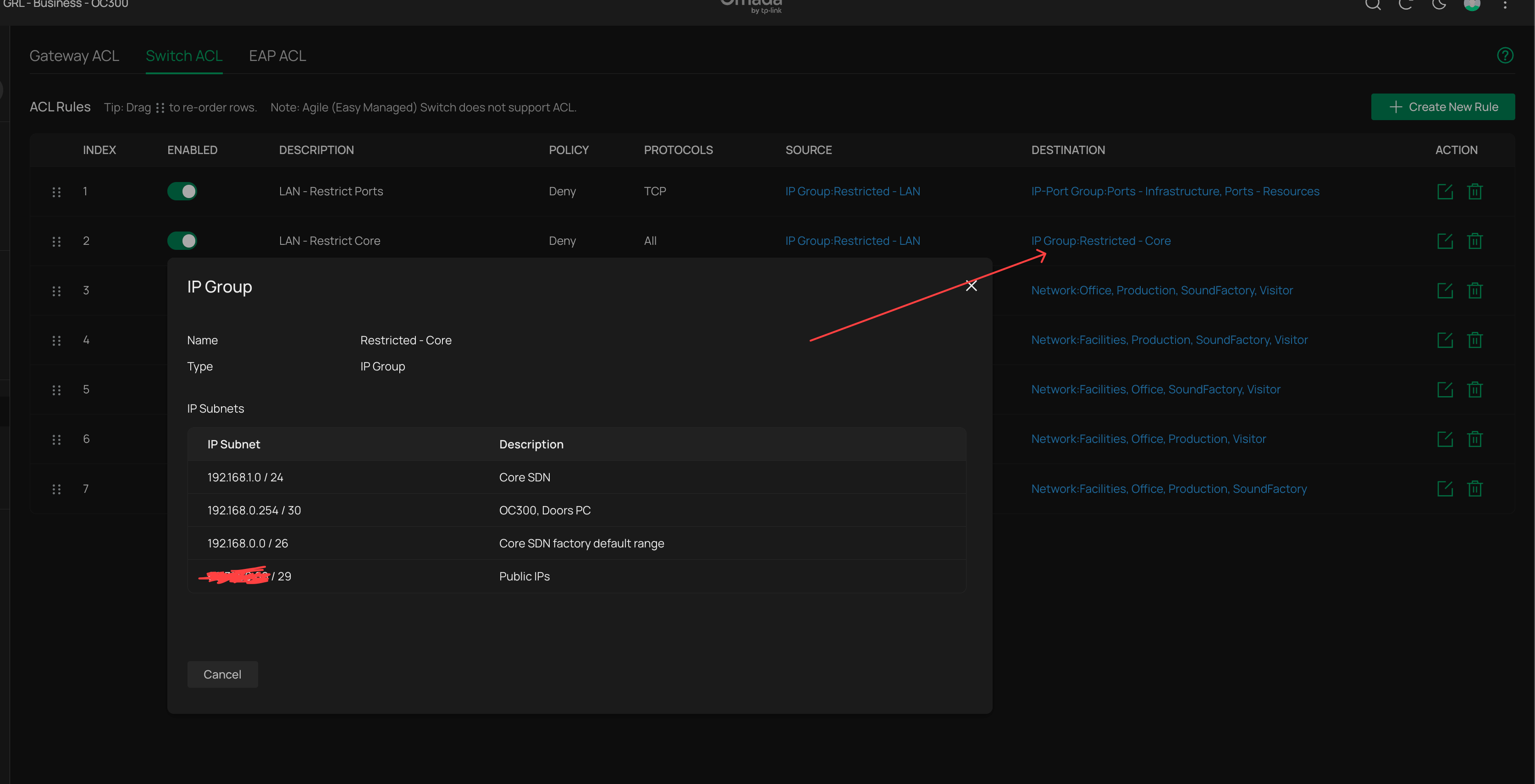
Would you be in a position to post a screenshot of acl-rule index 1 and 2?
We are not very happy with having all packets routed to the management vlan.
By using a different (intermediate) vlan we have a more granular way of working with something called traffic scrubbing.
Thank you - Will
- Copy Link
- Report Inappropriate Content
Ill post them later when home
It's easy to route packets on a dedicated transit vlan, you just need to point the next hop in the routes to the gateway and switch interfaces on that vlan (a transit vlan also needs to exist as a gateway interface or it won't work )
I even wrote a guide for this that was linked in the knowledge base somewhere
There isnt any issue routing on the management vlan as IP headers stay intact with the original source and destination IPs so switch rules still work on them if applied as ports type, there is no risk of data ingress to management vlan
- Copy Link
- Report Inappropriate Content
It is true that the factory defaults for Omada devices are to use VLAN 1 and the 192.168.0.1/24 subnet. However, it is relatively easy to change this and the system works quite well as long as the default VLAN is also the management VLAN.
In my case, I changed the default VLAN ID to 10 and the gateway address to 192.168.10.1/24. All my Omada devices reside in the management VLAN and have an IP address in the 192.168.10.x range.
If you look at the running config of an Omada switch in your network, you will still see VLAN 1 listed with a name of "System-VLAN" but in looking at the interfaces in the running config, you will find an entry that states "no switchport general allowed vlan 1". VLAN 1 exists but is no longer used.
My network is relatively small and I don't use switch routing here. I did set up switch routing (for test purposes) last year but really saw no improvement as my gateway handles everything quite well.
- Copy Link
- Report Inappropriate Content
- Copy Link
- Report Inappropriate Content
1) this rule prevents clients in the selected networks, supernetted togther in the IP group, to communicate with HTTP/HTTPS ports of the target devices (SDN devices, Routing interfaces etc) so not even gateway / switch login pages for that vlan are accessible
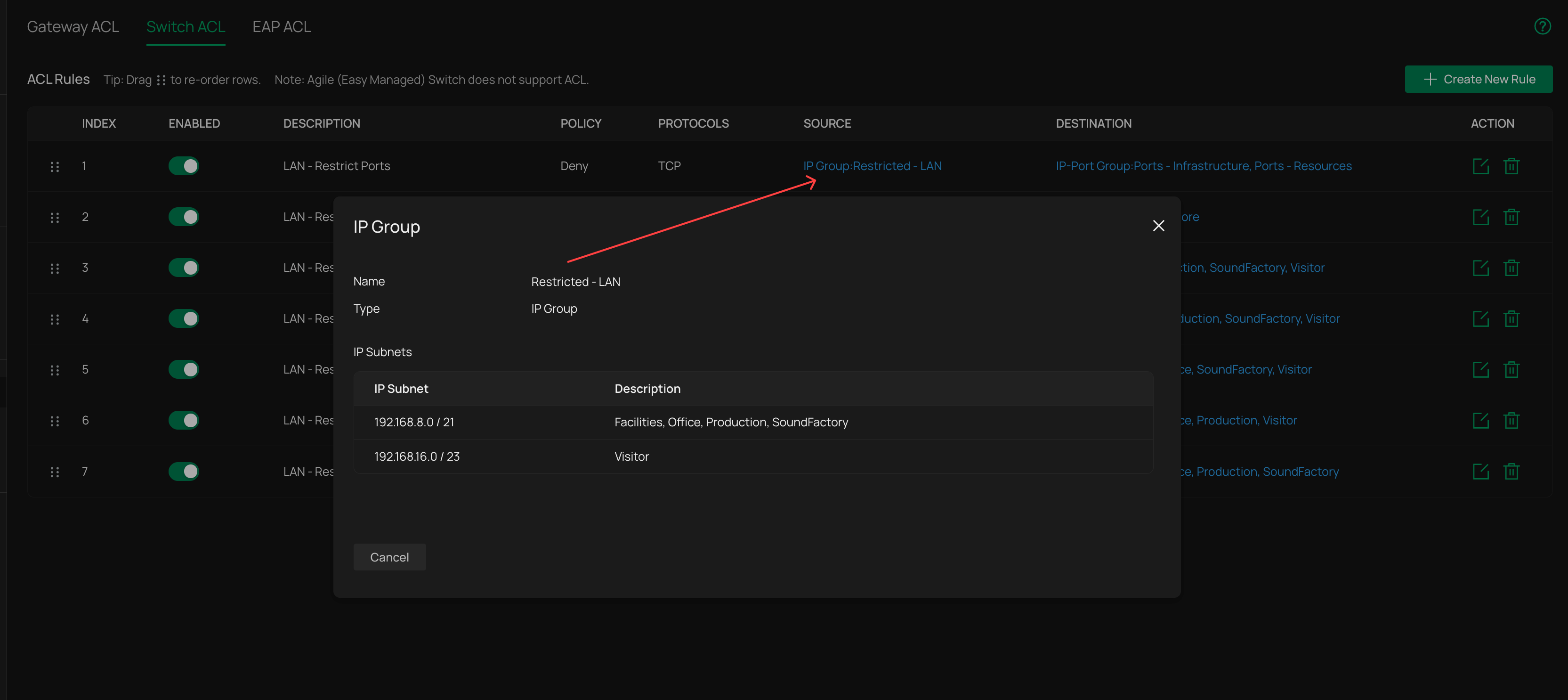
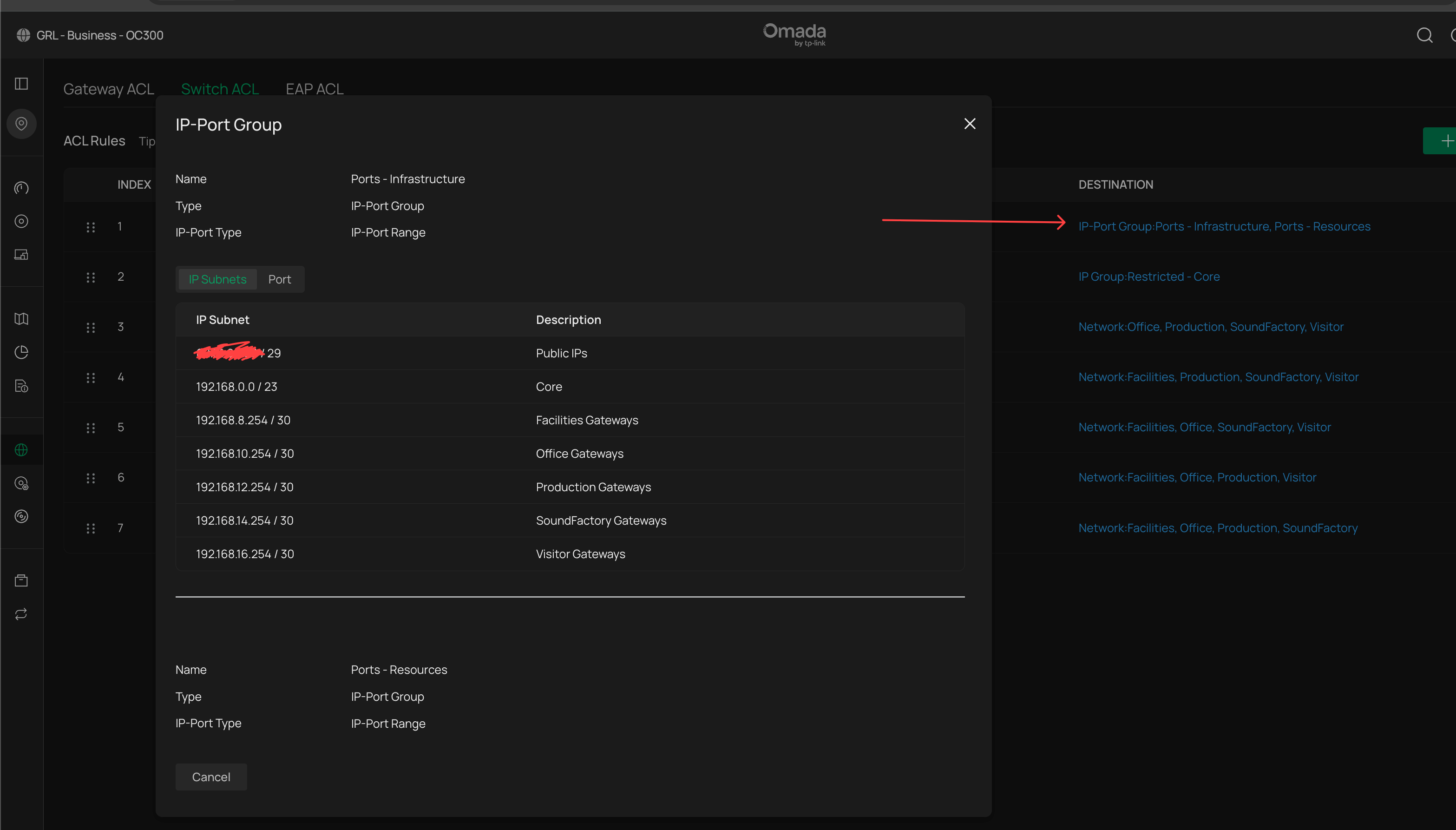
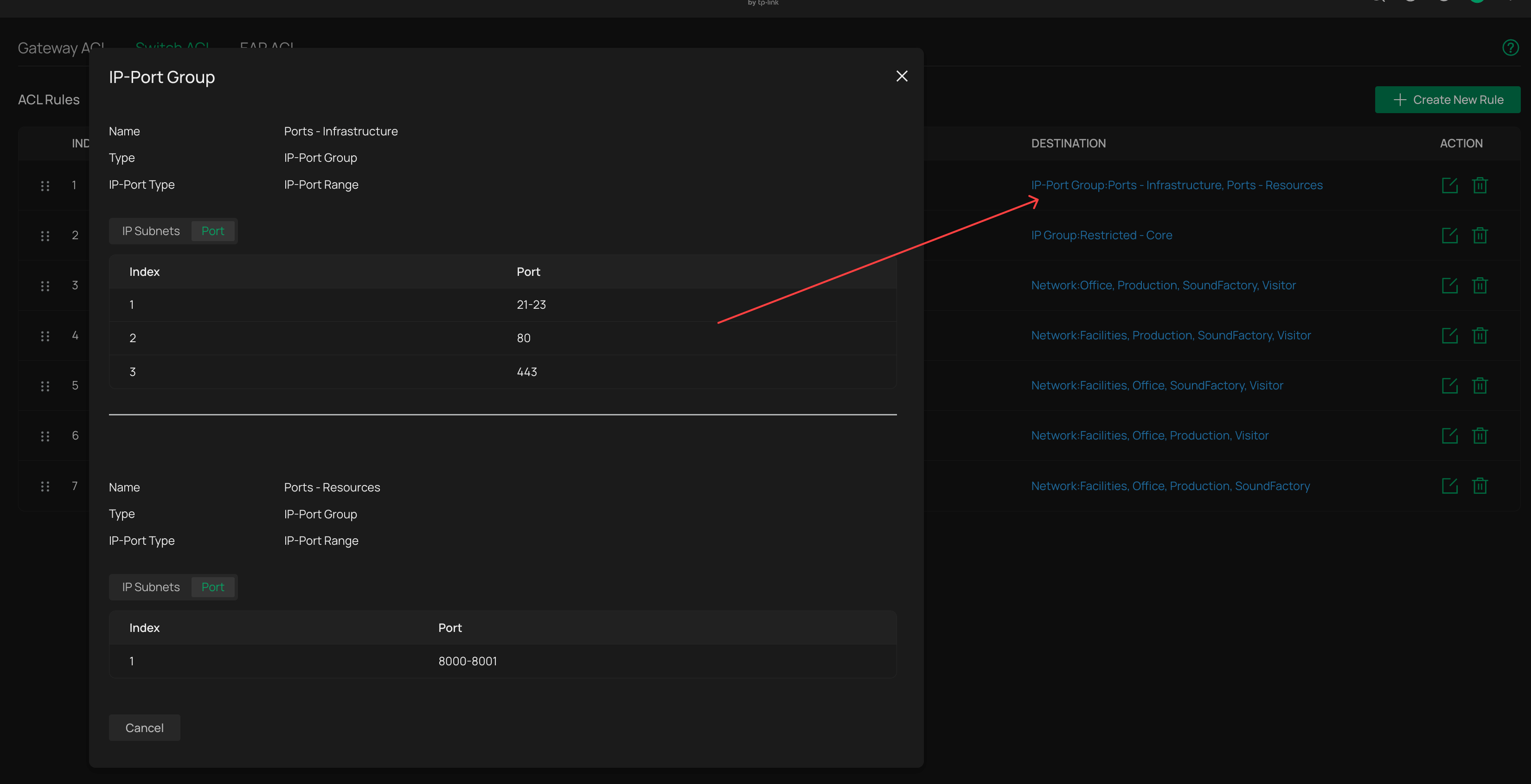
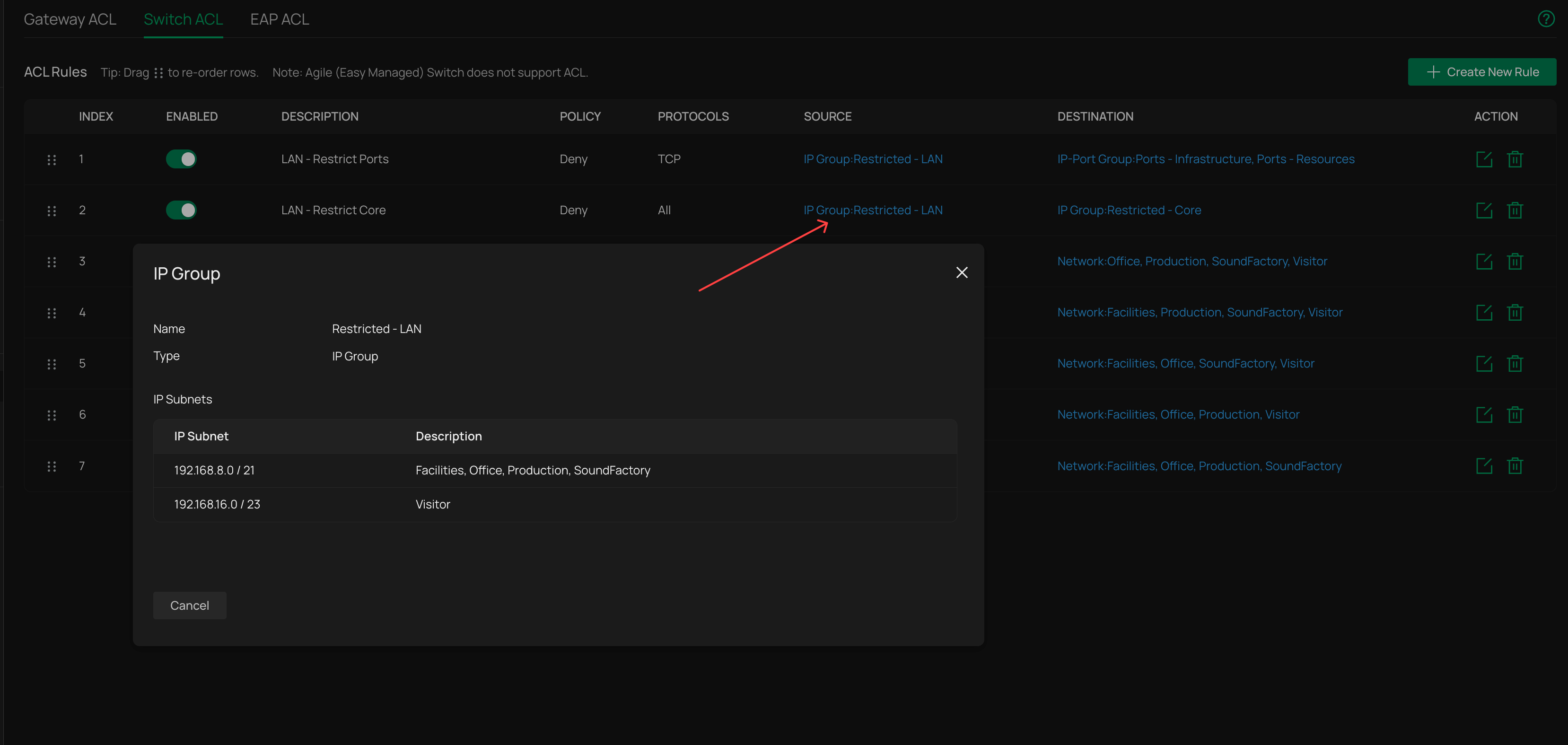
2) this rule prevents the selected networks fro accessing the SDN and critical devices present in the management vlan, but does not encompass the DHCP range used by my IT devices (such as laptop)
- Copy Link
- Report Inappropriate Content
Information
Helpful: 0
Views: 204
Replies: 18
Voters 0
No one has voted for it yet.