
How to tell TP-Link Device Hardware Versions Apart
TP-Link Devices use Hardware Versioning to indicate when a device receives a significant hardware update, whether that's to its specs, chassis, etc. This document explains how to determine which hardware versions are equivalent.
|
Hardware Version Format |
Example |
Equivalent Versions |
|
vX.0 |
V1.0 |
V1.6, V1.8, V1.9, etc. |
|
vX.X0 |
V1.20 |
V1.26, V1.28, V1.29, etc. |
This works for all version numbers, such as V3.30 being equivalent to V3.32, V3.33, within the primary version (the number before the period). For example, V1.3 would not be equivalent to V3.3.
How do I find the Hardware Version of my device?
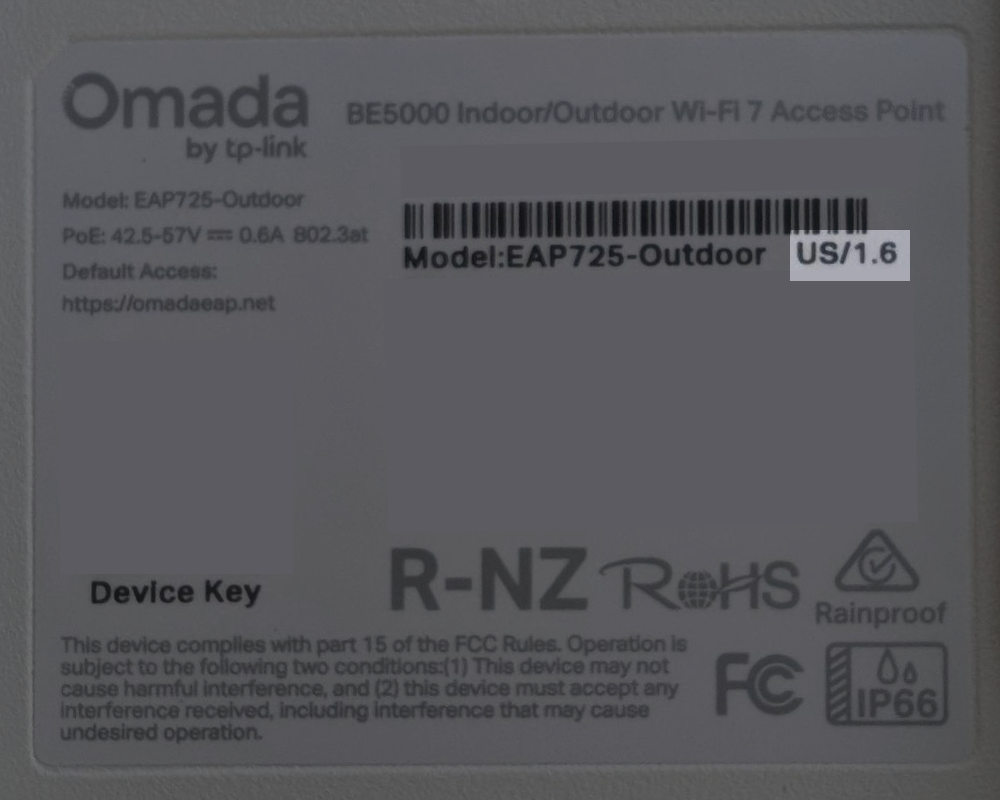
For most TP-Link devices, the hardware version is printed on a label on the bottom or back of the device. Look for text that reads "Ver:" or simply "V" followed by a number, such as "Ver: 2.0" or "V2." In some cases, it may also be displayed by Region Code/X.X, as shown below. This information is typically located near the model number and serial number on the same label.
Why doesn't my Hardware Version match what I see in the Omada Controller?
Devices show the primary version number when viewed in the controller. For example, V1.6 will show as V1.0 in the Omada Controller.
We hope this document helps you make an informed decision when purchasing TP-Link products.