
Get Started with Auto-Biorhythm Mode
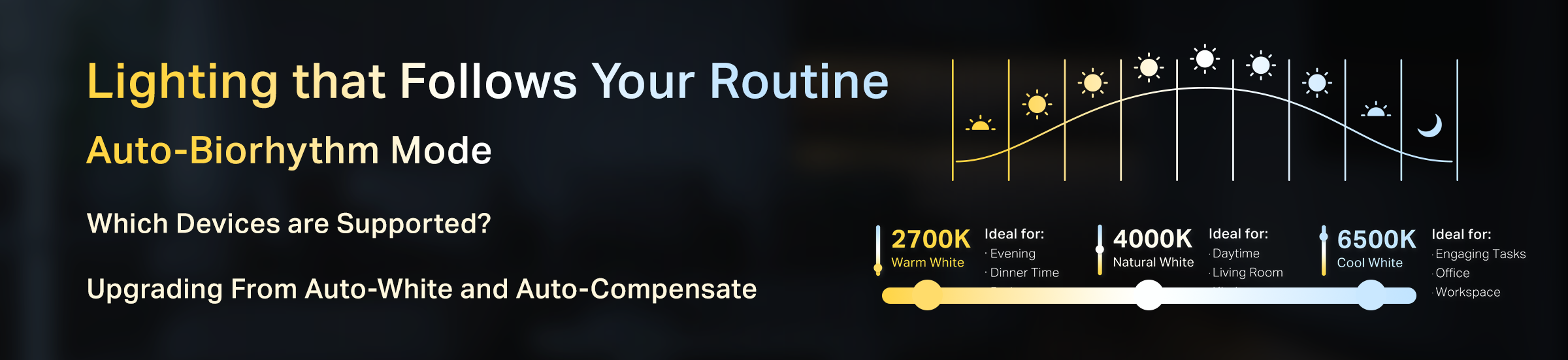
Get Started with Auto-Biorhythm Lighting for Tapo Bulbs and LED Strips
Tapo's Auto-Biorhythm Lighting automatically adjusts a light's brightness and color temperature based on your location's natural sunlight pattern and custom-set times, ensuring the most suitable lighting for your body's circadian rhythm every time it's turned on.
For example, it automatically provides a dim, mellow-toned light when turned on at night or in the morning, avoiding eye irritation and sleep disruption, and a more traditional white light for increased daytime visibility.
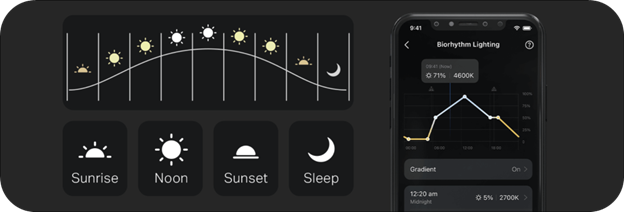
Choosing a Lighting Schedule for Your Routine
You can individually configure the feature’s ‘time nodes’ to build a lighting schedule that matches your daily routine. You can add up to 8 nodes to adjust brightness and color temperature at different points throughout the day.
Each Time Node Lets You Configure:
- Time: Sunrise, sunset, midday, midnight, or custom time
- Brightness: 1% to 100%
- Color Temperature: 2500K to 6500K, depending on the device
Unsure of what Color and Brightness to Use?
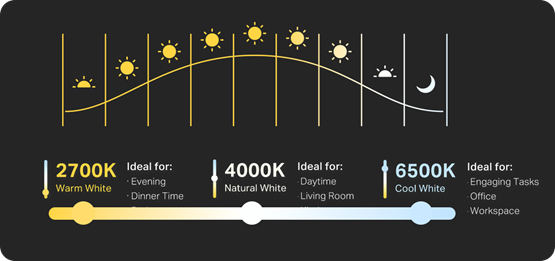
Enable the ‘Real-Time Preview’ to see your lights change as you find the best preset for you. You can find a general guide of the various colors relative to their daylight counterparts below.
- 6500K Cool White – Brisk, clear light. Suitable for Workspaces, study rooms, and offices
- 2500K Warm White – Relaxing, soft light. Great for dinner time and the bedroom
- 4000K Daylight – Fresh, stimulating light. Ideal for the living room and kitchen
Note: When the Auto Biorhythm is enabled, the bulb will follow the Auto Biorhythm settings and the Default State will be disabled at the same time. This Includes Overriding any Other Automations or Smart Actions affecting the Bulb
Coming from Auto-Match or Auto-Compensate?
Tapo Auto-Biorhythm Lighting is the newest version of the Auto-Match and Auto-Compensate lighting features.
Below you can find a general guideline of the temperatures and brightness used for the previous auto-match and auto-compensate features. Test and alter the following settings if you are looking to mimic the previous simulated daylight or daylight compensation behaviors.
|
|
Auto Match (Simulated Daylight) |
Auto Compensate |
|
30 minutes before sunrise |
2500K (05%) |
4000K (95%) |
|
30 minutes after sunrise |
4000K (50%) |
OFF |
|
Noon |
6500K (95%) |
OFF |
|
30 minutes before sunset |
4000K (50%) |
4000K (95%) |
|
30 minutes after sunset |
2500K (50%) |
2500K (95%) |
If you previously used Auto-Match and Auto-Compensate, your automations and schedules will remain intact; however, you will need to use the new feature to make further changes.
Should You Use Gradient Toggle?
Enabling the Gradient Option will Allow Your Devices to Gradually Make the Change from Color-to-Color
- With ‘Gradient’ Disabled: Color and Brightness Changes at Designated Time
- With ‘Gradient’ Enabled: Changes Occur Periodically as Listed In the Chart (~10 Minutes)
If you have other platforms or automations acting on these lights, you may consider turning the gradient toggle OFF so that your automation effects will be applied until the next explicitly listed time node.
Have Feedback on the New Auto-Biorhythm Lighting?
Provide Your Feedback in the Comments Below or Share What Your Schedule Looks Like Below