
Bridge alignment in Omada app

Hi,
I just got the EAP 215 bridge kit v3. I'm trying to find where in the Omada app I can align them.
I looked through the link below and I cannot figure out where the alignment option is.
How to use Bridge AP Alignment via Omada APP | Omada Network Support
I also have the new Beam Bridge 5 UR v1. I don't see any way to align those either.
- Copy Link
- Subscribe
- Bookmark
- Report Inappropriate Content


@FarmNet After some testing, unfortunately I can confirm the Antenna Alignment feature is only available in Standalone mode. I'll submit a feedback to add it to controller mode, but in the meantime, I thank you for your patience as we wait for that feature to be implemented.
- Copy Link
- Report Inappropriate Content
@FarmNet Thanks for posting! The Antenna Alignment feature is intended to help you measure signal strength between paired APs, not necessarily to make adjustments through the app. You will need to make the physical adjustments, and then be able to see the strength indicator in the feature.
- Copy Link
- Report Inappropriate Content
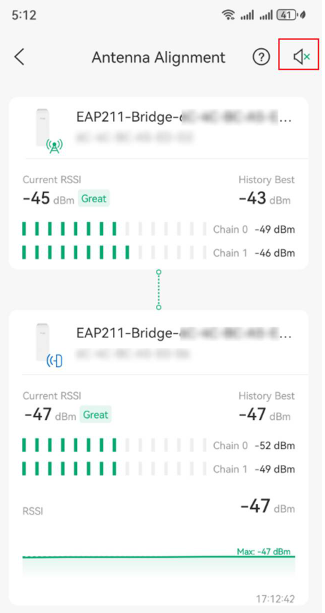
- Copy Link
- Report Inappropriate Content
@FarmNet If just in standalone, did you create a Bridge Group? If so, the Antenna Alignment feature should be in that group.
If using an Omada Controller instead, it should be in Devices -> Device Group
- Copy Link
- Report Inappropriate Content
I have an OC200 version
| 6.1.0.19 |
They show up in the Devices -> Device Group, but I cannot find the Antenna Alignment feature. What do I need to click on in the app?
- Copy Link
- Report Inappropriate Content
@FarmNet After some testing, unfortunately I can confirm the Antenna Alignment feature is only available in Standalone mode. I'll submit a feedback to add it to controller mode, but in the meantime, I thank you for your patience as we wait for that feature to be implemented.
- Copy Link
- Report Inappropriate Content

I just specifically bought the newly release Beam Bridge 5 UR because it had clearly said it had this alignment app, but I can't find it anywhere.
- Copy Link
- Report Inappropriate Content
@SpencerBahamas Hi there, the app-guided alignment is referring to the Antenna Alignment feature in the Omada App. Check out the FAQ here: How to use Bridge AP Alignment via Omada APP | Omada Network Support
- Copy Link
- Report Inappropriate Content
@NeilR_M Does this not work while using the App in Cloud Controller Mode? Does it need to be in a local mode, as I don't see this option when using the Cloud Controller mode?
- Copy Link
- Report Inappropriate Content
@SpencerBahamas That's correct, unfortunately. Antenna Alignment is currently Standalone mode only.
- Copy Link
- Report Inappropriate Content

@NeilR_M - any update to this? Nothing in the included instructions mentions the alignment must be done in standalone mode. It's frustrating to set these up through the app as instructed only to find out advertised features are not available.
- Copy Link
- Report Inappropriate Content
Information
Helpful: 0
Views: 1001
Replies: 10
Voters 0
No one has voted for it yet.