
vlan isolation
vlan isolation

I'm struggling with gateway, switch and eap type of acl rules.
I'm trying to find a way of isolating 2 vlans from the rest.
Meaning only internet traffic is allowed for these 2 vlans.
For that I have created 2 ip-groups (see attached pictures).
One has the 2 subnets I'm trying to isolate ( labeled as !-unsecure-subnets): 192.168.180.0/24 and 192.168.190.0/24.
And the other has all other subnets (labeled as !-secure-subnets): 192.168.2x0.0/24. Where x equals 0-4; meaning the 3-th otctet is 200, 210, 220, 230 and 240.
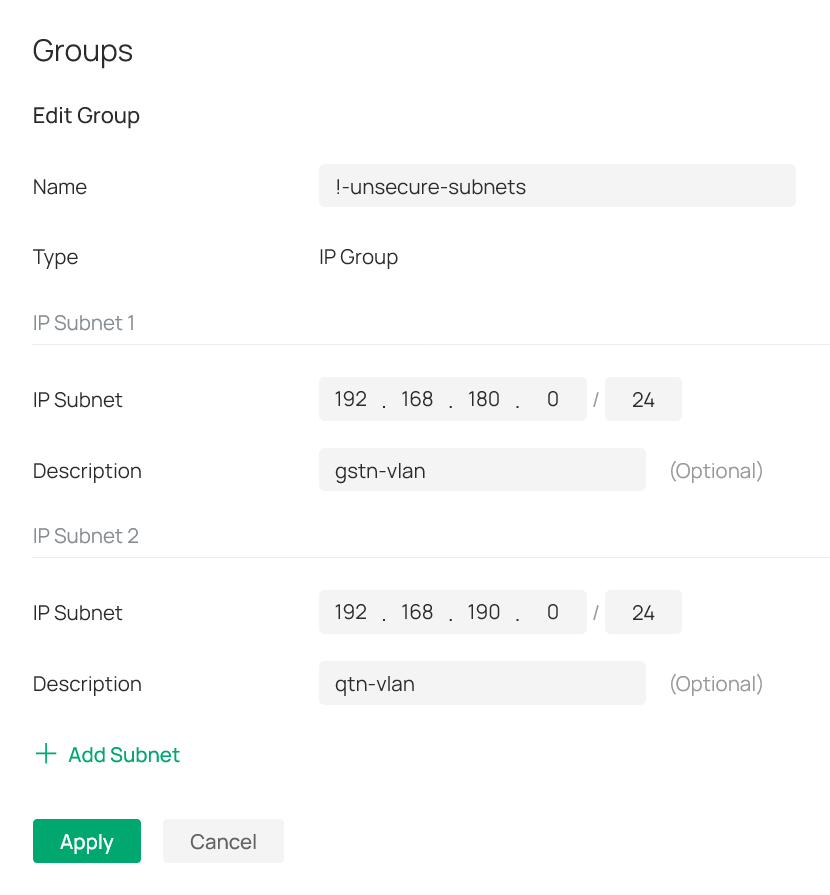
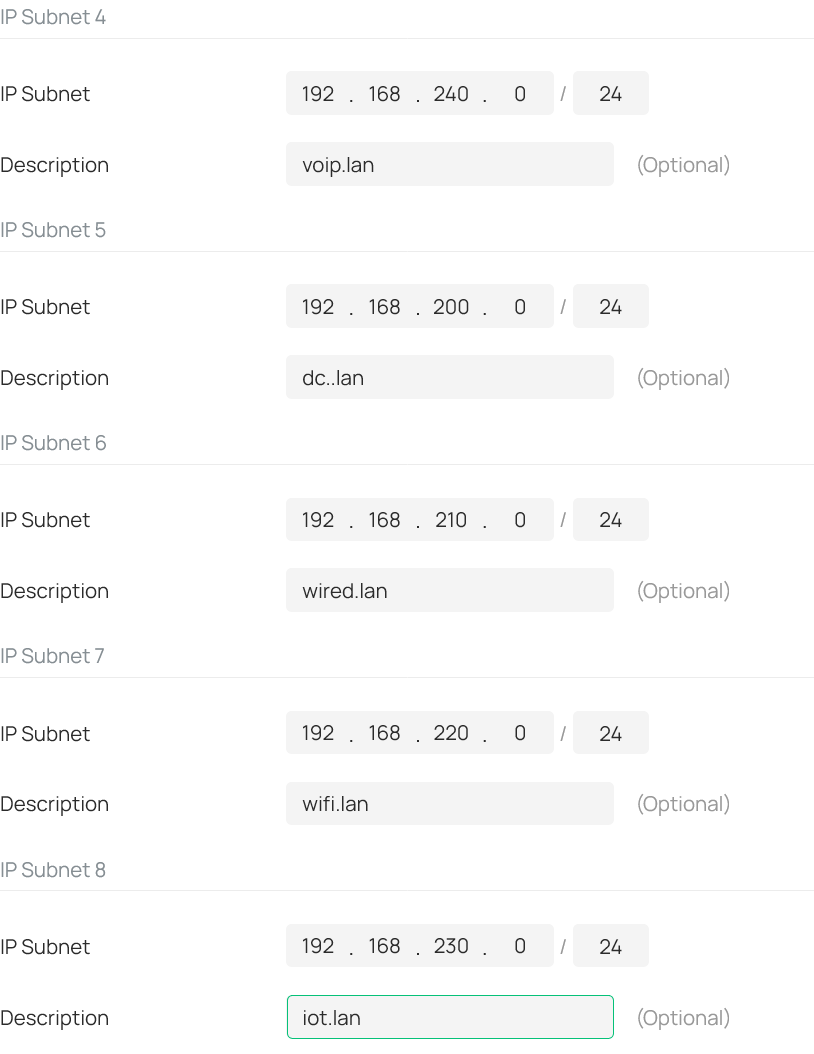
See also attached picture: I then created a deny rule for the gateway-acl (i.e. lan->lan), switch-acl and eap-acl.
All three with the same content as seen in the screenshot from the eap-acl.
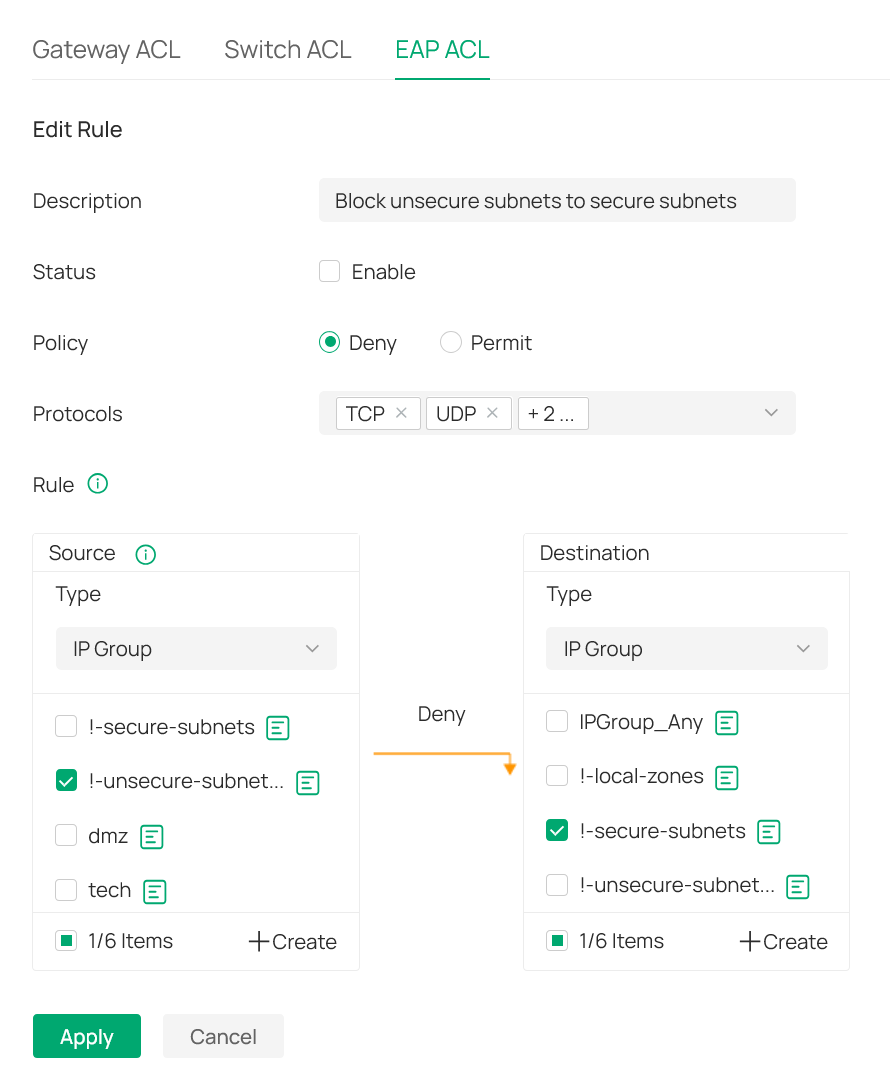
As a result all traffic is blocked?!
What am I overlooking in this setup?
- Copy Link
- Subscribe
- Bookmark
- Report Inappropriate Content

If you are using the latest firmware, then it is very easy to isolate your two VLANs. In each VLAN configuration, (found under site, Network Config, LAN), expand the Advanced Settings where you will find an Isolate Network option. Enabling this option will isolate the VLAN from all other VLANs and your IP Groups and ACLs are not needed. Alternatively, on the LAN page there is a tab for Isolation Settings where you can select the VLAN and add it to the isolated VLAN list.
- Copy Link
- Report Inappropriate Content
@jra11500 - thank you for the detailed explanation.
Unfortunately that feature only works if the router is doing the vlan routing.
Which is not the case for me - for performance reasons I'm doing L3-switching.
Meaning a SG2218 is doing all the vlan-routing and the Omada router is only doing internet routing.
As a result, I have no other option then trying to make it work with an ACL.
- Copy Link
- Report Inappropriate Content
That changes things! A topology map would help in recommending a solution. It would appear that you probably don't need any gateway or EAP ACLs, only switch ACLs and perhaps some static routes.
- Copy Link
- Report Inappropriate Content
@jra11500 - thank you for the quick follow-up.
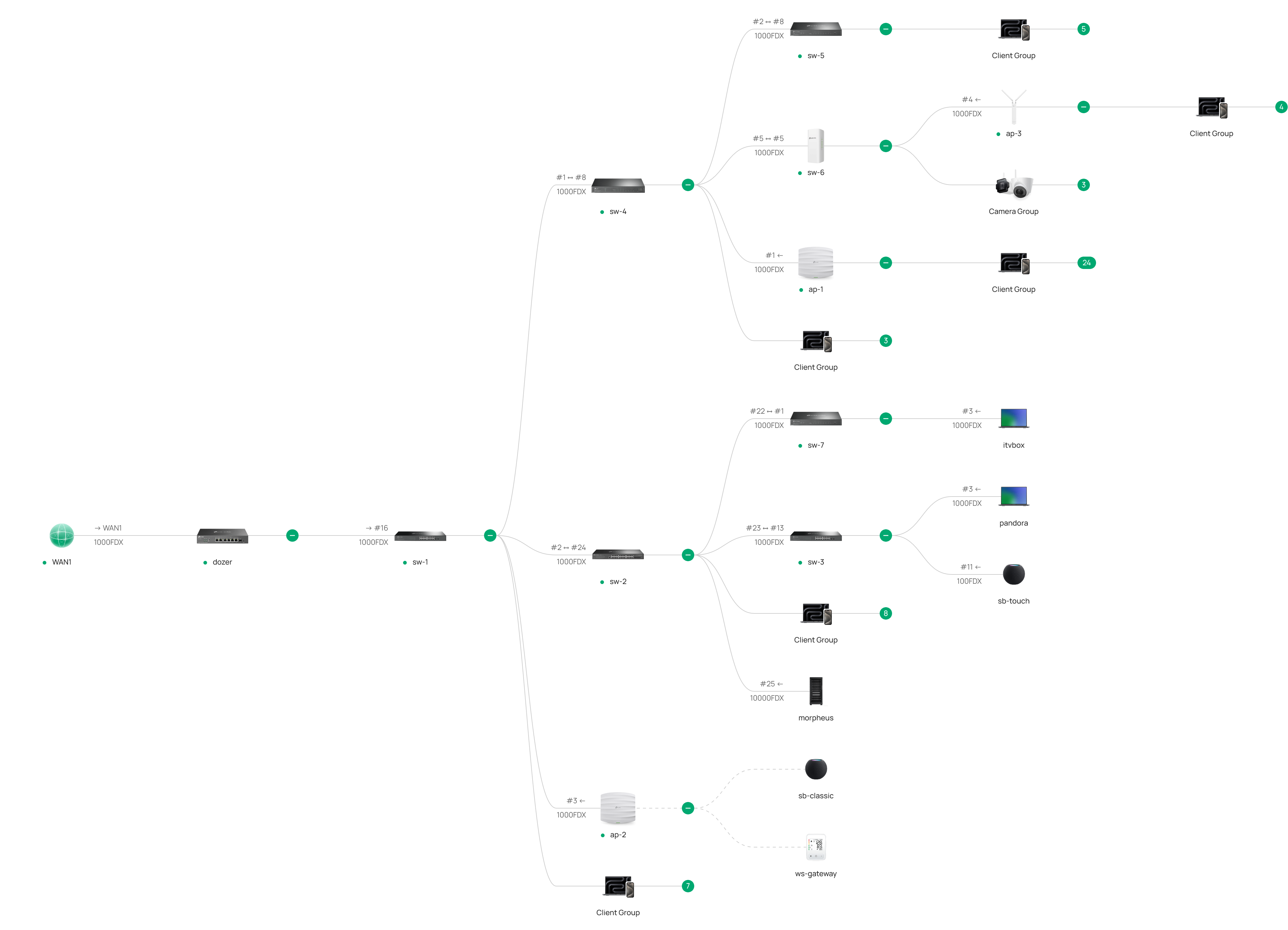
The bigger image at the end of this post shows the topology. Here you see dozer on the left; i.e. the Omada ER707-M2 router (with ip-adress 192.168.2.240). A little to the right there is sw-1 - which is the L3 switch/router and the default gateway for all vlans (with ip-adress 192.168.x.241.
All packets for the internet are traveling via a dmz/intermediate vlan (i.e. vlan-2 with 192.168.2.0/24).
All packets travelling between the vlans are staying within sw-1 as this is the default gateway for all vlans.
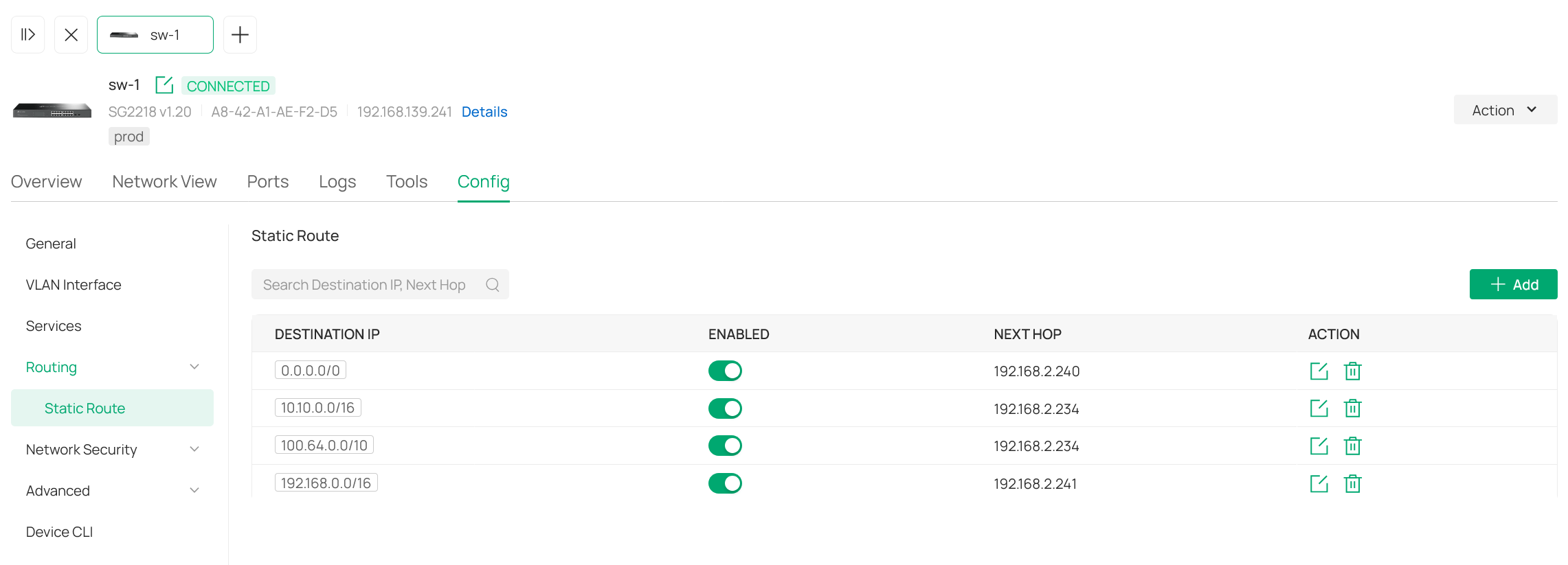
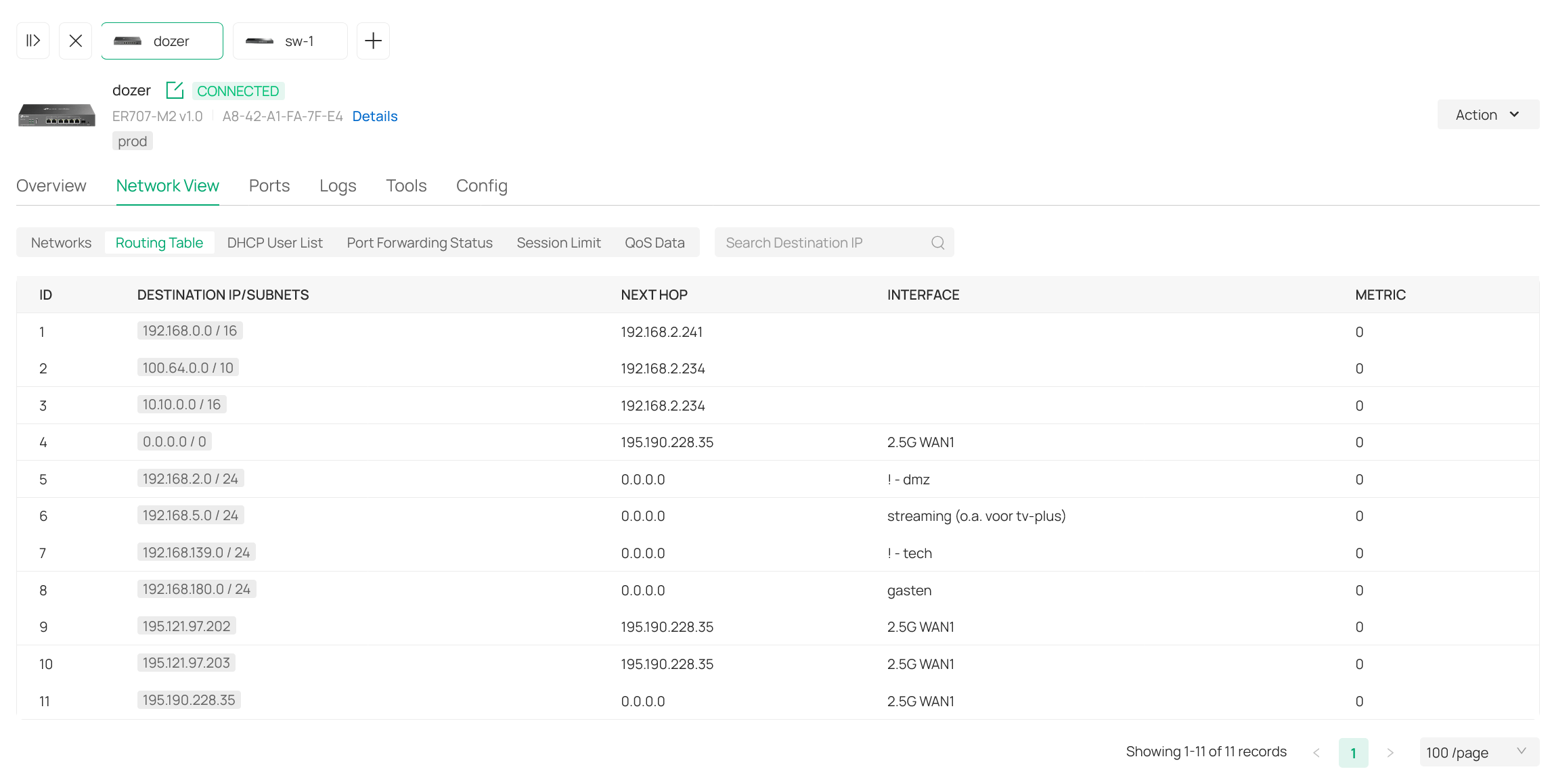
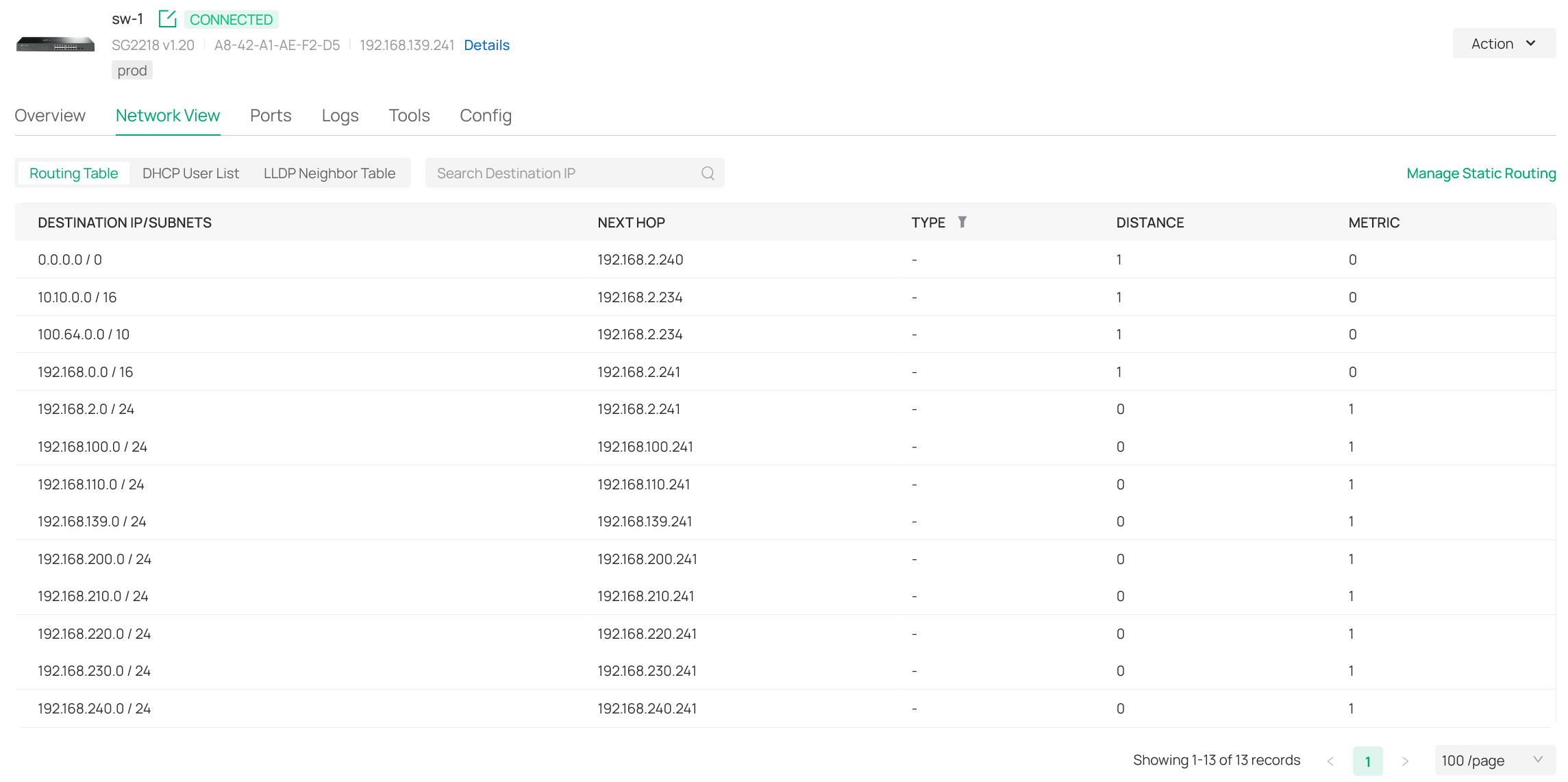
And yes - to make this work, there are a few static routes required - see the other screen shots.
One is coming from the network config => transmission => static route. The other is from the switch-sw-1 config.
Part of this is a debian container with ip-adress 192.168.2.234; which is the Tailscale gateway for all remote subnets.
The routing table of the router and sw-1 are shown in 2 other screenshots.
Please note that:
(1) - this dmz/intermediate vlan is hosted by the Omada router (and is not the management vlan).
(2) - most vlans have dnsmasq (via pihole) as their dhcp and dns server; including the management vlan.
(3) - bits-and-pieces of the screenshots are in dutch.
I hope this helps in recommending an approach for the switch-acl.
Feel free to ask any question if things are still confusing.

- Copy Link
- Report Inappropriate Content
In looking at your screenshots. I only see the 192.168.180.0/24 network in the gateway's routing table and I do not see your 192.168.190.0/24 network at all. Where are their interfaces?
- Copy Link
- Report Inappropriate Content
@jra11500 - there are none - within the Omada setup there is only a vlan config item - sorry for the confusion.
Subnet 192.168.190.0/24 (vlan-id 390) is hosted by a vlan interface on the OpnSense router (i.e. a vm on a proxmox server).
The wan port of the OpnSense router has the dmz/intermediate vlan as its native vlan.
The 390-vlan is configured as a vlan interface of this same wan port.
Meaning it is the only interface assignment for this vlan in the whole network.
Its what we call the quarantine vlan.
Meaning if a device is doing strange things it is virtually "relocated" to this vlan for further analysis.
This includes a different ip adress via the OpnSense router and its dhcp service attached to the vlan interface.
Meaning vlan 390 is part of all vlan trunk ports - just no interfaces (apart from the OpnSense router).
Makes any sense?
- Copy Link
- Report Inappropriate Content
I must admit that I am slightly confused. Personally, I see nothing wrong in the routing tables except for the 192.168.0.0/16 entry in the sw1's static routing table. I'm not sure you need that entry but I might be wrong. At this point, I do not have any recommendations for your ACLs but I am sure there are other forum members with more switch ACL experience who might be able to help you with the information that you provided.
- Copy Link
- Report Inappropriate Content
@jra11500 - thank you for your time and patience - really appreciated!
I'm not 100% sure here - but if memory serves me right (we are using this setup a few years now):
If we would leave the 192.168.0.0/16 out, all packets would be routed via the management vlan.
This is because this would then be the default route as it is also the factory default vlan.
- Copy Link
- Report Inappropriate Content
On the subject of the 192.168.0.0/16 entry, it is needed in the gateway in order to route all incoming 192.168.x.x traffic to the switch but in the switch all the traffic is then routed through the respective switch interface. That is why I questioned whether the static route is really needed in the switch. As there is no switch interface for the 192.168.180.0/24 and the 192.168.190.0/24 networks, I am not sure how that traffic should be routed and therefore can not offer a switch ACL solution.
- Copy Link
- Report Inappropriate Content
@jra11500 - lets imagine there are two interfaces for these vlans/subnets - what would you recommend as switch-acl?
- Copy Link
- Report Inappropriate Content
Information
Helpful: 0
Views: 904
Replies: 18
Voters 0
No one has voted for it yet.