
Why does all the manuals or videos show me options I don't have?

None of the Omada or Kasa tools does reconize my eap110.
The only acces I have is the web interface, and the ap is working but if I want to change anything or add it to kasa and tapo no possibility.
This is really frustrating.
I wanted to enable the 5Ghz band and lookked for the band steering option, didn't find it.
I have to ssid but both are 2.4Ghz and I don't see where to change that.
Can anyone help me please.
Thanks and regards.
- Copy Link
- Subscribe
- Bookmark
- Report Inappropriate Content

Hi,
I am no expert in Kasa and Tapo stuff, but to me the Kasa app appears to be made for adding and managing dedicated "Smart" devices, but not for managing regular routers or access points.
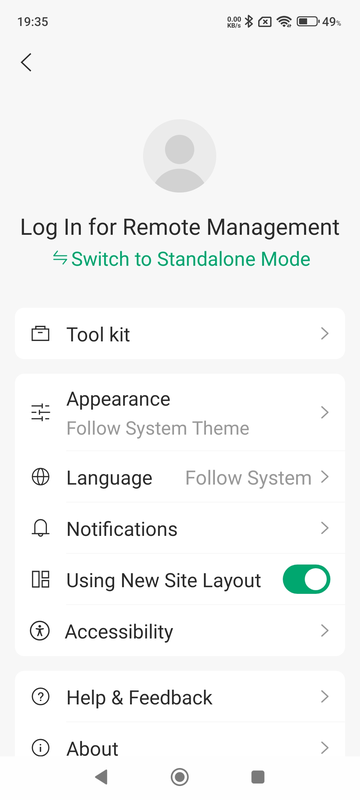
The Omada app, however, should recognize your EAP110. If you only have a sole EAP110 device without a controller, then make sure you have switched the Omada app to "Standalone Mode" via the main menu shown in the picture below. (default after installation of the app would be "Controller Mode")
Also, the EAP110 is a 2.4 GHz single band device. It does not have a 5 GHz band.
If you see your EAP110 emitting two 2.4 GHz SSIDs, then someone must have manually added a second SSID at some point.
- Copy Link
- Report Inappropriate Content
Hi,
I am no expert in Kasa and Tapo stuff, but to me the Kasa app appears to be made for adding and managing dedicated "Smart" devices, but not for managing regular routers or access points.
The Omada app, however, should recognize your EAP110. If you only have a sole EAP110 device without a controller, then make sure you have switched the Omada app to "Standalone Mode" via the main menu shown in the picture below. (default after installation of the app would be "Controller Mode")
Also, the EAP110 is a 2.4 GHz single band device. It does not have a 5 GHz band.
If you see your EAP110 emitting two 2.4 GHz SSIDs, then someone must have manually added a second SSID at some point.
- Copy Link
- Report Inappropriate Content
- Copy Link
- Report Inappropriate Content
- Copy Link
- Report Inappropriate Content
As I wrote previously, the EAP110 does not have a 5 GHz band.
Here is a link to its specifications: https://www.omadanetworks.com/en/business-networking/omada-wifi-outdoor/eap110-outdoor/#specifications
If you require the 5 GHz band, then you would need to buy another Outdoor EAP model that supports 5 GHz.
- Copy Link
- Report Inappropriate Content
Information
Helpful: 0
Views: 321
Replies: 4
Voters 0
No one has voted for it yet.