
Omada Software Controller does not show active channels and Connected Clients

Omada Software Controller does not show active channels and Connected Clients

Omada Software Controller does not show active channels and Connected Clients
Friday - last edited Yesterday
Tags: #Missing Clients
Model: EAP245  
Hardware Version: V3
Firmware Version: 5.0.3 Build 20210604 Rel. 51934

Please can someone confirm my thinking.

I have six EAP245/225/225Outdoor access points. I am currently controlling them with Omada Software controller 3.1.4.


On four of the EAP'sI can see the active wifi channels and number of connected clients. On one EAP245 and the EAP225 Outdoor I cannot see the active wifi channels or the number of connected clients. Also in the All Clients tab for connected clients, none of the clients connected to either of these devices are visabile in the results (I know there are some as this is my Garage and Garden AP to which my robot mower and car charger are both connected). Please see below screenshot:
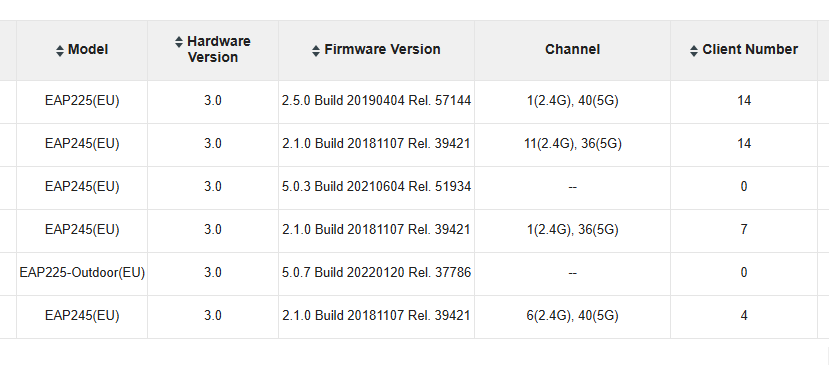


All the devices which have Channel and Client Number displayed have firmware versions 2.1.0 or 2.5.0 whereras the two EAPs which are not displaying this information have firmware 5.0.3 or 5.0.7 

My software controller bersion is 3.1.4. Do I need to upgrade the controller software to 5.0.7 or higher to be able to view the missing information?


Many thanks

0
0
#1
1 Accepted Solution
Re:Omada Software Controller does not show active channels and Connected Clients-Solution
Friday - last edited Yesterday

  @Fozzie Bear Yes, you will need to upgrade. Please see the release note attached to the firmware version for your device: 
EAP245(EU)_V3_5.0.3_20210604.pdf

Check out our subreddit, r/Omada_Networks! Want to help test and give feedback on new products? Sign up for the US Enterprise Beta Program here! Need a ticket? Contact Technical Support
Recommended Solution
0
0
#2
2 Reply
Re:Omada Software Controller does not show active channels and Connected Clients-Solution
Friday - last edited Yesterday

  @Fozzie Bear Yes, you will need to upgrade. Please see the release note attached to the firmware version for your device: 
EAP245(EU)_V3_5.0.3_20210604.pdf

Check out our subreddit, r/Omada_Networks! Want to help test and give feedback on new products? Sign up for the US Enterprise Beta Program here! Need a ticket? Contact Technical Support
Recommended Solution
0
0
#2
Re:Omada Software Controller does not show active channels and Connected Clients
Yesterday

  @NeilR_M Many thanks for the confirmation and the link to the upgrade process.

Very much appreciated

0
0
#3
