
WiFi vlans not working

Hi everyone
I have two models of tp-link APs EAP115-Wall (with diffrent FWs) and EAP235-Wall (3.1.1 Build 20230414 Rel. 54637(4555)). On my APs I have WiFi config like this:
| ssid | vlan id |
| myssid | 0 |
| myssidv | 10 |
On EAP235 the configuration behaves according to expectations, namely: non vlan wlan host recieve lan IPs e.g. 10.10.10..., and vlan wifi hosts get 192.168... And all works great.
But on EAP115 vlan host gets IPs config form lan 10.10.10.. and there is no network connection. When I set ip manually 192.168.... connection appears. What is going on?
- Copy Link
- Subscribe
- Bookmark
- Report Inappropriate Content


Hi,@alex512
Thank you for posting your question on our commercial forum.
We would like to confirm first: are you managing your EAPs via a controller?
If you are using a controller for management, please kindly check whether the EAP115 has been adopted to the same site as your EAP235, and verify that the configurations of the two devices are consistent. Generally, all EAPs adopted to the same site will apply the same unified configuration, including SSID and VLAN settings. Besides, we also recommend you confirm that your connected end devices are connected to the correct corresponding SSID.
If it is convenient for you, could you please share your complete VLAN configuration details with us? This will help us better analyze your case and provide appropriate targeted suggestions. Thank you for your cooperation.
- Copy Link
- Report Inappropriate Content
Hello @Jeremy_12
No,
No, I don't use a controller. I configure it manually. On the EAP115:
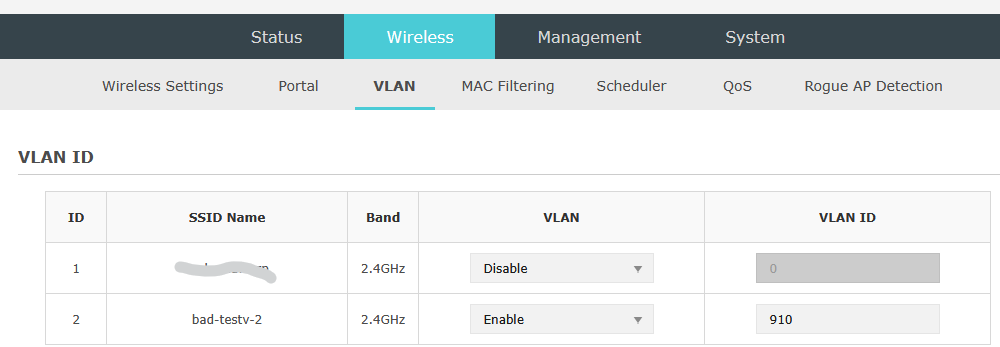
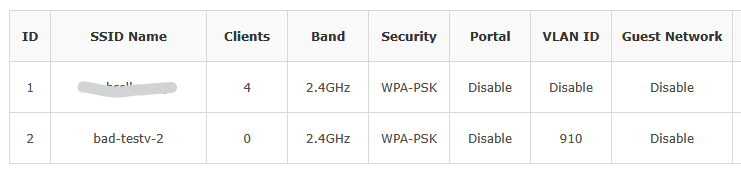
on EAP235 similar config:

Router:


As I mentioned, if I connect to testv-2, I get an IP from the DHCP server of VLAN 910, DNS works, and I have Internet access.
When I connect to bad-testv-2, I get a LAN IP. For the EAP115, Wireshark shows that traffic from the LAN is "leaking" into the VLAN. After connecting, for example, you can see a response first from the VLAN DHCP server, and shortly after from the LAN DHCP server. Sometimes it happens that when I connect a phone, it has the correct DHCP for a few seconds.
I also tested using the controller, but the result is the same.
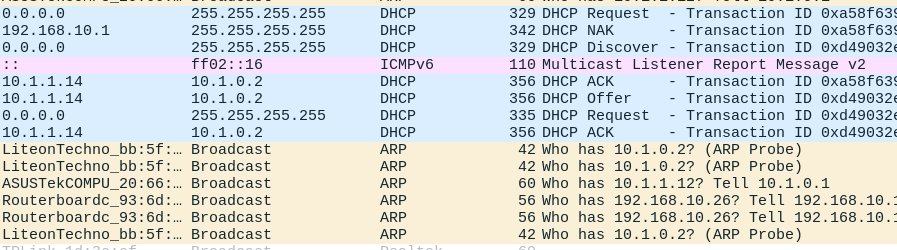
- Copy Link
- Report Inappropriate Content
Hi, @alex512
Thank you for providing the relevant information.
Would it be possible for you to share and confirm your complete network topology with us? This will help us conduct a more accurate analysis of your issue.
Additionally, could you please clarify which port on which device the uplink port of your EAP115 is connected to? Has the corresponding VLAN pass-through rule been configured for this port? We also recommend that you check whether the configuration of this port is consistent with that of the port connected to your EAP225.
For the configuration guide of setting up VLAN SSID via a third-party gateway, please refer to the link below(under the controller mode):How to configure SSID VLAN on Omada AP with Third-Party Gateway | Omada Network Support
- Copy Link
- Report Inappropriate Content
Hi @Nathan-TP
Thanks for replay.
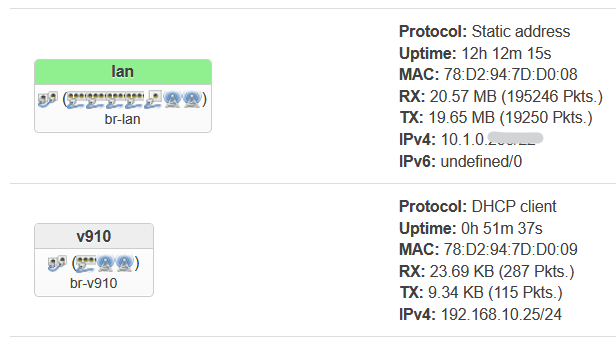
My network is quite simple. There is no dedicated port for any vlan.
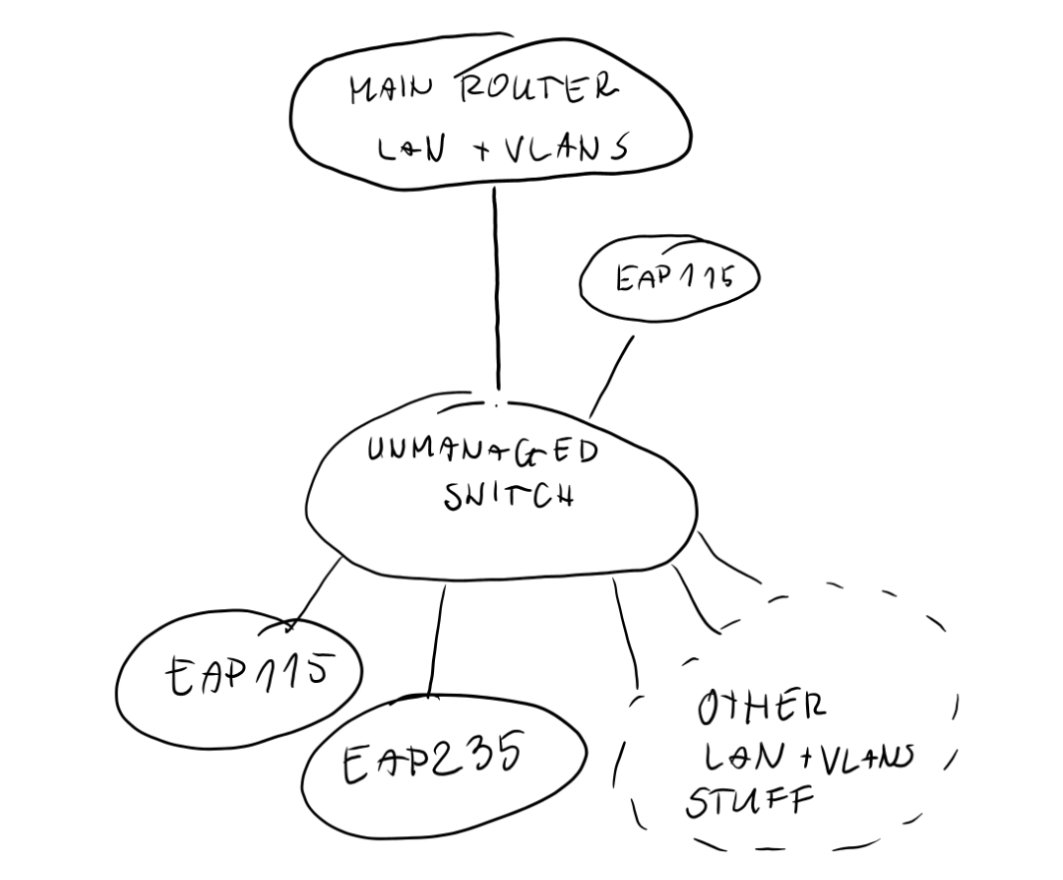
I have eg other ap configured similarly wifi networks connected to the v910 interface work exactly the same as in the EAP235. All is connected to the one uplink port which is connected to the same switch.
- Copy Link
- Report Inappropriate Content
@Nathan-TP
I've done a bit of research and I suppose that might be a similar issiu like https://community.tp-link.com/en/business/forum/topic/251778. I wonder if there is a chance for firmware update?
- Copy Link
- Report Inappropriate Content
Hi, @alex512
Thank you for your reply.
We have submitted all the information you provided to our engineering team, and they are currently conducting a detailed analysis of your case. I will follow up with you promptly the moment I receive a response from the team.
- Copy Link
- Report Inappropriate Content
Information
Helpful: 0
Views: 224
Replies: 6
Voters 0
No one has voted for it yet.