
TP-link EAP110 do not forward dhcp offer message
 This thread has been locked for further replies. You can start a new thread to share your ideas or ask questions.
PCs in my company somtimes cannot get ip addresses when connect with EAP110. Wiring worked fine. I checked my dhcp server (windows server 2016). I used WireShark and found out my dhcp server could take dhcp discovery message from cient connected with EAP110 and sent dhcp offer message out. But my pc still cannot get ip address. So i thought EAP110 do not forward dhcp offer message. It ussualy happens when there are many pcs connecting with the LAN network and just few pcs cannot get ip address.
I wondering can tp-link will fix this in some next firmware update for eap110 (my device is eap110 v4)
- Copy Link
- Subscribe
- Bookmark
- Report Inappropriate Content


Dear @Thanh_Phung ,
Thanh_Phung wrote
PCs in my company somtimes cannot get ip addresses when connect with EAP110. Wiring worked fine. I checked my dhcp server (windows server 2016). I used WireShark and found out my dhcp server could take dhcp discovery message from cient connected with EAP110 and sent dhcp offer message out. But my pc still cannot get ip address. So i thought EAP110 do not forward dhcp offer message. It ussualy happens when there are many pcs connecting with the LAN network and just few pcs cannot get ip address.
To better assist you, may I know the firmware version of your EAP?
Did you use it in standalone mode or controller? What about the controller's version?
What's the physical connection(current topology) of your all devices?(You can draw a diagram of Network Topology simply if you don't mind.)
Did you set any advanced settings in your network like VLAN, ACL?
Best Regards!
- Copy Link
- Report Inappropriate Content
@Hank21 Hi Hank,
Thank for your assist.
My eap firmware version is EAP110_V4_3.20.0 Build 20200525. It is in standalone mode.
I do not set any VLAN or ACL in my network.
This is my topology, very simple.
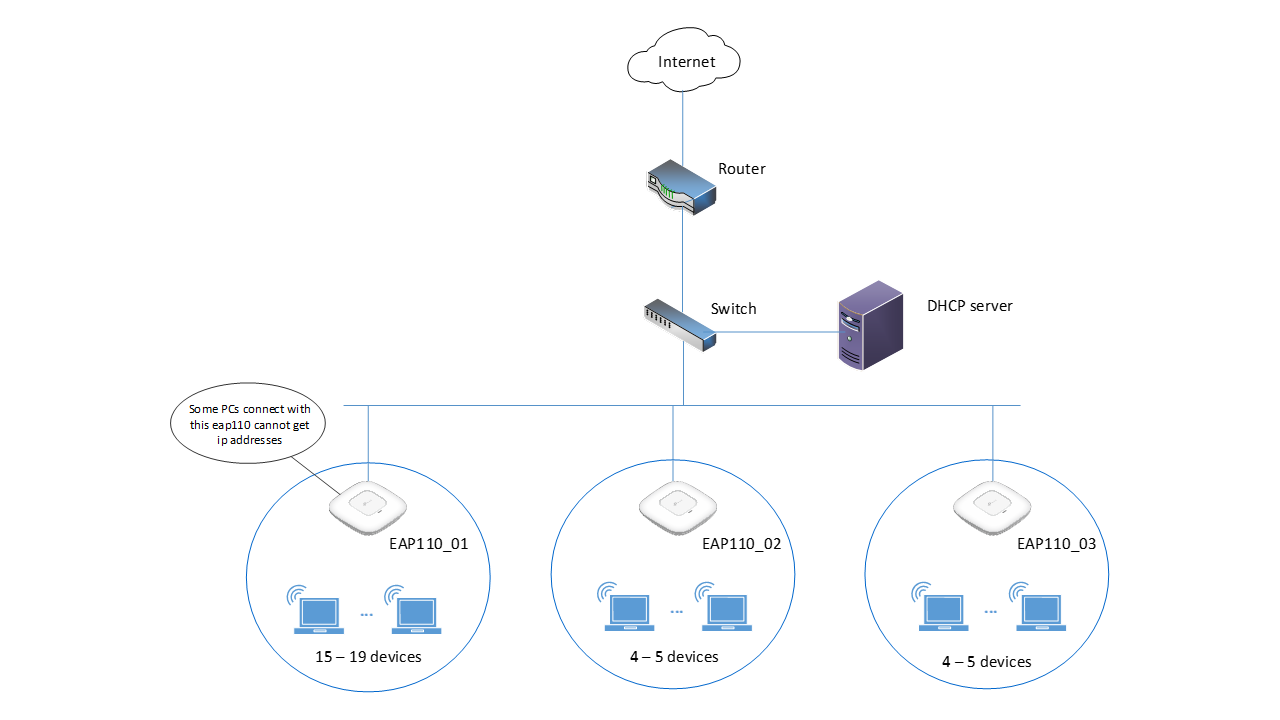
- Copy Link
- Report Inappropriate Content
Thanh_Phung wrote
My eap firmware version is EAP110_V4_3.20.0 Build 20200525. It is in standalone mode.
I do not set any VLAN or ACL in my network.
For your questions, here are some information as reference.
1. Is the client with the problem some specific devices?
2. When you capture the packet with wireshark, you can see that the server sends the IP to the PC successfully, but the PC doesn't get the IP, what is the IP address mentioned in the reply message from the PC?
Is it a broadcast message or a unicast message?
3. You can write down the IP address assigned by the server, and then manually set the corresponding static IP address for the PC, and then try to Ping the server to see if it can be pinged through?
4. It is suggestion that you can check your DHCP settings to see if you have reached the maximum number of IP addresses assigned to the client.
Best Regards!
- Copy Link
- Report Inappropriate Content
Dear @Hank21 ,
1. No, the problem happen to random devices
2. The DHCP server sent the DHCP offer message to the exactly device (i checked mac address in the packet), but the device do not receive the DHCP offer message and do not send the DHCP request message.
3. Yes, i can set any device static ip address. The device with static ip work normal and can ping the DHCP server
4. My DHCP server still have many ip addresses in DHCP pool can apply for clients
I really think the problem come from the EAP110. After i reboot the EAP110, everything will be ok for a while, but it will be happen again.
- Copy Link
- Report Inappropriate Content
The issue you are experiencing sounds unusual, I'd like to escalate your case to the TP-Link support team for further investigation.
They will reach you via your registered email address shortly, please pay attention to your email box later.
Once the issue is addressed or resolved, I'd encourage you to share it with the community.
Thank you so much for your cooperation and patience!
- Copy Link
- Report Inappropriate Content
Information
Helpful: 0
Views: 1329
Replies: 5
Voters 0
No one has voted for it yet.