WIFI Mesh Bridge Uplink

This thread has been locked for further replies. You can start a new thread to share your ideas or ask questions.

WIFI Mesh Bridge Uplink

This thread has been locked for further replies. You can start a new thread to share your ideas or ask questions.

WIFI Mesh Bridge Uplink
2024-07-04 00:55:22
Model: SG2210P  
Hardware Version: V3
Firmware Version: 5.6

I have 3 SG2210P switches 


1st is hooked to an OPNsense router, a Grandstream GWN7664 WIFI AP (Master), the 2nd SG2210P, a few other client devices. it's working fine

GWN7664 has allowed mesh bridging enabled


2nd is hooked to the 1st SG2210P, 2 Grandstream GWN7664 WIFI APs, a few other client devices

it boots up fine, uplink is on the wired ports between the two SG2210P units

once the GWN7664 boots, it overtakes the uplink, and both the TP-Link SG2210P units shut the wired uplink port down

it works fine but is not ideal as I would like the wired port to remain active and be used as the uplink.


I am not sure why the Grandstream APs are even trying to establish a mesh backhaul here, they are supposed to if wired communication fails and let go if wired is re-established, I don't know why the TPlinks are shutting down the wired port between the 2 switches but the switchover is seamless, it's just not as intended.  


3rd is hooked to a Grandstream GWN7664 WIFI AP and a few client devices and is the only reason the mesh bridge is enabled as it's impossible to get a wire to this 3rd location


If I boot the GWN7664 from a POE injector then plug in the SG2210P after its fully booted, everything works just fine. It's not acceptable on power outages to need to manually restart the switch in a particular order and its a sloppy setup plugging a POE injector into a POE port.


if I try to power the GWN7664 with the switch and the switch is in DHCP mode, the switch boots to 192.168.0.1 and the GWN7664 never establishes a mesh backlink. the GWN7664 now thinks it is a temporary master AP


if I try to power the GWN7664 with the switch and the switch is in static IP mode on the same subnet as OPNsense, I can use a client device with a static to log into the SG2210P from there I can add and remove a static route. once the static route is removed the GWN7664 establishes a mesh backhaul and everything works. Its not acceptable to need to login and add/remove a static route. I think this is more about refreshing network protocols without a reboot more than the act of adding and removing the route. 


is there a way to force the SG2210P to use a selected port as the uplink, and wait for an IP on that port, I think that would solve the problem on both 2nd and 3rd switches 


This setup all works fine with unmanaged switches but I need VLANs, QoS, and ability to remotely manage 


  0      
  0      
#1
Options
4 Reply
Re:WIFI Mesh Bridge Uplink
2024-07-04 00:58:46

Hi  @MattJob 

Someone asked something similar:

https://community.tp-link.com/en/business/forum/topic/673628?replyId=1377656


We don't support it and basically all the models we have cannot designate a port as the uplink. Reason explained in the link.

If you expect this feature to be available, please go to the request page and make a request. We will record and report to the dev for further evaluations. (Evaluation does not guarantee it would be added to the roadmap. Please paitently wait for the future replies on the related threads.)

  1  
  1  
#2
Options
Re:WIFI Mesh Bridge Uplink
2024-07-04 02:27:24

  @Clive_A 


I don't care if I have the ability to pick and force a up-link, just seemed like a solution if it was possible. I still need to fix the issue somehow.


I do not understand why a TP-link switch with a wired up-link to another TP-link switch would honor that link at boot, and then completely shut down that link in favor of a wireless backhaul established well after switch full boot, meanwhile not switching a wireless backhaul link when it's the only option available unless it was available at initial bootup, or tricking the switch into refreshing its protocols after boot.   


I can live with the 2nd switch auto-switching its uplink to wireless, it's not preferred, yes the backhaul can in theory support 9Gb, but the switch ports are only 1Gb and wireless has higher latency. If there is a solution of any kind that would be preferred.


What I must have a solution for is, how to get the switch to allow and use a wireless uplink when it's the only option and established after the switch boot.


If 2nd switch allows and swaps out up-links for what it deems a better up-link, why is the 3rd switch not allowing and swapping out no up-link for a working up-link?


is there ANY solution?  


  0  
  0  
#3
Options
Re:WIFI Mesh Bridge Uplink
2024-07-05 01:24:00

Hi  @MattJob 

MattJob wrote

  @Clive_A 


I don't care if I have the ability to pick and force a up-link, just seemed like a solution if it was possible. I still need to fix the issue somehow.


I do not understand why a TP-link switch with a wired up-link to another TP-link switch would honor that link at boot, and then completely shut down that link in favor of a wireless backhaul established well after switch full boot, meanwhile not switching a wireless backhaul link when it's the only option available unless it was available at initial bootup, or tricking the switch into refreshing its protocols after boot.   


I can live with the 2nd switch auto-switching its uplink to wireless, it's not preferred, yes the backhaul can in theory support 9Gb, but the switch ports are only 1Gb and wireless has higher latency. If there is a solution of any kind that would be preferred.


What I must have a solution for is, how to get the switch to allow and use a wireless uplink when it's the only option and established after the switch boot.


If 2nd switch allows and swaps out up-links for what it deems a better up-link, why is the 3rd switch not allowing and swapping out no up-link for a working up-link?


is there ANY solution?  


I cannot catch up with what you explained. Can you upload a diagram of your network and explain how the wireless backhaul thing?


In my experience, I can recall that the Deco had some explanations about backhaul similar but as it is a product in our family. There is no issue with that.

I cannot rule out if there is a compatibility issue with your AP. Need a diagram to understand your situation.

  1  
  1  
#4
Options
Re:WIFI Mesh Bridge Uplink
2024-07-05 04:29:19

  @Clive_A 


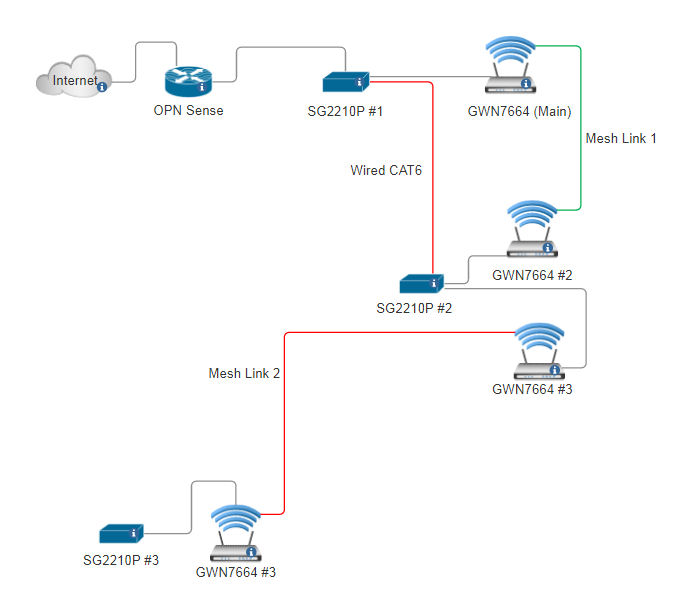
SG2210P-GM-Deployment

Wired Cat6 Link between SG2210P #1 and SG2210P #2 works until GWN7664 (Main) and GWN7664 #2 are fully booted

I have confirmed with Grandstream that allowing mesh gives preference to wired, however, diagnostics on the mesh link do run on boot and periodically 
SG2210P #1 and SG2210P #2 seem to pickup on the diagnostics of the mesh link and disable the ports for the Cat6 wired link

SG2210P #2 works properly over the cat6 link, it also works properly when the cat6 link is dropped and is running on a mesh backhaul.

Our intentions and preferences would be cat6 link but its working properly from the End User perspective   


SG2210P #3 mesh link is our only option and only works in the following situations


1.) use of a standalone POE injector to power GWN7664 #3, wait for full boot, then power on SG2210P


2.) give SG2210P #3 a static IP on the subnet of OPN Senes, wait for GWN7664 #3 to boot, log into SG2210P, add a static route, then remove the static route   


The diagram only has the infrastructure 

all 3 SG2210P have client devices such as computers and VoIP phones 

  0  
  0  
#5
Options