
NVR1004H configuration with Deco M4 (router mode)
 This thread has been locked for further replies. You can start a new thread to share your ideas or ask questions.
Issues :
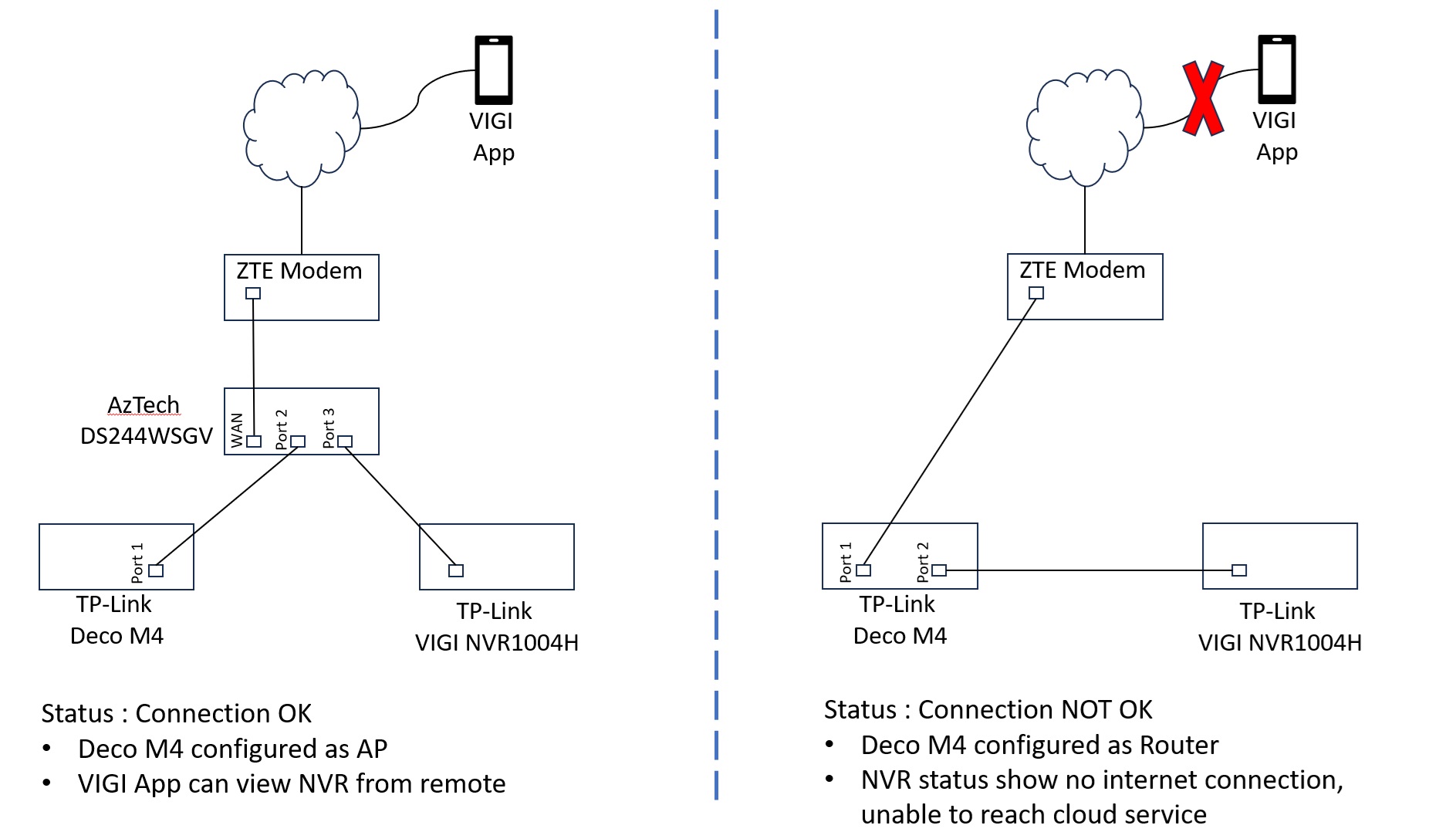
Unable to get NVR1004H establish cloud services when connect to Deco M4 (configured as router mode - right side of diagram). Deco M4 configuration verified good as internet connectivity is working fine
Hardware : VIGI NVR1004H-4P
Firmware : 1.1.1 Build 240514 Rel.69223n
Hardware : Deco M4
Firmware : 1.6.1 Build 20231227 Rel.80438
Tried :
- factory reset NVR1004H and Deco M4
- swap another Deco M4
- Copy Link
- Subscribe
- Bookmark
- Report Inappropriate Content


Hi @desfoo
Thanks for posting in our business forum.
Can you make sure that you can get Internet from the Deco?
From the diagram you gave, it looks like a problem with the main Deco failing to get Internet access.
If Deco does not supply Internet access, you might wanna clone the MAC address of the previous router. Or you can reboot the modem while the Deco is connected. Reboot the Deco as well.
Usually, this is a problem with the ISP who records the MAC address for the safety of your Internet. Reboot or ask the ISP to release the MAC address would fix it.
- Copy Link
- Report Inappropriate Content
Hi @Clive_A,
I confirmed Deco is connected to Internet as my computer able to surf Internet from Deco WiFi. Deco Port 2 is working connecting my computer using LAN cable. Also tried clean fresh setup including rebooting modem, everything is working fine except NVR unable to establish cloud connection.
- Copy Link
- Report Inappropriate Content
Hi @desfoo
Thanks for posting in our business forum.
desfoo wrote
Hi @Clive_A,
I confirmed Deco is connected to Internet as my computer able to surf Internet from Deco WiFi. Deco Port 2 is working connecting my computer using LAN cable. Also tried clean fresh setup including rebooting modem, everything is working fine except NVR unable to establish cloud connection.
Do you have screenshots of the NVR page where it displays the binding page?
If you have any VIGI cameras locally, can you bind the cameras directly bypassing the NVR? I'd like to confirm if this is a problem with the NVR firmware, local firewall or the cloud server.
It's hard to judge it now as the cloud server is rarely down. It should be binding the NVR to the TP-Link ID smoothly. This does not require any port forwarding and is like any regular Internet access. Deco got its firewall but it should be okay as well.
Very weird.
- Copy Link
- Report Inappropriate Content
Hi @Clive_A
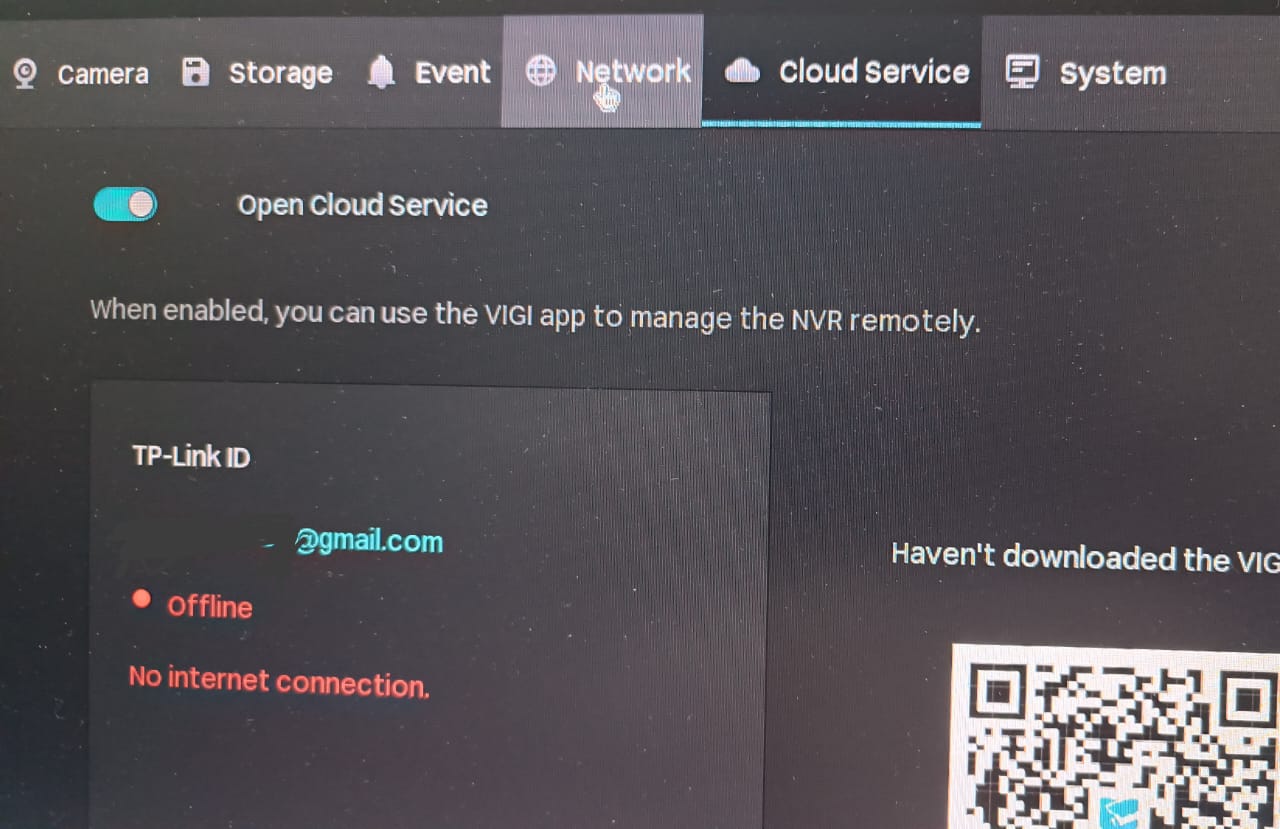
FYI, NVR can be connected to cloud via satellite M4 Port 1 & 2 but not on main M4 (no configuration changes on NVR)
Screenshot for NVR connecting to main M4.
- Copy Link
- Report Inappropriate Content
Hi @desfoo
Thanks for posting in our business forum.
desfoo wrote
Hi @Clive_A
FYI, NVR can be connected to cloud via satellite M4 Port 1 & 2 but not on main M4 (no configuration changes on NVR)
Screenshot for NVR connecting to main M4.
OK. I have some clues now. I think you can ring the home support and get a quick check about the Deco.
So, I am not familiar with the Deco. But what sounds to me is that the Deco seems to be not able to assign an IP to the NVR when connected to the second port on the main. Did you check the IP from the connection to the main Deco?
There is no WAN port on the Deco and it is auto-detect. I assume it might be the main Deco fails to detect that connection from the NVR and recognizes it as a WAN.
Probably you need to update the firmware of the M4? If there is any suitable firmware or beta on the forum. The Deco page.
- Copy Link
- Report Inappropriate Content
Hi @Clive_A
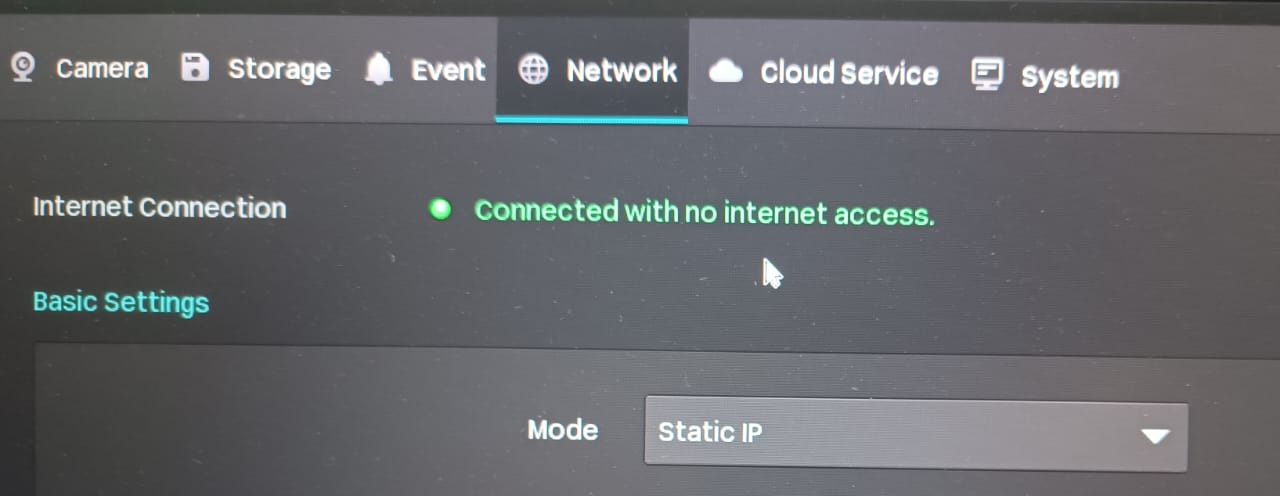
I assigned static IP on NVR. All M4 and NVR is latest firmware available on download center.
I have posted same on network community, pending for solution
- Copy Link
- Report Inappropriate Content
Hi @desfoo
Thanks for posting in our business forum.
desfoo wrote
Hi @Clive_A
I assigned static IP on NVR. All M4 and NVR is latest firmware available on download center.
I have posted same on network community, pending for solution
With the static IP address, it starts to work properly? So it is indeed a problem with the Deco.
- Copy Link
- Report Inappropriate Content
Hi @Clive_A
No, it is not working. Connected with no internet access. I assumed the "Connected" is to LAN.
- Copy Link
- Report Inappropriate Content
Hi @desfoo
Thanks for posting in our business forum.
desfoo wrote
Hi @Clive_A
No, it is not working. Connected with no internet access. I assumed the "Connected" is to LAN.
Check if you have set the IP and related parameters correctly. But it looks like it is working somehow. Maybe ping is possible so it thinks it is connected to Internet.
- Copy Link
- Report Inappropriate Content
Information
Helpful: 0
Views: 815
Replies: 9
Voters 0
No one has voted for it yet.